1. Bubuka
This manual provides essential information for the setup, operation, and maintenance of your TCL 50C7K QD-Mini LED TV. Please read this manual thoroughly before using the television and retain it for future reference.
2. Émbaran Kasalametan
Always observe the following basic safety precautions when using this television:
- Ulah ngalaan TV ka hujan atawa beueus pikeun nyegah seuneu atawa shock listrik.
- Ulah muka lomari. Rujuk ngalayanan ka tanaga anu mumpuni wungkul.
- Pastikeun ventilasi anu leres. Ulah meungpeuk bukaan ventilasi.
- Teundeun TV dina permukaan datar nu stabil pikeun nyegah ragrag.
- Cabut colokan TV nalika badai kilat atanapi nalika henteu dianggo kanggo waktos anu lami.
- Jauhkeun TV tina sinar panonpoé langsung, sumber panas, sareng médan magnét anu kuat.
3. Naon dina Box
Pastikeun yén sadaya komponén aya nalika ngabongkar:
- TCL 50C7K QD-Mini LED TV
- Kadali jauh
- Kabel Daya
- Manual pangguna (dokumén ieu)
- TV Stand and Support Screws
4. Setélan
4.1 Instalasi fisik
You can install your TV using the included stand or by wall-mounting it (wall mount sold separately).

Gambar: Tukangeun view of the TV with the stand. Ensure the stand is securely fastened to the TV and placed on a stable surface.

Image: Illustration of seamless wall mounting and integrated cable management for a clean installation.
4.2 Nyambungkeun Alat
Connect your external devices to the appropriate ports on the TV. The TCL 50C7K features multiple connectivity options.
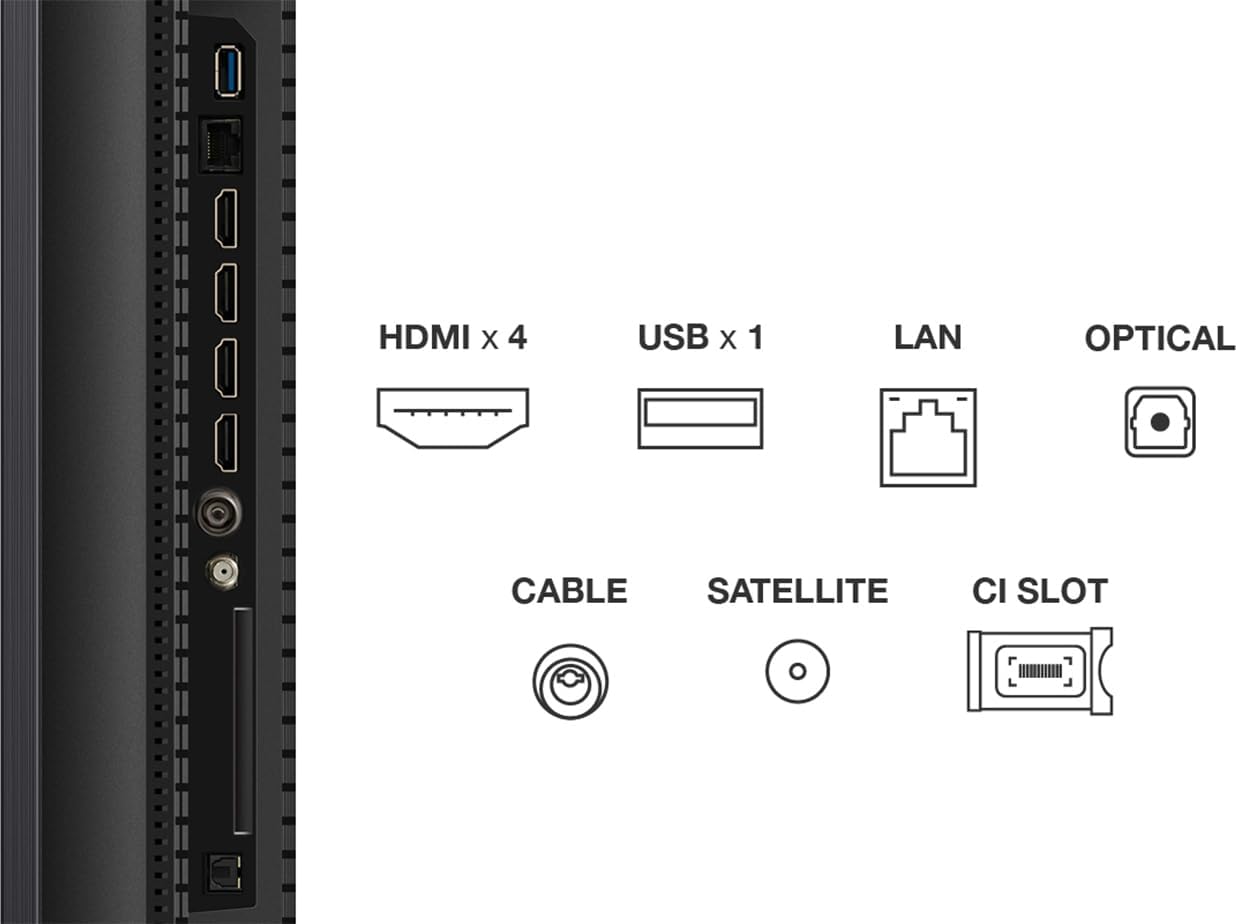
Gambar: Detil view of the TV's connectivity panel, showing 4 HDMI ports, 1 USB port, LAN, Optical audio out, Cable input, Satellite input, and a CI Slot.
- HDMI: Sambungkeun pamaén Blu-ray, konsol kaulinan, jeung alat-alat HDMI-diaktipkeun séjén.
- USB: Pikeun nyambungkeun alat panyimpenan USB pikeun muterkeun media files.
- LAN: Pikeun sambungan internét kabel.
- OPTIKAL: Pikeun kaluaran audio digital ka soundbar atanapi sistem home theater.
- CABLE/SATELLITE: For connecting antenna or satellite feeds.
4.3 Mimiti Power-On jeung Google TV Setup
After connecting the power cable and any desired devices, press the power button on the remote control. Follow the on-screen instructions to complete the initial setup of Google TV, including network connection, Google account login, and channel scanning.
5. Ngoperasikeun TV
5.1 Fungsi Remote Control

Image: The TCL 50C7K television alongside its remote control (RC833A), highlighting the layout of buttons for navigation, volume, channel selection, and smart features.
The remote control (RC833A) allows you to navigate the TV's interface and control various functions:
- Tombol Daya: Ngahurungkeun atawa mareuman TV.
- Pad Navigasi (Kaluhur/Turun/Kénca/Katuhu/OK): Pikeun menu navigasi jeung pilihan.
- Volume Kaluhur/Turun: Nyaluyukeun tingkat sora.
- Saluran luhur/handap: Robah saluran TV.
- Tombol Asisten Google: Activates voice control for Google TV.
- Tombol potong kompas aplikasi: Aksés gancang ka layanan streaming populér.
5.2 Fitur Smart TV (Google TV)
Your TCL 50C7K is equipped with Google TV, providing access to a vast library of apps, movies, and shows. Use the Google Assistant for hands-free voice control to search for content, control smart home devices, and more.
5.3 Gambar jeung Sora Setélan
Access the TV's settings menu to customize picture and sound. The TV supports various HDR formats including HDR10, HDR HLG, HDR10+, Dolby Vision, and Dolby Vision IQ, ensuring optimal visual quality for compatible content. For audio, Dolby Atmos provides an immersive sound experience.
5.4 Gaming Features (Game Master)
The Game Master feature optimizes your gaming experience. With HDMI 2.1 support, Automatic Low Latency Mode (ALLM), 144Hz Variable Refresh Rate (VRR), and FreeSync Premium Pro certification, the TV delivers smooth, responsive gameplay with minimal input lag.
6. Pangropéa
6.1 Ngabersihan TV
- layar: Ngusap layar nganggo kaén anu lembut sareng teu aya serat. Pikeun tanda nekad, make solusi beberesih layar husus dirancang pikeun TV, dilarapkeun ka lawon, teu langsung kana layar.
- Kabinet: Anggo kaén anu lembut sareng garing pikeun ngusap kabinet TV. Ulah make cleaners abrasive atawa pangleyur.
6.2 Apdet parangkat lunak
Ensure your TV's software is up-to-date for optimal performance and new features. You can check for updates through the Google TV settings menu. The TV will typically notify you when updates are available.
7. Cara ngungkulan
Upami anjeun ngalaman masalah sareng TV anjeun, tingal masalah sareng solusi umum ieu:
| Masalah | Solusi anu mungkin |
|---|---|
| Taya kakuatan | Pariksa naha kabel daya parantos disambungkeun kalayan pageuh kana TV sareng stop kontak. Pastikeun stop kontakna tiasa dianggo. |
| Henteu aya gambar, tapi aya sora | Pariksa heula sumber input anu leres. Pariksa sambungan kabel ka alat éksternal. |
| Henteu aya sora, tapi aya gambar | Pariksa setélan tingkat volume sareng bisu. Pastikeun sistem audio éksternal disambungkeun sareng dihurungkeun kalayan leres. |
| Kadali jauh teu jalan | Ganti batré. Pastikeun teu aya halangan antara jauh sareng sénsor IR TV. |
| Masalah sambungan jaringan | Balikan deui router/modem anjeun. Pariksa kecap akses Wi-Fi. Pikeun sambungan kabel, pastikeun kabel Ethernet parantos nyambung kalayan leres. |
8. Spésifikasi
Key technical specifications for the TCL 50C7K QD-Mini LED TV:
- merek: TCL
- Jumlah modél: 50C7K
- Ukuran layar: 50 inci
- Téknologi tampilan: Mini LED
- Resolusi: 4K (3840 x 2160)
- Laju Anyarkeun Asli: 144 Hz (with Motion Clarity Pro)
- Fitur husus: QD-Mini LED, HDR Premium 2000, 144 Hz Motion Clarity Pro, Game Master, Google TV with Google Assistant built-in
- Konektipitas: Bluetooth, Wi-Fi, Ethernet, HDMI (x4), USB (x1), Optical Audio Out
- Ukuran (W x D x H): 111.3 cm x 27 cm x 71.2 cm (kalayan nangtung)
Gambar: Hareupeun view of the TCL 50C7K TV with its remote control, illustrating key dimensions including width (1111.2 mm), height (710.04 mm with stand, 645.82 mm without), and thickness (66.72 mm).
9. Garansi jeung Rojongan
Kanggo inpormasi jaminan, mangga tingal kartu garansi anu kalebet dina produk anjeun atanapi kunjungan ka TCL resmi website. Specific details regarding spare parts availability and guaranteed software updates are not available in this document.
For technical support or service inquiries, please contact TCL customer service through their official channels.