
1. Bubuka
This manual provides instructions for the installation, operation, and maintenance of your Arlo Essential Spotlight Camera. This wireless security camera offers 1080p HD video, color night vision, two-way audio, and direct Wi-Fi connectivity for comprehensive outdoor surveillance.
2. Naon dina Box
Pastikeun sadaya komponén parantos aya sateuacan neraskeun pamasangan.
- Kaméra Sorotan Penting Arlo
- Tembok Gunung
- Pemasangan Screws sareng Jangkar Tembok
- Adaptor Daya (Listrik Kabel)
- Gancang Mimitian Guide
3. Setélan
3.1. Instalasi fisik
The Arlo Essential Spotlight Camera is designed for outdoor use and comes with a wall mount for secure placement.
- Pilih Lokasi: Select an outdoor location that provides the desired field of view (130 degrees) and has access to a power outlet. Ensure the camera is positioned to cover critical areas without obstructions.
- Pasang kaméra:
- Attach the wall mount to your chosen surface using the provided screws and wall anchors.
- Securely attach the camera to the wall mount.
- Adjust the camera angle to achieve optimal coverage.
- Sambungkeun Kakuatan: Plug the power adapter into the camera and then into a suitable outdoor power outlet. The camera operates on corded electric power.

Image: Arlo Essential Spotlight Camera mounted on a wall, demonstrating its compact design and placement.
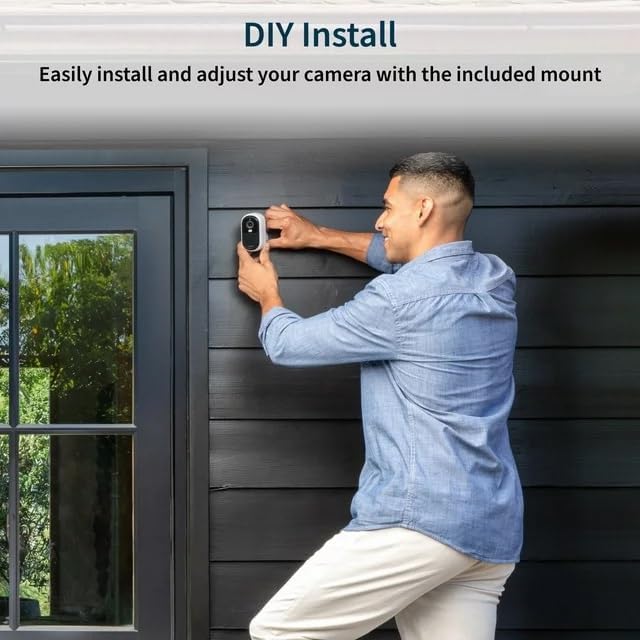
Image: A person installing the Arlo Essential Spotlight Camera on an exterior wall, illustrating the DIY installation process.
3.2. Pamasangan Aplikasi sareng Sambungan Wi-Fi
The Arlo Essential Spotlight Camera connects directly to your Wi-Fi network and is managed via the Arlo Secure App.
- Unduh Aplikasi Arlo Secure: Download and install the Arlo Secure App from your smartphone's app store (available for iOS and Android).
- Ngadamel akun: Buka aplikasi teras turutan pitunjuk dina layar pikeun nyieun akun Arlo anyar atanapi lebet ka akun anu tos aya.
- Tambahkeun kaméra anjeun:
- In the app, tap the '+' icon or select "Add Device".
- Choose "Cameras" and then select "Essential Spotlight Camera".
- Follow the app's prompts to connect your camera to your 2.4 GHz Wi-Fi network. This typically involves scanning a QR code with the camera or manually entering network details.
- Test Sambungan: Once connected, verify that you can view live video from your camera within the Arlo Secure App.
4. Ngoperasikeun kaméra
4.1. 1080p HD Video and Field of View
The camera records and streams video in 1080p High Definition, providing clear and detailed footage. It features a 130-degree field of view pikeun ngaleutikan titik buta.

Image: A smartphone screen showing the 130-degree field of view captured by the Arlo Essential Spotlight Camera, highlighting its wide coverage.
4.2. Warna Peuting Visi
The integrated spotlight enables color night vision, allowing you to see more details in low-light conditions compared to traditional infrared night vision.

Image: A split image demonstrating the difference between Color Night Vision and Traditional Night Vision, showing clearer details with color.
4.3. Audio Dua Arah
Utilize the built-in microphone and speaker for two-way communication. This feature includes noise cancellation for clearer audio interactions with visitors or to deter intruders.

Image: A smartphone displaying a live feed from the Arlo camera, with speech bubbles indicating two-way audio communication with a person outside a door.
4.4. Deteksi gerak sareng Tanda
The camera features motion detection that triggers recording and sends real-time notifications to your smartphone via the Arlo Secure App. You can customize motion zones and sensitivity settings within the app.
Image: A hand holding a smartphone displaying a notification from the Arlo app, indicating motion detection and offering options for live video or siren activation.
4.5. Integrated Spotlight and Siren
The camera includes an integrated spotlight that can be activated automatically upon motion detection or manually via the app. An integrated siren can also be triggered to deter unwanted visitors.
5. Pangropéa
5.1. Résistansi Cuaca
The Arlo Essential Spotlight Camera is designed with a weather-resistant casing to withstand various outdoor conditions, including heat, cold, rain, and sun. Ensure all connections are secure to maintain its weather resistance.

Image: The Arlo Essential Spotlight Camera shown with water droplets, illustrating its weather-resistant design against rain.
5.2. beberesih
Periodically clean the camera lens and housing to ensure optimal video clarity. Use a soft, damp lawon. Hindarkeun pembersih abrasive atanapi pangleyur anu tiasa ngaruksak tungtung atanapi lensa kaméra.
6. Cara ngungkulan
| Masalah | Solusi anu mungkin |
|---|---|
| Kaméra teu nyambung ka Wi-Fi |
|
| Kualitas pidéo goréng |
|
| Taya panggeuing deteksi gerak |
|
| Masalah audio dua arah |
|
7. Spésifikasi
| Fitur | Rincian |
|---|---|
| Ngaran modél | Kaméra Sorotan Penting Arlo |
| Resolusi Capture Video | 1080p HD |
| widang View | 130 darajat |
| Visi Peuting | Color Night Vision (with integrated spotlight) |
| Audio | Audio Dua Arah sareng Pembatalan Noise |
| Konektipitas | Direct Wi-Fi (2.4 GHz) |
| Sumber Daya | Kabel Listrik |
| Pamakéan jero rohangan / outdoor | Luar |
| Tipe Pamasangan | Tembok Gunung |
| Alat nu cocog | Smartphone (via Arlo Secure App) |
| Ukuran barang (L x W x H) | 2.7 x 2 x 1 inci |
| Item Beurat | 4 ons |
8. Garansi jeung Rojongan
For detailed warranty information, please refer to the warranty card included with your product or visit the official Arlo website. For technical support, troubleshooting assistance, or to access additional resources, please visit Rojongan Arlo or contact Arlo customer service directly.