Bubuka
Discover a new way to listen with Truefree EarFit DS1 earbuds, the next generation of open-ear Bluetooth headphones designed for comfort, sound quality, and freedom. Featuring an innovative ear hook structure made from a titanium alloy, the DS1 ensures a soft and stable fit that won't fall out - even during intense workouts. Its lightweight design (only 8.9 grams per earbud) makes it barely noticeable, yet completely secure.
With Bluetooth 6.0, dual-device pairing, and an ultra-low 66ms latency, the DS1 provides stable and fast connections for both music lovers and gamers. The 12x17mm peak drivers, paired with Truefree's custom sound equalization algorithm, deliver rich bass and clear high frequencies, while silicone sound channels reduce sound leakage by 96.9%. Stay powered throughout your day with 40 hours of total playtime, fast charging support, and a digital LED battery display on the case. Whether you're hitting the gym, on a call, or commuting, the IPX5 water resistance, 4 ENC microphones, and custom EQ settings via the Truefree app make the DS1 your reliable daily audio companion.
Fitur konci:
- Open-Ear Design & Ear Hooks for All-Day Comfort: Ergonomically designed with soft TPU ear hooks and a titanium alloy, these open-ear headphones ensure a secure, pressure-free fit. Weighing only 8.9g per earbud - perfect for workouts, glasses wearers, and extended use.
- Upgraded Bluetooth 6.0 for Seamless Connection: Enjoy ultra-stable, interference-resistant wireless performance with Bluetooth 6.0. Supports instant auto-pairing, dual-device connection, and a 66ms low-latency gaming mode for a lag-free experience.
- LED Power Display & Fast Charging Case: Stay informed with a digital LED display showing both earbud and case battery levels. Charge for 10 minutes, enjoy 2 hours of playtime - 40 hours total battery life eliminates power anxiety. 5 times larger charging area for 99.9% more stable charging - reduces charging failure and disconnection.
- Powerful Bass & Enhanced Sound Clarity: Equipped with dual 12x17mm peak drivers and a dynamic sound equalizer, Truefree DS1 delivers immersive, full-range audio. Silicone sound channels reduce sound leakage by 96.9%, allowing you to listen louder without disturbing others.
- 4 ENC Microphones for Clear Calls Anywhere: A 4-mic dual-ear array with wind noise cancellation (up to 98%) ensures clear call quality, even in windy or noisy outdoor environments.
- IPX5 Water Resistance for Active Use: IPX5 water resistance to withstand sweat and splashes - ideal for gym sessions, running, cycling, and outdoor adventures. Designed for a secure, drop-proof fit even during intense movement.
- Custom Controls & App with 9 EQ Modes: Easily manage calls, music, volume, and game mode with touch controls. Use the Truefree app to personalize EQ settings (bass boost, treble enhancement, etc.) and adjust sound to your preference.
Naon Kaasup
Your Truefree DS1 package includes the following items:
- Truefree DS1 Wireless Earbuds (Left and Right)
- Wadah Pangisi Daya nganggo Layar LED
- Manual pamaké
- Kabel Ngecas (Tipe-C)
- Optional Anti-Loss Lanyard (Silicone)
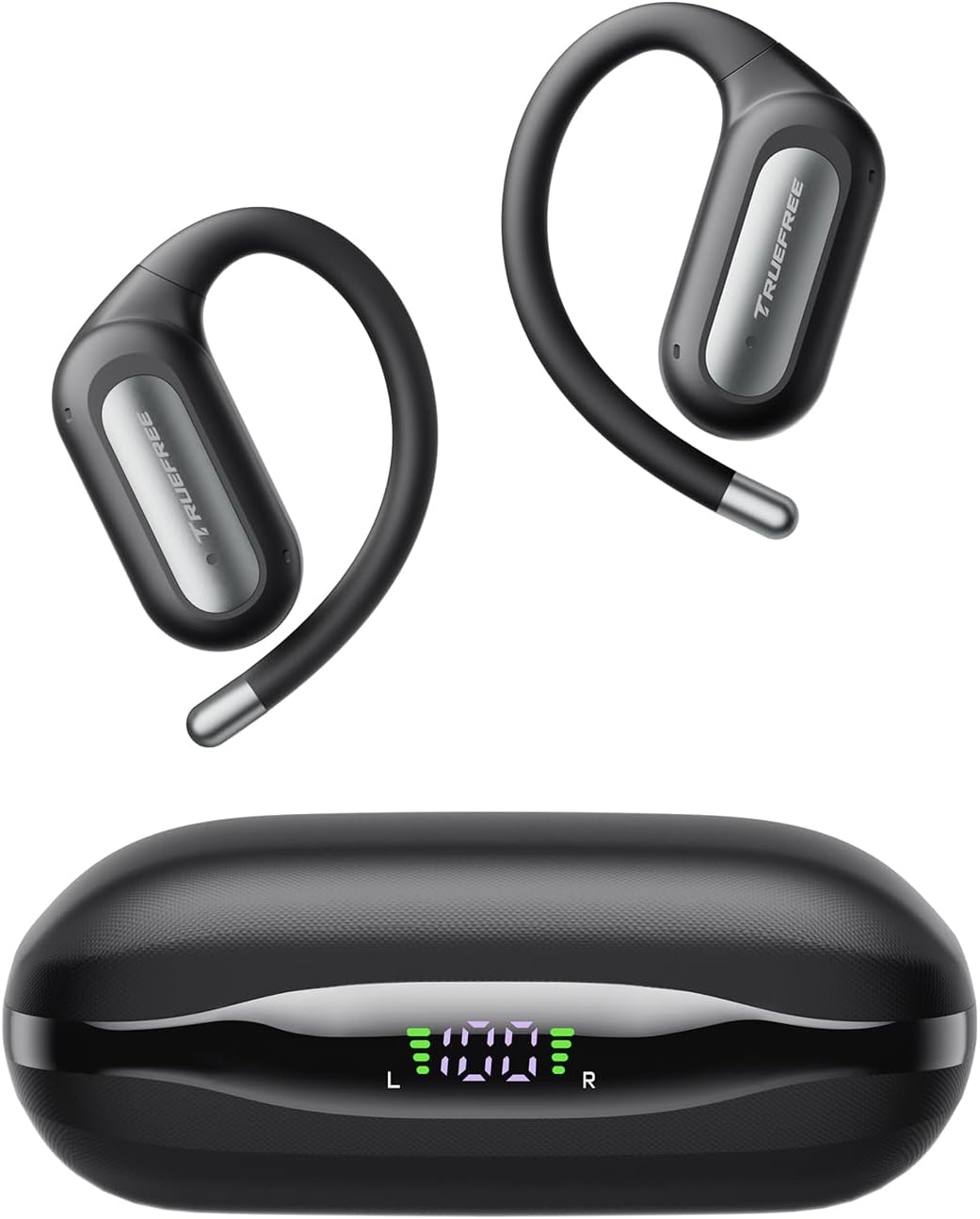
Image: The Truefree DS1 Wireless Earbuds and their charging case, showcasing the sleek design and LED battery indicator.
Guide Setup
1. Muatan Awal
Before first use, fully charge the earbuds and the charging case. Place the earbuds into the charging case. Connect the charging case to a power source using the provided USB Type-C cable. The LED display on the case will show the charging progress.

Image: The charging case with earbuds, displaying the digital LED battery indicator for both the case and individual earbuds.
2. Nyapasangkeun sareng Alat Anjeun
- Pastikeun yén earbuds dieusi sareng di jero wadah ngecas.
- Buka wadah ngecas. Earbuds bakal otomatis asup kana mode papasangan.
- Dina smartphone, tablet, atanapi laptop anjeun, aktipkeun Bluetooth.
- Milarian pikeun "TRUEFREE DS1" in the list of available Bluetooth devices.
- Select "TRUEFREE DS1" to connect. Once connected, you will hear an audible confirmation.
The DS1 supports dual-device connectivity, allowing seamless switching between two paired devices without needing to disconnect and reconnect manually.

Image: A close-up of the earbud, illustrating its advanced Bluetooth 6.0 technology for stable and fast connections.

Image: The Truefree DS1 earbuds and case shown connected to both a smartphone and a laptop, demonstrating the multipoint connection feature.
Parentah Operasi
Ngagem Earbuds
Gently place the earbud over your ear, ensuring the ear hook wraps securely around the back of your ear. Adjust for a comfortable and stable fit. The lightweight design (8.9g per earbud) ensures comfort even during extended wear.

Image: A model wearing the Truefree DS1 earbuds, emphasizing their comfortable and stable open-ear design, ideal for prolonged use.
Toél Kontrol
The Truefree DS1 earbuds feature intuitive touch controls for easy management of audio and calls. Specific functions can be customized via the Truefree app.
| Aksi | Fungsi |
|---|---|
| Ketok Tunggal (L/R) | Puter / Reureuh Musik, Jawab / Tungtung Telepon |
| Ketok dua kali (L) | Lagu saméméhna |
| Ketok dua kali (R) | Lagu salajengna |
| Ketuk Tilu (L/R) | Aktipkeun Asisten Sora |
| Pencét Panjang (K/K) | Nolak Telepon |
| Long Press (L/R) during music | Volume Up/Down (configurable) |
Audio Quality and EQ Settings
The DS1 features 12x17mm dual-magnetic drivers for powerful bass and clear highs. For a personalized listening experience, download the Truefree app to access 9 preset EQ modes and custom equalizer settings.

Gambar: Hiji ngabeledug view diagram illustrating the internal components of the earbud, focusing on the 12x17mm dual-magnetic drivers responsible for powerful and immersive sound.

Image: Screenshots of the Truefree mobile application, demonstrating the various sound effect presets and the custom equalizer interface for personalized audio tuning.
Nelepon
The DS1 is equipped with 4 ENC (Environmental Noise Cancellation) microphones to ensure clear call quality, even in noisy environments. Use the touch controls to answer or end calls.

Gambar: A lengkep view of the earbud's internal microphone placement, illustrating the dual-mic array for enhanced call clarity and wind noise cancellation.
Pangropéa sareng Perawatan
Tahan cai (IPX5)
The Truefree DS1 earbuds are IPX5 water-resistant, meaning they can withstand sweat and light splashes. They are suitable for workouts and outdoor activities. However, they are not designed for submersion in water or use during swimming.

Image: A man engaged in physical activity, wearing the Truefree DS1 earbuds, highlighting their IPX5 water resistance against sweat and splashes.
beberesih
To maintain optimal performance and hygiene, regularly clean your earbuds and charging case. Use a soft, dry, lint-free cloth to wipe down the surfaces. Do not use abrasive cleaners or immerse the devices in liquid.
Panyimpenan
When not in use, store the earbuds in their charging case to protect them and ensure they remain charged for your next use. Store in a cool, dry place away from extreme temperatures.
Pamérésan masalah
If you encounter any issues with your Truefree DS1 earbuds, please refer to the following common solutions:
| Masalah | Solusi anu mungkin |
|---|---|
| Earbuds teu dipasangkeun | Pastikeun earbud tos dicas. Pasang deui kana wadahna, tutup, teras buka deui pikeun lebet deui kana modeu pairing. Pariksa setélan Bluetooth alat anjeun teras cobian sambungkeun deui. |
| Teu aya sora ti hiji earbud | Ensure both earbuds are charged. Try placing both back in the case and taking them out again. Re-pair with your device. |
| Volume lemah atawa kualitas sora goréng | Adjust the volume on both your device and the earbuds. Ensure earbuds are clean and properly seated in your ears. Check EQ settings in the Truefree app. |
| Masalah ngecas | Pastikeun kabel ngecas disambungkeun pageuh kana wadah sareng sumber daya. Coba kabel ngecas atanapi adaptor daya anu béda. Bersihkeun kontak ngecas dina earbud sareng di jero wadahna. |
| Toél kadali teu responsif | Ensure your fingers are clean and dry. Restart the earbuds by placing them in the case and taking them out. Check the Truefree app for any disabled touch controls. |
If the issue persists, please refer to the official Truefree support channels for further assistance.
spésifikasi
| Fitur | Rincian |
|---|---|
| Ngaran modél | DS1 |
| merek | Truefree |
| Panempatan Ceuli | Buka-Ceuli |
| Téhnologi konektipitas | Nirkabel |
| Téknologi Komunikasi Nirkabel | Bluetooth 6.0 |
| Komponén Kaasup | Headphones, Charging Case, User Manual |
| Bahan | Thermoplastic Polyurethane (TPU), Titanium Alloy |
| Mangpaat husus Pikeun Produk | Olahraga |
| Alat nu cocog | Mobile Phones, Tablets, Laptops |
| Beurat Earbud | 8.9 gram (unggal) |
| Total Playtime | Dugi ka 40 jam (kalayan ngeusi batre) |
| Peunteun Résistansi Cai | IPX5 |
| Mikropon | 4 ENC Microphones |
| Supir | 12x17mm Dual-Magnetic Drivers |
| Mode Latency Low | 66ms (Modeu Kaulinan) |
Garansi sareng Rojongan
Truefree products typically come with a manufacturer's warranty. Please refer to the warranty card included in your product packaging or visit the official Truefree websitus pikeun inpo jaminan lengkep jeung istilah.
For technical support, product inquiries, or assistance with troubleshooting beyond this manual, please contact Truefree customer service. Contact details can usually be found on the official Truefree websitus atanapi dina bungkusan produk.
Anjeun oge bisa nganjang ka Truefree Store on Amazon pikeun inpormasi lengkep sareng sumber pangrojong.


