1. Produk Langkungview
This manual provides detailed instructions for the AINAVI 10-inch Touchscreen Car Stereo Radio, model Double Knobs 6+128, designed for Dodge Ram 1500, 2500, and 3500 vehicles manufactured between 2013 and 2018, compatible with both Manual and Auto AC climate control systems. This advanced car stereo features Android 13 OS, 4GB RAM, 64GB ROM, and a QLED screen for a fast and smooth user experience. It integrates wired and wireless CarPlay, Android Auto, GPS navigation, 5G WiFi, and Bluetooth 5.0 for enhanced connectivity and entertainment.

Image 1.1: Comparison of the Dodge Ram 1500/2500/3500 dashboard before and after installing the AINAVI 10-inch Touchscreen Car Stereo, showing compatibility with both manual and automatic climate control versions.
2. Naon Kaasup
Paket produk ngawengku komponén di handap:
- 1x Android Car Stereo (Head Unit)
- 1 x Wiring Harness Power Cable with CANbus Decoder
- Radio Antenna adaptor
- Antena GPS
- USB & Audio Cables
- Manual pamaké
- Kaméra Nyadangkeun AHD 1080P
- Mikropon éksternal
- Frame Removal Tool

Image 2.1: A visual representation of all items included in the package, such as the head unit, various cables, antennas, backup camera, and installation tools.
Video Unboxing
Video 2.1: This video demonstrates the unboxing process and showcases all the components included in the AINAVI car stereo package for Dodge Ram 1500 2500 3500 (2013-2018).
3. Setup jeung Instalasi
The AINAVI car stereo is designed for a plug-and-play installation in compatible Dodge Ram models (2013-2018). It comes with a customized dash kit, wiring harness, and CANbus decoder to ensure seamless integration without modifying your vehicle's original cables. Professional installation is recommended if you are unfamiliar with car stereo installations.
Pituduh Pidéo Instalasi
Video 3.1: A comprehensive installation video guide for the Dodge Ram radio with Automatic AC, demonstrating the step-by-step process of replacing the factory stereo with the AINAVI unit.
Pamasangan kaméra cadangan
The included AHD 1080P backup camera enhances safety by providing a clear view when reversing. Follow the instructions below for proper installation and wiring.
Video 3.2: This video provides a detailed guide on how to connect an aftermarket backup camera specifically for pickup trucks, ensuring correct wiring and placement.
4. Parentah Operasi
Touchscreen Interface and Knobs
The 10-inch QLED touchscreen with 1280x720 resolution offers a responsive and clear display. The unit also features dual manual knobs for convenient volume control and play/pause functions.
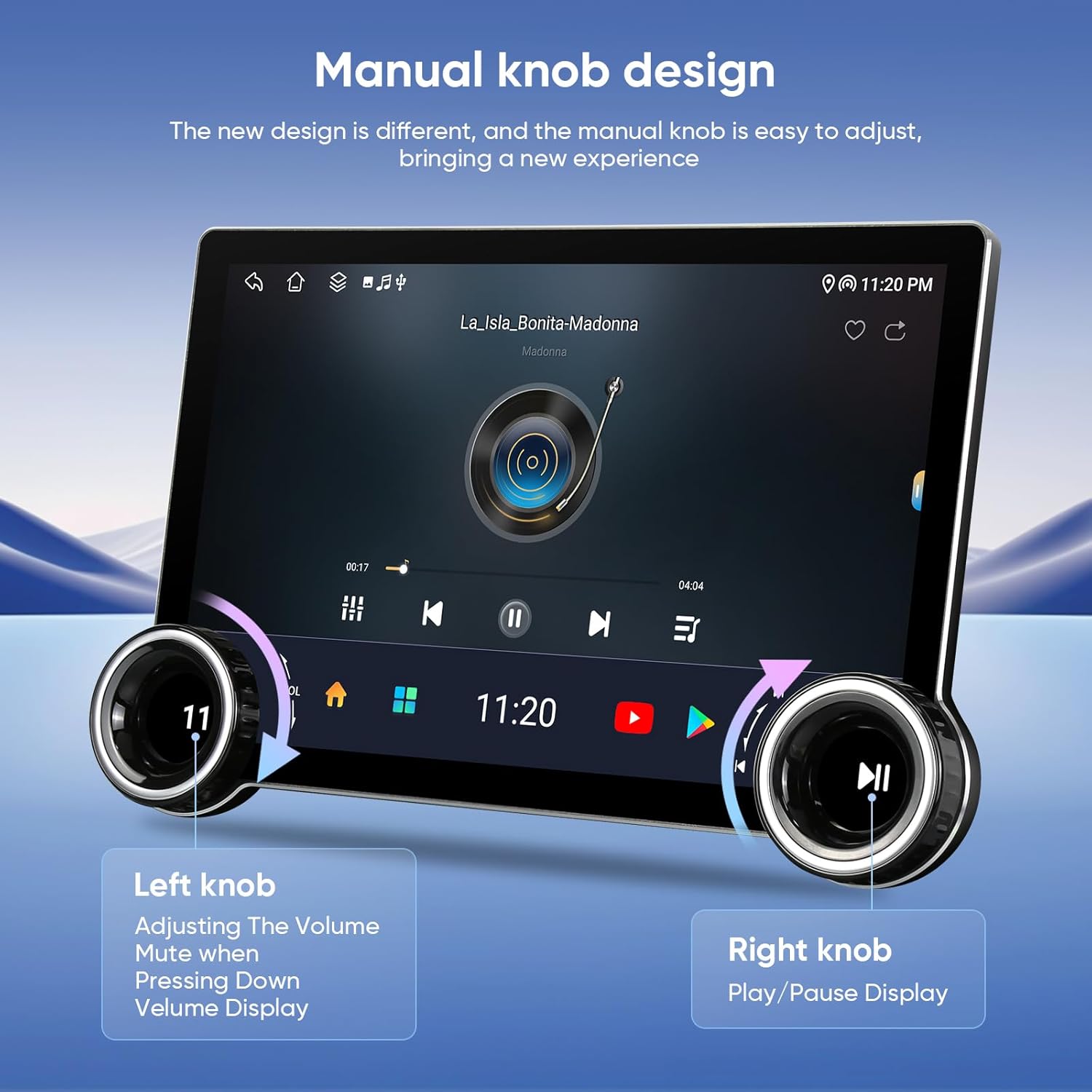
Image 4.1: Detail of the manual knob design, highlighting the left knob for volume adjustment and mute, and the right knob for play/pause functionality.
CarPlay & Android Auto
Enjoy seamless integration with your smartphone using built-in wireless and wired CarPlay, and USB connection Android Auto. Access GPS navigation, make calls, send/receive messages, and stream music directly from your phone. Voice commands like "Hey Siri" or "Hey Google" are supported.

Image 4.2: The car stereo screen displaying both Apple CarPlay and Android Auto, illustrating how smartphones can be integrated for navigation, communication, and entertainment.
Video 4.3: This video demonstrates the process of connecting a smartphone for Wireless Android Auto, showcasing the user interface and functionality.
GPS Navigation and Connectivity
The built-in GPS navigation system provides real-time traffic information when connected to a network. You can also download offline maps for navigation without an internet connection. Dual-band WiFi (2.4Ghz & 5Ghz) ensures high-speed internet access, and Bluetooth 5.0 allows for hands-free calls, music streaming, and phonebook synchronization.

Image 4.4: The car stereo screen displaying GPS navigation with multiple map application icons, indicating comprehensive navigation capabilities.

Image 4.5: The car stereo screen illustrating WiFi connectivity and Bluetooth music streaming, with a smartphone shown interacting with the system.
Fitur Audio
Experience superior sound quality with the built-in 4*45W amplifier and DSP (Digital Sound Processor) featuring Time Correction and a 48-band EQ. Adjust sound field positions and customize your audio experience. The unit also supports AM/FM/RDS radio.

Image 4.6: The car stereo screen displaying the AM/FM/RDS radio interface, showing available channels and options for tuning.
Split Screen and Steering Wheel Control
Utilize the split-screen function to run two applications simultaneously, such as navigation and music. The system retains original steering wheel control functionality for convenient and safe operation.

Image 4.7: The car stereo screen showcasing the split-screen feature, allowing simultaneous use of navigation and other applications, alongside an illustration of integrated steering wheel controls.
5. Spésifikasi
- Sistem operasi: Android 13 OS
- Prosesor: 4GB RAM, ROM 64GB
- Ukuran tampilan: 10 Inches QLED Touchscreen
- Resolusi: 1280x720
- Téknologi layar rampa: G+G Full Lamination, Grade A, 170-degree full-viewdina sudut
- Kaluaran Audio: 4*45W Max. Output Amplifier, Built-in DSP with Time Correction & 48-band EQ
- Konektipitas: Built-in Wireless/Wired CarPlay, USB Android Auto, Built-in GPS Navigation, Dual-band WiFi (2.4Ghz & 5Ghz), Bluetooth 5.0
- Jenis Service Kendaraan: Dodge Ram 1500 2500 3500 (2013-2018) with Manual or Auto AC Climate Control
- Fitur husus: FM+AUX, Android Mirroring+Airplay, Split Screen Function, Volume Control, Bluetooth Hands-Free Calling, Music Streaming, RCA, Screen Mirroring, Subwoofer, Spotify, Rear View Camera Input, Support original backup camera
- Beurat barang: 8 ons
- Ukuran produk: 11.5 x 11.5 x 11.5 inci
- Jumlah modél: Double Knobs 6+128

Image 5.1: Visual details of the touchscreen's high-definition display, emphasizing its resolution, size, color accuracy, brightness, and contrast.

Image 5.2: The car stereo demonstrating its full RCA output capability by displaying content on the main unit and two connected rear-seat monitors.
6. Pangropéa
To ensure optimal performance and longevity of your AINAVI car stereo, follow these maintenance guidelines:
- Ngabersihan layar: Make kaen nu lemes, teu aya lint rada dampdibilas ku cai atanapi pembersih layar anu dirancang khusus pikeun éléktronik. Hindarkeun bahan kimia anu keras atanapi bahan anu abrasif.
- Apdet parangkat lunak: Periodically check for software updates to ensure your system has the latest features and bug fixes. Refer to the "System Update" option in the Car Settings menu.
- Sambungan kabel: Ensure all wiring harness and accessory cables are securely connected to prevent intermittent issues.
- Perawatan Lingkungan: Hindarkeun ngalaan unit ka suhu anu ekstrim, sinar panonpoé langsung pikeun période anu berkepanjangan, atanapi kalembaban anu kaleuleuwihan.
7. Cara ngungkulan
If you encounter any issues with your AINAVI car stereo, refer to the following common troubleshooting steps:
- Henteu aya kakuatan:
- Pariksa sadaya sambungan kabel kakuatan pikeun mastikeun aranjeunna aman.
- Pariksa heula sekring stereo kendaraan naha masih utuh.
- Henteu aya sora:
- Pastikeun polumeu teu dipareuman atawa disetel handap teuing.
- Pariksa sambungan kabel speaker.
- Verify audio settings in the DSP/EQ menu.
- CarPlay/Android Auto Teu Nyambung:
- Ensure Bluetooth is enabled on both the stereo and your smartphone.
- For wired connections, try a different USB cable.
- Restart both the stereo and your smartphone.
- Kadali Setir Teu Gawé:
- Verify the CANbus TX/RX wires are correctly connected.
- Access the "Steering Wheel Learning" function in the settings to reconfigure the controls.
- Masalah Sinyal GPS:
- Pastikeun anteneu GPS dipasang kalawan bener sareng gaduh tampilan anu jelas view of the sky (e.g., on the dashboard near the A-pillar).
- Check map application settings for offline map downloads or network connectivity.
Upami masalahna teras-terasan saatos nyobian léngkah-léngkah ieu, mangga ngahubungi dukungan palanggan kanggo bantosan salajengna.
8. Garansi jeung Rojongan
This AINAVI product comes with a one-year manufacturer guarantee. For any product-related inquiries, technical support, or warranty claims, please do not hesitate to contact us via Amazon email. Our customer service team is committed to providing prompt assistance.

Image 8.1: Information on how to obtain customer support, including contact methods and a phone number for assistance.


