1. Bubuka
This manual provides detailed instructions for the installation, operation, and maintenance of your AINAVI 8-inch Android 12 Car Stereo Radio. This advanced multimedia system features an 8-inch QLED touch screen, Android 12 operating system, Octo-Core processor, built-in GPS navigation, 5G WiFi, Bluetooth 5.0, and support for both wireless/wired CarPlay and USB Android Auto. Please read this manual thoroughly before use to ensure proper functionality and to maximize your experience.
2. Eusi Paket
Pastikeun yén sadaya item anu didaptarkeun di handap kalebet kana pakét anjeun:
- 1 x Android Car Stereo
- 1 x Belakang View Kaméra
- 1 x Mikropon
- 1 x Manual Pamaké
- 1 x Radio Antenna Adaptor
- 1 x RCA Kabel
- 1 x Kabel USB
- 1 x Antena GPS
- 1 x Wiring Harness Power Cable
- 1 x CANbus Decoder
- 1 x Frame Removal Tool
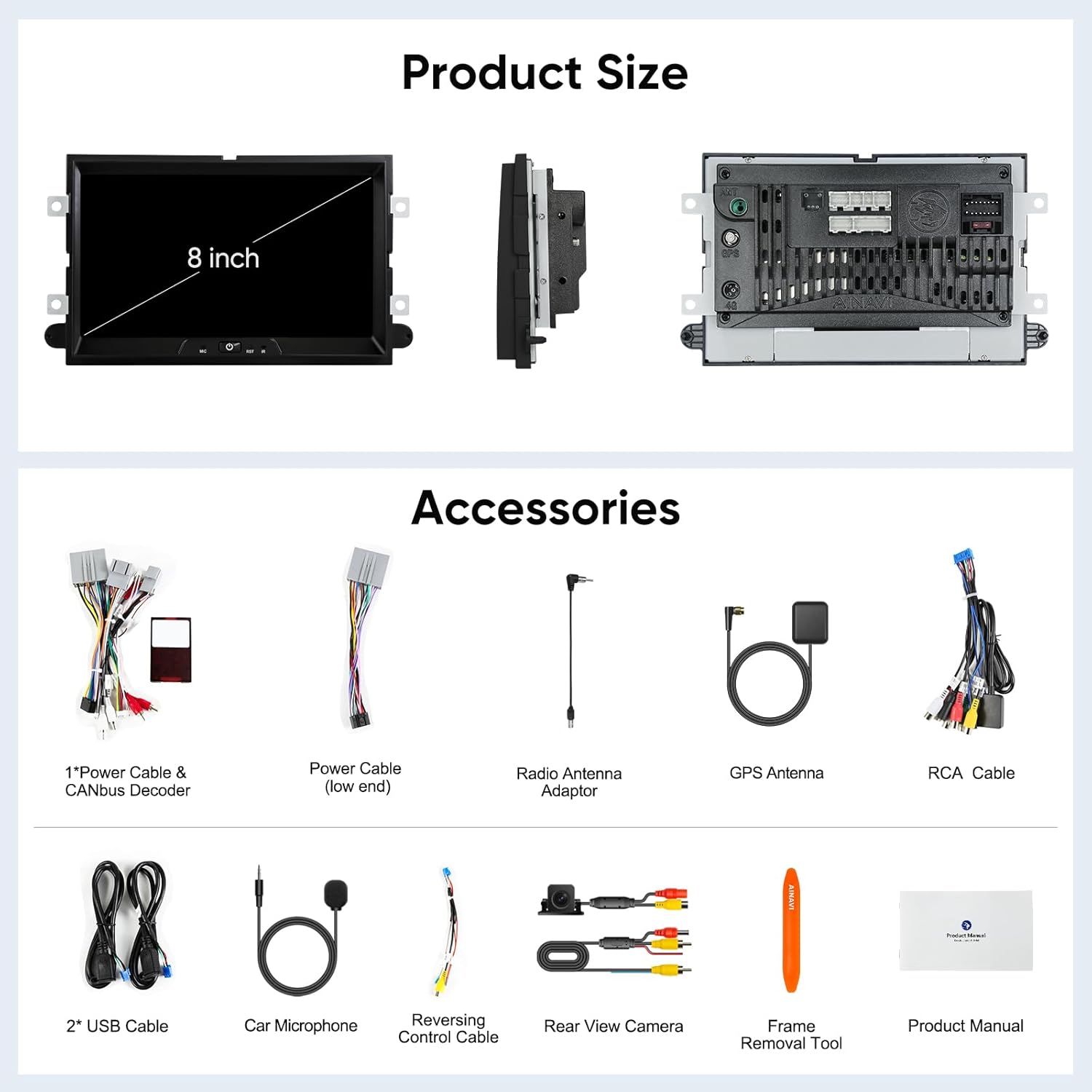
Figure 2.1: Product and Included Accessories. This image displays the main 8-inch car stereo unit along with all the cables, antennas, camera, microphone, and tools provided in the package.
3. Kasaluyuan Kandaraan
This AINAVI car stereo is designed for specific Ford models and years. Please ensure your vehicle is listed below for proper fitment and functionality:
| Modél | Mangtaun-taun | Modél | Mangtaun-taun |
|---|---|---|---|
| E250/E350 | 2009–2010 | Gaya bébas | 2005–2007 |
| Ujung | 2007–2010 | Fusion | 2006–2009 |
| Kabur | 2008–2012 | Tandaan LT | 2006–2008 |
| Ékspédisi | 2007–2010 | Milan | 2006–2009 |
| Expedition EL/MAX(U354) | 2007–2014 | MKX | 2007–2009 |
| Explorer(U251) | 2006–2010 | Montego | 2005–2007 |
| F150 | 2004–2008 | Pendaki gunung | 2007–2010 |
| F250/F350 | 2006–2010 | Mustang | 2005–2009 |
| Lima Ratus | 2005–2007 | Sable | 2008–2009 |
| Pokus | 2005–2007 | Shelby GT500 | 2007–2009 |
| Freestar | 2004–2007 | Kaurus | 2008–2009 |

Figure 3.1: Compatible Ford Models and Years. This image provides a visual reference for the vehicle compatibility list.
4. Setup & Instalasi
The AINAVI car stereo is designed for a plug-and-play installation in compatible Ford vehicles. It includes a dedicated wiring harness and CANbus decoder, eliminating the need for cable modifications in most cases. Professional installation is recommended if you are unfamiliar with car audio systems.
4.1 Daptar pariksa Pra-Pamasangan
- Ensure your vehicle is compatible (refer to Section 3).
- Gather necessary tools (e.g., screwdriver set, trim removal tools).
- Pegatkeun sambungan terminal batré négatip kandaraan urang sateuacan ngamimitian sagala pagawean listrik.
4.2 Léngkah-léngkah Pamasangan (Umum)
- Carefully remove the factory radio and trim panels using appropriate trim removal tools to avoid damage.
- Connect the provided wiring harness to the vehicle's factory harness. Ensure all connections are secure.
- Connect the CANbus decoder, GPS antenna, radio antenna adapter, and any other accessories (e.g., rear view camera, microphone) to the new head unit.
- Temporarily connect the new head unit and reconnect the vehicle's battery. Test basic functions like power on, radio, and steering wheel controls.
- If all functions work correctly, disconnect the battery again, secure all wiring, and mount the new head unit into the dashboard.
- Reinstall all trim panels and reconnect the battery.

Figure 4.1: Car Stereo Installed. This image illustrates the appearance of the AINAVI car stereo after installation in a compatible vehicle dashboard.
Figure 4.2: Before and After Modification. This image demonstrates the visual change in the car's interior after replacing the original radio with the AINAVI unit.
5. Parentah Operasi
5.1 Operasi Dasar
- Hurungkeun/Pareuman: Press and hold the power button (if available) or turn on your vehicle's ignition.
- Layar cabak: Navigate the interface by tapping, swiping, and pinching on the 8-inch QLED display.
- Kontrol volume: Adjust volume using the on-screen controls or your vehicle's steering wheel controls.
- Kadali setir: The unit supports your vehicle's existing steering wheel control buttons for convenience.
5.2 Napigasi GPS
The unit features built-in GPS navigation. You can use pre-installed maps or download additional navigation applications from the Google Play Store.
- Navigasi Online: Connect the head unit to a network via 5G WiFi to receive real-time traffic information and online map updates.
- Navigasi Offline: Download offline maps to use the GPS function without an internet connection.

Figure 5.1: GPS Navigation and Multimedia. This image illustrates the display showing GPS navigation alongside options for multimedia playback.
5.3 Konéktipitas
- 5G WiFi: Connect to a WiFi hotspot (e.g., from your smartphone) to access the internet for app downloads, streaming, and online services. Supports dual-band 2.4GHz and 5GHz WiFi for stable and high-speed connections.
- Bluetooth 5.0: Pair your smartphone via Bluetooth for hands-free calling, audio streaming, and phonebook synchronization.
5.4 CarPlay & Android Auto
The unit supports both wireless and wired CarPlay, and USB connection Android Auto, allowing seamless integration with your smartphone.
- Wireless/Wired CarPlay: Connect your iPhone to access navigation, make calls, send/receive messages, and listen to music directly from the stereo interface.
- USB Android Auto: Connect your Android phone via USB to use Google Maps, make calls, send messages, and play music.
- Kontrol sora: Activate voice commands by saying "Hey Siri" (for CarPlay) or "Hey Google" (for Android Auto) to control functions hands-free.

Figure 5.2: CarPlay and Android Auto Interface. This image displays the user interface when CarPlay or Android Auto is active, showing various app functionalities.

Figure 5.3: Smart Voice Control. This image highlights the voice command capabilities of the stereo when using CarPlay or Android Auto.
5.5 Audio Settings (DSP)
The built-in Digital Sound Processor (DSP) provides advanced audio customization options.
- Ékualiser 48-pita: Fine-tune the audio output across 48 frequency bands to match your preferences.
- Koréksi Waktos: Adjust the sound delay for individual speakers to optimize the sound field position, creating a more immersive listening experience.
- Amppanguat: The unit features a 4*45W amplifier for clear and powerful sound output.

Figure 5.4: Intelligent Tone Adjustment System. This image displays the DSP settings screen, allowing users to customize sound characteristics.

Figure 5.5: DSP 48 EQ Band & Time Correction. This image provides a closer look at the advanced DSP settings, including the graphical equalizer and time correction controls.

Figure 5.6: Built-in DSP Function Sound Control System. This image visually explains how the DSP enhances audio quality by allowing precise control over speaker output.
6. Pangropéa
To ensure the longevity and optimal performance of your AINAVI car stereo, follow these maintenance guidelines:
- Ngabersihan layar: Anggo lawon anu lemes sareng henteu ngaganggu pikeun ngusap layar sacara lembut. Pikeun noda anu bandel, radaampen lawon jeung cai atawa cleaner aman layar. Hindarkeun bahan kimia anu kasar atanapi bahan abrasive.
- Suhu: Hindarkeun ngalaan unit ka suhu anu ekstrim, boh panas sareng tiis, kanggo waktos anu berkepanjangan.
- Apdet parangkat lunak: Periodically check for available software updates through the system settings to ensure you have the latest features and performance enhancements.
- Sambungan: Ensure all cables and connections remain secure to prevent intermittent issues.
7. Cara ngungkulan
If you encounter issues with your car stereo, refer to the following common troubleshooting steps. If the problem persists, please contact customer support.
- Henteu aya kakuatan: Check all power connections. Ensure the vehicle's battery is properly connected and charged. Verify the fuse for the stereo is intact.
- Henteu aya sora: Pariksa sambungan spiker. Pastikeun volume henteu dibisukeun atanapi disetel teuing handap. Pariksa setélan audio (EQ, kasaimbangan, fader).
- Kaleungitan Sinyal GPS: Pastikeun anteneu GPS dipasang kalawan bener sareng gaduh tampilan anu jelas view of the sky. Try restarting the navigation application.
- Masalah Sambungan Bluetooth: Ensure Bluetooth is enabled on both the stereo and your phone. Delete previous pairings and try pairing again.
- Layar rampa teu ngaréspon: Try restarting the unit. If the issue continues, a factory reset might be necessary (note: this will erase all user data and settings).
- Kadali Setir Teu Gawé: Verify the CANbus decoder and wiring harness connections are correct. Check the steering wheel control settings in the unit's menu.
8. Spésifikasi
Below are the technical specifications for the AINAVI 8-inch Android 12 Car Stereo Radio:
| Fitur | Spésifikasi |
|---|---|
| Sistem operasi | Android 12 |
| Prosesor | Octo-Core (ARM Cortex A55) |
| Ram | 2GB |
| Panyimpenan internal (ROM) | 32GB |
| Ukuran layar | 8 inci |
| Tipe tampilan | QLED, G+G Full Lamination |
| Resolusi | 1280x720 |
| Viewdina Angle | 178° |
| Konektipitas | 5G WiFi (2.4Ghz & 5Ghz), Bluetooth 5.0 |
| Napigasi | Built-in GPS (supports offline maps) |
| Integrasi Smartphone | Wireless/Wired CarPlay, USB Android Auto |
| Kaluaran Audio | 4*45W (Max. Output) |
| Keunggulan DSP | Time Correction, 48-band EQ |
| Item Beurat | 3.72 pon |
| Ukuran Paket | 13.89 x 9.76 x 5.28 inci |
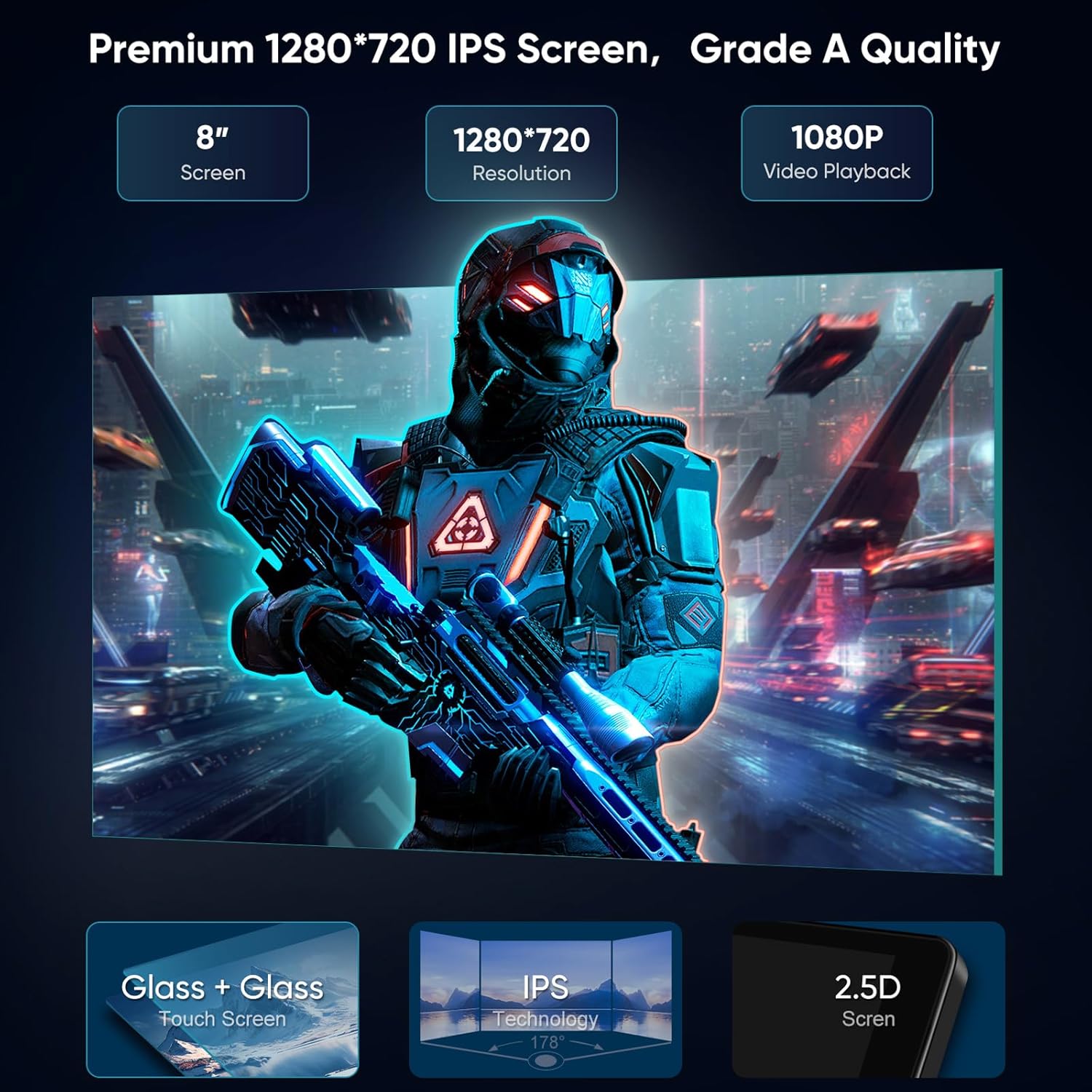
Figure 8.1: Premium Screen Specifications. This image details the display technology and resolution of the car stereo.
9. Émbaran jaminan
The AINAVI 8-inch Android 12 Car Stereo Radio comes with a garansi produk sataun from the date of purchase. This warranty covers manufacturing defects and malfunctions under normal use. Please retain your proof of purchase for warranty claims. The warranty does not cover damage caused by improper installation, misuse, accidents, or unauthorized modifications.
10. Rojongan Palanggan
For any technical assistance, installation questions, or warranty inquiries, please contact our professional technical support team:
- Ngaliwatan Amazon: Navigate to your order details on Amazon and click on the seller's name (HomeCar), then select "Ask a question." Please provide pictures or videos if your query relates to installation or technical issues.
- Hotline: +1 (833) 858-5016
- Surélék: info@ainavi.com
- Jam Gawé: 01:00 PM to 00:00 AM PST

Figure 10.1: How to Reach Us for Installation & Technical Support. This image provides a visual guide on contacting support through Amazon.

Figure 10.2: Customer Support Representative. This image represents the availability of customer support for assistance.


