1. Bubuka
The AOPUTTRIVER AP-5000Y is a professional-grade handheld hot wire anemometer designed for accurate measurement of wind speed, airflow (CFM/CMM), temperature, and humidity. Featuring a retractable telescopic probe and a clear LCD display, this device is an essential tool for HVAC professionals, environmental monitoring, and various industrial applications. Its compact design and robust features ensure reliable performance in diverse environments.

Image: The AOPUTTRIVER AP-5000Y Hot Wire Anemometer, showing the main unit, flexible probe, and USB-C charging cable.
2. Fitur Produk
- Pangukuran 3-in-1: Accurately detects wind speed (m/s, km/h, ft/min, knots, mph), airflow (CFM/CMM), and temperature (°C/°F).
- Retractable Telescopic Probe: Ideal for precise measurements in confined spaces like air conditioning vents. The probe is waterproof, dustproof, and measures 298.5*40.84*23.7mm.
- Layar LCD kalayan Lampu Latar: Provides clear presentation of wind speed (max, min, real-time), airflow, temperature, and humidity. Equipped with anti-interference touch keys and a low battery indicator.
- Antarmuka Tipe-C: For convenient charging via a 600mAh Li-Ion battery and USB data export.
- Pareuman-otomatis: Selectable feature to conserve battery life.
- Aplikasi lega: Suitable for environmental measurements, air transportation, and air conditioning monitoring systems.

Image: Visual representation of the anemometer's key features, including 5 units, MAX/MIN/AVG, LCD backlight, °C/°F option, auto power off, airflow/temperature measurement, and 360-degree bending probe.

Image: Diagram illustrating the 3-in-1 measurement capabilities: wind velocity (0.1-30m/s), wind temperature (0°C-45°C), CMM (0-999900m³/min), and CFM (0-999900ft³/min).
3. Eusi Paket
Saatos muka bungkusan, mangga pariksa yén sadaya item di handap ieu kalebet:
- AP-5000Y Hot Wire Anemometer Unit
- Telescopic Probe
- Kabel Data USB Tipe-C
- Kantong Panyimpenan Kanvas
- Instruksi Manual
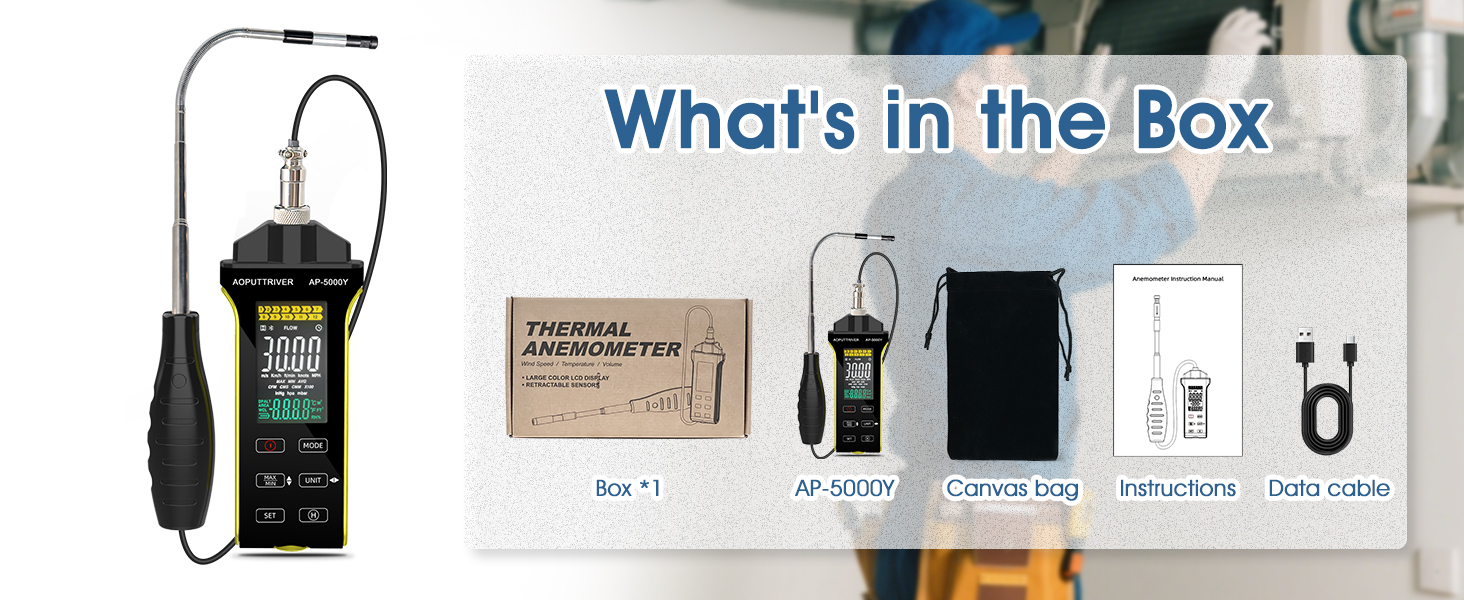
Image: A visual breakdown of the package contents, showing the anemometer, canvas bag, instructions, and data cable alongside the product box.
4. Setup Awal
4.1 Ngecas Alat
Before first use, fully charge the anemometer's built-in 600mAh Li-Ion battery. Connect the provided USB Type-C cable to the device's Type-C port and plug the other end into a standard USB power adapter (not included) or a computer's USB port. The charging indicator on the display will show charging status.
4.2 Nyambungkeun usik
Carefully connect the telescopic probe to the main unit's designated port. Ensure a secure connection to prevent inaccurate readings. The probe can be extended and bent up to 360 degrees for optimal positioning in various measurement scenarios.
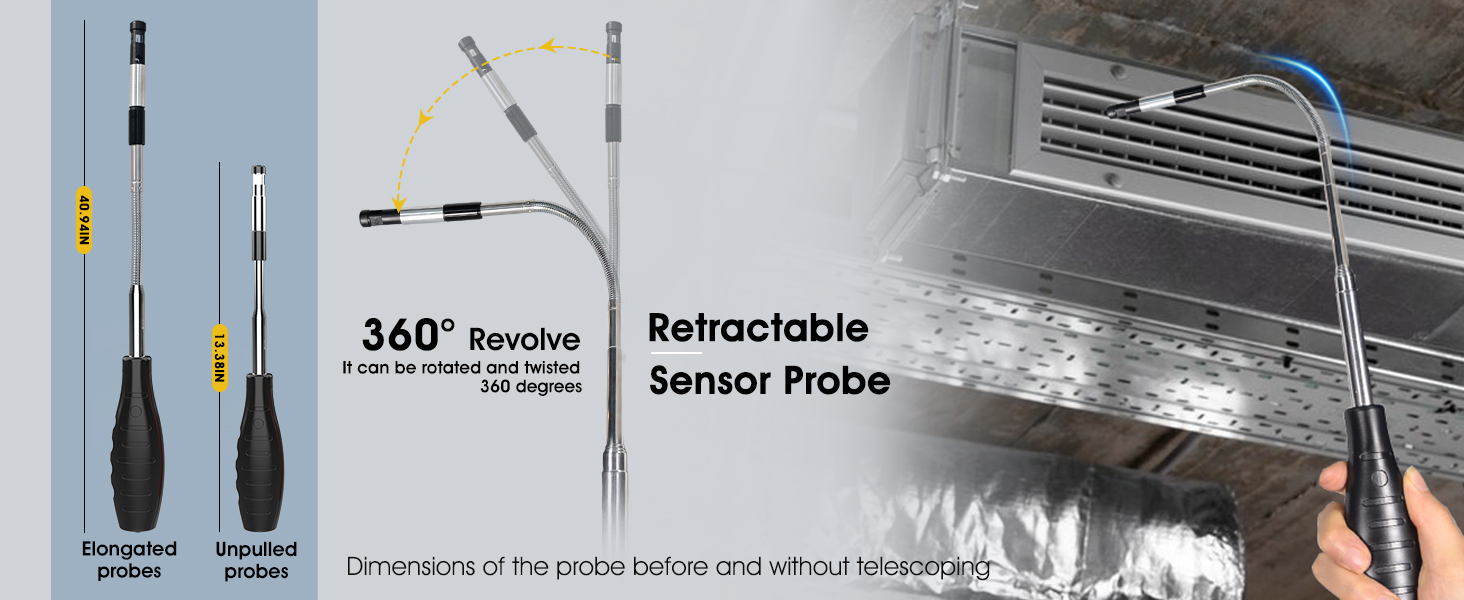
Image: Illustration of the retractable sensor probe, showing its elongated and unpulled states, and its ability to revolve 360 degrees for flexible positioning.
5. Parentah Operasi
5.1 Daya Hurung/Pareuman
Press and hold the power button (usually marked with a power symbol) to turn the device on or off. The LCD display will illuminate upon power-on.
5.2 Measurement Modes and Unit Selection
Use the 'MODE' button to cycle through different measurement parameters: wind speed, airflow (CFM/CMM), temperature, and humidity. Press the 'UNIT' button to change the units for the selected parameter (e.g., m/s, km/h for wind speed; °C, °F for temperature).

Image: Tables detailing the measurement ranges and resolutions for airflow (CFM/CMM) and air velocity (m/s, km/h, ft/min, knots, mph).
5.3 Ngartos Tampilan
The LCD display shows real-time readings, along with maximum (MAX), minimum (MIN), and average (AVG) values. The backlight ensures readability in low-light conditions. Indicators for battery level and selected units are also present.

Image: Comparison of the LCD display with and without backlight, demonstrating its clarity in different lighting conditions.
5.4 Data Hold and Export
Press the 'HOLD' button to freeze the current reading on the display. To export data, connect the device to a computer using the Type-C USB cable. Refer to the specific software instructions (if applicable) for data logging and analysis.

Image: The anemometer being used to measure airflow in an HVAC duct, highlighting the flexibility and reach of the hot-wire sensor probe.
6. Perawatan sareng Pangropéa
- beberesih: Wipe the device and probe with a soft, dry cloth. Do not use abrasive cleaners or solvents. Ensure the probe is dry before storage.
- Panyimpenan: Store the anemometer in its canvas bag in a cool, dry place away from direct sunlight and extreme temperatures.
- Perawatan batré: To prolong battery life, avoid fully discharging the battery frequently. Recharge the device regularly, especially if it will be stored for an extended period.
- Penanganan Probe: Handle the telescopic probe with care. Avoid excessive force when extending, retracting, or bending to prevent damage to the sensor.
7. Ngungkulan Masalah Umum
| Masalah | Mungkin Cukang lantaranana | Solusi |
|---|---|---|
| Alat teu hurung | batré lemah; Tombol daya teu dipencet leres | Charge the device fully; Press and hold the power button firmly for a few seconds. |
| Bacaan teu akurat | Probe not fully connected; Sensor dirty or damaged; Incorrect unit selected | Ensure probe is securely connected; Clean the sensor carefully; Verify correct measurement unit is selected. |
| Pintonan taram atanapi kosong | Low battery; Backlight off; Device malfunction | Recharge battery; Press backlight button (if available); Contact customer support if issue persists. |
| Cannot export data | Incorrect cable; Driver issue; Software not installed | Use the provided Type-C cable; Install necessary drivers or software on your computer. |
8. Spésifikasi Téknis
| Parameter | Nilai |
|---|---|
| Rentang laju hawa | 0.1~30 m/s |
| Rentang Suhu hawa | 0~45 °C (32~113 °F) |
| Rentang Volume Udara (CFM) | 0-999900 ft³ / mnt |
| Rentang Volume Udara (CMM) | 0-999900 m³ / mnt |
| Dimensi Probe | 298.5 x 40.84 x 23.7 mm |
| Jenis Batré | Batré Li-Ion 600mAh |
| Panganteur | USB Tipe-C |
| Otomatis Pareum | Bisa dipilih |
| Parsél Dimensi | 31.1 x 18.2 x 5.7 cm |
| Beurat | 540 g |
9. Garansi sarta Rojongan Palanggan
AOPUTTRIVER products are manufactured to high quality standards. For information regarding warranty coverage, technical support, or service inquiries, please refer to the warranty card included with your product or visit the official AOPUTTRIVER websitus. Mangga simpen resi pameseran anjeun salaku bukti pameseran pikeun klaim garansi naon waé.
For further assistance, you may contact AOPUTTRIVER customer support through the contact information provided on their official websitus atawa ngaliwatan pangecér mana produk ieu dibeuli.


