
Naon dina Box
The Soundcore P41i package includes the following items:
- Earbud Soundcore P41i
- Charging Case with Built-In USB-C Cable
- Eartips (XS, S, M, L, XL sizes)

Image: The Soundcore P41i earbuds, charging case with integrated USB-C cable, and a selection of XS, S, M, L, XL eartips are shown laid out on a white surface.
Disetél
1. Ngecas Earbuds jeung Case
Before first use, fully charge the earbuds and the charging case. The charging case features a built-in USB-C cable for convenience.
- Charging the Case with Integrated Cable: Pull out the built-in USB-C charging cable from the left side of the case. Plug the USB-C end into a compatible charger or power source. The LED display on the case will show the charging status.
- Charging the Case with External Cable: Locate the USB-C port on the back of the case. Connect a USB-A to C or USB-C to C cable to this port and plug the other end into a charger.
- Ngecas Earbuds: Place the earbuds into the charging case. The earbuds will begin charging automatically. The LED display on the case indicates the charge level of each earbud.
The display will turn off after 30 seconds. Press the side button to turn it on again.

Image: The Soundcore P41i charging case is open, revealing the earbuds inside. The digital display shows the battery percentage tina kasus jeung earbuds individu.
Video: Two methods to charge the charging case
Video: This video demonstrates two ways to charge the Soundcore P41i charging case: using its integrated USB-C cable with a charger, and using an external USB-C cable connected to the case's port.
2. Nyapasangkeun sareng Alat Anjeun
The Soundcore P41i earbuds support Fast Pair for Android devices and can be manually paired via Bluetooth.
- Pasangan Gancang (Android): Open the charging case near your Android device. A pop-up notification will appear on your device. Tap 'Connect' to pair.
- Papasangan Bluetooth Manual: Open the charging case. The earbuds will automatically enter pairing mode (indicated by flashing lights). On your device, go to Bluetooth settings and select 'Soundcore P41i' from the list of available devices.

Image: A smartphone displays a 'Soundcore P41i' connection prompt, illustrating the Fast Pair feature. The earbuds are shown in their open charging case.
3. Milih Eartips Katuhu
Selecting the correct size eartips is crucial for optimal sound quality, noise cancellation, and comfort. Experiment with the included XS, S, M, L, and XL eartips to find the best fit for your ears.

Image: A visual guide demonstrating the correct way to attach eartips to the earbuds and an array of eartip sizes (XS, S, M, L, XL) to ensure a secure and comfortable fit.
Ngoperasikeun Earbuds
1. Toél Kontrol
The Soundcore P41i earbuds feature touch-sensitive areas for controlling playback, calls, and ambient sound modes. These controls can be customized via the Soundcore app.
- Ketuk Tunggal: Puter/Reureuh musik.
- Ketok Ganda: lagu salajengna.
- Tap 3 Times: (Customizable via app)
- Ketok jeung Tahan: Cycle through Ambient Sound modes (Noise Cancellation, Normal, Transparency).
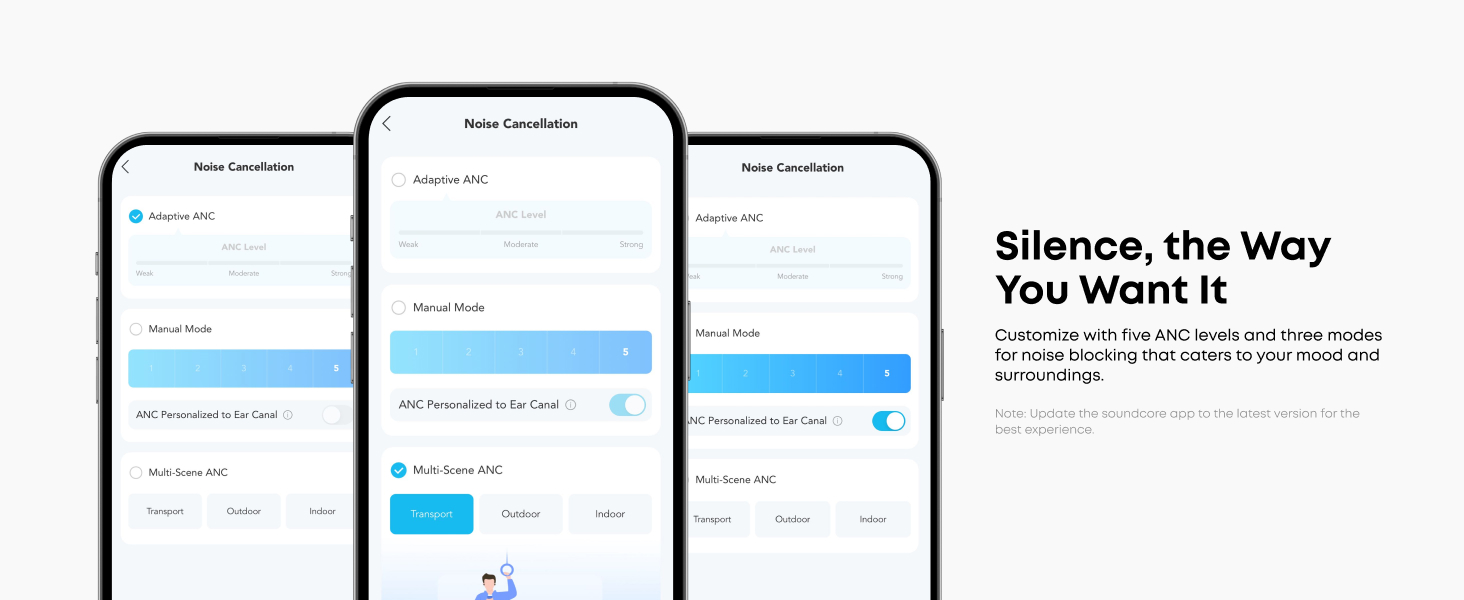
Image: An earbud is shown in an ear, with a blue highlighted area indicating the touch-sensitive control surface.
2. Ambient Sound Modes
The earbuds offer Adaptive Noise Cancelling (ANC) to reduce ambient noise, a Normal mode, and a Transparency mode to stay aware of your surroundings. These modes can be toggled using the touch controls or through the Soundcore app.

Image: An earbud is shown with sound waves indicating noise cancellation. A person is wearing the earbuds on a train, suggesting use in noisy environments.
3. Portable Phone Charging
The charging case doubles as a portable power bank for your USB-C compatible phone. It has a 3,000mAh capacity and provides up to 10W output.
- Pull out the built-in USB-C charging cable from the left side of the case.
- Plug the USB-C cable into your phone's charging port.
- The case's display will show a blue arrow, indicating it is charging your phone.
When the battery level of the charging case is 10% or lower, it will stop charging the phone to preserve power for the earbuds.

Image: A hand holds a smartphone being charged by the Soundcore P41i charging case using its integrated USB-C cable. The phone's screen shows it is charging.
Video: How to charge a phone with the charging case (without Type-C to Lightning adapter)
Video: This video demonstrates how to use the Soundcore P41i charging case's built-in USB-C cable to charge a phone directly, without needing a separate adapter.
Video: How to charge a phone with the charging case (with adapter)
Video: This video illustrates how to use the Soundcore P41i charging case to charge a phone that requires a Lightning adapter, by connecting the adapter to the case's built-in USB-C cable.
4. Phone Stand Feature
The charging case also integrates a phone stand. Simply open the case and pull out the small stand located inside the lid. This allows you to prop up your phone for hands-free viewing.

Image: A person is shown using the Soundcore P41i charging case as a stand to hold a smartphone horizontally, enabling hands-free viewing.
5. Sambungan Multipoint
The Soundcore P41i earbuds can connect to two Bluetooth devices simultaneously, allowing for seamless switching between them (e.g., between a laptop and a smartphone).

Image: A visual representation of the earbuds connected to both a laptop and a smartphone, demonstrating the multipoint connection feature.
6. Fitur Aplikasi Soundcore
Download the Soundcore app to unlock the full potential of your P41i earbuds. Features include:
- EQ anu tiasa disaluyukeun: Saluyukeun sora profiles kana preferensi Anjeun.
- Sora HearID: Personalized sound profile dumasar kana pangrungu anjeun.
- Gaming/Movie Mode: Optimized audio for different media.
- High-Precision Translation: Real-time translation for over 100 languages.
- Pembaruan firmware: Keep your earbuds up-to-date with the latest features and improvements.

Image: Multiple smartphone screens display the Soundcore app interface, showcasing various noise cancellation levels and modes, including Adaptive ANC.
Pangropéa
1. beberesih
Regular cleaning helps maintain sound quality and prolong the lifespan of your earbuds.
- Earbuds: Gently wipe the earbuds, especially the eartips and charging contacts, with a soft, dry, lint-free cloth. Remove any earwax buildup from the eartips and speaker mesh using a small brush or cotton swab.
- Kasus ngecas: Wipe the charging case with a soft, dry cloth. Ensure the charging contacts inside the case are clean and free of debris.
2. Panyimpenan
When not in use, always store the earbuds in their charging case to protect them from damage and keep them charged.
- Store the case and earbuds in a cool, dry place away from extreme temperatures and direct sunlight.
- Avoid storing them in damp lingkungan.
Pamérésan masalah
If you encounter issues with your Soundcore P41i earbuds, try the following solutions:
- Taya Sora/Kualitas Sora Lemah:
- Ensure earbuds are properly seated in your ears and eartips provide a good seal.
- Pariksa tingkat volume dina alat sareng earbud anjeun.
- Clean the speaker mesh and eartips for any obstructions.
- Sambungkeun deui earbuds ka alat anjeun.
- Masalah pasangan:
- Pastikeun Bluetooth diaktipkeun dina alat Anjeun.
- Place the earbuds back in the case, close the lid, and then open it again to re-enter pairing mode.
- Forget/delete "Soundcore P41i" from your device's Bluetooth list and try pairing again.
- Masalah ngecas:
- Pastikeun kabel ngecas disambungkeun aman ka duanana wadahna jeung sumber kakuatan.
- Pariksa naha kontak ngecas dina earbuds sareng jero wadahna beresih.
- Coba kabel ngecas atawa adaptor kakuatan béda.
- Ngareset Earbuds: If issues persist, you may need to reset the earbuds. Refer to the Soundcore app or the official Soundcore support website for specific reset instructions for the P41i model.
spésifikasi
| Fitur | Spésifikasi |
|---|---|
| Ngaran modél | P41i (A3937) |
| Kontrol bising | Pembatalan Noise adaptif |
| Téhnologi konektipitas | Nirkabel (Bluetooth 5.3) |
| Ukuran Supir Audio | 11 milimeter |
| Kahirupan Batré (Earbuds) | Nepi ka 12 jam (sakali muatan) |
| Kahirupan Batré (kalayan Case) | Nepi ka 192 jam |
| Ngecas Kapasitas Case | 3,000 mah |
| Tingkat Résistansi Cai | IPX5 (Tahan Cipratan) |
| Mikropon | 6-Mic AI Clear Calls |
| Tipe Kontrol | Toél Control |
| Item Beurat | 104 Gram (Earbuds + Case) |
| Dimensi produk | 2.97 x 2.34 x 1.17 inci |
Garansi sareng Rojongan
Soundcore products are designed to meet high quality and performance standards. For warranty information, technical support, or to access frequently asked questions, please visit the official Soundcore websitus atanapi ngahubungan layanan palanggan maranéhna.
You can find detailed support resources, including user manuals, FAQs, and contact information, at us.soundcore.com/pages/support.