1. Produk Langkungview
This manual provides detailed instructions for the MONTECH XR Wood ATX Mid-Tower PC Gaming Case. It covers setup, operation, maintenance, and specifications to ensure optimal performance and longevity of your PC case.

Figure 1.1: MONTECH XR Wood PC Gaming Case, showcasing its genuine black walnut front panel and pre-installed ARGB fans.
The MONTECH XR Wood case combines aesthetic appeal with high functionality, featuring a genuine black walnut front panel, extensive cooling support, and comprehensive dust filtration.
2. Fitur konci
- Genuine Black Walnut Front: Experience the elegance of American Walnut wood integration, seamlessly blending nature and modern design on the front panel.
- Superior Airflow & Cooling: Achieve superior airflow with extensive cooling support, accommodating up to 12 fans for maximum ventilation.
- Comprehensive Dust Filtration: 360° four-sided dust filter, ensuring all fans are shielded for optimal protection against dust accumulation.
- Spacious Compatibility: Designed for spacious compatibility and high-performance hardware, supporting up to a 360mm AIO cooler and the latest RTX 50 series GPUs.
- Kipas ARGB PWM anu tos dipasang sateuacanna: Comes with four high-performance GF120 ARGB PWM fans, delivering optimized airflow and stunning customizable lighting.
- Robust I/O: Features two USB 3.0 ports and a USB Type-C port for faster transfers and wider device support.

Figure 2.1: The genuine black walnut front panel with fine laser engraving, highlighting the blend of nature and design.
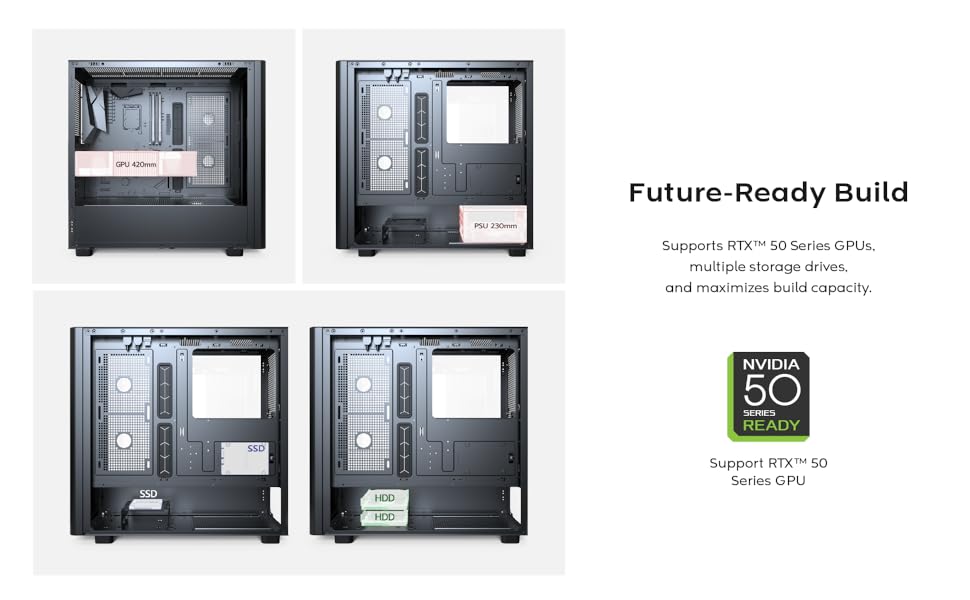
Figure 2.2: Illustration of the extensive cooling support, detailing fan and radiator placements for optimal thermal performance.

Figure 2.3: Internal layout demonstrating compatibility with large GPUs, including the latest RTX 50 series.

Figure 2.4: The robust top I/O panel, providing convenient access to essential ports and controls.
3. Setup Guide
3.1 Ngabongkar bungkusan
Carefully remove the PC case from its packaging. Inspect the case for any signs of damage that may have occurred during transit. Retain the packaging for future transport or warranty purposes.
3.2 Pamasangan komponén
Follow these general steps for installing your PC components into the MONTECH XR Wood case. Refer to your individual component manuals for specific installation details.
- Pamasangan motherboard: Align your ATX, Micro-ATX, or Mini-ITX motherboard with the standoffs inside the case. Secure it with the provided screws.
- Pamasangan Power Supply Unit (PSU): Install the PSU into the bottom mount bay. Secure it with screws from the rear of the case.
- Pamasangan Drive Panyimpen: Install 2.5" SSDs and 3.5" HDDs into the designated bays. The case supports multiple storage drives.
- Pamasangan Kartu Grafis (GPU): Insert your graphics card into the appropriate PCIe slot on the motherboard. Ensure it is securely seated and fastened with the retention clip or screw. The case supports GPUs up to 420mm in length.
- Manajemén Kabel: Ngamangpaatkeun cutouts routing kabel sarta titik dasi-handap tukangeun baki motherboard pikeun ngatur kabel rapih. Ieu ngaronjatkeun aliran hawa jeung estetika.

Gambar 3.1: Internal view of the case demonstrating component installation and cable management possibilities.
4. Parentah Operasi
4.1 Powering On
After all components are installed and cables are connected, ensure the power switch on your Power Supply Unit (PSU) is in the 'ON' position. Then, press the power button located on the top I/O panel of the case to start your system.
4.2 ARGB Fan Control
The MONTECH XR Wood case comes with four pre-installed GF120 ARGB PWM fans. These fans offer customizable lighting effects. You can control the ARGB lighting in one of two ways:
- Parangkat Lunak motherboard: If your motherboard supports Addressable RGB (ARGB) synchronization (e.g., ASUS Aura Sync, MSI Mystic Light Sync, GIGABYTE RGB Fusion, ASRock Polychrome RGB), connect the fans' ARGB cables to the appropriate 3-pin 5V ARGB header on your motherboard. Use the motherboard's software to customize lighting effects and colors.
- Case RGB Button: The case may feature a dedicated RGB button on the top I/O panel. Press this button to cycle through various pre-set lighting modes or to turn the RGB lighting on/off.

Figure 4.1: Illustration of optimized airflow provided by the four pre-installed GF120 ARGB PWM fans.
5. Pangropéa
5.1 Lebu Filter beberesih
The MONTECH XR Wood case features a comprehensive 360° four-sided dust filter system to protect your components from dust accumulation and maintain optimal airflow. Regular cleaning of these filters is crucial for system longevity and performance.
To clean the dust filters:
- Pareum listrik: Ensure your PC is completely powered off and unplugged from the wall outlet before performing any maintenance.
- Hapus saringan: Gently remove the magnetic dust filters located on the top, front, and bottom of the case. The side glass panel can also be removed for access to internal areas.
- Saringan bersih: Use a soft brush, a vacuum cleaner with a brush attachment, or compressed air to remove accumulated dust from the filters. Do not use water or liquid cleaners.
- Reattach Filters: Once clean and dry, reattach the filters securely to their respective positions.

Angka 5.1: Ngabeledug view illustrating the comprehensive dust filtration system and removable panels for easy cleaning.
6. Spésifikasi Téknis
| Fitur | Spésifikasi |
|---|---|
| Ngaran modél | XR Wood |
| Nomer Modél Item | 11-970-017 |
| Jenis Kasus | Pertengahan Menara |
| Motherboard kasaluyuan | ATX, Mikro ATX, Mini ITX |
| Ukuran (L x W x H) | 18.7 x 9.1 x 17.9 inci (47.5 x 23.1 x 45.5 cm) |
| Item Beurat | 15.1 pon (6.85 kg) |
| Kipas anu tos dipasang | 4 x 120mm GF120 ARGB PWM Fans |
| Max Fan Rojongan | Nepi ka 12 fans |
| Rojongan Radiator Max | Up to 360mm AIO |
| GPU Clearance | Nepi ka 420mm |
| Jenis Pemasangan PSU | Gunung handap |
| I / O palabuhan | 2 x USB 3.0, 1 x USB Type-C, Audio, Mic, Reset Button, Power Button |
| Saringan lebu | 360° four-sided (Top, Front, Bottom) |
7. Cara ngungkulan
7.1 Taya Daya
- Ensure all power cables are securely connected to the PSU, motherboard, and wall outlet.
- Verify the power switch on the PSU is in the "ON" position.
- Pariksa sambungan tombol kakuatan panel hareup kana motherboard nu.
7.2 Kipas Teu Muter / RGB Teu Jalan
- Check fan power connections to the motherboard or fan controller.
- Ensure ARGB headers are correctly connected to the 3-pin 5V ARGB header on your motherboard.
- Verify that compatible motherboard RGB software is installed and configured correctly, or try cycling through modes using the case's RGB button.
7.3 Isu overheating
- Verify proper fan orientation for optimal airflow (intake vs. exhaust).
- Bersihkeun saringan lebu sacara teratur pikeun nyegah pangwatesan aliran hawa.
- Ensure adequate space around the PC case for proper ventilation.
- Check CPU cooler and GPU fan functionality.
8. Garansi jeung Rojongan
For detailed warranty information, technical support, and customer service inquiries regarding your MONTECH XR Wood PC Gaming Case, please visit the official Montech website or contact their authorized support channels. It is recommended to retain your proof of purchase for any warranty claims.
Resmi Montech Websitus: www.montechpc.com


