
1. Produk Langkungview
The Hisense 65E7Q QLED Smart TV offers a premium viewing experience with its 65-inch QLED display. This television integrates advanced technologies such as Dolby Vision and Dolby Atmos for immersive audio-visuals, AI Smooth Motion for fluid images, and dedicated modes for gaming and sports. Powered by the VIDAA operating system, it provides easy access to a wide range of streaming content and smart features, including voice control.

Hareupeun view of the Hisense 65E7Q QLED Smart TV.
Fitur konci:
- Warna QLED: Experience rich, vibrant, and realistic colors.
- AI Gerak Halus: Advanced MEMC and 3D Noise Reduction for fluid, blur-free images.
- Dolby Visi & Dolby Atmos: Cinematic picture and immersive sound for an enhanced entertainment experience.
- Modeu Kaulinan Plus: Reduces input lag to 16ms, with 60Hz VRR and ALLM for ultra-fluid gaming.
- Modeu Olahraga AI: Optimizes picture and sound for sports content, reducing motion blur and enhancing stadium-like audio.
- AI 4K Upscaler: Enhances blurry images to near-4K quality.
- VIDAA Smart TV OS: Fast, secure, and intuitive operating system with access to popular streaming applications.
- Kontrol sora: Integrated Alexa and VIDAA Voice for convenient operation.
2. Émbaran Kasalametan
Please read all safety instructions carefully before using your TV. Keep this manual for future reference. Always ensure the TV is placed on a stable surface to prevent tipping. Do not expose the TV to rain or moisture. Refer to the full safety guidelines in the included safety manual.
3. Eusi Paket
Pastikeun yén sadaya item aya dina kotak:
- Hisense 65E7Q QLED Smart TV
- Kabel Daya
- Remote Control (with 1 AAAA battery included)
- Stand TV (2 buah)
- Screws pikeun Majelis Stand
- Manual pangguna (dokumén ieu)
- Kartu Garansi
4. Setélan
4.1 Ngarakit Stand
- Teundeun layar TV sacara saksama dina tempat anu lemes sareng datar pikeun nyegah karuksakan.
- Sejajarkeun potongan nangtung sareng slot anu cocog dina handapeun TV.
- Ngamankeun potongan nangtung ngagunakeun screws disadiakeun. Pastikeun aranjeunna tightened pageuh.

Diagram illustrating TV dimensions and stand installation points.
4.2 Pamasangan témbok
If you plan to wall mount your TV, ensure you use a VESA-compatible wall mount kit (not included). The Hisense 65E7Q supports a VESA mounting standard of 600 x 400 mm. Follow the instructions provided with your wall mount kit for safe installation.
4.3 Nyambungkeun périferal
Connect your external devices to the TV's ports as needed. Refer to the port diagram below:

Tukangeun view showing available ports and connections.
- Port HDMI (x3): Connect Blu-ray players, game consoles, and other HDMI devices. One port supports eARC for enhanced audio return.
- Port USB (x2): Connect USB flash drives for media playback. (1x USB 3.0, 1x USB 2.0)
- Input Antena (x2): Connect your terrestrial or cable antenna.
- Ethernet (LAN): Pikeun sambungan jaringan kabel.
- Audio optik kaluar: Nyambung ka soundbar atawa panarima audio pikeun audio digital.
- Jack headphone: Pikeun déngékeun pribadi.
- Input AV: Pikeun nyambungkeun alat nu leuwih heubeul maké video komposit jeung kabel audio stereo.
4.4 Daya Awal Hurung
- Sambungkeun kabel listrik ka TV teras ka stopkontak.
- Pencét tombol daya dina kadali jauh atanapi TV.
- Turutan pitunjuk dina layar pikeun ngarengsekeun setelan awal, kalebet pilihan basa, sambungan jaringan, sareng panyeken saluran.
5. Ngoperasikeun TV Anjeun
5.1 Jauh Jauh
The included remote control allows you to navigate the TV's features. Insert the provided AAAA battery into the remote. The remote supports voice control for convenient operation.
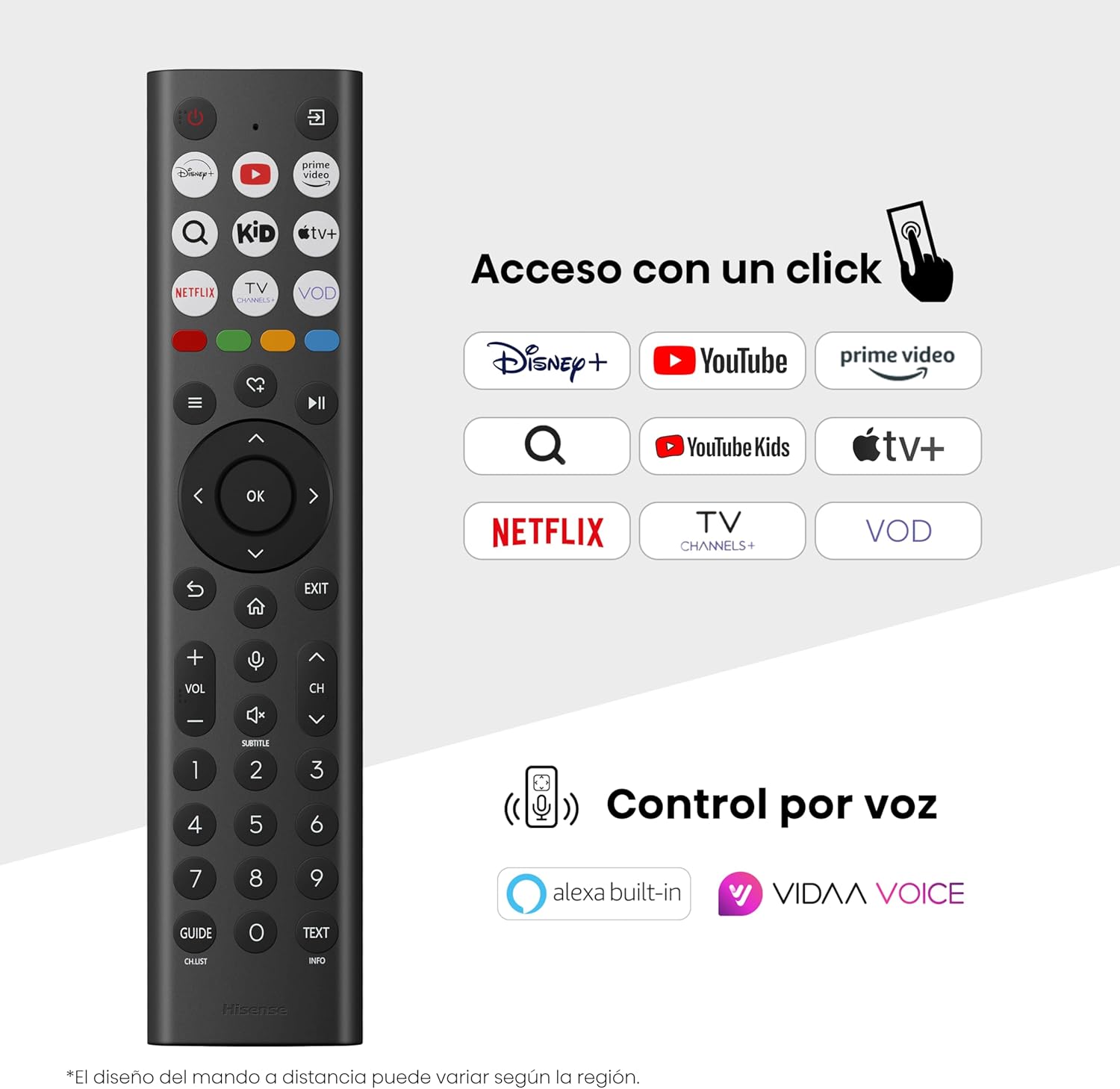
Hisense Smart TV remote control with dedicated app buttons and voice control.
5.2 Fitur Smart TV (VIDAA OS)
Your Hisense TV runs on the VIDAA operating system, offering a user-friendly interface for accessing various applications and services.

The VIDAA Smart TV interface with popular streaming applications.
- Aplikasi: Access pre-installed apps like Netflix, YouTube, Prime Video, and more.
- Kontrol sora: Use the remote's voice function to search for content, adjust settings, or interact with Alexa built-in and VIDAA Voice.
- Screen Mirroring (AirPlay): Share content from your Apple devices directly to the TV.
- Bagikeun ka TV: Easily send content from your mobile devices to the TV.
5.3 Setélan Gambar
Optimalkeun anjeun viewing experience with various picture enhancement technologies:
- Warna QLED: Delivers over a billion shades of vibrant, lifelike colors.
- AI 4K Upscaler: Automatically enhances lower-resolution content to near-4K quality.
- AI Gerak Halus: Reduces motion blur in fast-paced scenes, ensuring clear and fluid visuals.
- Dolby Visi: Provides stunning brightness, contrast, and color for a dramatic visual experience.
- Modeu Filmmaker: Ngajaga babandingan aspek, warna, sareng laju pigura asli pikeun nampilkeun pilem sakumaha anu dimaksud ku sutradara.
- Sénsor Cahaya AI: Intelligently adjusts screen brightness based on ambient light for optimal viewefisiensi sareng énergi.
- Modeu Perawatan Panon: Ngurangan émisi cahaya biru pikeun ngaleutikan galur panon.
- Mode Hemat Énergi: Optimizes power consumption without significantly compromising picture quality.

QLED technology delivers over a billion vibrant color tones.

AI 4K Upscaler enhances lower resolution content to near 4K clarity.

AI Smooth Motion ensures fluid images without blur, especially in fast-moving scenes.

Filmmaker Mode presents content exactly as the director intended.
5.4 Setélan Sora
Ningkatkeun pangalaman audio anjeun ku:
- Dolby Atmos: Immersive, multi-dimensional sound that fills your room.
- Speaker terpadu: Built-in speakers with a maximum output of 1 Watt per channel.
- EzPlay: Seamlessly control compatible Hisense soundbars directly from your TV screen.

Dolby Vision and Dolby Atmos combine for a spectacular audio-visual experience.
5.5 Fitur kaulinan
For gamers, the TV offers:
- Modeu Kaulinan Plus: Reduces input lag to 16ms, ensuring responsive gameplay.
- 60Hz VRR (Variable Refresh Rate): Synchronizes the TV's refresh rate with the game console's output to prevent screen tearing.
- ALLM (Modeu Latency Lemah Otomatis): Automatically switches the TV to low-latency mode when a game is detected.
- Bar kaulinan: An integrated control center for quick access to game settings and real-time performance monitoring.

Game Mode Plus provides ultra-fluid, lag-free gaming.

The Game Bar offers centralized control for game settings.
5.6 Sports Features
- Modeu Olahraga AI: Automatically detects sports content and optimizes picture and sound settings for a stadium-like experience, enhancing clarity and audio effects.
6. Pangropéa
6.1 Ngabersihan TV
- Sok cabut TV samemeh beberesih.
- Use a soft, dry, lint-free cloth to gently wipe the screen and TV body.
- Pikeun tanda pengkuh, enteng dampen lawon ku cai atawa cleaner layar husus (ulah menyemprot langsung kana layar).
- Hindarkeun nganggo pembersih abrasive, alkohol, bénzéna, atanapi thinners, sabab ieu tiasa ngaruksak permukaan TV.
6.2 Apdet parangkat lunak
TV Anjeun tiasa nampi apdet parangkat lunak sacara périodik pikeun ningkatkeun kinerja sareng nambihan fitur anyar. Pastikeun TV Anjeun disambungkeun ka internét pikeun nampa apdet ieu. Anjeun biasana tiasa mariksa apdet sacara manual dina menu setelan TV.
7. Cara ngungkulan
Upami anjeun ngalaman masalah sareng TV anjeun, tingal solusi umum ieu:
- Henteu aya kakuatan: Check if the power cable is securely connected and the power outlet is working. Try a different outlet.
- Taya Gambar/Sora: Pastikeun sumber input anu bener dipilih. Pariksa sadaya sambungan kabel (HDMI, anteneu).
- Remote Control Teu Gawé: Check the battery (1 AAAA battery). Ensure there are no obstructions between the remote and the TV.
- Masalah Sambungan Jaringan: Verify your Wi-Fi password or Ethernet cable connection. Restart your router.
- Kualitas Gambar goréng: Saluyukeun setelan gambar (kacaangan, kontras, seukeutna gambar). Pastikeun sumber input nyadiakeun sinyal kualitas luhur.
- Distorsi sora: Check audio settings. If using external speakers, ensure they are connected correctly.
For more detailed troubleshooting, consult the full electronic user manual or contact Hisense customer support.
8. Spésifikasi
Detailed technical specifications for the Hisense 65E7Q QLED Smart TV:
| Fitur | Spésifikasi |
|---|---|
| Nomer modél | 65E7Q |
| Ukuran layar | 65 inci |
| Téknologi tampilan | QLED |
| Resolusi | 4K (3840 x 2160) |
| Refresh Laju | 60 Hz |
| Dukungan Format HDR | Dolby Visi |
| Motion Enhancement Technology | AI Gerak Lemes |
| Ningkatkeun Kualitas Gambar | AI 4K Upscaler, AI Smooth Motion, QLED Colour |
| Waktu Tanggapan | 100 Milidetik |
| Konfigurasi lampu tukang | Direct Illumination, Dimming |
| Pedaran Speaker | Integrated speaker with Dolby Atmos |
| Max Speaker Kaluaran Power | 1 Watt |
| Saluran Audio | Multichannel |
| Surround Sound Format | Dolby Atmos |
| Sistem operasi | VIDAA |
| Kapasitas Panyimpenan Mémori | 1 GB |
| Métode kontrol | Sora |
| Téhnologi konektipitas | Bluetooth, HDMI, Wi-Fi |
| Internet Applications | Netflix, YouTube, Prime Video, AirPlay 2 |
| Palabuhan HDMI | 3 (including HDMI 2.1 with eARC) |
| palabuhan USB | 2 (1x USB 3.0, 1x USB 2.0) |
| Téhnologi nirkabel | Wifi |
| Screen Mirroring Technology | AirPlay |
| Standar Pamasangan VESA | 600 x 400 mm |
| Ukuran produk (DxWxH) | 7.6 x 145.3 x 83.8 cm |
| Beurat produk | 15.2 kg (kalayan stand) |
| Kelas Énergi Énergi | E |
| Konsumsi Énergi Taunan | 84 kWh/1000h (SDR), 160 kWh/1000h (HDR) |
| Kakuatan | 1 Watt (standby) |
| Voltage | 100-240 VCA 50-60 Hz |
| Komponén Kaasup | Kabel Daya, Kadali Jauh, Nangtung |
| Model Taun | 2025 |
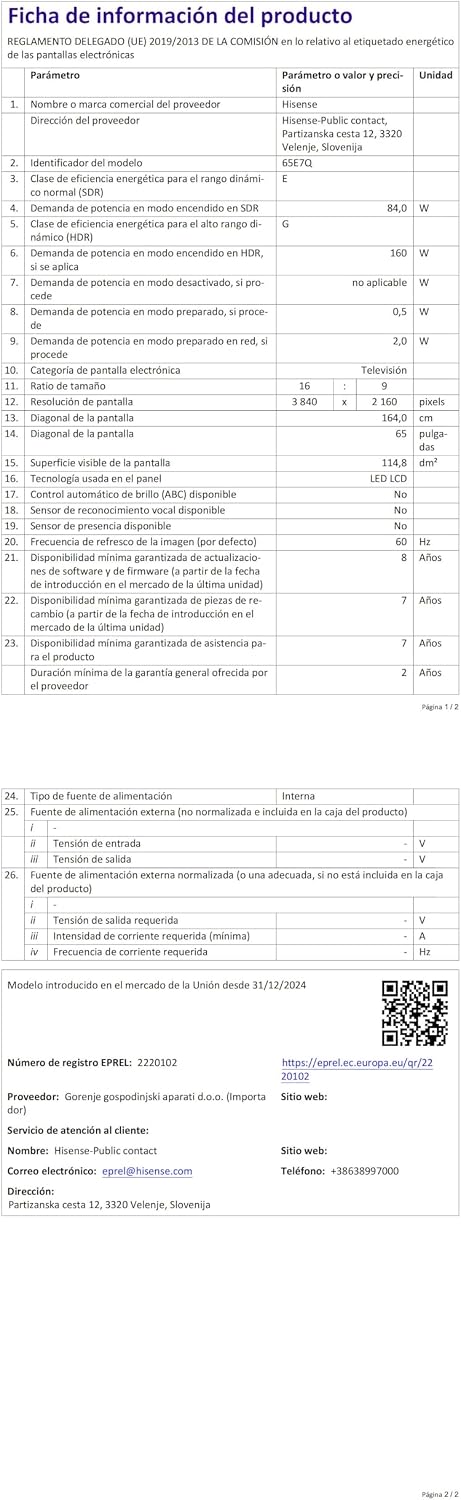
Energy label for the Hisense 65E7Q TV.
For more detailed product information, please refer to the EPREL database: https://eprel.ec.europa.eu/qr/2220102
9. Garansi jeung Rojongan
9.1 Garansi Produk
TV Hisense Ieu hadir kalawan a Garansi produk 3 taun. Punten tahan bukti pameseran anjeun pikeun klaim garansi.
9.2 Kasadiaan suku cadang
Spare parts for this model are guaranteed to be available in the EU for a duration of 10 taun from the product's market introduction.
9.3 Rojongan Palanggan
For technical assistance, troubleshooting, or warranty service, please contact Hisense customer support. Refer to the contact information provided in your warranty card or visit the official Hisense websitus pikeun wewengkon Anjeun.