
1. Bubuka
The ANLEON S0-PRo is a wired, in-ear headphone amplifier designed for personal monitoring applications. It provides a simple and effective solution for musicians, particularly those in fixed stage positions like drummers and keyboard players, to monitor their own performance audio. Its user-friendly design ensures quick setup and operation.
2. Fitur Produk
- Pangawasan Pribadi: Specifically designed for in-ear monitoring, allowing musicians to hear their own mix clearly.
- Kontrol volume: Features a dedicated volume knob with an integrated on/off switch for easy level adjustment.
- Konektipitas anu kuat: Equipped with a locking XLR input for secure connection and a 3.5mm jack for headphones.
- Kompak sareng Portabel: Small dimensions and lightweight design make it easy to transport and integrate into any setup.
- Hirup batré anu panjang: Internal 350mAh battery provides approximately 14 hours of operation.
- Ngecas gancang: Ngecas pinuh dina kirang langkung 2 jam.
3. Eusi Paket
The ANLEON S0-PRo package typically includes:
- ANLEON S0-PRo Personal In-Ear Monitor Headphone Amppangagung
- Manual pamaké
- Note: A 1/4" TRS to XLR Male cable is not included and must be purchased separately.
4. Setélan
- Hurungkeun/Pareuman: Rotate the volume knob clockwise to turn the unit on. A green LED indicator will illuminate. Rotate counter-clockwise until it clicks to turn off.
- Sambungkeun Input Audio: Connect an XLR cable (not included) from your audio source (e.g., mixing console, audio interface) to the XLR input port on the S0-PRo. The XLR input features a locking mechanism for secure connection.
- Sambungkeun headphone: Plug your in-ear monitors or headphones into the 3.5mm stereo jack output.
- Ngecas: To charge the device, connect a USB charging cable (not included) to the charging port. The charging time is approximately 2 hours.

Image: The ANLEON S0-PRo unit shown connected to an XLR cable at the bottom and a USB charging cable on the side. This illustrates the input and charging connections.

Gambar: A close-up view of the bottom of the ANLEON S0-PRo, highlighting the 3.5mm headphone output jack and the volume control knob with its triangular indicator.
XLR Pinout Information:
For proper connection, note the XLR pinout configuration:
- XLR pin 1 is connected to the 1/4″ plug sleeve.
- XLR pin 2 is connected to the 1/4″ plug tip.
- XLR pin 3 is connected to the 1/4″ plug ring.
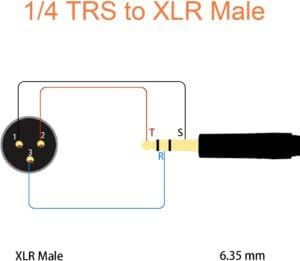
Image: A wiring diagram illustrating the connection between a 1/4" TRS plug and an XLR Male connector, detailing which pins correspond to the tip, ring, and sleeve for proper audio signal transmission.
5. Parentah Operasi
- Daya Hurung: Ensure the S0-PRo is charged or has sufficient battery life. Turn the volume knob clockwise to power on the device. The green indicator light will confirm it is active.
- Setel Volume: Slowly rotate the volume knob to adjust the monitoring level to a comfortable listening volume. Start with a low volume and gradually increase it to avoid sudden loud sounds.
- Monitor Audio: Once connected and powered on, you will hear the audio signal from your source through your connected headphones.
- Pareum listrik: When finished, rotate the volume knob counter-clockwise until it clicks to power off the unit. This conserves battery life.
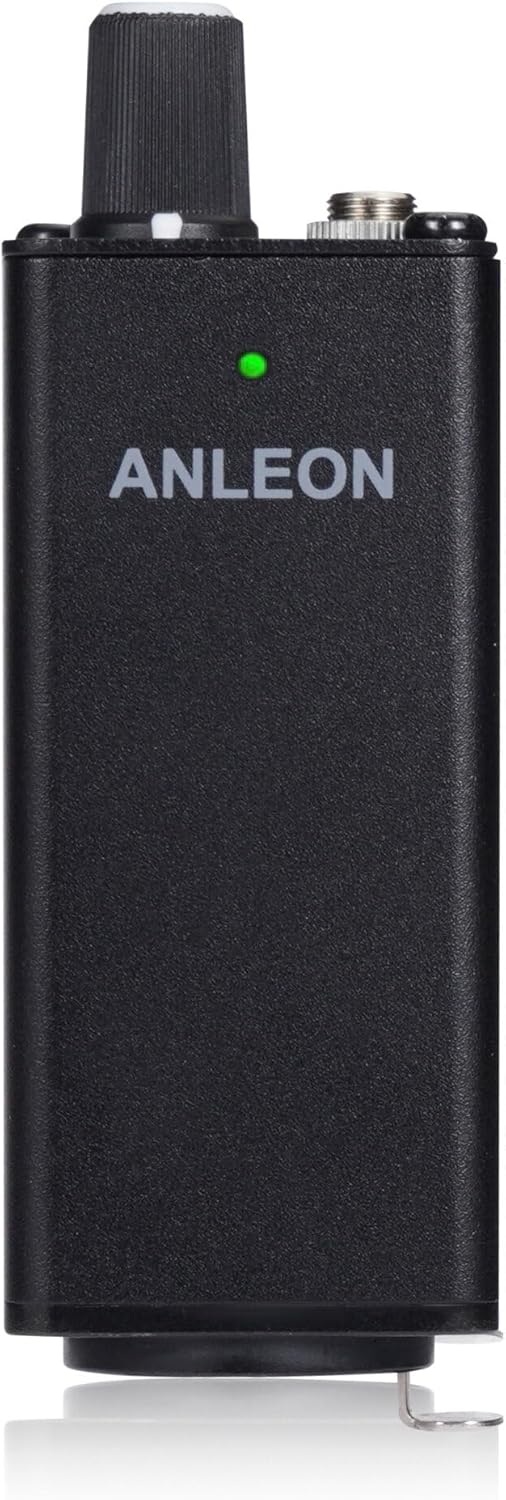
Gambar: hareup view of the ANLEON S0-PRo, showing the brand name and a small green LED indicator light, which signifies the unit is powered on.
6. Pangropéa
- beberesih: Anggo lawon anu lemes sareng garing pikeun ngabersihkeun bagian luar alat. Entong nganggo pembersih cair atanapi pangleyur.
- Panyimpenan: Store the S0-PRo in a cool, dry place away from direct sunlight and extreme temperatures.
- Perawatan batré: Pikeun umur batré anu optimal, ulah sering ngosongkeun batréna. Cas alat sacara rutin, sanaos henteu dianggo kanggo waktos anu lami.
- Hindarkeun Uap: Jauhkeun alat ieu tina cai sareng kalembaban anu luhur pikeun nyegah karusakan komponén internal.
7. Cara ngungkulan
| Masalah | Mungkin Cukang lantaranana | Solusi |
|---|---|---|
| Taya sora tina headphone. |
|
|
| Sora nyimpang. |
|
|
| Unitna teu ngecas. |
|
|
8. Spésifikasi
| Fitur | Rincian |
|---|---|
| Input | XLR, stereo (XLR pin 1 to 1/4″ plug sleeve, XLR pin 2 to 1/4″ plug tip, XLR pin 3 to 1/4″ plug ring) |
| Kaluaran | 3.5 mm jack, stereo |
| Max. Daya Kaluaran | 2 x 100 mW @ 16 Ω |
| Impedansi headphone | 32-600 ohm |
| Diménsi | 30 x 30 x 90 mm (approx. 1.18"D x 1.18"W x 3.54"H) |
| Batré | 350 mah |
| Kahirupan batré | ~14 jam |
| Waktu Ngecas | Tip. 2 jam |
| Beurat | 90g (kira-kira 3.17 oz) |
| Warna | Hideung |
| Bahan | alumunium |
9. Garansi jeung Rojongan
ANLEON products are designed for reliability and performance. For warranty information and technical support, please refer to the official ANLEON websitus atanapi ngahubungan distributor lokal Anjeun.
Punten tahan bukti pameseran anjeun pikeun klaim garansi.