Bubuka
The MONODEAL Model 8818 is a versatile desktop portable CD player designed to provide a comprehensive audio experience. It integrates multiple functions including a CD player, Bluetooth 5.0 HiFi speaker, FM radio, USB flash drive player, and 3.5mm audio player. Additionally, it features wireless charging, an intelligent dual alarm clock, and a sleep timer, making it an ideal companion for various settings from home to office.

Image: The MONODEAL Model 8818 CD Player, showcasing its sleek black design, digital display, control buttons, and included remote control. A CD is visible in the player, and two vinyl records are placed next to it.
Naon dina Box
- pamuter CD
- Manual pamaké
- Kadali jauh
- Kabel listrik
Produk Leuwihview
Familiarize yourself with the various components and controls of your MONODEAL CD Player.
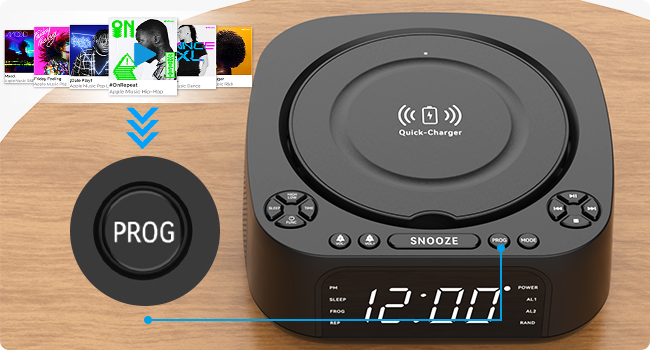
Image: A detailed diagram of the MONODEAL CD Player, highlighting its various buttons, ports, and features with corresponding numbers for easy identification.
| No. | Fitur | Katerangan |
|---|---|---|
| 1 | High/Low Brightness | Saluyukeun kacaangan tampilan. |
| 2 | Tombol Saré | Activates/sets sleep timer. |
| 3 | Waktos Set | Nyetél waktos ayeuna. |
| 4 | Function/Shutdown | Switches modes or powers off. |
| 5 | Alarm Clock 1 / Volume - | Sets Alarm 1 or decreases volume. |
| 6 | Alarm Clock 2 / Volume + | Sets Alarm 2 or increases volume. |
| 7 | Base carjer | Pad ngecas nirkabel. |
| 8 | Tombol Tunda | Snoozes active alarm. |
| 9 | PROG (Program) | Programs CD tracks or FM presets. |
| 10 | Tombol Mode | Switches between playback modes (CD, Bluetooth, FM, USB, AUX). |
| 11 | Play / Reureuh | Ngamimitian atanapi ngareureuhkeun playback. |
| 12 | Teras / Teruskeun gancang | Skips to next track or fast forwards. |
| 13 | saméméhna / Rewind | Skips to previous track or rewinds. |
| 14 | Tombol eureun | Ngeureunkeun playback. |
| 15 | USB Port (Data/Playback) | Pikeun playback USB flash drive. |
| 16 | Port USB (Ngecas) | For charging external devices (5V/1A). |
| 17 | 3.5mm Input | Audio input jack. |
| 18 | Pelabuhan AUX | Input audio bantu. |
| 19 | Layar Pintonan | Shows time, mode, and playback information. |
Disetél
1. Sambungan Daya
Connect the provided power cord to the DC IN port on the back of the CD player and plug the other end into a standard wall outlet. The display will light up.
2. Netepkeun Waktos
- Pencét éta WAKTU button (3) on the unit.
- Ngagunakeun éta saméméhna / Rewind (13) jeung Teras / Teruskeun gancang (12) buttons to adjust the hour.
- Pencét WAKTU again to confirm the hour and move to minutes.
- Ngagunakeun éta saméméhna / Rewind (13) jeung Teras / Teruskeun gancang (12) buttons to adjust the minutes.
- Pencét WAKTU once more to save the time setting.
3. Adjustment Caang tampilan
Pencét éta High/Low Brightness button (1) to toggle between high and low brightness modes for the display screen (19).

Image: Comparison of the display screen's brightness in daylight and night settings, demonstrating the high and low brightness modes.
Parentah Operasi
Puteran CD
- Buka panutup kompartemen CD.
- Insert a CD (compatible with CD, CD-R, CD-RW, MP3, WMA formats) with the label side facing up.
- Tutup panutup kompartemen CD.
- Pencét éta Function/Shutdown button (4) to power on the unit, then press the Modus button (10) until "CD" mode is selected.
- Pencét éta Play / Reureuh tombol (11) pikeun ngamimitian playback.
- Paké saméméhna / Rewind (13) jeung Teras / Teruskeun gancang (12) pikeun nganapigasi lagu.
- Pencét Eureun (14) to stop playback.

Image: The MONODEAL CD Player with a CD being inserted, illustrating the CD playback function.
Bluetooth Function (RX & TX)
The unit supports both Bluetooth reception (RX) to play audio from your phone/tablet and Bluetooth transmission (TX) to send audio to Bluetooth headphones/speakers.

Image: A visual representation of the two Bluetooth modes (RX and TX), showing the CD player receiving audio from a laptop and transmitting audio to headphones and a portable speaker.
Bluetooth Reception (RX Mode)
- Pencét éta Modus button (10) until "BT" (Bluetooth) mode is selected. The display will show "BT" and flash, indicating pairing mode.
- On your smartphone or tablet, enable Bluetooth and search for "MONODEAL 8818".
- Select the device to pair. Once connected, "BT" will stop flashing.
- You can now play audio from your device through the CD player's speakers.

Image: A user connecting their smartphone to the MONODEAL CD Player via Bluetooth reception, illustrating how to stream music from a mobile device.
Bluetooth Transmission (TX Mode)
This feature allows you to transmit audio from the CD player (e.g., CD playback, FM radio) to external Bluetooth headphones or speakers.
- Pastikeun headphone/spiker Bluetooth anjeun aya dina modeu pairing.
- On the CD player, while in CD, FM, or USB mode, press and hold the Modus button (10) for a few seconds to activate TX mode. The display will show "TX" and flash.
- The CD player will automatically search for and connect to nearby Bluetooth audio devices.
- Once connected, audio will be routed to your external Bluetooth device.
Note: This device does not support car Bluetooth connections.

Image: A user wearing Bluetooth headphones, connected wirelessly to the MONODEAL CD Player, demonstrating the Bluetooth transmission feature for private listening.
Radio FM
- Pencét éta Modus button (10) until "FM" mode is selected.
- Extend the antenna for better reception.
- Pencét jeung tahan tombol Play / Reureuh button (11) to auto-scan and save available stations. The unit can store up to 40 stations.
- Ngagunakeun éta saméméhna / Rewind (13) jeung Teras / Teruskeun gancang (12) buttons to cycle through saved stations.
- To manually tune, briefly press saméméhna / Rewind (13) atawa Teras / Teruskeun gancang (12).
- The unit supports FM stereo/mono switching.

Image: A woman and a child listening to the FM radio on the MONODEAL CD Player, with icons indicating various FM frequencies for different environments.
USB Playback
- Selapkeun USB flash drive nu ngandung audio MP3/WMA files into the USB data port (15).
- Pencét éta Modus button (10) until "USB" mode is selected.
- Playback bakal dimimitian sacara otomatis.
- Paké saméméhna / Rewind (13) jeung Teras / Teruskeun gancang (12) pikeun nganapigasi lagu.

Image: The MONODEAL CD Player with a USB flash drive inserted for music playback and a tablet connected to the charging USB port, demonstrating simultaneous charging and playback.
Input AUX
- Connect an external audio device (e.g., MP3 player, mobile phone) to the AUX port (18) or 3.5mm input (17) using a 3.5mm audio cable.
- Pencét éta Modus button (10) until "AUX" mode is selected.
- Audio from your connected device will now play through the CD player's speakers. Control playback from your external device.

Image: A smartphone connected to the MONODEAL CD Player via a 3.5mm audio cable, demonstrating the AUX-IN mode for playing audio from external devices.
Ngecas nirkabel
The top of the CD player features a built-in wireless charging panel (7) for compatible smartphones.
- Place your wireless charging compatible smartphone directly on the charger base (7) on top of the unit.
- Ensure the phone is centered on the charging area.
- The phone should indicate that it is charging.
Note: For optimal charging, remove any thick phone cases. Charging time may vary (3-8 hours).

Image: A smartphone wirelessly charging on top of the MONODEAL CD Player, with an indicator showing the charging process and estimated time.
Fungsi Jam Alarm
The unit features a dual alarm clock function, allowing you to set two separate alarms.
- Pencét jeung tahan Jam Alarm 1 (5) atawa Jam Alarm 2 (6) button. The hour will flash.
- Paké saméméhna / Rewind (13) jeung Teras / Teruskeun gancang (12) to adjust the hour, then press the corresponding alarm button again to confirm.
- Adjust the minutes similarly and press the alarm button to confirm.
- Select the alarm source (CD, FM radio, USB, Bluetooth) using the Modus button (10) and confirm with the alarm button.
- To activate/deactivate an alarm, briefly press the corresponding alarm button. An alarm icon will appear/disappear on the display.
- Sawaktos alarm disada, pencét tombol Tunda button (8) for a temporary pause, or press any other button to turn off the alarm.

Image: Two scenes depicting the sleep timer and morning alarm clock functions. One shows a person sleeping with the display showing 23:58, and the other shows a person waking up with the display showing 08:00.
Fungsi Timer Saré
The sleep timer allows the unit to play music for a set duration before automatically turning off.
- While playing audio (CD, FM, USB, Bluetooth), press the Saré button (2) repeatedly to cycle through sleep timer options (e.g., 15, 30, 45, 60, 90, 120 minutes).
- Unit bakal otomatis pareum saatos waktos anu dipilih.
Operasi Remote Control
The included remote control allows convenient operation from a distance of up to 5 meters.
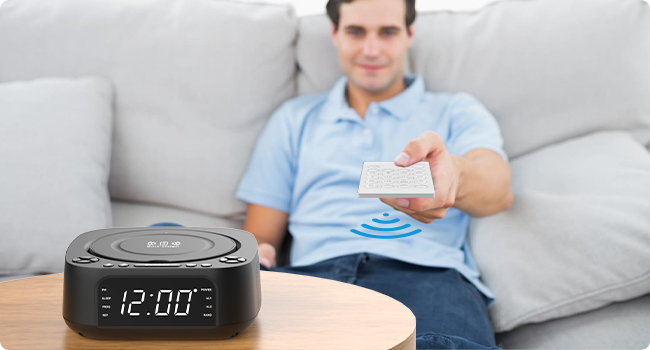
Image: A person using the remote control to operate the MONODEAL CD Player from a distance, highlighting the convenience of remote operation.
Most functions available on the unit's control panel are also accessible via the remote control. Refer to the remote control's button labels for specific functions (e.g., Mute, EQ, Repeat, etc.).
Pangropéa
- beberesih: Anggo kaén anu garing sareng lemes pikeun ngabersihan bagian luar unit. Ulah make cleaners abrasive atawa pangleyur.
- Perawatan CD: Anggo CD ti sisi-sisina. Jaga supaya tetep bersih sareng bébas tina goresan. Anggo lawon anu lemes sareng henteu ngaganggu pikeun ngusap CD ti tengah ka luar.
- Panyimpenan: Upami teu dianggo salami lami, cabut kabel alatna teras simpen di tempat anu tiis sareng garing.
- Ventilasi: Pastikeun ventilasi anu cekap di sakitar unit pikeun nyegah panas teuing. Ulah ngahalangan liang ventilasi.
Pamérésan masalah
| Masalah | Mungkin Cukang lantaranana | Solusi |
|---|---|---|
| Unit teu hurung. | Taya sambungan kakuatan. | Pastikeun kabel listrik dicolokkeun sacara aman kana unit sareng stopkontak témbok anu tiasa dianggo. |
| Taya sora tina speaker. | Volume too low; incorrect mode; mute activated. | Increase volume; ensure correct mode (CD, BT, FM, USB, AUX); check if mute is on (remote). |
| CDna luncat atawa teu bisa diputer. | CD kotor, calar, atanapi teu leres dipasangna. | Clean CD; try a different CD; ensure CD is inserted label-side up. |
| Papasangan Bluetooth gagal. | Device too far; not in pairing mode; interference. | Ensure unit is in BT mode and flashing; bring devices closer; restart both devices. |
| panarimaan radio FM goréng. | Antena teu dipanjangkeun; sinyal lemah. | Fully extend the FM antenna; try repositioning the unit. |
| Ngecas nirkabel teu jalan. | Phone not compatible; phone case too thick; phone not centered. | Ensure phone supports wireless charging; remove thick cases; reposition phone on the charging pad. |
spésifikasi
| Fitur | Rincian |
|---|---|
| Nomer modél | 8818 |
| Ukuran produk (L x W x H) | 7.32 x 7.32 x 2.89 inci (186 x 186.5 x 73.5 mm) |
| Item Beurat | 2.4 pon |
| Téhnologi konektipitas | Bluetooth, Auxiliary, USB |
| Tipe Speaker | Stereo (2 x 1W speakers) |
| Format Cakram anu Dirojong | CD, CD-R, CD-RW, MP3, WMA |
| Frékuénsi Radio FM | 87.5-108 MHz (up to 40 presets) |
| USB Playback | Supports MP3/WMA from USB flash drives |
| Kaluaran Ngecas Nirkabel | 5W / 10W |
| USB Ngecas Kaluaran | 5V / 1A |
| Fungsi Jam Alarm | Dual alarm, 4 wake-up modes (CD, FM, USB, Bluetooth) |
| Timer Saré | 15-120 menit |
| Rentang Control Jauh | Nepi ka 5 méter |
| Produsén | MONODEAL |
| Negara asal | Cina |

Image: The MONODEAL CD Player with its dimensions (length, width, height) indicated in millimeters, showcasing desain kompak na.
Garansi sareng Rojongan
MONODEAL is committed to providing quality products and customer satisfaction.
- Panggantian 12 Bulan: Your product is covered by a 12-month replacement policy for manufacturing defects.
- Rojongan Hirupna: MONODEAL offers lifetime technical support for this product.
For any questions or problems, please contact MONODEAL customer support. Contact information can typically be found on the product packaging or the official MONODEAL websitus.


