1. Bubuka
The RENPHO MorphoScan Base Smart Scale is an advanced body composition analyzer designed to provide comprehensive insights into your body's health. Utilizing eight-electrode dual-frequency and segmental Bioelectrical Impedance Analysis (BIA) technology, this scale offers precise measurements of various body metrics. This manual provides essential information for safe and effective use of your device.
Inpormasi Kaamanan Penting:
- This device is intended for athletic fitness and health monitoring purposes only. It is not a substitute for medical equipment.
- Consult a qualified medical professional for any decisions regarding diagnosis and treatment.
- Individuals with pacemakers or other implanted medical devices should not use this scale.
- Pregnant women should consult their doctor before using this device.
2. Produk Langkungview
The RENPHO MorphoScan Base Smart Scale offers innovative technology for detailed body composition analysis. Its design includes a large platform and a retractable handle for full-body measurements.
Fitur konci:
- 8-Electrode Dual-Frequency BIA Technology: Provides accurate and detailed body composition data.
- Comprehensive LED Display: Shows BMI, body fat percentage, perén otot rangkatage, visceral fat index, and a seven-day weight trend directly on the scale.
- Detailed Health Report: Generates a comprehensive report in the RENPHO Health App, including segmental body fat analysis.
- Aplikasi anu ramah-pamaké: The RENPHO Health App supports unlimited user profiles and syncs with Apple Health, MyFitnessPal, and Samsung Health.
- Desain awét: Features a 60-inch elastic cable, durable handle, and a large weighing platform supporting up to 180 kg (400 lbs).
- Hirup batré anu panjang: Up to 130 days of battery life with 4 AAA batteries (included).
Naon anu aya dina Kotak:
- RENPHO MorphoScan Base Smart Scale
- 4 Batré AAA
- Instruksi Manual
3. Setélan
3.1 Pamasangan batré
- Buka kompartemen batré dina handapeun skala.
- Pasangkeun 4 batré AAA, pastikeun polaritasna bener (+/-).
- Tutup kompartemen batré anu aman.
3.2 Ngundeur Aplikasi sareng Masangkeun
- Unduh Aplikasi Kaséhatan RENPHO ti Apple App Store atanapi Google Play Store.
- Ngadaptar akun tur asup.
- Pastikeun Bluetooth diaktipkeun dina smartphone Anjeun.
- Open the RENPHO Health App and follow the on-screen instructions to add the 'Body Composition Scale (R-MSC02)' device.
- The app will automatically connect to the scale via Bluetooth.
3.3 Kalibrasi Awal
For accurate readings, place the scale on a hard, flat surface. Avoid soft surfaces like carpets, which can affect accuracy.

Image: RENPHO MorphoScan Base Smart Scale displaying various metrics on its LED screen.
3.4 Setup Video Guide
Video: A step-by-step guide on how to set up and use the RENPHO MorphoScan Base Smart Scale, including app connection and measurement process.
4. Parentah Operasi
Follow these steps to take an accurate body composition measurement:
- Teundeun skala dina permukaan teuas, datar.
- Step onto the scale with bare, dry feet, ensuring your feet are positioned on the four electrode pads.
- Grasp the retractable handle and pull it up. Place your thumbs on the thumb electrodes and other fingers on the four-finger electrodes.
- Keep your arms straight and held 30-45 degrees away from your body.
- Ensure continuous contact with all 8 electrode pads (4 on the scale, 4 on the handle).
- Hold this position until the measurement is complete and the report is generated on the scale's display and in the app.
- Return the handle to its retracted position and step off the scale.
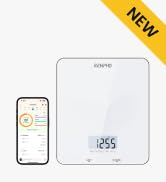
Image: Visual guide for correct foot and hand placement on the scale and handle.

Image: Proper posture and arm extension while using the scale with the handle.
5. Understanding Your Data
The RENPHO Health App provides a detailed breakdown of your body composition metrics. These metrics help you track your health and fitness progress over time.
5.1 Key Metrics Displayed:
- beurat: Beurat awak anjeun ayeuna.
- BMI (Indéks Jisim Awak): Ukuran lemak awak dumasar kana jangkungna sareng beurat awak.
- Awak Fat Persentage: Babandingan lemak dina awak anjeun.
- Otot kerangka Percentage: Persentage of muscle attached to bones.
- Visceral Fat Index: Level of fat surrounding your organs.
- 7-Day Weight Trend: Visual representation of your weight changes over the last week.
- Additional metrics available in the app include Fat-Free Body Weight, Subcutaneous Fat, Body Water, Bone Mass, Protein, BMR (Basal Metabolic Rate), and Metabolic Age.

Image: The RENPHO Health App interface displaying a comprehensive body composition analysis report.
5.2 Multi-User Support
The RENPHO Health App allows you to create unlimited user profiles, making it suitable for tracking the body data of multiple family members. The scale can display data for up to eight users directly on its screen.
5.3 Singkronisasi Data
The RENPHO Health App can sync your data with other popular fitness applications such as Apple Health, MyFitnessPal, and Samsung Health, providing a centralized view of your health information.

Image: The RENPHO Health App's compatibility with various third-party health and fitness applications.
5.4 Data Analysis Video
Video: Hiji leuwihview of the RENPHO Smart Body Fat Scale MorphoScan Base, highlighting its features and data analysis capabilities.
6. Pangropéa
6.1 beberesih
- Ngusap beungeut skala ku lemes, damp lawon.
- Ulah make cleaners abrasive atawa neuleumkeun skala dina cai.
6.2 Panyimpenan
- Simpen skala dina tempat anu tiis sareng garing.
- Hindarkeun nempatkeun barang beurat dina skala nalika henteu dianggo.
- Upami timbangan moal dianggo kanggo waktos anu lami, cabut batréna pikeun nyegah bocor.
7. Cara ngungkulan
7.1 Bacaan teu akurat
- Pastikeun timbangan disimpen dina permukaan anu teuas sareng datar.
- Make sure your feet are bare and dry, and in full contact with all electrode pads.
- Verify the handle is held correctly with continuous contact on all handle electrodes.
- Pariksa tingkat batré jeung ngaganti lamun perlu.
7.2 Masalah konektipitas
- Pastikeun Bluetooth diaktipkeun dina smartphone Anjeun.
- Restart the RENPHO Health App and try pairing again.
- Move your smartphone closer to the scale.
- If issues persist, try restarting your smartphone and the scale (by removing and reinserting batteries).
7.3 Layar Teu Jalan
- Check if the batteries are correctly installed and have sufficient charge. Replace batteries if needed.
- Ensure the scale is not exposed to extreme temperatures or moisture.
8. Spésifikasi
| Fitur | Rincian |
|---|---|
| merek | RENPHO |
| Nomer modél | R-MSC02 |
| Warna | Hideung |
| Batesan Beurat | 180 Kilograms / 400 lbs |
| Tipe tampilan | LED |
| Fitur husus | Auto Shut Off, Body Fat, Eight electrodes, Large Display, Smart |
| Sumber Daya | 4 batré AAA (kaasup) |
| Item Beurat | 4.4 pon / 2 Kilogram |
| Ukuran Paket | 15.35 x 14.25 x 2.28 inci |
| Konektipitas | Bluetooth |
9. Jaminan & Dukungan
RENPHO products are manufactured to the highest quality standards. For specific warranty information and to access customer support, please refer to the warranty card included with your product or visit the official RENPHO website. If you encounter any issues or have questions regarding your RENPHO MorphoScan Base Smart Scale, please contact RENPHO customer service for assistance.


