Bubuka
This manual provides comprehensive instructions for the safe and efficient operation, maintenance, and troubleshooting of your AIPER Scuba S1 Robot Pool & Wall Cleaner. Please read this manual thoroughly before using the device to ensure optimal performance and longevity.
Produk Leuwihview
Fitur konci
- Ultra-Thin Filtration: Equipped with an additional, replaceable 3-micron ultra-fine filter for capturing small debris, ensuring clear pool water.
- Manjangkeun Umur Batré: Provides up to 180 minutes of cleaning time on a single charge, suitable for larger pools.
- Navigasi WavePath 2.0: Intelligent navigation technology for efficient and systematic pool coverage, optimizing cleaning routes.
- Kontrol Aplikasi Smart: Manage cleaning modes, receive Over-the-Air (OTA) updates, and monitor device status via a dedicated mobile application.
- Wall and Waterline Cleaning: Capable of cleaning both the pool floor and walls, including scrubbing above the waterline.
- Caterpillar Tracks: Enhanced mobility for navigating corners, drains, and uneven surfaces without getting stuck.

Image: The Scuba S1 highlighting its 180-minute extended battery duration for thorough cleaning.

Image: The Scuba S1 demonstrating its caterpillar tracks for superior mobility across various pool surfaces and obstacles.
Komponén
The AIPER Scuba S1 consists of the main robotic unit, an internal dual filtration system, and a charging adapter. The robotic unit features a control panel, durable caterpillar tracks for movement, and brushes for scrubbing surfaces.
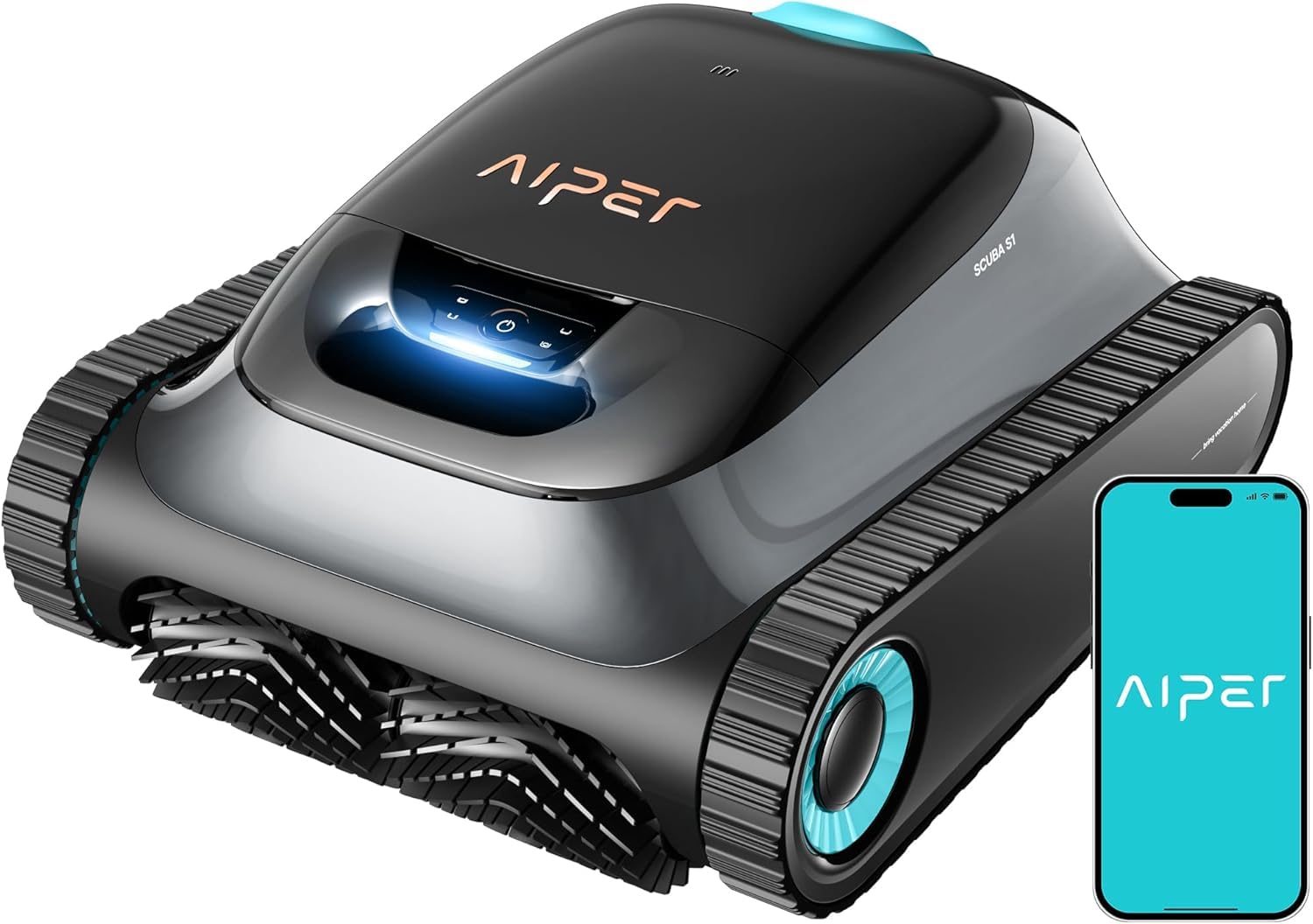
Image: The AIPER Scuba S1 robotic pool cleaner, showcasing its design and the accompanying mobile application for smart control.

Image: Illustration of the dual filtration system, highlighting the 3-micron ultrafine filter for fine debris and the 180-micron filter for larger particles.
Disetél
- Ngecas awal: Before first use, fully charge the robot using the provided charging adapter. Ensure the charging port is dry before connecting. The battery indicator will show charging status.
- Pamasangan Filter: Ensure the desired filter (standard or ultrafine) is correctly installed in the filter basket. Refer to the "Maintenance" section for details on filter types and installation.
- Unduh Aplikasi sareng Sambungan: Download the AIPER app from your device's app store. Follow the in-app instructions to pair your Scuba S1 cleaner via Bluetooth or Wi-Fi. This enables smart control and OTA updates.
- Panempatan di Kolam Renang: Gently lower the cleaner into the pool. Ensure it is fully submerged and air bubbles have escaped before starting operation.

Image: The AIPER app interface, illustrating options for mode control, OTA updates, cleaning logs, and device monitoring.
Parentah Operasi
Ngamimitian siklus beberesih
- Mimitian Manual: Press the power button on the robot's control panel once it is submerged in the pool.
- Mimitian Aplikasi: Open the AIPER app, select your Scuba S1, and choose your desired cleaning mode.

Image: The four available cleaning modes: Automatic (floor and wall), Floor Only, Wall Only, and ECO (periodic cleaning).
Modeu beberesih
- otomatis: Cleans both the pool floor and walls, including the waterline.
- Lantai Ngan: Focuses cleaning solely on the pool floor.
- Tembok wungkul: Cleans only the pool walls and waterline.
- Mode Eco: Provides periodic cleaning for ongoing maintenance.
The WavePath 2.0 navigation system optimizes the cleaning path for maximum coverage, ensuring no area is missed.

Image: Visual representation of WavePath 2.0 navigation, demonstrating its systematic cleaning pattern for superior pool coverage.

Image: The Scuba S1 performing wall and waterline cleaning, demonstrating its ability to scrub above the water surface.
Retrieving the Cleaner
Once the cleaning cycle is complete or the battery is low, the cleaner will typically move to the edge of the pool. Use the floating line or carefully pull the cleaner out of the water using its handle. Avoid pulling it out by the power cord (if applicable) or other delicate parts.
Pangropéa
Filter beberesih
Regular cleaning of the filter basket and filters is crucial for maintaining optimal cleaning performance.
- Remove the cleaner from the pool and open the filter compartment.
- Extract the filter basket.
- Rinse the filter basket and filters thoroughly with a garden hose. For the 3-micron ultrafine filter, handle with care as the fibers can be delicate.
- Ensure all debris is removed before reinserting the filters and closing the compartment.
beberesih umum jeung Panyimpenan
- Wipe down the exterior of the cleaner with a soft cloth after each use.
- Store the cleaner in a cool, dry place away from direct sunlight and extreme temperatures.
- Ensure the battery is charged periodically during long storage periods to maintain battery health.
Pamérésan masalah
| Masalah | Mungkin Cukang lantaranana | Solusi |
|---|---|---|
| Cleaner teu hurung. | Batré lemah; tombol daya teu dipencet kalawan bener. | Charge the cleaner fully. Ensure the power button is pressed firmly. |
| Poor cleaning performance / Not picking up fine debris. | Clogged filter; incorrect filter type for debris; worn brushes. | Clean the filter basket and filters thoroughly. Ensure the 3-micron ultrafine filter is used for fine debris. Inspect and replace brushes if worn. |
| Cleaner gets stuck or moves erratically. | Obstruction; air trapped inside; software glitch. | Remove any large obstructions. Gently shake the cleaner to release trapped air. If using the app, check for and apply any available OTA updates. Try restarting the cleaner. |
| Tukang beberesih teu bisa nanjak témbok kalawan efektif. | Low battery; dirty brushes/tracks; water chemistry imbalance. | Ensure the battery is fully charged. Clean the caterpillar tracks and brushes. Check pool water chemistry (e.g., calcium hardness, pH). |
spésifikasi
- Ngaran modél: Scuba S1
- merek: AIPER
- Métode kontrol: App
- Jenis Batré: Litium Ion
- Battery Energy Content: 112.32 Watt Jam
- Beurat batré: 735 gram
- Number of Lithium-ion Cells: 12
- Beurat barang: 7.7 kg (7 kg 700 g)
- Ukuran produk (L x W x H): 40 x 23 x 45 cm
- Sumber Daya: Batré Powered
Garansi sareng Rojongan
The AIPER Scuba S1 Robot Pool & Wall Cleaner comes with a garansi 3 taun, nyadiakeun karapihan pikiran ngeunaan durability jeung kinerja na.
For technical support, warranty claims, or further assistance, please contact AIPER customer service through their official website or the contact information provided with your purchase documentation. Ensure you have your model number (Scuba S1) and proof of purchase available when contacting support.


