1. Produk Langkungview
The WHATOOK H05 Portable Handheld Turbo Fan is a versatile personal cooling device designed for various uses. It features a powerful brushless motor, 5 adjustable speed settings, an LED display for battery and speed indication, and a 4000mAh rechargeable battery. Its foldable design allows for handheld, desk, or neck-worn operation.
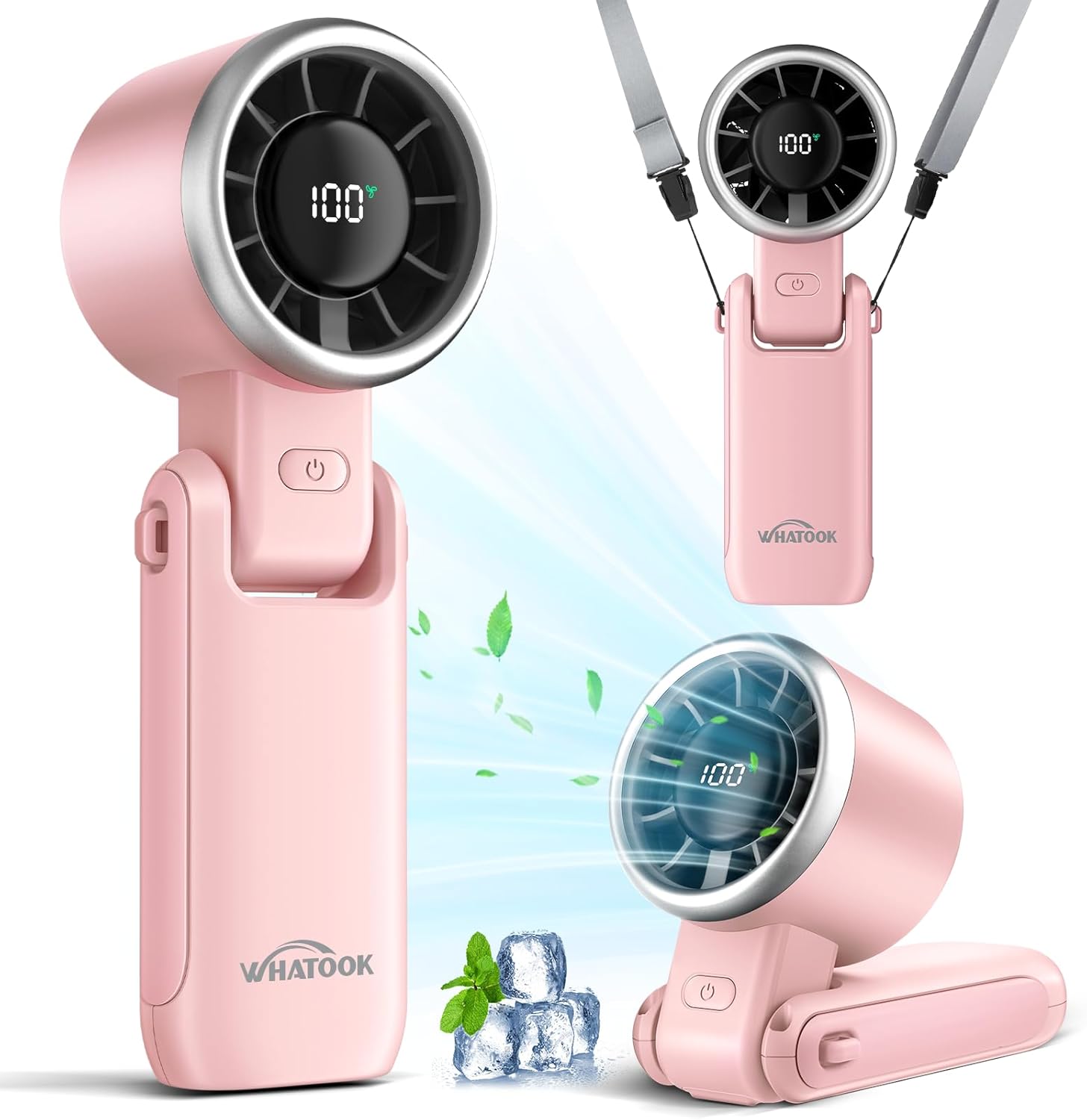
Image 1.1: The WHATOOK H05 fan demonstrating its three usage modes: handheld, folded for desk use, and worn around the neck with the included lanyard.
2. Eusi Paket
Saatos muka bungkusan, mangga pastikeun sadaya barang aya:
- 1 x WHATOOK H05 Portable Handheld Turbo Fan
- 1 x Kabel Ngecas USB Tipe-C
- 1 x Adjustable Neck Lanyard
- 1 x Manual Pamaké (dokumén ieu)
Video 2.1: An unboxing video demonstrating the contents of the WHATOOK Portable Handheld Mini Fan package, including the fan, charging cable, and lanyard.
3. Setélan
3.1 Ngecas Kipas
Before first use, fully charge the fan. The fan is equipped with a 4000mAh battery and charges via a USB Type-C port.
- Locate the Type-C charging port on the side of the fan.
- Connect the provided USB Type-C cable to the fan and to a compatible USB power source (e.g., wall charger, power bank, laptop, car charger).
- Pintonan LED bakal nunjukkeun persentase batrétage. When charging, the digits on the screen will flash. When fully charged (approximately 2.5 hours), the digital screen will display 100% constantly.

Image 3.1: The WHATOOK H05 fan highlighting its 4000mAh large capacity battery and the LED display showing battery percentage jeung speed.
3.2 Attaching the Neck Lanyard
For hands-free use, attach the adjustable neck lanyard:
- Locate the small loop on the side of the fan's handle.
- Thread the thin string of the lanyard through this loop.
- Secure the lanyard by passing the clip end through the string loop and pulling tight.
- Adjust the lanyard length for comfortable wearing around your neck.
4. Parentah Operasi
4.1 Daya Hurung/Pareuman
- To power on: Press the power button once. The fan will start at Speed 20%.
- To power off: Long press the power button for 2 seconds.
4.2 Nyaluyukeun Fan Speed
The fan has 5 speed settings, indicated by the LED display (20%, 40%, 60%, 80%, 100%).
- While the fan is on, single-press the power button to cycle through the speeds.
- Each press will increase the speed by one level (20% → 40% → 60% → 80% → 100%).
- After 100%, pressing the button again will return the fan to Speed 20%.

Image 4.1: The WHATOOK H05 fan's 5 speed settings, detailing RPM and wind speed for each level.
4.3 Modeu Pamakéan
The fan's 180° foldable design allows for three convenient usage modes:
- Handheld Fan: Use the fan in its extended form for direct cooling.
- kipas méja: Fold the handle to create a stable base, allowing the fan to stand on a flat surface like a desk or nightstand.
- Neck Fan: Attach the lanyard and wear the fan around your neck for hands-free cooling.
Video 4.2: A demonstration of the WHATOOK Portable Handheld Mini Fan in various usage scenarios, including handheld and desk modes.
5. Pangropéa
5.1 beberesih
- Ensure the fan is powered off before cleaning.
- Lap bagian luar kipas ku lawon anu lemes sareng garing.
- Ulah nganggo pembersih anu abrasif, pangleyur, atanapi ngalelepkeun kipas kana cai.
- Gently clean the fan grille with a soft brush or cotton swab to remove dust.
5.2 Panyimpenan
When not in use, store the fan in a cool, dry place away from direct sunlight and extreme temperatures. Ensure the battery is partially charged (around 50%) before long-term storage to maintain battery health.
6. Cara ngungkulan
- Kipas teu hurung: Check if the battery is charged. Connect the fan to a power source using the Type-C cable and allow it to charge for a few minutes before attempting to power it on again.
- Aliran hawa lemah: Ensure the fan is set to a higher speed. Check the LED display for the current speed setting. Verify that there are no obstructions blocking the air intake or outlet.
- Sora anu teu biasa: A slight humming sound is normal during operation, especially at higher speeds. If the noise is excessive or unusual, ensure no foreign objects are caught in the fan blades.
- Batré teu tahan muatan: Ensure you are using the provided Type-C cable and a compatible power adapter. If the issue persists, contact customer support.
7. Spésifikasi
| Fitur | Spésifikasi |
|---|---|
| merek | KUMAHA |
| Ngaran modél | H05 |
| Dimensi produk | 6.2 "D x 1.8" W x 2.2" H |
| Item Beurat | 6.4 ons |
| Sumber Daya | Batré (4000mAh) |
| Waktu Ngecas | 2.5 jam |
| Waktos Gawé | Nepi ka 12 jam (gumantung kana laju) |
| Desain kipas listrik | Méja Fan |
| Fitur husus | Lipat |
| Jumlah Tingkat Daya | 5 |
| Tipe Motor | Brushless |
| Tingkat Noise | 50 desibel |
| Métode kontrol | Toél |
| Kacepetan Angin Max | 12m/s |
| Max Rotational Speed | 15000 rpm |

Gambar 7.1: Internal view of the WHATOOK H05 fan, showcasing its upgraded brushless motor, 7-blade turbine fan, and performance metrics.
8. Garansi jeung Rojongan
For warranty information and customer support, please refer to the official WHATOOK website or contact the retailer where the product was purchased. Keep your purchase receipt as proof of purchase.


