1. Bubuka
This manual provides detailed instructions for the safe and efficient operation of the TOA Electronics BG-2060 5-Input Mixer Amplifier. The BG-2060 is designed for background music and general announcement applications, suitable for various commercial environments such as bars, retail stores, and banquet rooms. It features multiple inputs, flexible output options, and robust controls for optimal audio management.
2. Émbaran Kasalametan
Please read these safety instructions carefully before operating the unit. Keep this manual for future reference.
- Sumber Daya: Connect the unit only to the specified power supply (120 V AC, 60 Hz).
- Ventilasi: Pastikeun ventilasi nyukupan. Ulah meungpeuk bukaan ventilasi.
- Uap: Ulah ngalaan unit ka hujan atawa Uap pikeun nyegah seuneu atawa shock listrik.
- Palayanan: Rujuk sadayana jasa ka tanaga jasa anu mumpuni. Entong nyobian ngalayanan produk ieu nyalira.
- panempatan: Tempatkeun alatna dina tempat anu rata sareng stabil. Ulah neundeunna caket sumber panas atanapi dina sinar panonpoé langsung.
- Grounding: Pastikeun grounding ditangtoskeun pikeun nyegah shock listrik.
3. Eusi Paket
Pariksa yén sadaya barang anu didaptarkeun di handap ieu kalebet kana pakét:
- TOA Electronics BG-2060 Mixer Amppangagung
- 5x Volume control cover YA-920
- 4x Removable terminal plug (2 pins)
- 2x Removable terminal plug (3 pins)
- 1x Removable terminal plug (4 pins)
- 1x Removable terminal plug (5 pins)
- Manual pangguna (dokumén ieu)
4. Produk Langkungview
4.1 Panel payun

angka 4.1: Kadali Panel hareup
This image displays the front panel of the TOA BG-2060 Mixer Amplifier. Key features visible include five input volume knobs (Mic, Line 1/Tel, Line 2, Line 3, Module), Bass and Treble tone controls, Signal, Peak, and Power LED indicators, and the main power switch. The overall design is a sleek black chassis.
- Input Volume Controls (MIC, LINE 1/TEL, LINE 2, LINE 3, MODULE): Adjust the volume level for each corresponding input channel.
- Kontrol BASS: Adjusts the low-frequency response of the audio output.
- Kontrol TREBLE: Adjusts the high-frequency response of the audio output.
- LED SIGNAL: Nyaangan nalika aya sinyal audio.
- LED PUNCAK: Illuminates when the output signal is clipping or nearing distortion.
- DAYA LED: Indicates the power status of the unit (blue when ON).
- Saklar Daya: Hurungkeun unit ON atawa OFF.
4.2 Panel tukang
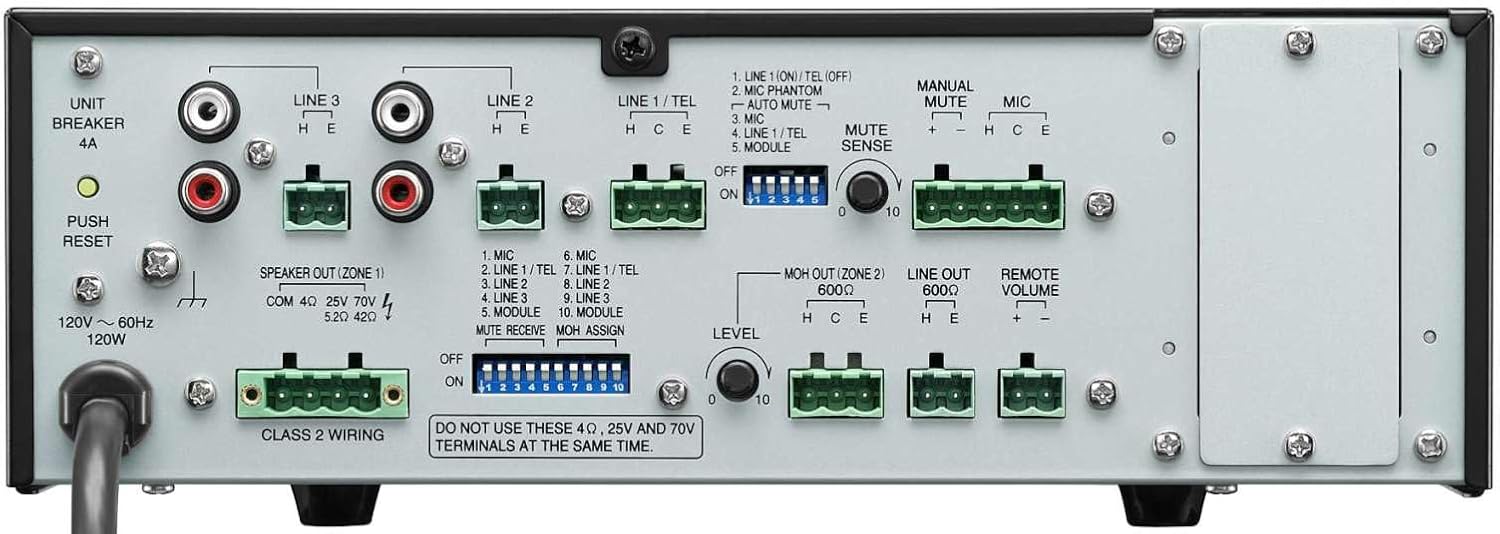
Gambar 4.2: Sambungan Panel Rear
This image shows the rear panel of the TOA BG-2060 Mixer Amplifier, detailing its connectivity options. Visible are the power input, speaker outputs (4 Ohms, 25V, 70V), various input terminals (Mic, Line 1/Tel, Line 2, Line 3, Module), MOH output, Line output, Remote Volume control, and DIP switches for configuration.
- Input kakuatan: AC power cord connection.
- UNIT BREAKER: Resettable circuit breaker.
- Speaker Output (ZONE 1): Terminals for connecting speakers (4 Ohms, 25V, or 70V). Note: Do not use 4 Ohms, 25V, and 70V terminals at the same time.
- Terminal Input:
- MIC: Balanced input for microphones, with +24V DC phantom power option.
- LINE 1/TEL: Selectable input for line-level devices or telephone paging.
- LINE 2, LINE 3: Unbalanced inputs for line-level devices (e.g., CD players, media players).
- MODUL: Input for optional modules.
- MOH OUT (ZONE 2): Music On Hold output, also assignable as a second zone output.
- LINE OUT: Unbalanced line-level output for connecting to external amplifters atawa alat ngarékam.
- VOLUME JAUH: Terminals for connecting an optional remote volume control.
- Saklar DIP: Configure various settings such as phantom power, input sensitivity, muting functions, and MOH assignment.
5. Setélan
Follow these steps for initial setup of your BG-2060 Mixer Amppangagung.
- Pareum listrik: Ensure the unit's power switch is in the OFF position and the power cord is disconnected.
- Sambungan Speaker: Connect your speakers to the appropriate speaker output terminals (4 Ohms, 25V, or 70V) on the rear panel. Ensure correct polarity. Do not connect speakers to multiple output types simultaneously.
- Sambungan Alat Input: Connect your audio sources (microphones, music players, etc.) to the desired input terminals (MIC, LINE 1/TEL, LINE 2, LINE 3, MODULE) using appropriate cables and terminal plugs.
- Konfigurasi Pindah DIP: Refer to the rear panel diagram and the detailed instructions in the full manual for setting the DIP switches according to your specific needs (e.g., phantom power for microphones, mute settings).
- Sambungan Pilihan: If using, connect to the MOH OUT, LINE OUT, or REMOTE VOLUME terminals.
- Sambungan Daya: Once all connections are secure, plug the power cord into a suitable AC outlet.
6. Operasi
Operating the BG-2060 is straightforward.
- Daya Hurung: Turn the POWER switch on the front panel to the ON position. The POWER LED will illuminate blue.
- Input Volume Adjustment: Slowly turn up the volume knob for the input channel you wish to use (MIC, LINE 1/TEL, etc.).
- Pangaturan Volume Master: Adjust the master volume control (if applicable, or use individual input volumes) to achieve the desired overall output level.
- Kontrol nada: Use the BASS and TREBLE controls to fine-tune the audio's low and high frequencies to your preference.
- Ngawaskeun: Observe the SIGNAL and PEAK LEDs. The SIGNAL LED indicates audio presence. If the PEAK LED illuminates frequently or stays lit, reduce the input volume to prevent distortion.
- Fungsi muting: If configured via DIP switches, utilize the manual or automatic mute functions as needed for paging or announcements.
7. Pangropéa
Proper maintenance ensures the longevity and optimal performance of your mixer amppangagung.
- beberesih: Ngusap unit ku kaén anu lembut sareng garing. Ulah make cleaners abrasive, lilin, atawa pangleyur.
- Ventilasi: Periodically check that ventilation openings are clear of dust and debris.
- Sambungan: Pastikeun sadaya sambungan kabel aman sareng bébas tina korosi.
- Panyimpenan: Upami nyimpen unit kanggo waktos anu lami, pegatkeun sambungan listrik sareng simpen di tempat anu tiis sareng garing.
8. Cara ngungkulan
Tingali tabel di handap pikeun masalah umum sareng solusina.
| Masalah | Mungkin Cukang lantaranana | Solusi |
|---|---|---|
| Taya kakuatan | Power cord disconnected; Unit breaker tripped; Power outlet issue. | Check power cord connection; Press UNIT BREAKER button on rear panel; Test power outlet with another device. |
| Taya kaluaran sora | Input volume too low; Speaker connections incorrect; Mute function active; Incorrect input selected. | Increase input and master volumes; Verify speaker wiring and impedance; Check DIP switch settings for mute; Ensure correct input source is active. |
| Sora distort | Input signal too high (PEAK LED on); Incorrect impedance matching; Faulty cable. | Reduce input volume; Ensure speaker impedance matches amplifier output; Replace cables. |
| Humming atanapi buzzing noise | Ground loop; Loose connections; Interference from other electronics. | Ensure proper grounding; Check all cable connections; Move unit away from other electronic devices. |
9. Spésifikasi
| Fitur | Rincian |
|---|---|
| Sumber Daya | 120 V AC, 60 Hz |
| Kaluaran dipeunteun | 60W |
| Input | Mic: -60 dB, 600 Ohms, balanced; Line 1/TEL: -10 dB/-20 dB, 10 kOhms, balanced; Line 2, 3: -10 dB, 10 kOhms, unbalanced; Modules |
| Kaluaran | Speaker: 4 Ohms, 25 V (10 Ohms), 70 V (83 Ohms), balanced; MOH: 0 dB, 600 Ohms, balanced; Line: 0 dB, 600 Ohms, unbalanced |
| Peraturan Kaluaran | 2 dB or less, no load to full load (1 kHz) |
| Kakuatan Phantom | On/Off switch for Mic, +24 V DC |
| Kontrol Nada | Bass: +/- 10 dB at 100 Hz; Treble: +/- 10 dB at 10 kHz |
| Ngabuburit | Manual mute/Automatic mute |
| Indikator | LED kakuatan, tingkat sinyal LED, Puncak LED |
| Ukuran (PxLxT) | 10.39 x 3.71 x 10.52 inci |
| Beurat | 11.68 pon |
10. Garansi jeung Rojongan
For warranty information and technical support, please refer to the documentation provided with your purchase or visit the official TOA Electronics websitus.


