1. Pitunjuk Kasalametan Umum
Salawasna perhatikeun pancegahan kaamanan dasar nalika nganggo alat listrik pikeun ngirangan résiko kahuruan, kejutan listrik, sareng tatu pribadi.
- Kasalametan Area Gawé: Jaga wewengkon gawé anjeun beresih jeung cahayana alus. Wewengkon nu pabalatak atawa poek ngondang kacilakaan. Ulah ngajalankeun parabot kakuatan dina atmosfir ngabeledug, kayaning ku ayana cair kaduruk, gas, atawa lebu.
- Kasalametan listrik: Hindarkeun kontak awak sareng permukaan anu dibumikeun atanapi dibumikeun sapertos pipa, radiator, kompor, sareng kulkas. Ulah ngantepkeun alat-alat listrik ka hujan atanapi kaayaan baseuh.
- Kasalametan Pribadi: Salawasna maké panyalindungan panon. Paké parabot kaamanan luyu kayaning masker lebu, sapatu kaamanan non-skid, topi teuas, atawa panyalindungan dédéngéan lamun diperlukeun. Pakéan anu leres; ngahindarkeun pakéan atawa perhiasan leupas.
- Pamakéan sareng Perawatan Alat: Ulah maksakeun alat kakuatan. Anggo alat kakuatan anu leres pikeun aplikasi anjeun. Pegatkeun sambungan colokan tina sumber kakuatan jeung/atawa pak batré tina alat kakuatan saméméh nyieun sagala pangaluyuan, ngaganti asesoris, atawa nyimpen parabot kakuatan.
- Pamakéan sareng Perawatan Alat Batré: Ngecas ukur nganggo carjer anu ditunjuk ku produsén. Anggo alat-alat listrik ngan nganggo bungkus batré anu ditunjuk sacara khusus.
2. Produk Langkungview
The TOTAL TDLI16682 is a 16V compact brushless cordless drill designed for various drilling and fastening tasks. It features a powerful brushless motor, adjustable torque, and a keyless chuck for easy bit changes.
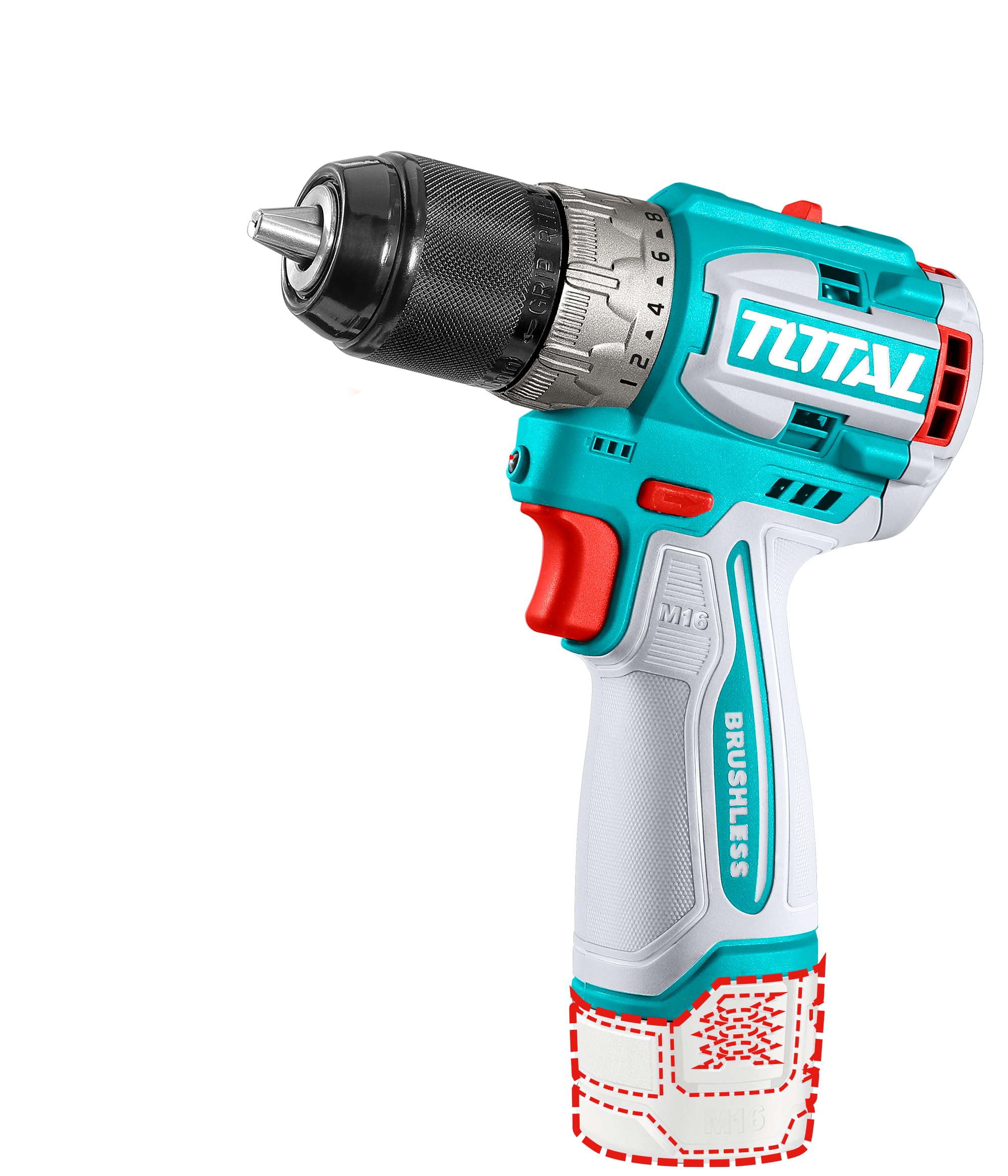
Image 1: TOTAL TDLI16682 16V Compact Brushless Cordless Drill kit. This image displays the drill unit, two 2.0Ah Lithium-ion batteries, a battery charger, a double-ended screwdriver bit, and a durable carrying case.
Komponén konci:
- Chuck tanpa konci: Pikeun parobahan bit gancang jeung gampang.
- Cincin Pangaluyuan Torsi: To select the desired torque setting.
- Pamilih laju: For high or low-speed operation.
- Saklar Maju/Mundur: Controls rotation direction.
- Saklar pemicu: Aktipkeun bor jeung ngadalikeun speed variabel.
- Lampu Gawé LED: Illuminates wewengkon gawé.
- Paket batré: 16V Lithium-ion (2.0Ah).
- Charger batré: For recharging battery packs.
3. Setélan
3.1. Ngecas Batré
- Pastikeun batréna bersih sareng garing sateuacan ngecas.
- Sambungkeun carjer ka stopkontak standar.
- Insert the battery pack into the charger, ensuring it clicks into place.
- Lampu indikator carjer bakal nembongkeun status ngecas. Tingal pituduh husus pangecas pikeun indikasi cahaya.
- Once fully charged, remove the battery pack from the charger and disconnect the charger from the power outlet.
3.2. Pamasangan sareng Cabut Batré
- Pamasangan: Sejajarkeun pak batré jeung dasar cecekelan bor tur geser ka jero nepi ka ngonci aman.
- Ngahapus: Press the battery release button (usually located on the side of the battery pack) and slide the battery pack out of the handle.
3.3. Instalasi Bit jeung Lengser
- Pamasangan: Rotate the chuck counter-clockwise to open the jaws. Insert the drill bit or screwdriver bit into the chuck as far as it will go. Rotate the chuck clockwise to tighten the jaws firmly around the bit.
- Ngahapus: Puter cuk counter-jarum jam pikeun loosen rahang jeung cabut bit.
4. Parentah Operasi
4.1. Maju / Mundur Rotasi
The forward/reverse switch is located above the trigger. Push it to the left for forward rotation (drilling/tightening) and to the right for reverse rotation (removing screws). Ensure the switch is in the center position when not in use to prevent accidental starting.
4.2. Kontrol Laju
The drill features a variable speed trigger. Pressing the trigger lightly will result in lower speeds, while pressing it further will increase the speed. Use the speed selector switch (usually on top of the drill) to choose between high-speed (for drilling) and low-speed (for driving screws) settings.
4.3. Torsi adjustment
The torque adjustment ring, located behind the chuck, allows you to set the desired torque for driving screws. Higher numbers indicate higher torque. For drilling, set the ring to the drill symbol for maximum power. Adjust the torque to prevent over-tightening screws or damaging the workpiece.
4.4. LED Gawé Lampu
The integrated LED work light automatically illuminates the work area when the trigger is pressed, providing better visibility in dimly lit conditions.
5. Pangropéa
5.1. beberesih
Bersihkeun liang ventilasi bor sacara rutin pikeun nyegah panas teuing. Anggo alat anu lemes sarengamp cloth to wipe down the tool. Do not use harsh chemicals or abrasive cleaners. Keep the chuck jaws free of debris.
5.2. Kaperawatan batré
Store batteries in a cool, dry place away from direct sunlight and extreme temperatures. Do not store fully discharged batteries for extended periods. Recharge batteries before they are completely depleted to prolong their lifespan.
5.3. Panyimpenan
When not in use, store the drill, batteries, and charger in their carrying case in a secure, dry place out of reach of children.
6. Cara ngungkulan
| Masalah | Mungkin Cukang lantaranana | Solusi |
|---|---|---|
| Bor teu ngamimitian. | Battery not charged or improperly installed. Forward/reverse switch in center (lock) position. | Charge battery. Reinstall battery correctly. Move forward/reverse switch to desired direction. |
| Ngurangan kakuatan atawa speed. | Ngecas batré low. Overload. | Recharge battery. Reduce pressure on the tool or use a sharper bit. |
| Batré teu ngecas. | Carjer teu dicolokkeun. Batré atawa carjer lepat. | Check power connection. Contact customer support if problem persists. |
7. Spésifikasi
- model: TDLI16682
- Voltage: 16 volt
- Torsi maksimum: 60 Newton Méter
- Tipe Motor: Brushless
- Kapasitas batré: 2.0Ah Lithium-ion (x2 included)
- Jenis cuk: Tanpa konci
- Beurat barang: Approximately 209 g (tool only, without battery)
- Ukuran produk: 32 x 25 x 10 cm (ukuran bungkusan)
- Komponén Kaasup: Drill Attachment, 2 Batteries, 1 Charger, Carrying Case
8. Garansi jeung Rojongan
For warranty information, service, or technical support, please refer to the warranty card included with your product or contact TOTAL customer service through their official website or authorized service centers. Keep your purchase receipt as proof of purchase.


