1. Émbaran Kasalametan penting
Please read this manual carefully before using the AIRROBO P25 Robot Vacuum Cleaner and retain it for future reference. Adhere to all safety warnings and instructions to prevent injury or damage.
- Alat ieu tiasa dianggo ku murangkalih umur 8 taun ka luhur sareng jalma anu kakurangan kamampuan fisik, indrawi atanapi mental atanapi kurang pangalaman sareng pangaweruh upami aranjeunna dipasihan pangawasan atanapi petunjuk ngeunaan panggunaan alat dina cara anu aman sareng ngartos bahaya anu aya. .
- Barudak teu kedah maén sareng alat. Beberesih sareng pangropéa pangguna henteu kedah dilakukeun ku murangkalih tanpa pangawasan.
- Ensure the charging base is placed against a wall on a level surface and is connected to a power outlet.
- Ulah nganggo robot vacuum cleaner dina lingkungan baseuh atanapi caket cai.
- Jauhkeun buuk, pakean longgar, ramo, sareng sadaya bagian awak tina bukaan sareng bagian anu obah.
- Ulah nyokot naon bae anu kaduruk atawa ngaroko, kayaning roko, korek api, atawa lebu panas.
- Ulah make tanpa bin lebu jeung/atawa saringan di tempat.
- Ngan anggo adaptor ngecas anu disayogikeun ku produsén.
2. Eusi Paket
Pastikeun yén sadaya barang aya sareng dina kaayaan anu saé nalika muka bungkusan:
- AIRROBO P25 Robot Vacuum
- Base ngecas
- Adaptor Daya AC
- Kadali jauh
- 4 Sikat samping
- Hepa Filter (pre-installed)
- Alat beberesih
- Guide pamaké
- Kartu Palayanan
- Sikat Utama (dipasang sateuacana)

Image: All components included in the AIRROBO P25 Robot Vacuum package.
3. Produk Langkungview
3.1 Komponén
The AIRROBO P25 Robot Vacuum consists of the following main components:
- Unit Utama (Robot Vakum)
- Dustbin with HEPA Filter
- Sikat samping
- Sikat Utama
- Ngecas Kontak
- Infrared Sensors (Anti-collision, Anti-fall)
- Tombol Daya
- Home Button (Return to Charging Base)
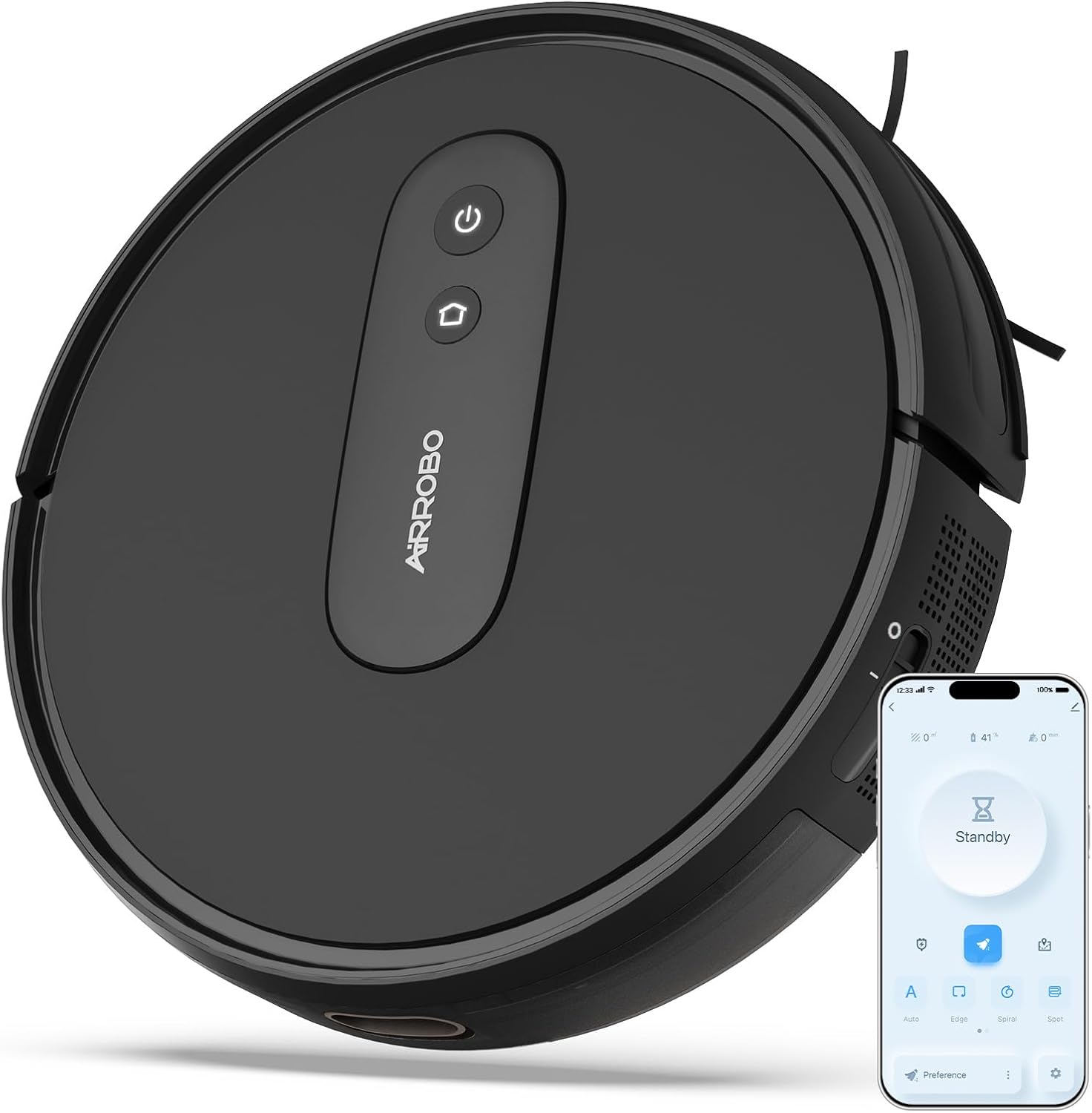
Image: The AIRROBO P25 Robot Vacuum with its primary controls visible.
3.2 Fitur konci
The AIRROBO P25 is designed with advanced features for efficient cleaning:
- Daya sedot anu kuat 2800Pa: Effectively cleans dust, dirt, and pet hair from various floor types, including low-pile carpets and hard floors.
- Slim 3-inch Design: Allows the vacuum to easily navigate under furniture like sofas, beds, and cabinets, reaching hidden dirt.
- Smart Gyroscope Navigation: Utilizes precision gyroscope navigation and infrared sensors to clean in systematic rows, avoiding obstacles and preventing falls.
- 600ML Large Dustbin: A generous dustbin capacity reduces the frequency of emptying, especially beneficial for pet owners.
- Smart APP Control & Voice Control: Manage cleaning schedules, modes, and monitor status via a dedicated smartphone application. Compatible with Amazon Alexa and Google Assistant for voice commands.
- Ngecas Otomatis: The robot automatically returns to its charging base when the battery is low or after completing a cleaning cycle.
- Sababaraha Mode beberesih: Offers various cleaning modes including Auto Clean, Spot Clean, Edge Clean, and Spiral Clean to suit different cleaning needs.

Gambar: Pameran robot vakumasing its powerful 2800Pa suction capability.

Image: The slim design of the robot vacuum allows it to clean under low furniture.

Image: Illustration of the robot's efficient gyroscope navigation system.
4. Setélan
4.1 Ngecas Robot
Before first use, fully charge the robot vacuum. Place the charging base against a wall in an open area, ensuring there are no obstacles within 1 meter (3 feet) to the sides and 2 meters (6 feet) in front. Connect the power adapter to the charging base and plug it into a wall outlet. Place the robot onto the charging base, ensuring the charging contacts align. The indicator light on the robot will show charging status.

Image: The robot vacuum automatically docking with its charging base.
4.2 Connecting to the AIRROBO App
For enhanced control and scheduling, connect your AIRROBO P25 to the official AIRROBO app:
- Connect your smartphone to a 2.4GHz Wi-Fi network and ensure Bluetooth is enabled.
- Turn on the AIRROBO P25 robot vacuum.
- Download the 'AIRROBO' app from your smartphone's app store.
- Create an account and log in to the AIRROBO app.
- Click 'Add device' within the app and select the P25 robot vacuum from the list.
- Turutan pitunjuk dina layar pikeun ngalengkepan sambungan.

Image: Step-by-step guide for connecting the robot vacuum to the AIRROBO mobile application.
5. Ngoperasikeun Robot Vakum
5.1 Modeu beberesih
The AIRROBO P25 offers several cleaning modes to address different cleaning needs:
- Ngabersihan Otomatis: The robot cleans systematically in a zig-zag pattern, covering the entire floor area.
- Bersihan titik: The robot cleans a concentrated area in a spiral pattern, ideal for localized spills or dirt.
- Bersihan tepi: Robot ieu ngabersihkeun sapanjang témbok sareng sisi-sisina parabot pikeun mastikeun juru sareng perimeterna kabersihan sacara tuntas.
- Spiral Clean: Similar to Spot Clean, but can be initiated for a larger area.

Image: Visual representation of the four distinct cleaning modes.

Image: Different cleaning paths the robot can follow based on selected mode.
5.2 Ngajadwalkeun beberesih
Use the AIRROBO app to set up scheduled cleaning times. This allows the robot to automatically start cleaning at your preferred times, even when you are not home.
- Open the AIRROBO app.
- Navigate to the scheduling section.
- Atur waktos sareng dinten beberesih anu dipikahoyong.
- Konfirmasi jadwal.

Image: Setting a timed cleaning task via the mobile app.
5.3 Kontrol sora
The AIRROBO P25 is compatible with Amazon Alexa and Google Assistant. Once connected to your smart home system, you can control the robot with voice commands.
- Ensure your robot is connected to the AIRROBO app and your smart home assistant (Alexa/Google Assistant) is linked to your AIRROBO account.
- Use commands such as "Alexa, turn on the P25" or "Hey Google, start cleaning with P25."

Image: Controlling the robot vacuum using smart app and voice commands.
6. Pangropéa
Pangropéa rutin ngajamin kinerja optimal sareng manjangkeun umur vakum robot anjeun.
6.1 Ngosongkeun tong sampah
The 600ML dustbin should be emptied after each cleaning cycle or when full.
- Pencét tombol ngaleupaskeun tong sampah pikeun nyabut tong sampah tina robot.
- Buka panutup tempat sampah teras buang eusina kana tempat sampah.
- Tutupkeun panutup tempat sampah teras lebetkeun deui kana robot dugi ka ngaklik dina tempatna.

Image: The 600ML large dustbin, shown with collected debris.
6.2 Ngabersihan Saringan sareng Sikat
Clean the HEPA filter and brushes regularly to maintain suction power.
- Saringan HEPA: Tap the filter gently to remove dust. Do not wash the HEPA filter with water. Replace every 3-6 months depending on usage.
- Sikat samping: Cabut bulu atawa kokotor nu kusut tina sikat gigir. Mun sikatna geus ruksak, ganti deui.
- Sikat utama: Remove the main brush cover and lift out the brush. Use the cleaning tool to cut and remove tangled hair.
- Ngecas Kontak: Wipe the charging contacts on both the robot and the charging base with a dry cloth periodically to ensure good connection.
7. Cara ngungkulan
Tingali tabel di handap pikeun masalah umum sareng solusina:
| Masalah | Mungkin Cukang lantaranana | Solusi |
|---|---|---|
| Robot teu hurung | batré lemah; Pareum listrik | Place robot on charging base; Ensure power switch is ON. |
| Robot teu ngecas | Ngecas kontak kotor; Dasar ngecas teu diaktipkeun | Clean charging contacts; Check power connection to charging base. |
| Ngurangan kakuatan sedot | Dustbin full; Filter clogged; Main brush tangled | Kosongkeun tempat runtah; Bersihkeun/ganti saringan; Bersihkeun sikat utama. |
| Robot sering macét | Obstacles on floor; Cliff sensors dirty | Clear cables/small objects; Clean cliff sensors. |
| Cannot connect to App | Incorrect Wi-Fi band (not 2.4GHz); Incorrect password; Bluetooth off | Ensure 2.4GHz Wi-Fi; Re-enter password; Turn on Bluetooth. |
8. Spésifikasi
Key technical specifications for the AIRROBO P25 Robot Vacuum Cleaner:
| Fitur | Spésifikasi |
|---|---|
| merek | AIRROBO |
| Ngaran modél | P25 |
| Daya nyeuseup | 2800Pa (Modeu Maks) |
| Dimensi produk | 12 "L x 12" W x 3 "H (30cm x 30cm x 8cm) |
| Kapasitas tong sampah | 600 ml |
| Kahirupan batré | Nepi ka 120 menit |
| Jenis Filter | HEPA |
| Métode kontrol | Aplikasi, Kadali Jauh |
| Jinis Napigasi | Giroskop Napigasi |
| Tingkat Noise | 55dB (Quiet Mode) |
| Sumber Daya | Batré Powered |
| Item Beurat | 7.7 pon |

Image: Dimensions of the AIRROBO P25 Robot Vacuum.
9. Garansi jeung Rojongan
The AIRROBO P25 Robot Vacuum Cleaner comes with a worry-free 12-garansi sasih ti tanggal beuli. Garansi ieu nyertakeun cacad manufaktur sareng gangguan dina panggunaan normal.
For customer support, technical assistance, or warranty claims, please contact AIRROBO directly:
- Telepon Dukungan Palanggan: +1 8599558668
- Jam operasional: 9 AM to 5 PM, Monday to Friday (Eastern Time)
- You can also visit the official AIRROBO store on Amazon for more information and support resources: AIRROBO Amazon Store


