
1. Bubuka
Thank you for choosing the GMK Solar Security Camera Model CG6. This manual provides essential information for the proper setup, operation, and maintenance of your wireless outdoor security camera. The camera features 2K live video, full-color night vision, motion detection, two-way talk, and is powered by a solar panel and internal battery for continuous operation. It is designed for both indoor and outdoor use with IP65 weatherproofing.

Image: Two GMK Solar Security Cameras with accompanying solar panels, illustrating the complete system.
2. Naon dina Box
- GMK Solar Security Camera(s)
- Panel panonpoe)
- Mounting Bracket(s) for Camera
- Mounting Bracket(s) for Solar Panel
- Kabel Ngecas USB-C
- Pemasangan Screws sareng Jangkar Tembok
- Installation Template Sticker(s)
- Instruksi Manual
3. Produk Langkungview
The GMK CG6 camera features a durable, weatherproof design suitable for various environments. Key components include the camera lens, LED white lights for color night vision, infrared lights for black and white night vision, a PIR motion sensor, microphone, speaker, and dual Wi-Fi antennas for stable connectivity. The camera also includes a USB-C port for charging and connecting the solar panel, and a microSD card slot for local storage.

Image: An indoor view showing the camera detecting motion, with icons indicating flashlight alarm, siren alert, and motion detection notification push.
4. Parentah Setup
4.1 Muatan Awal
Before installation, fully charge the camera using the provided USB-C charging cable. Connect the USB-C end to the camera's charging port (located under the silicone cover) and the USB-A end to a standard USB power adapter (not included). A full charge ensures optimal performance from the start.
4.2 Pamasangan Aplikasi & Papasangan
- Download the 'Vicohome' app from the App Store (iOS) or Google Play Store (Android).
- Ngadaptarkeun akun anyar atanapi log in upami anjeun parantos gaduh.
- Follow the in-app instructions to add your camera. This typically involves powering on the camera and scanning a QR code generated by the app using the camera's lens.
- Ensure your Wi-Fi network is 2.4GHz. This camera does not support 5GHz Wi-Fi.
Video: A step-by-step guide on how to pair your phone with the GMK security camera using the mobile application.
4.3 Instalasi fisik
Pilih lokasi pamasangan anu nyadiakeun cahaya anu jelas view of the area you wish to monitor and receives adequate sunlight for the solar panel. Use the provided mounting brackets, screws, and template stickers to securely install the camera and solar panel. The solar panel can be mounted separately from the camera to optimize sun exposure.
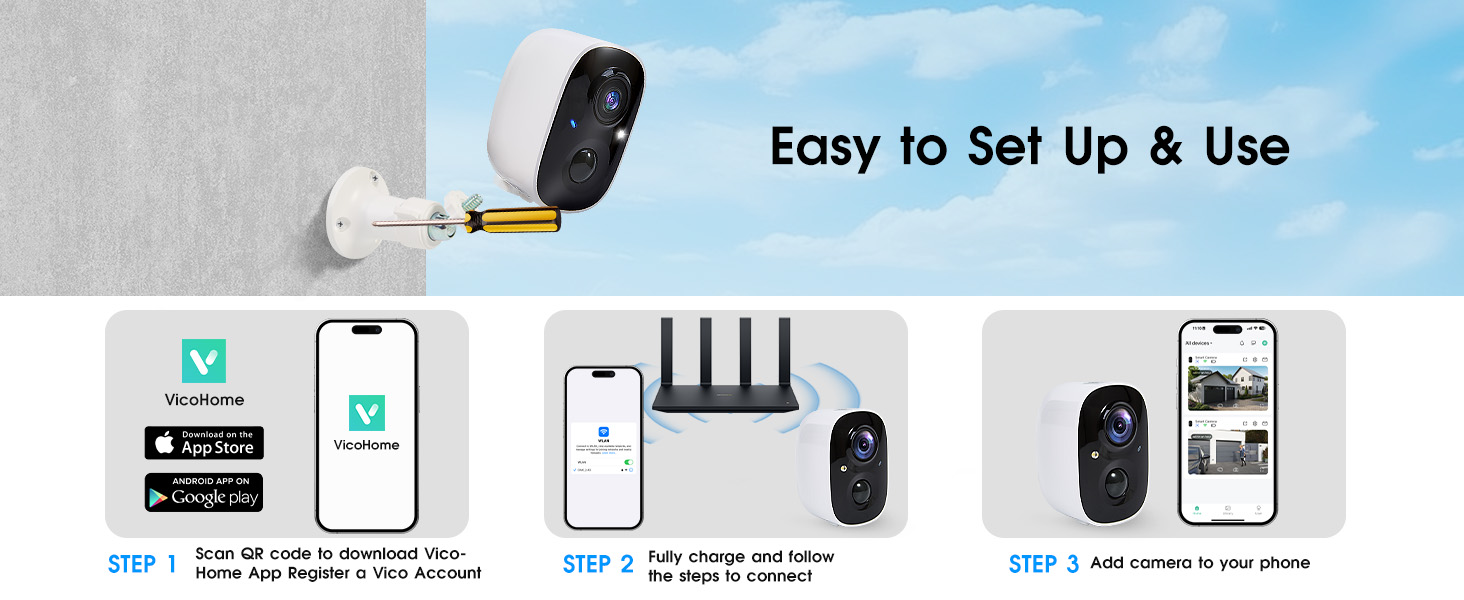
Image: Visual guide showing three steps: 1) Scan QR code to download VicoHome App, 2) Fully charge and connect, 3) Add camera to phone.
5. Parentah Operasi
5.1 Hirup View & Two-Way Talk
Open the Vicohome app and select your camera to view the live feed. Use the two-way talk feature to communicate with visitors or deter unwanted guests directly through the app.

Image: A person speaking into their phone, with a speech bubble indicating two-way voice intercom with someone at the door.
5.2 Deteksi & Peringatan Gerakan
The camera features smart PIR motion detection. You can customize detection zones and sensitivity levels within the app to minimize false alarms. When motion is detected, the camera can send instant alerts to your phone, activate a siren, or turn on its LED white lights.
Video: Tutorial on how to enable motion alerts and adjust sensitivity settings within the camera's mobile application.
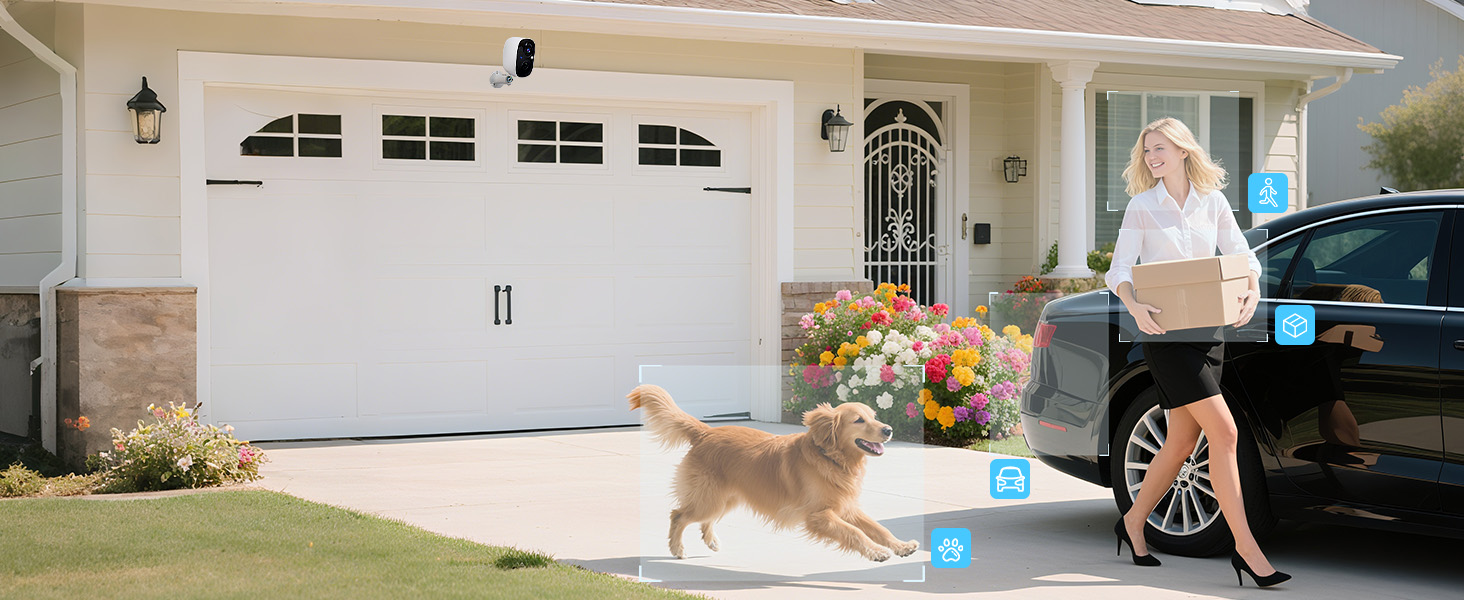
Image: Icons illustrating AI Motion Detection Identification for humans, pets, vehicles, and packages, with a phone screen showing detected events.
5.3 Visi Peuting
The camera offers dual light source night vision, providing both full-color night vision (with LED white lights) and infrared night vision (black and white). You can configure the night vision mode in the app.
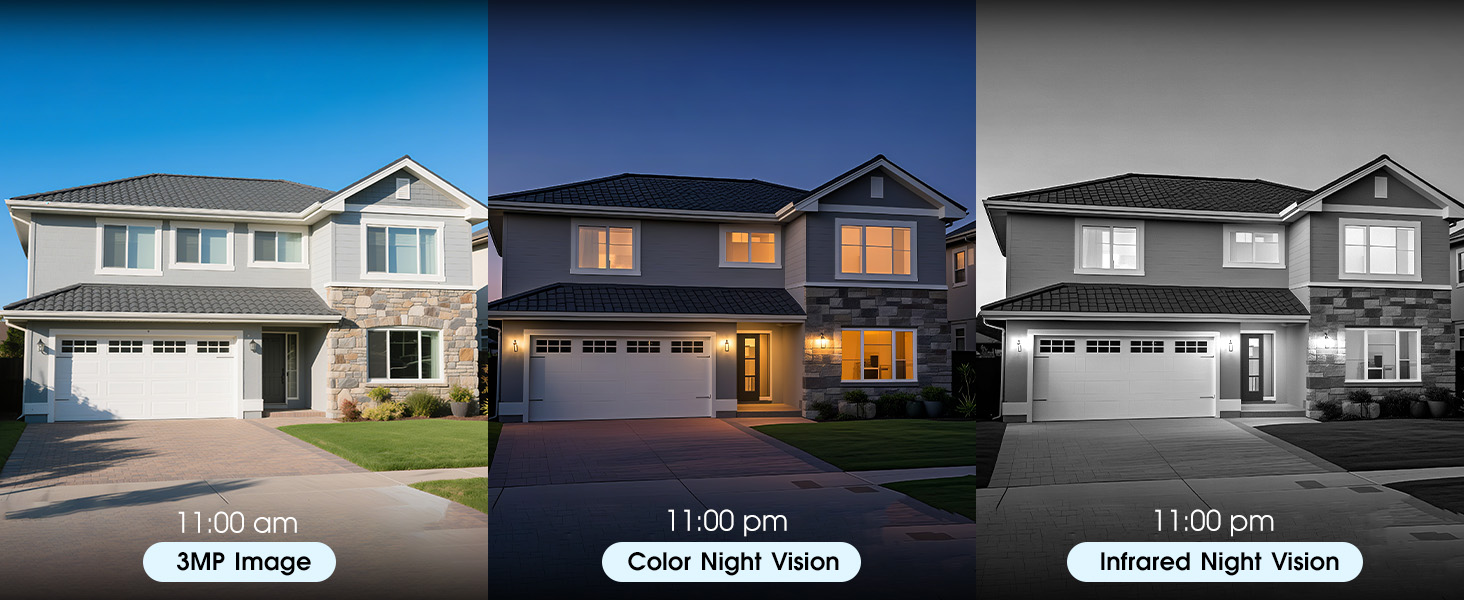
Image: A three-panel comparison showing a house in daylight (3MP Image), with color night vision, and with infrared night vision.
5.4 Sharing Device Access
You can share access to your camera's live view and recorded videos with other users through the app, allowing multiple family members or trusted individuals to monitor the property simultaneously.
Video: Instructions on how to share your camera's access with another person using the mobile application.
5.5 Sleep Mode & Scheduling
To conserve battery life or for privacy, you can activate a sleep mode for the camera or set up a schedule for its operation within the app.
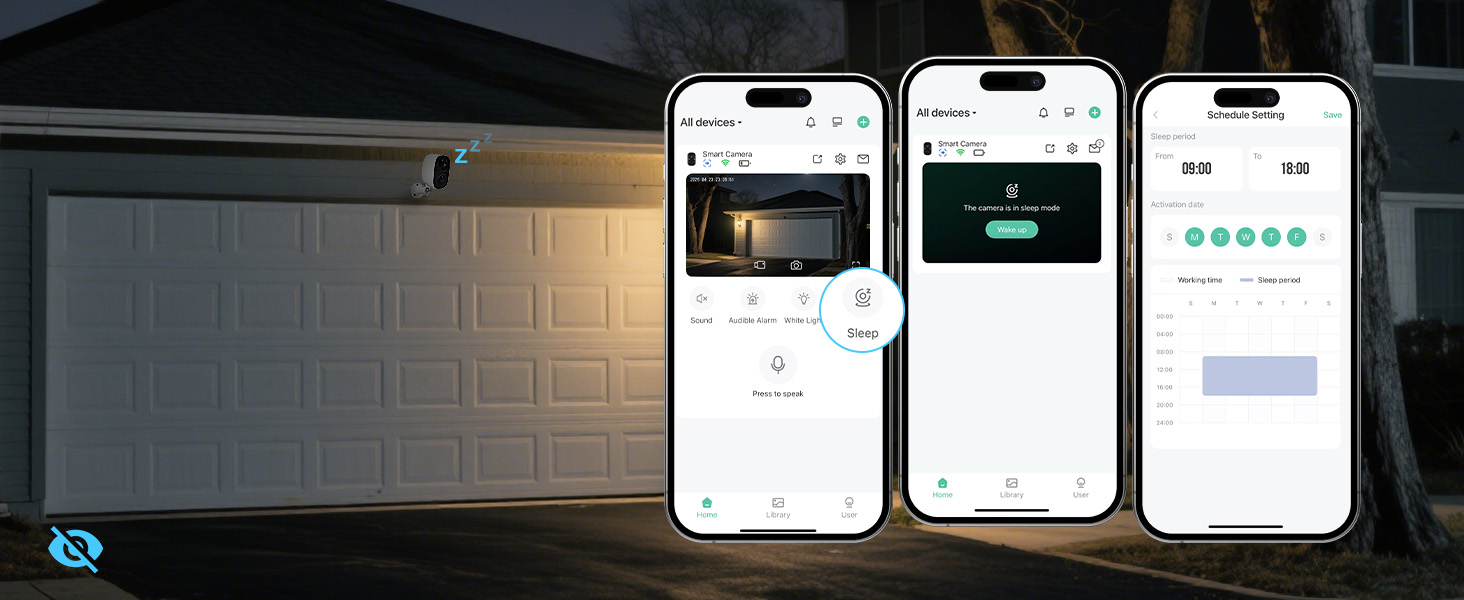
Image: App screenshots demonstrating how to activate sleep mode and set up a schedule for camera operation.
6. Power Management & Storage
6.1 Solar & Battery Power
The camera is equipped with a built-in rechargeable battery (4500 mAh) and a solar panel. The solar panel continuously charges the battery, providing wire-free and non-stop operation. Ensure the solar panel is positioned to receive sufficient sunlight (at least a couple of hours a day) to maintain battery charge.

Gambar: Hiji ngabeledug view of the camera highlighting its built-in premium energy battery, emphasizing its true wireless capability.
6.2 Pilihan Panyimpenan
The camera supports dual storage modes: microSD card (up to 128GB, not included) and cloud storage. Free rolling 3-day cloud storage is available, with a 30-day free trial of advanced cloud features and AI recognition. Local storage on an SD card provides a reliable backup without ongoing subscription costs.

Image: The camera positioned next to icons representing free 3-day video history cloud storage and microSD card storage (up to 128GB).
7. Spésifikasi
| Fitur | Spésifikasi |
|---|---|
| Ngaran modél | CG6 |
| Resolusi Capture Video | 1296p (2K) |
| Resolusi Masih Éféktif | 3 MP |
| Téhnologi konektipitas | Wireless (2.4GHz Wi-Fi only) |
| Sumber Daya | Solar Powered and Battery Powered (4500 mAh) |
| Pamakéan jero rohangan / outdoor | Jero rohangan, Luar |
| Tingkat Résistansi Cai | IP65 Cuaca |
| Fitur husus | 2-Way Audio, HD Resolution, Motion Sensor, Night Vision (Color & IR), Portable |
| Viewdina Angle | 110 darajat |
| Panyimpenan | MicroSD (dugi ka 128GB), Panyimpenan Awan |
| Item Ukuran L x W x H | 8.07 x 6.45 x 3.54 inci |
| Item Beurat | 2.2 pon |
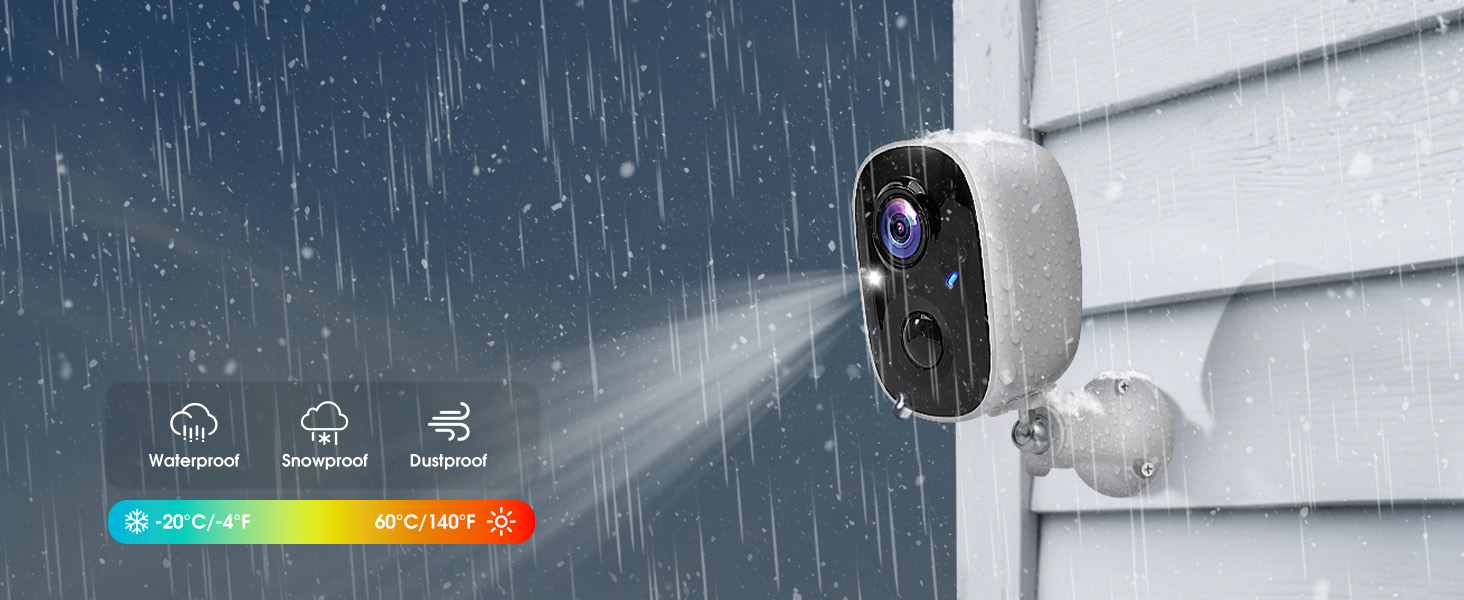
Image: The camera shown enduring rain, snow, and dust, highlighting its IP65 weatherproof rating and wide operating temperature range.
8. Pangropéa
- beberesih: Usap lénsa kaméra sareng panel surya sacara rutin nganggo kaén anu lemesamp cloth to ensure clear image quality and efficient solar charging.
- Pariksa batré: Monitor the battery level through the app. While the solar panel provides continuous charging, extreme weather or prolonged periods without sunlight may affect performance.
- Pembaruan firmware: Check the app periodically for firmware updates to ensure your camera has the latest features and security enhancements.
9. Cara ngungkulan
- Masalah konektipitas: Ensure your Wi-Fi network is 2.4GHz and the camera is within range of your router. Restarting your router or camera may resolve temporary connection problems.
- Deteksi Gerakan Teu Bisa Dipicu: Adjust the detection area and sensitivity level in the app. Ensure there are no obstructions blocking the PIR sensor.
- Panglihatan Peuting Anu Goréng: Check if the camera lens is clean. Ensure there are no strong light sources directly facing the camera at night, which can interfere with night vision.
- Batré gancang ngucur: Verify the solar panel is receiving adequate direct sunlight. Reduce the frequency of motion alerts or live view aksés upami teu penting.
10. Garansi jeung Rojongan
GMK is committed to providing reliable, high-quality security cameras. For any questions, assistance, or warranty inquiries, please contact GMK customer support. Our team of experts is available to provide support when you need it.
Inpormasi kontak:
- Surélék: Support@getgmk.com
- Telepon: +1 (313) 380-6888 (7:00 - 17:00 Business Day)