1. Bubuka
Thank you for choosing the ILIFE A30 Pro Robot Vacuum Cleaner. This manual provides essential information for the safe and efficient operation, maintenance, and troubleshooting of your device. Please read it thoroughly before first use and retain it for future reference.

Image: The ILIFE A30 Pro robot vacuum, its self-emptying base, a remote control, and various cleaning accessories including brushes and dust bags.
2. Parentah Kasalametan penting
To reduce the risk of injury or damage, read these safety instructions carefully and keep them accessible during the product's lifespan.
- Alat ieu tiasa dianggo ku murangkalih umur 8 taun ka luhur sareng jalma anu kakurangan kamampuan fisik, indrawi atanapi mental atanapi kurang pangalaman sareng pangaweruh upami aranjeunna dipasihan pangawasan atanapi petunjuk ngeunaan panggunaan alat dina cara anu aman sareng ngartos bahaya anu aya. .
- Barudak kedah diawaskeun pikeun mastikeun yén aranjeunna henteu maén sareng alatna.
- Beberesih sareng pangropéa pangguna henteu kedah dilakukeun ku murangkalih tanpa pangawasan.
- Anggo ngan ukur adaptor daya asli anu disayogikeun ku produsén.
- Ulah ngajalankeun robot di wewengkon kalawan seuneu kabuka atawa objék rapuh.
- Ensure the charging dock is placed against a wall on a level surface, with adequate clear space around it.
- Before cleaning, remove loose cables, small objects, and any items that could entangle the robot.
- Do not expose the robot or charging dock to water or moisture.
3. Setup Guide
3.1 Unboxing sareng Penempatan Awal
Carefully remove all components from the packaging. Place the self-emptying station against a wall in an open area, ensuring there are no obstacles within 1 meter (3 feet) to the front and 0.5 meters (1.5 feet) to the sides. Connect the power adapter to the station and plug it into a wall outlet.

Image: The ILIFE A30 Pro self-emptying station with its lid open, showing a full dust bag inside and a stack of new dust bags next to it.
3.2 Ngecas Robot
Place the robot onto the charging contacts of the self-emptying station. Ensure the contacts align. The robot will begin charging automatically. For first use, fully charge the robot, which may take several hours.
3.3 App Connection (ILIFEClean App)
- Download the 'ILIFEClean' app from your mobile device's app store.
- Ngadaptar akun tur asup.
- Follow the in-app instructions to add your ILIFE A30 Pro. Ensure your Wi-Fi network is 2.4GHz, as the robot is only compatible with this frequency.

Image: A person sitting on a couch, controlling the ILIFE A30 Pro robot vacuum and its self-emptying station using the ILIFEClean mobile application.
4. Parentah Operasi
4.1 Initial Mapping and Navigation
The ILIFE A30 Pro utilizes LiDAR navigation and SLAM algorithms to create a detailed map of your home. For the first cleaning cycle, allow the robot to complete a full scan of your home without interruption to ensure accurate mapping and optimal cleaning routes.

Image: The ILIFE A30 Pro robot vacuum operating in a living room, with blue laser lines illustrating its LiDAR navigation and mapping capabilities.
4.2 Modeu beberesih sarta kakuatan nyeuseup
The robot offers four adaptable cleaning modes:
- jempé: 500 Pa suction for quiet operation.
- Standar: 1000 Pa suction for daily cleaning.
- kuat: 1800 Pa suction for more demanding tasks.
- Max: 5000 Pa suction for deep cleaning, especially on carpets.
These modes can be selected via the ILIFEClean app or the remote control.

Image: The ILIFE A30 Pro robot vacuum cleaning a carpet, illustrating its powerful 5000 Pa suction capability with a rotating brush.
4.3 3-in-1 Functionality: Vacuum, Sweep, and Mop
The ILIFE A30 Pro features a 2-in-1 tank (200ml for dust, 200ml for water) allowing it to vacuum, sweep, and mop simultaneously. To use the mopping function, fill the water tank and attach the mop pad. If you only wish to vacuum, remove the mop pad holder.

Image: The ILIFE A30 Pro robot vacuum next to its self-emptying station, with an exploded view of its 2-in-1 dust and water tank and mop attachment, illustrating its 3-in-1 cleaning capability.
4.4 Fitur Kontrol Pinter
Using the ILIFEClean app, you can:
- Set forbidden zones and virtual walls to restrict cleaning areas.
- Jadwalkeun waktos beberesih.
- Select specific rooms for cleaning.
- Adjust suction power and water level for mopping.
The robot also supports voice control via Amazon Alexa and Google Home, and can be operated with the included remote control.

Image: The ILIFE A30 Pro robot vacuum operating near a cat tree, with a visual representation of a 'forbidden zone' (red shaded area) and a 'virtual wall' (blue shaded area) to restrict its movement.
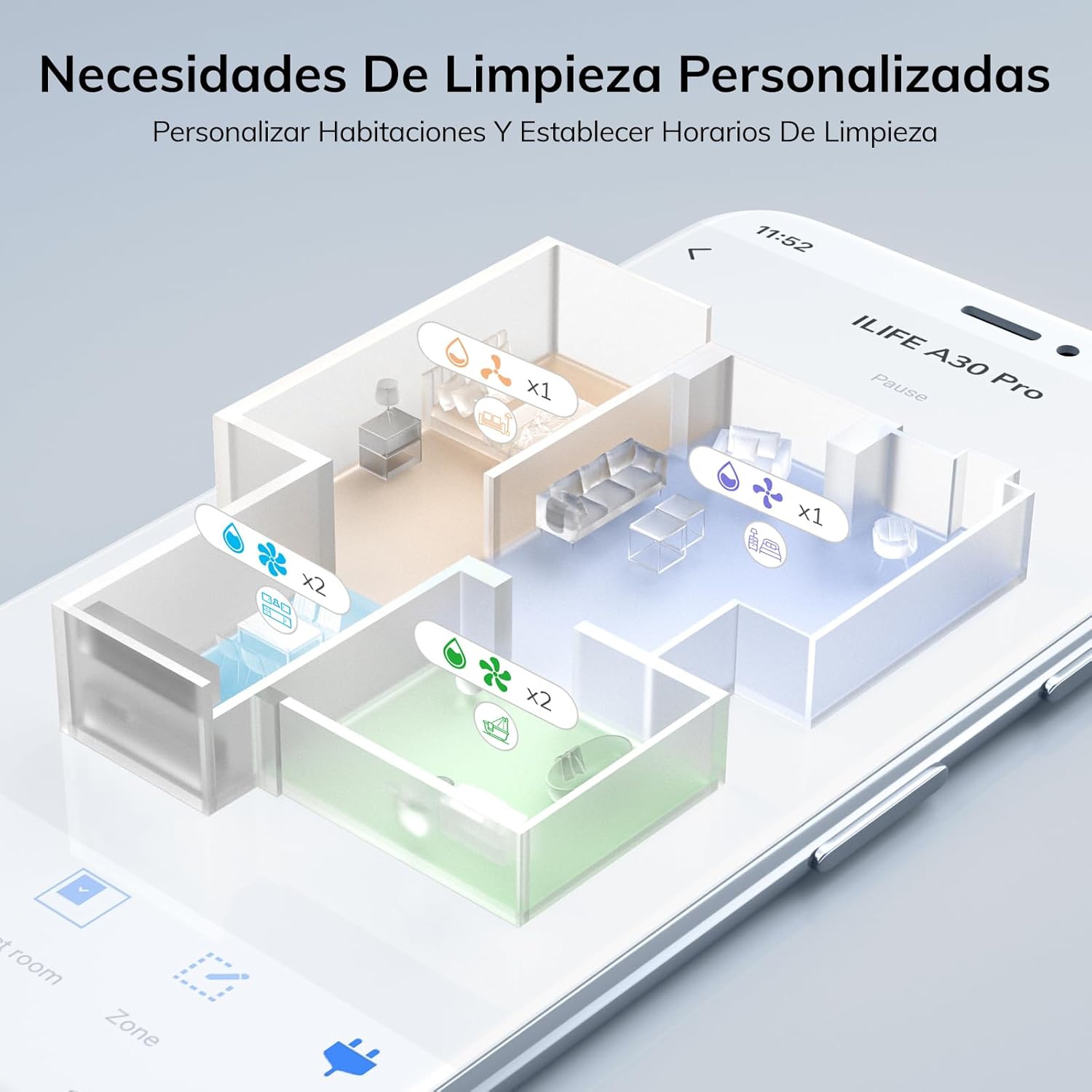
Image: A smartphone screen displaying the ILIFEClean app interface, showing a detailed map of a house with different rooms highlighted for personalized cleaning settings, including suction and water levels.

Image: The ILIFE A30 Pro robot vacuum, its self-emptying station, a smartphone displaying the control app, a remote control, and a smart speaker, illustrating multiple control options including app, voice, and remote.
5. Pangropéa
Regular maintenance ensures optimal performance and extends the lifespan of your ILIFE A30 Pro.
5.1 Self-Emptying Station and Dust Bag
The self-emptying station automatically transfers dust from the robot's dustbin into a larger 2.5L dust bag. Each dust bag can hold up to 8 weeks of debris, providing up to 280 days of hands-free cleaning with the included 5 bags. Replace the dust bag when the indicator light on the station signals it is full.
5.2 Ngabersihkeun Sikat Utama sareng Sikat Samping
- Balikkeun robot teras cabut panutup sikat utama.
- Lift out the main brush and use the cleaning tool to remove hair and debris.
- Carefully pull off the side brushes and clean any entangled hair or dust. Reattach them securely.
5.3 Cleaning the 2-in-1 Dust/Water Tank
- Remove the 2-in-1 tank from the robot.
- Empty the dust compartment and rinse it with water. Ensure it is completely dry before reinserting.
- Empty any remaining water from the water tank and rinse. Allow it to air dry.
- Clean the filter inside the dust compartment regularly.
5.4 Ngabersihan Sénsor sareng Ngecas Kontak
Ngusap sénsor gawir, sénsor témbok, sareng kontak ngecas dina robot sareng stasiun ngecas ku kaén anu bersih sareng garing pikeun mastikeun fungsi anu leres.
6. Cara ngungkulan
If you encounter issues with your ILIFE A30 Pro, refer to the following common problems and solutions:
- Robot henteu ngecas: Ensure the charging contacts on both the robot and the station are clean and free of debris. Verify the power adapter is securely plugged into the wall outlet and the station.
- Robot sering macét: Clear obstacles, loose cables, and thick rugs from the cleaning path. Use the app to set forbidden zones for problematic areas.
- Kinerja beberesih goréng: Check if the dustbin is full or the dust bag in the station needs replacement. Clean the main brush, side brushes, and filters. Increase suction power via the app.
- Masalah sambungan aplikasi: Ensure your Wi-Fi network is 2.4GHz. Restart your router, the robot, and your mobile device. Try re-pairing the robot with the app.
- Robot nyieun sora anu teu biasa: Check for foreign objects or entangled hair in the main brush, side brushes, or wheels.
Lamun masalah persists, mangga ngahubungan rojongan customer.
7. Spésifikasi
| Fitur | Spésifikasi |
|---|---|
| merek | iLife |
| Ngaran modél | A30 Pro |
| Daya nyeuseup | Nepi ka 5000 Pa (Modeu Maks) |
| Jinis Napigasi | LiDAR Precision Navigation |
| Batré Runtime | Nepi ka 2 jam 30 menit |
| Dust Bin Capacity (Robot) | 200 ml (integrated with water tank) |
| Kapasitas Tangki Cai (Robot) | 200 ml (integrated with dust bin) |
| Kapasitas Kantong Debu Anu Bisa Dikosongkeun Mandiri | 2.5 L |
| Konektipitas | 2.4GHz WiFi, ILIFEClean App, Remote Control, Alexa, Google Home |
| Disarankeun Surfaces | Wood, Tile, Laminate, Vinyl, Concrete, Marble |
| Beurat | 6.7 kg (approximate product weight) |
8. Émbaran jaminan
For detailed warranty information, please refer to the warranty card included with your product packaging or contact your point of purchase. Warranty terms and conditions may vary by region and retailer.
9. Rojongan Palanggan
If you have any questions or require further assistance with your ILIFE A30 Pro, please contact ILIFE customer support through the official websitus atanapi inpormasi kontak anu disayogikeun dina dokuméntasi produk anjeun.


