1. Produk Langkungview
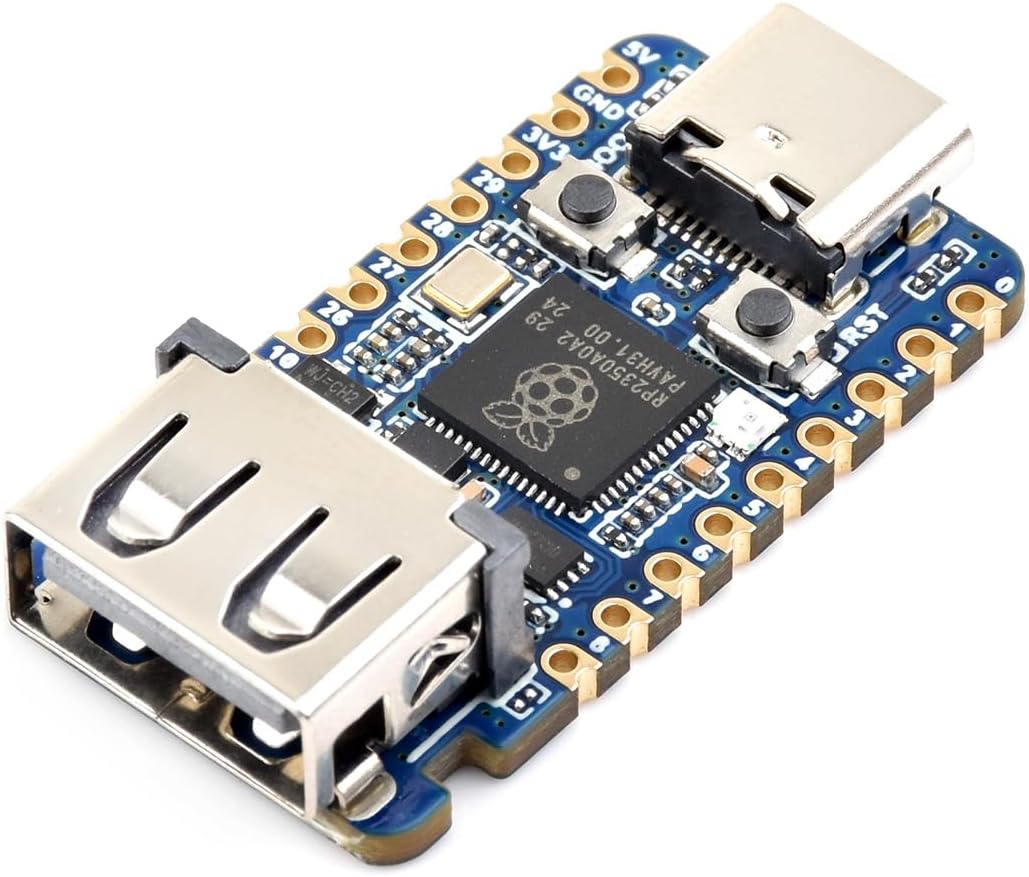
The Waveshare RP2350 USB Mini Development Board is a compact and powerful microcontroller board designed for embedded systems development. It is based on the Raspberry Pi RP2350 dual-core and dual-architecture microcontroller, offering flexible clock speeds up to 150 MHz. This board is ideal for a wide range of applications, from basic prototyping to complex IoT projects.
Fitur konci:
- Integrated Raspberry Pi RP2350 microcontroller with dual-core Arm Cortex-M33 and dual-core Hazard3 RISC-V processors.
- Flexible clock frequency up to 150 MHz.
- 520KB of SRAM and 2MB of onboard Flash memory.
- Modern Type-C USB connector for power and data.
- Castellated module design for direct soldering to carrier boards.
- USB 1.1 support with device and host capabilities.
- Onboard 1x USB Type-A expansion port via PIO, compatible with USB 2.0/1.1 transmission.
- Low-power sleep and dormant modes for efficient energy management.
- Drag-and-drop programming via USB mass storage.
- 15 multi-function GPIO pins, including 2 SPI, 2 I2C, 2 UART, 4 12-bit ADC, and 14 controllable PWM channels.
- 12 Programmable I/O (PIO) state machines for custom peripheral support.
2. Spésifikasi Téknis
| Fitur | Rincian |
|---|---|
| Dimensi produk | 1.3 x 0.69 x 0.59 inci |
| Item Beurat | 0.352 ons |
| Produsén | Waveshare |
| Nomer Modél Item | RP2350-USB-A |
| merek | babagi ombak |
| CPU Socket | BGA |
| Alat nu cocog | Komputer Pribadi |
| Téhnologi Mémori RAM | SRAM |
| Prosesor cocog | Raspberry Pi RP2350, Cortex-M33, Hazard3 RISC-V |
| Tipe Chipset | Raspberry Pi RP2350A |
| Mémori Jam Speed | 150 MHz |
| Ngaran modél | RP2350 USB Mini Dev Board |
| Kapasitas Panyimpenan Mémori | 0.52 MB |
| RAM Mémori Ukuran Maximum | 520 KB |
3. Setup Guide
3.1 Sambungan Awal
- Connect the RP2350 USB Mini Development Board to your computer using a USB Type-C cable. The board will typically be recognized as a mass storage device.
- Ensure your operating system has the necessary USB drivers. For most modern systems, these drivers are installed automatically.
3.2 Entering Bootloader Mode
To upload new firmware or programs, the board needs to be in bootloader mode. This is typically achieved by:
- Pressing and holding the BOOT button while connecting the board to your computer via USB.
- Alternatively, some development environments may allow entering bootloader mode via software commands.
4. Parentah Operasi
4.1 Programming the Board
The RP2350 USB Mini Development Board supports drag-and-drop programming. Once the board is in bootloader mode and recognized as a mass storage device, you can simply drag and drop compiled firmware files (e.g., .uf2 files) directly onto the board's drive. The board will automatically reset and run the new program.
4.2 Debugging and Communication
The board provides several interfaces for debugging and communication:
- SWD Interface: A 3-pin SWD (Serial Wire Debug) interface is available for hardware debugging, compatible with most ARM-based microcontrollers.
- Antarmuka UART: A UART (Universal Asynchronous Receiver/Transmitter) interface is provided for serial communication, useful for sending and receiving data during development and debugging.
- Antarmuka I2C: An I2C (Inter-Integrated Circuit) port is available for connecting various sensors and peripherals.
- USB Type-A Expansion Port: This port allows for USB 2.0/1.1 transmission via PIO, expanding connectivity options.
4.3 Supported Development Environments
The RP2350 microcontroller supports various programming languages and development environments, including:
- C/C++ SDK: The official Raspberry Pi C/C++ SDK can be used for command-line development or integrated into popular IDEs like Visual Studio Code and Eclipse.
- MicroPython: A full implementation of the Python 3 programming language optimized for embedded hardware, similar to Raspberry Pi Pico.
Waveshare Electronics provides extensive online development resources and example materials to assist with basic function implementations and complex project cases. These resources can be quickly integrated into your applications.
5. Pangropéa sarta perawatan
5.1 Nanganan Precautions
- Listrik statik: Electronic components are sensitive to electrostatic discharge (ESD). Always handle the board with care, preferably using an anti-static wrist strap or by touching a grounded object before handling.
- Uap: Protect the board from moisture and humidity. Store it in a dry environment to prevent damage.
- Stress Fisik: Avoid applying excessive force or bending the board, as this can damage components or solder joints.
5.2 beberesih
If cleaning is necessary, gently wipe the board with a soft, dry cloth. For stubborn dirt, use a small amount of isopropyl alcohol on a cotton swab, ensuring the board is powered off and completely dry before re-powering.
5.3 Panyimpenan
When not in use, store the RP2350 USB Mini Development Board in its original packaging or an anti-static bag in a cool, dry place away from direct sunlight and extreme temperatures.
6. Cara ngungkulan
If you encounter issues with your RP2350 USB Mini Development Board, consider the following common troubleshooting steps:
- Board Not Recognized: Ensure the USB cable is securely connected and functional. Try a different USB port or cable. Verify the board is in bootloader mode if attempting to upload firmware.
- Kasalahan Pemrograman: Double-check your code for syntax errors. Ensure the correct development environment and SDK are installed and configured. Confirm the board is in bootloader mode.
- Teu Aya Daya/LED Pareum: Check the USB connection and power source. Ensure the cable is providing sufficient power.
- Masalah periferal: Verify wiring connections to GPIO pins. Ensure correct pin assignments in your code. Check power supply to external components.
For more detailed troubleshooting guides and solutions, please refer to the official Waveshare online development resources and technical support channels.
7. Média Produk
7.1 Gambar produk


7.2 Video Produk Resmi
RP2350 GEEK Overview
video ieu nyadiakeun leuwihview of the RP2350 GEEK development board, highlighting its dual-core processor, operating frequency, integrated LCD display, and various interfaces for debugging and development. It also demonstrates the drag-and-drop programming feature and support for C/C++ and MicroPython.
8. Garansi jeung Rojongan
Waveshare provides online development resources and technical support for the RP2350 USB Mini Development Board. Should you encounter any problems or require assistance, please do not hesitate to contact Waveshare's customer support. Detailed documentation, tutorials, and example code are available through their official channels to help you with your projects.


