1. Bubuka
Thank you for choosing the Angrox Voice Remote Control. This remote is specifically designed as a replacement for Philips Google Smart TVs, offering enhanced functionality including voice control and dedicated shortcut buttons for popular streaming services. Please read this manual carefully to ensure proper setup and operation.

Gambar: Hareup jeung samping view of the Angrox Voice Remote Control, showcasing desain ergonomis na perenah tombol.
2. Setélan
2.1 Pamasangan batré
Remot ieu peryogi dua (2) batré AAA (teu kalebet). Pastikeun polaritasna leres nalika nyelapkeun batréna.
- Cabut panutup batré di tukangeun remot ku cara ngageserkeunana ka handap.
- Insert two AAA batteries, matching the positive (+) and negative (-) terminals as indicated inside the battery compartment.
- Ganti panutup batré ku cara ngageser deui kana tempatna nepi ka ngaklik aman.

Image: A three-step diagram illustrating how to remove the battery cover, insert two AAA batteries, and replace the cover.
2.2 Pairing with Your TV
Before using the remote, it must be paired with your Philips Google Smart TV. This remote supports both infrared and Bluetooth technology for optimal performance.
- Ensure your Philips Google Smart TV is powered on.
- Hold down the "VOL-" button and the "Mic" (Google Assistant) button simultaneously for 5 seconds.
- The remote will initiate the pairing process. All pairing transactions occur in the background, and no further setup is typically required once the pairing is successful.

Image: A hand holding the remote, with an arrow pointing from the 'VOL-' and 'Mic' buttons to a TV screen, illustrating the pairing process.

Image: A visual guide showing the remote and a TV screen with on-screen instructions for pairing, emphasizing holding the VOL- and Mic buttons.
2.3 Compatible TV Models
This voice replacement remote is compatible with the following Philips Google Smart TV series:
- 7000 runtuyan: 75PUL7552/F7, 65PUL7552/F7, 55PUL7552/F7, 50PUL7552/F7, 43PUL7652/F7
- 7600 runtuyan: 65PUL7672/F7, 55PUL7672/F7, 50PUL7672/F7, 43PUL7672/F7

Image: The remote control centered between two Philips Google Smart TVs, with lists of compatible 7000 and 7600 series models.
3. Parentah Operasi
3.1 Tombol Fungsi Leuwihview
Familiarize yourself with the various buttons and their functions on your Angrox remote control:
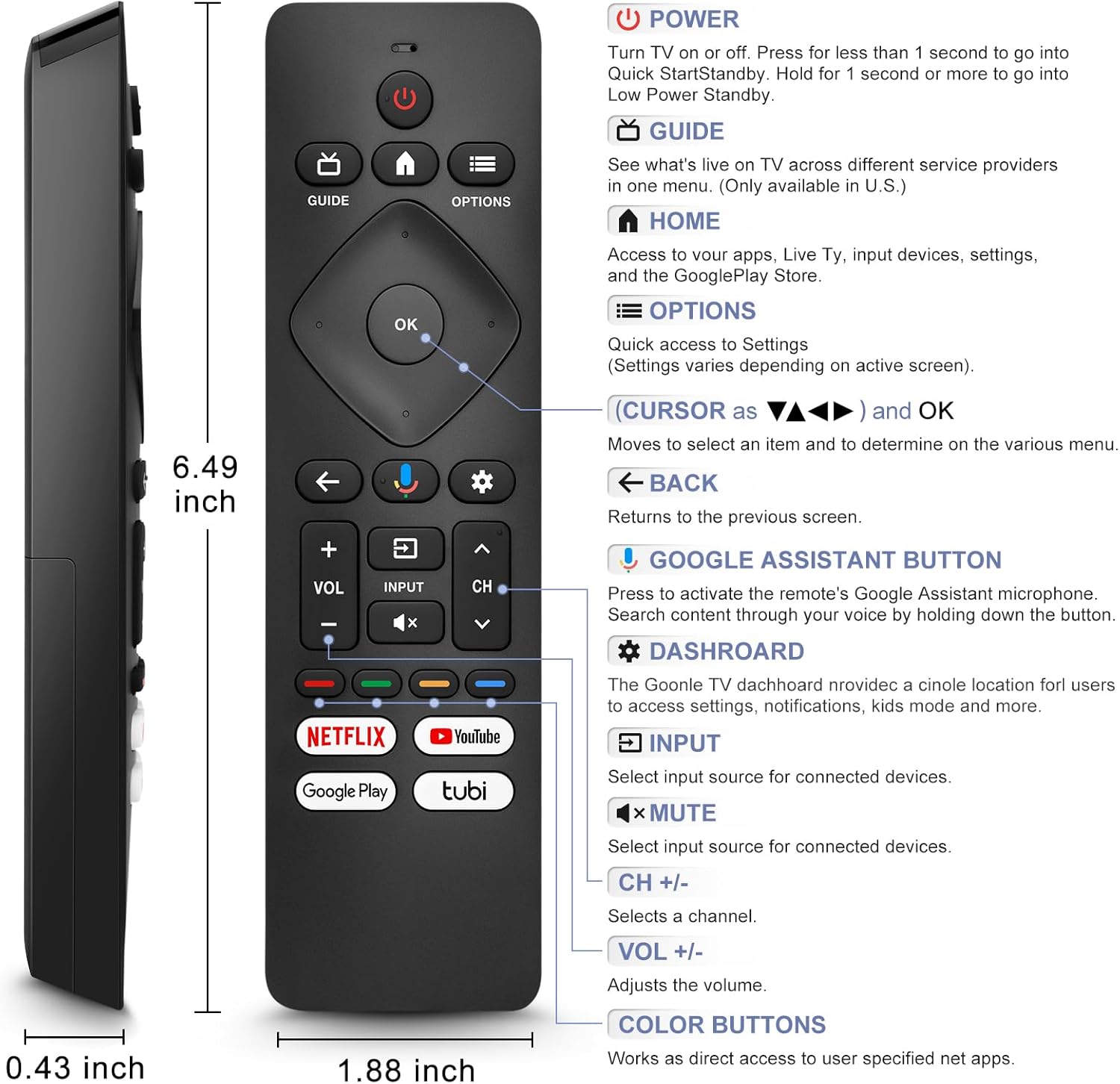
Image: A detailed diagram of the remote control with labels and descriptions for each button, including Power, Guide, Home, Options, Cursor/OK, Back, Google Assistant, Dashboard, Input, Mute, Volume, Channel, and Color Buttons.
- kakuatan: Press to turn TV on or off. Hold for 1 second for Quick Start Standby, or longer for Low Power Standby.
- Pituduh: Access live TV service providers (availability may vary by region).
- imah: Access apps, Live TV, input devices, settings, and the Google Play Store.
- Pilihan: Quick access to settings (settings vary based on active screen).
- Cursor (Up/Down/Left/Right) & OK: Napigasi ménu sareng konpirmasikeun pilihan.
- Balik: Balik deui ka layar saméméhna.
- Tombol Asisten Google: Press and hold to activate the remote's microphone for voice search.
- Dasbor: Access the Google TV dashboard for settings, notifications, and kids mode.
- Input: Pilih sumber input pikeun alat nu disambungkeun.
- Jempé: Jempekeun atanapi aktipkeun deui sora audio TV.
- VOL +/-: Saluyukeun tingkat polumeu.
- CH +/-: Select the next or previous channel.
- Tombol Warna: Provide direct access to user-specified net apps.
3.2 Voice Search Function
The integrated voice function allows for easier and more intuitive interaction with your smart TV. Simply press and hold the Google Assistant button and speak your command or query.
- Pencét jeung tahan tombol Tombol Asisten Google (microphone icon).
- Nyarios jelas kana mikropon remote.
- Leupaskeun tombol mun geus réngsé nyarita.
Examples of voice commands include: "What's the weather today?", "Turn down the volume", "Open YouTube", or searching for specific content.
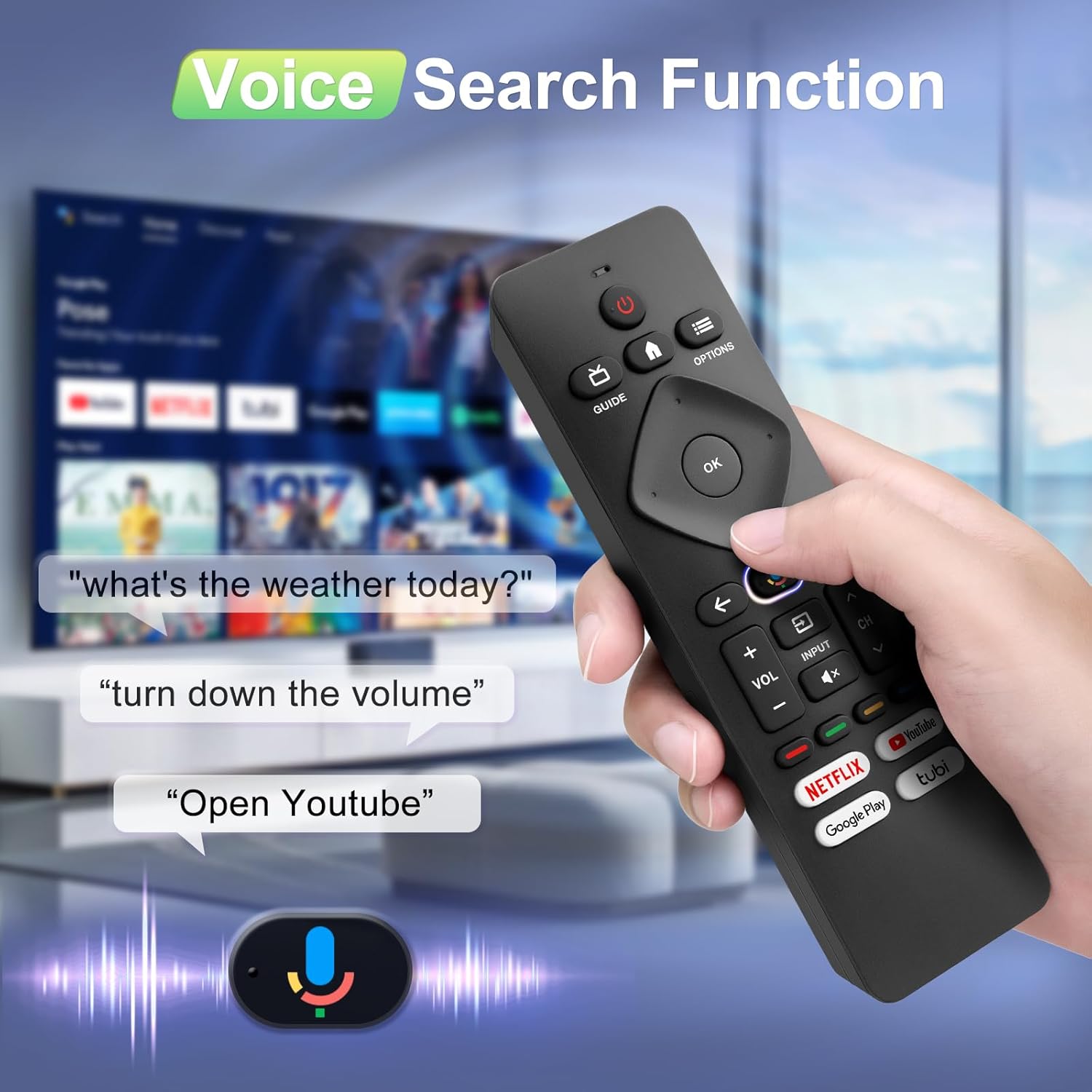
Image: A hand holding the remote, with speech bubbles showing example voice commands like "what's the weather today?" and "Open Youtube", demonstrating the voice search capability.
3.3 Tombol potong kompas
The remote features four dedicated shortcut buttons for quick access to popular streaming channels:
- Netflix
- YouTube
- Google Play
- Tubi
Pressing these buttons will directly launch the respective application on your TV, provided they are installed and configured.

Image: The remote control highlighting the four dedicated shortcut buttons for Netflix, YouTube, Google Play, and Tubi, with their respective logos.
4. Pangropéa
Pikeun mastikeun umur panjang sareng kinerja optimal tina kadali jauh anjeun, turutan tungtunan pangropéa ieu:
- beberesih: Ngusap rémot ku kaén anu lemes sareng garing. Ulah make cleaners cair atawa bahan abrasive.
- Ngagantian batré: Ganti batréna nalika réspon remot janten laun atanapi lirén fungsina. Salawasna gentos kadua batréna sakaligus ku anu énggal.
- Panyimpenan: Nyimpen remote di tempat anu tiis sareng garing jauh tina sinar panonpoé langsung sareng suhu anu ekstrim.
- Hindarkeun tetes: Jaga jarak jauh tina dampak fisik, sabab tetes tiasa ngaruksak komponén internal.
5. Cara ngungkulan
If you encounter issues with your remote control, please refer to the following common solutions:
- Jauh Teu Ngabales:
- Pariksa naha batréna diselapkeun leres kalayan polaritasna anu leres.
- Ganti batré anu lami ku batré AAA anu énggal.
- Pastikeun teu aya halangan antara remot sareng panarima IR TV.
- Fungsi Sora Teu Gawé:
- Ensure the remote is properly paired with your TV via Bluetooth. Refer to Section 2.2.
- Make sure you are pressing and holding the Google Assistant button while speaking.
- Pariksa setélan TV anjeun pikeun mastikeun kontrol sora diaktipkeun.
- Buttons Unresponsive or Sticky:
- Clean the remote surface, especially around the buttons, to remove any dirt or debris.
- If buttons remain unresponsive after cleaning and battery replacement, the remote may require replacement.
- Short Remote Distance:
- The remote supports infrared and Bluetooth. Ensure no physical obstructions are blocking the signal.
- The remote is designed for optimal performance within 10 meters (approximately 33 feet) and is available up to 12 meters (approximately 39 feet).
6. Spésifikasi
| merek | Angrox |
| Nomer modél | URMT26CND002 |
| Alat nu cocog | Philips Google Smart TVs (7000 & 7600 Series) |
| Téhnologi konektipitas | Infrared, Bluetooth |
| Fitur husus | Ergonomic, Voice Search, Shortcut Buttons |
| Sumber Daya | 2 x Batré AAA (teu kalebet) |
| Item Beurat | 2.39 ons (kira-kira 67.7 gram) |
| Ukuran Paket | 6.73 x 1.93 x 1.02 inci |
| Button Durability | Tested for 5,000-8,000 clicks per button |
7. Garansi jeung Rojongan
Angrox is committed to providing excellent after-sale service. We focus on the compatibility and quality of our replacement remotes. If you have any questions or concerns regarding your order or the product, please do not hesitate to contact us directly. Our professional after-sale service team is available to assist you.
For support, please refer to the contact information provided with your purchase or visit the Angrox store on Amazon.
