Bubuka
This manual provides essential information for setting up, operating, maintaining, and troubleshooting your ASUS Vivobook 17 laptop. Please read this guide thoroughly to ensure proper use and to maximize the performance and longevity of your device.
The ASUS Vivobook 17 is designed for productivity and entertainment, featuring an Intel Core i3-1215U processor, a 17.3-inch Full HD display, up to 40GB RAM, and up to 2TB PCIe NVMe M.2 SSD storage. It operates on Windows 11 Pro and includes a comprehensive set of connectivity options.
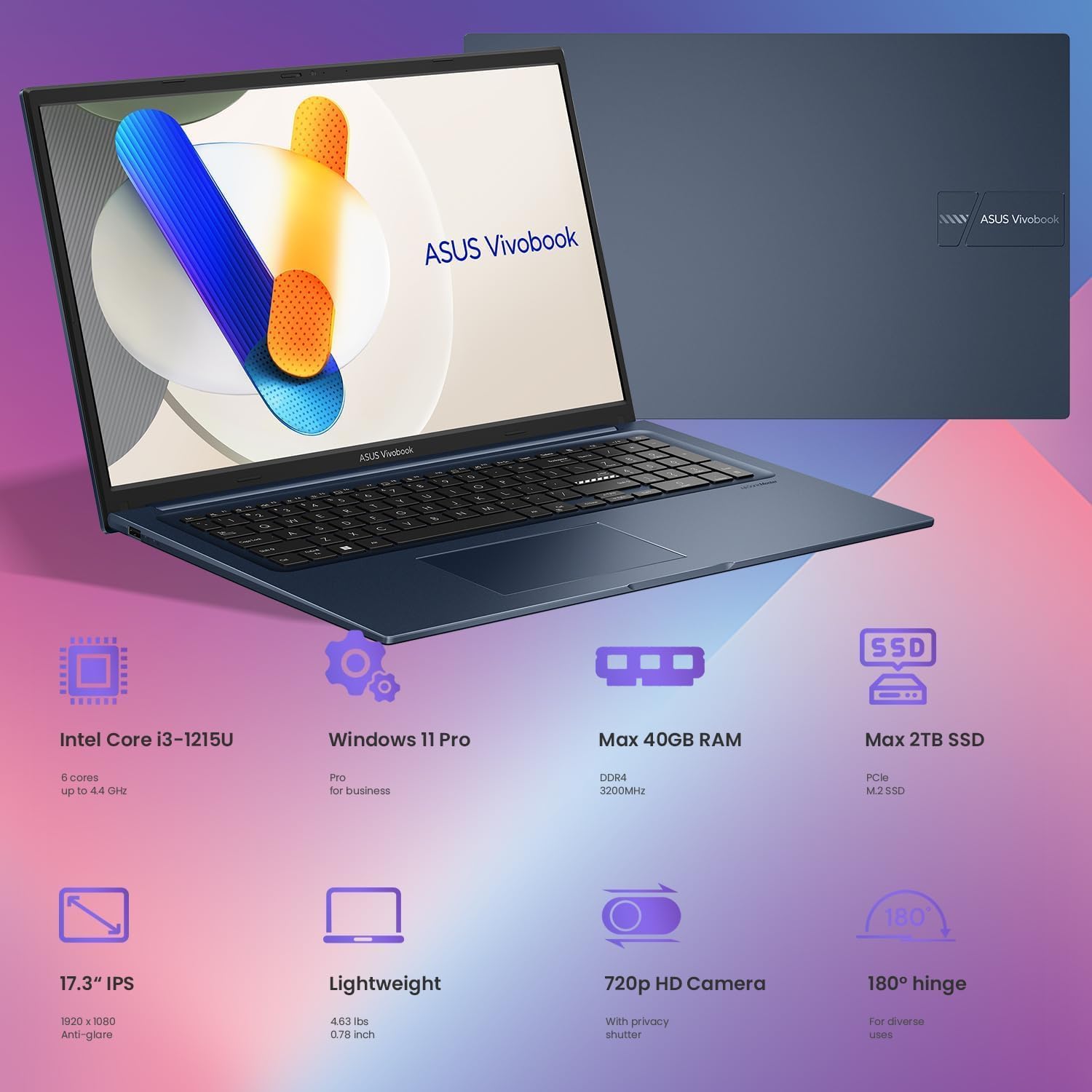
Image: ASUS Vivobook 17 laptop displaying its overall design and key specifications like Intel Core i3-1215U, Windows 11 Pro, Max 40GB RAM, Max 2TB SSD, 17.3" IPS display, lightweight design, 720p HD Camera, and 180-degree hinge.
Guide Setup
1. Mimiti Power-On
- Sambungkeun Kakuatan: Plug the AC adapter into the laptop's power connector and then into a power outlet.
- Buka tampilan: Carefully open the laptop display.
- Daya Hurung: Pencét tombol daya, biasana aya dina dek kibor, pikeun ngamimitian laptop.
- Setup Sistem Operasi: Follow the on-screen instructions to complete the Windows 11 Pro setup process. This includes selecting your region, language, and setting up user accounts.
2. Nyambungkeun périferal
Your Vivobook 17 offers various ports for connecting external devices:
- Alat USB: Connect USB flash drives, external hard drives, mice, or keyboards to the available USB-A or USB-C ports.
- Tampilan éksternal: Anggo port HDMI pikeun nyambungkeun monitor éksternal atanapi proyéktor.
- Alat Audio: Plug headphones or external speakers into the 3.5mm Headphone/Microphone Combo Jack.
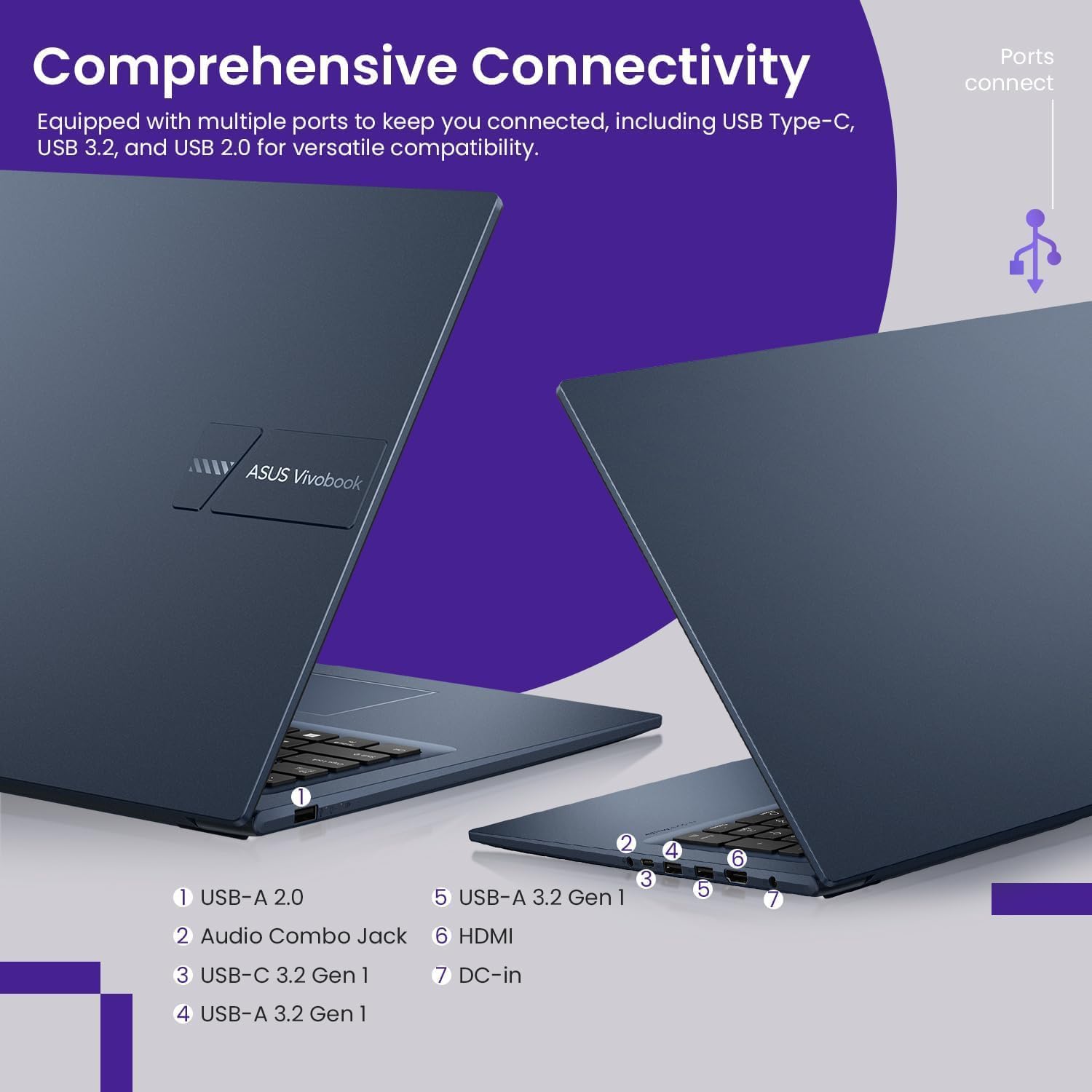
Gambar: Detil view of the ASUS Vivobook 17's left and right side ports, including USB-A 2.0, Audio Combo Jack, USB-C 3.2 Gen 1, USB-A 3.2 Gen 1, HDMI, and DC-in power connector.
3. Konektipitas Jaringan
- Wifi: Access network settings in Windows 11 to connect to a wireless network. The laptop supports Wi-Fi 5 (802.11ac).
- Bluetooth: Enable Bluetooth in Windows settings to pair with compatible devices such as wireless headphones or mice. The laptop supports Bluetooth 4.1.
Parentah Operasi
1. Pamakéan Dasar
- kibor: The laptop features a US English, Full Size Backlit Keyboard with a Numeric Keypad. Use the function keys (Fn) in combination with F-keys for various shortcuts (e.g., volume, brightness).
- Touchpad: The integrated touchpad supports multi-touch gestures for navigation and interaction with the operating system.
- Sensor sidik: Utilize the integrated fingerprint sensor for secure and quick login via Windows Hello.
2. Fitur tampilan
The 17.3-inch Full HD (1920 x 1080) display features ultra-slim NanoEdge bezels for an immersive viewing experience. The 180-degree hinge allows for flexible positioning of the screen.
3. Webkaméra
Diwangun-di HD Webcam includes a privacy shutter. Slide the shutter to cover the camera lens when not in use to ensure privacy.
4. Performance sarta Panyimpenan
The Intel Core i3-1215U processor with 6 cores and 8 threads provides efficient performance for daily tasks and multitasking. The laptop supports up to 40GB DDR4 RAM and up to 2TB PCIe NVMe M.2 SSD for fast data access and ample gudang.

Image: ASUS Vivobook 17 laptop with a graphic emphasizing the Intel Core i3 processor, 6 Cores, 8 Threads, and 4.4 GHz Turbo speed.

Image: ASUS Vivobook 17 laptop with a graphic emphasizing generous storage options, including up to 2TB PCIe SSD and up to 40GB RAM.
Pangropéa
1. beberesih
- layar: Anggo kaén anu lemes sareng teu aya serat anu hampang dampDieusian ku cai atanapi pembersih layar. Ulah nyemprot cairan langsung kana layar.
- Keyboard sareng Chassis: Paké lawon lemes, garing. Pikeun kokotor nekad, a rada damp lawon jeung solusi sabun hampang bisa dipaké, mastikeun euweuh cairan asup bukaan.
- Palabuhan: Jaga port bébas tina lebu sareng runtah. Anggo hawa anu dikomprés upami diperyogikeun, cekel kaléngna nangtung.
2. Kaperawatan batré
- Hindarkeun suhu anu ekstrim.
- Ulah pinuh discharge batré remen.
- Upami nyimpen laptop kanggo waktos anu lami, pastikeun batréna dicas sakitar 50-60%.
3. Apdet parangkat lunak
Regularly update your Windows operating system and ASUS drivers to ensure optimal performance, security, and compatibility. Check for updates through Windows Settings and the MyASUS application.
Pamérésan masalah
Isu umum jeung Solusi
- Laptop teu hurung: Ensure the AC adapter is securely connected and the power outlet is functional. Try a different outlet. If the battery is completely drained, it may take a few minutes to show signs of charging.
- Henteu aya tampilan: Check if the laptop is powered on. If an external monitor is connected, ensure it is properly connected and selected as the display output (Fn + F8 or similar key combination).
- Masalah konektipitas Wi-Fi: Ensure Wi-Fi is enabled in Windows settings. Restart your router and the laptop. Check for updated network drivers.
- kinerja slow: Close unnecessary applications. Check for background processes consuming high resources. Ensure sufficient free storage space. Run a disk cleanup.
- Kibor atanapi touchpad henteu ngaréspon: Pareuman terus hurungkeun deui laptop. Pastikeun euweuh alat éksternal anu ngaganggu. Pariksa apdet driver.
For more complex issues or problems not resolved by these steps, please refer to the ASUS support websitus atanapi ngahubungan layanan palanggan maranéhna.
spésifikasi
| Fitur | Rincian |
|---|---|
| Ngaran modél | Vivobook 17 |
| Prosesor | Intel Core i3-1215U (6 Core, 8 Thread, nepi ka 4.4 GHz) |
| Grafika | Integrated Intel UHD Grafika |
| Sistem operasi | Windows 11 Pro |
| Ram | Up to 40GB DDR4 SDRAM |
| Panyimpenan | Up to 2TB PCIe NVMe M.2 SSD |
| tampilan | 17.3-inch FHD (1920 x 1080) BrightView, 250 nits, 60% NTSC |
| Konektipitas | Wi-Fi 5 (802.11ac), Bluetooth 4.1 |
| Palabuhan | 1x USB-C 3.2 Gen 2, 2x USB-A 3.2 Gen 2, 1x USB-A 2.0, 1x HDMI 1.4b, 1x Headphone/Microphone Combo Jack (3.5mm), 1x Power Connector |
| kibor | US English, Full Size Backlit Keyboard with Numeric Keypad and Fingerprint Sensor |
| Webkaméra | HD with Privacy Shutter |
| Ukuran (L x W x H) | 16 x 12 x 2 inci |
| Item Beurat | 8 pon |
| Warna | Biru |
| Military-grade standard | US MIL-STD-810H compliant |
Émbaran jaminan
ASUS provides a limited warranty for its products. The specific terms and duration of your warranty may vary by region and product. Please refer to the warranty card included with your product packaging or visit the official ASUS support websitus kanggo inpormasi garansi sareng prosedur pendaptaran anu lengkep.
Simpen bukti pameseran anjeun (struk atanapi faktur) sabab éta bakal diperyogikeun pikeun klaim garansi.
Rojongan Palanggan
For technical assistance, product inquiries, or service requests, please contact ASUS customer support through the following channels:
- Rojongan ASUS Websitus: Nganjang www.asus.com/support/ for drivers, FAQs, troubleshooting guides, and contact information specific to your region.
- Aplikasi MyASUS: The pre-installed MyASUS application on your laptop provides easy access to customer support, system diagnostics, and software updates.
When contacting support, please have your laptop's serial number and model name (Vivobook 17, B0DW5LJLQF) ready to expedite the service process.


