1. Bubuka
This user manual provides essential information for the safe and efficient operation of your iFFALCON 50U65 50-inch 4K LCD Google TV. Please read this manual thoroughly before using the product and retain it for future reference.
2. Émbaran Kasalametan
Salawasna turutan pancegahan kaamanan dasar nalika nganggo televisi ieu pikeun ngirangan résiko kahuruan, kejutan listrik, sareng tatu.
- Ulah ngalaan TV ka hujan atawa beueus.
- Entong meungpeung lawang angin.
- Pastikeun grounding anu pas pikeun colokan listrik.
- Hindarkeun nempatkeun TV dina permukaan anu teu stabil.
- Cabut colokan TV nalika badai kilat atanapi nalika henteu dianggo kanggo waktos anu lami.
- Rujuk sadayana jasa ka tanaga jasa anu mumpuni.
3. Eusi Paket
Pastikeun yén sadaya item aya dina bungkusan:
- iFFALCON 50U65 50-inch 4K LCD Google TV
- Kadali jauh
- Kabel Daya
- Manual pangguna (dokumén ieu)
- Kartu Garansi
- TV Stand (if included)
- Screws for TV Stand (if included)
4. Setélan
4.1 Instalasi fisik
Your iFFALCON 50U65 TV can be installed on a stand or wall-mounted. Ensure the TV is placed on a stable, level surface or securely mounted to a wall using a VESA-compatible bracket (sold separately).
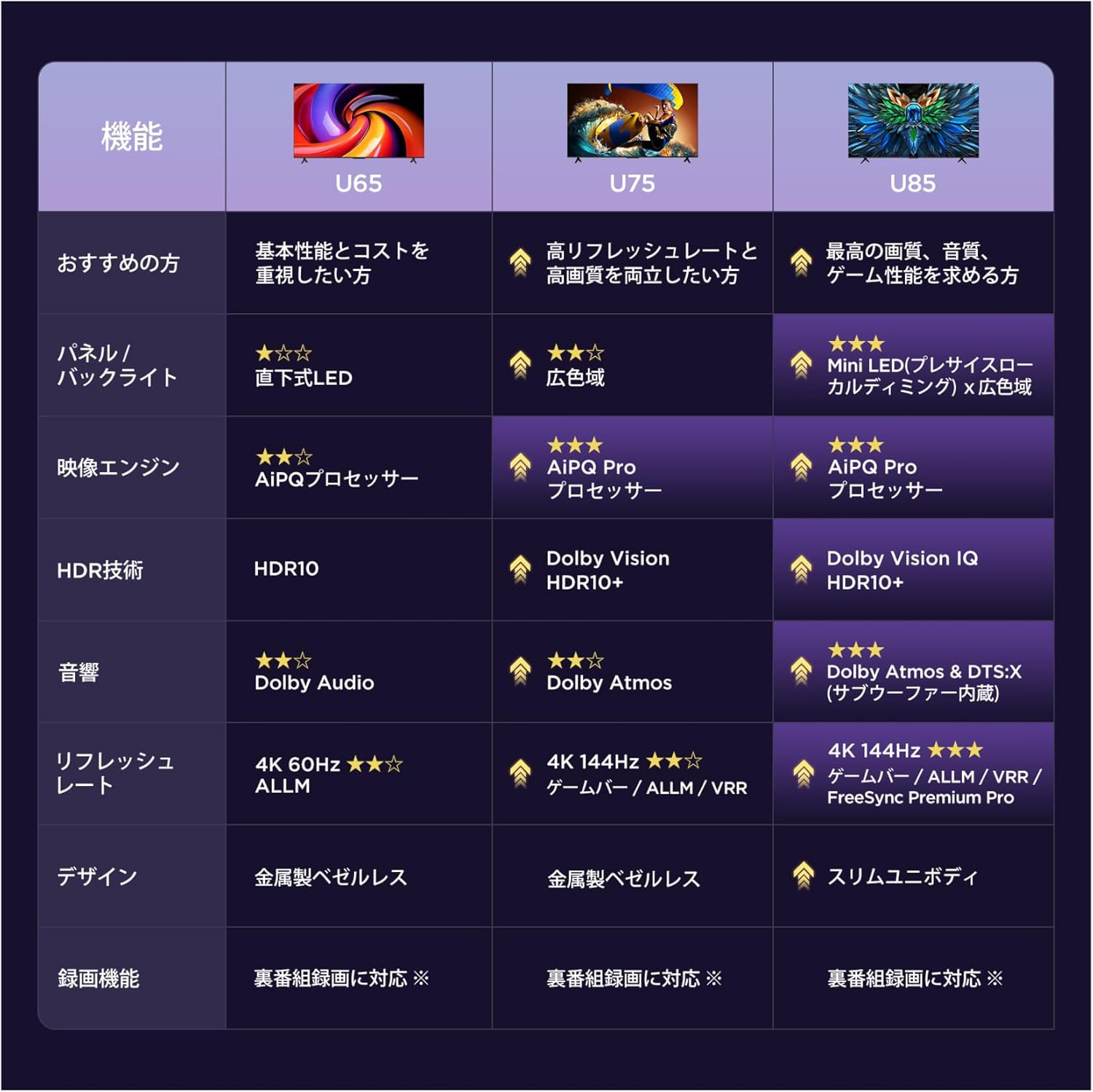
Image: The iFFALCON 50U65 TV with dimensions (Width: 111.1 cm, Height: 68.4 cm, Depth: 25.4 cm) and a diagram showing a recommended viewing distance of approximately 0.9 meters for a 50-inch screen in a 6-8 tatami room.
4.2 Sambungan
Sambungkeun alat anjeun ka TV nganggo palabuhan anu sayogi:
- kakuatan: Sambungkeun kabel kakuatan ka TV jeung stop kontak témbok.
- HDMI: Use HDMI cables to connect external devices such as Blu-ray players, game consoles, or set-top boxes. The TV has 3 HDMI ports.
- USB: Connect USB storage devices for media playback or software updates. The TV has 2 USB ports.
- Antena/Kabel: Sambungkeun anteneu atawa feed TV kabel pikeun saluran siaran.
- Jaringan (Ethernet/Wi-Fi): Connect to your home network via an Ethernet cable or Wi-Fi for internet services.
4.3 Setup Awal
Saatos diaktipkeun heula, TV bakal ngabimbing anjeun dina prosés pangaturan awal:
- Pilihan Basa: Pilih basa anu anjeun pikaresep.
- Sambungan jaringan: Connect to your Wi-Fi network or use an Ethernet cable.
- Asup Akun Google: Asup sareng akun Google anjeun pikeun ngakses fitur sareng aplikasi Google TV.
- Scan Channel: Pilari saluran siaran anu sayogi.
- Setélan Privasi: Adjust privacy settings as desired.
5. Parentah Operasi
5.1 Jauh Jauh
The included remote control allows you to navigate the TV's features. Familiarize yourself with the buttons for power, volume, channel, input selection, and smart TV app shortcuts.
5.2 Fungsi Dasar
- Hurungkeun/Pareuman: Pencét tombol daya dina rémot.
- Penyesuaian volume: Paké tombol Volume Up/Turun.
- Pilihan Saluran: Anggo tombol Saluran Kaluhur/Turun atanapi pad angka.
- Sumber Input: Press the Input button to switch between HDMI, TV, and other sources.
5.3 Fitur Smart TV (Google TV)
Your iFFALCON 50U65 TV runs on Google TV, providing access to a wide range of streaming services and smart features.

Image: The Google TV interface showing recommended content and popular streaming applications like YouTube, Netflix, Prime Video, and Disney+.
- Aplikasi streaming: Access pre-installed apps like Netflix, YouTube, Amazon Prime Video, Hulu, Disney+, and more.
- Voice Search (Hey Google): Press the dedicated voice assistant button on your remote and speak commands to search for content, control smart home devices, or get information.
- Chromecast Built-in & AirPlay 2: Cast content directly from your smartphone or tablet (Android or Apple) to the TV screen.

Image: A child interacting with the TV using the 'Hey Google' voice command, demonstrating the voice search functionality.

Image: An illustration showing how AirPlay 2 and Chromecast built-in allow users to share videos, photos, and music from Apple and Android devices to the TV's large screen.
5.4 Setélan Gambar
The iFFALCON 50U65 features an AiPQ Processor and HDR10 support for enhanced visual quality.

Image: A diagram illustrating the AiPQ Processor, which optimizes image quality at the pixel level using intelligent sensing capabilities.
- Prosesor AiPQ: Automatically adjusts image quality for clarity, color, contrast, and HDR performance.
- HDR10: Provides a wider range of colors and contrast for a more realistic picture.
- MEMC (Estimasi Gerak, Pampasan Gerak): Reduces motion blur and image tearing for smoother visuals, especially in fast-paced scenes.

Image: A side-by-side comparison demonstrating the enhanced detail, brightness, and vibrant colors provided by HDR10 technology compared to a non-HDR image.

Image: A comparison showing a snowboarder with and without MEMC enabled. The image with MEMC shows significantly reduced motion blur and smoother movement.
5.5 Sound Settings (Dolby Audio)
The TV supports Dolby Audio for an immersive sound experience.

Image: An illustration depicting sound waves emanating from the TV and surrounding the viewer, representing the immersive experience of Dolby Audio.
- Dolby Audio: Delivers rich, clear, and detailed sound that fills the room, creating a more engaging audio experience for movies, sports, and music.
- Sistem Speaker: Features a 2.1 channel audio system for enhanced sound output.
5.6 Fitur kaulinan
The iFFALCON 50U65 is equipped with features designed to enhance your gaming experience.

Image: A dynamic scene from a video game displayed on the iFFALCON TV, highlighting the 'Game Master' feature for an optimized gaming experience.
- Master kaulinan: Optimizes display and audio technology for smooth gaming.
- ALLM (Modeu Latency Lemah Otomatis): Otomatis pindah ka mode low-latency lamun konsol game dideteksi, ngurangan input lag.
- Wide Game View: Expands the in-game field of view up to 2x with 21:9 or 32:9 screen ratios.
- Bar kaulinan: Provides quick access to important game-related information and settings during gameplay.
6. Pangropéa
Pikeun mastikeun umur panjang sareng kinerja optimal TV anjeun, turutan tungtunan pangropéa ieu:
- Ngabersihan layar: Gently wipe the screen with a soft, lint-free cloth. For stubborn marks, use a screen-specific cleaner applied to the cloth, not directly to the screen.
- Ngabersihkeun pigura: Anggo lawon anu lembut sareng garing pikeun ngabersihan pigura TV.
- Debu: Sacara rutin lebu bukaan ventilasi pikeun nyegah overheating.
- Kabel listrik: Inspect the power cord for any damage. Do not use if damaged.
- Multi-Eye Care: The TV features low blue light, natural light correction, and flicker-free technology to reduce eye strain.

Gambar: Témbongkeun ilustrasicasing the Multi-Eye Care features, including low blue light, natural light correction, and flicker-free technology, designed for comfortable viewing during movies and games.
7. Cara ngungkulan
Upami anjeun ngalaman masalah sareng TV anjeun, tingal masalah sareng solusi umum ieu:
| Masalah | Solusi anu mungkin |
|---|---|
| Taya kakuatan | Pariksa naha kabel daya disambungkeun pageuh sareng stop kontakna tiasa dianggo. |
| Henteu aya gambar, tapi aya sora | Pastikeun sumber input anu bener dipilih. Pariksa sambungan kabel ka alat éksternal. |
| Henteu aya sora, tapi aya gambar | Pariksa tingkat volume sareng setélan bisu. Pariksa sambungan kabel audio. |
| Kadali jauh teu jalan | Replace batteries. Ensure no obstructions between the remote and TV. |
| Teu bisa nyambung ka Wi-Fi | Pariksa router sareng modem anjeun. Lebetkeun deui kecap akses Wi-Fi. Coba balikan deui TV sareng router. |
| Aplikasi TV Smart henteu dimuat | Check internet connection. Clear app cache or reinstall the app. Update TV software. |
Lamun masalah persists, mangga ngahubungan rojongan customer.
8. Spésifikasi
| Fitur | Rincian |
|---|---|
| Nomer modél | 50U65 |
| Ukuran layar | 50 inci |
| Tipe tampilan | LCD VA |
| Resolusi | 4K Ultra HD |
| Refresh Laju | 60 Hz |
| Rojongan HDR | HDR10 |
| Sistem operasi | Google TV |
| Palabuhan HDMI | 3 |
| palabuhan USB | 2 |
| Konéktipitas Wireless | Wi-Fi, Bluetooth |
| Téhnologi Audio | Dolby Audio, 2.1 Channel Speakers |
| Fitur husus | Chromecast Built-in, Game Mode, AiPQ Processor, MEMC, ALLM, Wide Viewdina Angle |
| Diménsi Produk (W x H x D) | 111.1 cm x 68.4 cm x 25.4 cm |
| Beurat produk | 7.3 kg |
| Konsumsi Daya Taunan | 100 kWh/taun |
| Cocog pikeun dipasang dina témbok | Yes (VESA standard) |
9. Garansi jeung Rojongan
Your iFFALCON 50U65 TV comes with a warranty. Please refer to the included warranty card for specific terms and conditions.
For after-sales support, technical assistance, or repair services, please contact iFFALCON customer support:
- Telepon: 0120-955-517 (Operating hours: 09:00 - 18:00)
- Websitus: https://www.tcl.com/jp/ja/support
iFFALCON provides repair services nationwide in Japan.


