1. Bubuka
Thank you for choosing the pTron Fusion Pro Retro Signature 20W Bluetooth Speaker. This manual provides essential information for the proper setup, operation, and maintenance of your device. Please read it thoroughly before use to ensure optimal performance and longevity.

Gambar 1.1: Hareupeun view of the pTron Fusion Pro Retro Signature Bluetooth Speaker, showcasing its retro design and integrated carry handle.
The Fusion Pro Retro Signature speaker combines a classic aesthetic with modern audio technology, offering 20W dynamic sound through dual drivers, versatile connectivity options, and a portable design for both indoor and outdoor use.
2. Eusi Paket
- pTron Fusion Pro Retro Signature Bluetooth Speaker
- Kabel Ngecas Tipe-C
- Kartu Garansi
3. Tata Letak sareng Kontrol Alat
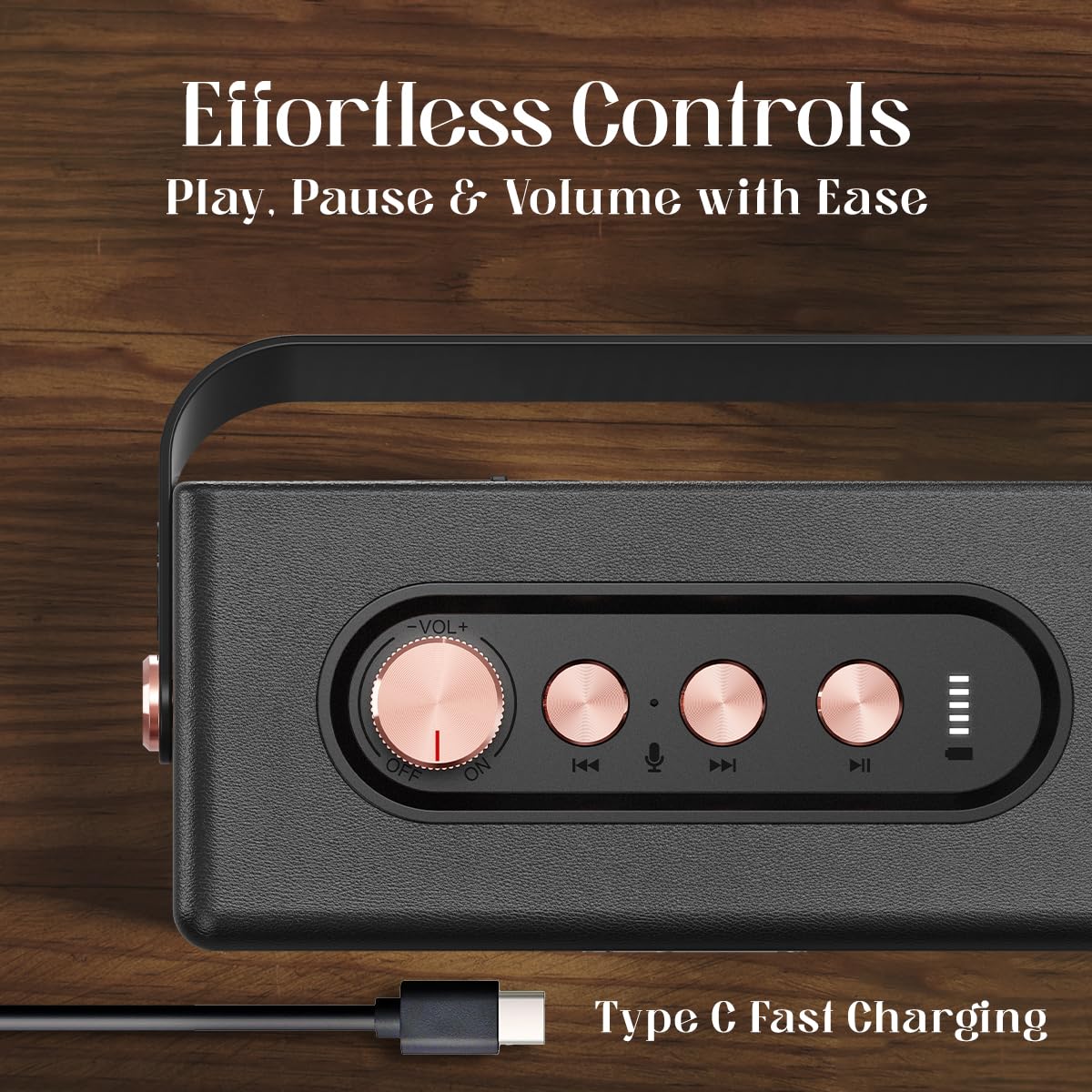
Image 3.1: Top panel controls including the volume knob, previous track, microphone, next track, and play/pause buttons, along with the Type-C charging port.
Kadali Langkungview:
- Jilid Kenop: Rotate to adjust volume. Press and hold to power ON/OFF.
- Tombol Lacak Sateuacanna: Pencét pikeun pindah kana lagu anu sateuacanna.
- Tombol mikropon: Pikeun nelepon handsfree.
- Tombol Lacak salajengna: Pencét pikeun pindah kana lagu salajengna.
- Tombol Puter/Reureuh: Pencét pikeun maénkeun atanapi ngareureuhkeun audio.
- Tipe-C Port: Pikeun ngecas speaker.
4. Setélan
4.1 Ngecas Speaker
- Connect the provided Type-C charging cable to the speaker's Type-C port.
- Connect the other end of the cable to a compatible USB power adapter (DC 5V/1A max.) or a computer's USB port.
- Indikator ngecas bakal hurung. Ngeusi batre pinuh biasana nyandak kirang langkung 2 jam.
- Once fully charged, the indicator light will change or turn off (refer to specific LED behavior in the quick start guide if available).
Catetan: Ensure the speaker is fully charged before first use for optimal battery life.
4.2 Powering on / Pareum
- Pikeun Power ON: Press and hold the Volume Knob for a few seconds until you hear an audible prompt or see the indicator light illuminate.
- Pikeun mareuman: Press and hold the Volume Knob again for a few seconds until you hear an audible prompt or the indicator light turns off.
5. Parentah Operasi
5.1 Nyapasangkeun Bluetooth

Image 5.1: The speaker paired with a smartphone, demonstrating instant Bluetooth v5.3 connectivity for music streaming.
- Ensure the speaker is powered ON and in Bluetooth pairing mode (indicated by a flashing LED light).
- Dina smartphone anjeun, tablet, atawa alat Bluetooth-diaktipkeun sejen, arahkeun ka setelan Bluetooth.
- Milarian pikeun available devices and select "pTron Fusion Pro" from the list.
- Once connected, you will hear an audible confirmation, and the LED indicator will stop flashing.
- The speaker will automatically reconnect to the last paired device when powered on, if the device is within range (up to 10 meters) and Bluetooth is enabled.
5.2 Leres Wireless Stereo (TWS) papasangan

Image 5.2: Two pTron Fusion Pro Retro Signature speakers paired together using the TWS feature for enhanced stereo sound.
To achieve a stereo sound experience, you can pair two pTron Fusion Pro Retro Signature speakers together:
- Pastikeun duanana spiker dihurungkeun sareng henteu nyambung ka alat Bluetooth anu sanés.
- Dina salah sahiji spiker (ieu bakal janten spiker utama), pencét dua kali tombol Puter/Pause. Spiker bakal lebet kana modeu pasangan TWS.
- The two speakers will automatically search for and connect to each other. You will hear an audible confirmation once TWS pairing is successful.
- Now, connect your Bluetooth device to the primary speaker as described in section 5.1. Audio will play simultaneously through both speakers.
5.3 Multi-Play Modes (USB/TF Card)

Image 5.3: The speaker supports multiple playback modes including Bluetooth v5.3, TF Card, and USB playback.
- Puterkeun USB: Selapkeun USB flash drive nu ngandung audio filekana port USB. Spiker bakal otomatis ngadeteksi sareng mimiti muterkeun musik tina drive.
- Playback Kartu TF: Lebetkeun kartu TF (microSD) anu ngandung audio filekana slot kartu TF. Spiker bakal otomatis ngadeteksi sareng mimiti muterkeun musik tina kartu éta.
- To switch between modes, briefly press the Play/Pause button (or refer to specific mode switching instructions if available in a quick start guide).
5.4 Telepon bebas leungeun
When connected to your smartphone via Bluetooth, the speaker can be used for hands-free calls:
- Ngajawab Telepon: Press the Microphone button once.
- Tungtung Telepon: Press the Microphone button once during a call.
- Nolak Telepon: Press and hold the Microphone button for 2 seconds.
6. Pangropéa
- Ngabersihan spéker nganggo kaén anu lemes sareng garing. Ulah make cleaners abrasive atawa pangleyur.
- Hindarkeun ngalaan spéker ka suhu anu ekstrim, sinar panonpoé langsung, atanapi kalembaban anu luhur.
- Do not immerse the speaker in water as it is not waterproof.
- Simpen spéker dina tempat anu tiis sareng garing upami henteu dianggo kanggo waktos anu lami.
- Charge the battery at least once every three months to prevent deep discharge if stored for long durations.
7. Cara ngungkulan
| Masalah | Mungkin Cukang lantaranana | Solusi |
|---|---|---|
| Speaker teu hurung. | batré lemah. | Ngecas spéker pinuh. |
| Taya sora. | Volume low teuing; alat teu disambungkeun; modeu input salah. | Increase volume; ensure Bluetooth is connected or USB/TF card is inserted correctly; switch input mode. |
| Papasangan Bluetooth gagal. | Speaker henteu dina mode papasangan; alat jauh teuing; gangguan. | Ensure speaker is in pairing mode; move device closer (within 10m); turn off other Bluetooth devices. |
| Papasangan TWS gagal. | One or both speakers already connected to another device. | Pegatkeun sambungan duanana spiker tina sagala alat Bluetooth sateuacan nyobian pasangan TWS. |
8. Spésifikasi

Image 8.1: The speaker's internal structure highlighting the 52mm dual drivers responsible for ampkaluaran sora liified.
| Fitur | Rincian |
|---|---|
| Ngaran modél | Fusion |
| Tipe Speaker | Speaker Speaker |
| Téhnologi konektipitas | Bluetooth v5.3, USB, TF Card |
| Mode Kaluaran Audio | Stereo |
| Speaker Maksimum Kaluaran Power | 20 Watt |
| Ukuran Supir Audio | 52 Millimetres (Dual Drivers) |
| Rentang Bluetooth | 10 Méter |
| Batré Rata Kahirupan | 8 Hours (up to 10 hours depending on usage) |
| Waktu Ngecas | 2 Jam |
| Jenis Batré | Lithium Ion (1 x 9V battery included) |
| Bahan | Acrylonitrile Butadiene Styrene (ABS) |
| Dimensi produk | 7D x 16W x 9H Sentimeter |
| Item Beurat | 500 gram |
| Tingkat Résistansi Cai | Henteu Tahan Cai |
| Métode kontrol | Tombol Push, kenop Rotary |
| Fitur husus | Hi-Res Audio, Portable, Stereo Pairing (TWS), USB Port |
9. Garansi jeung Rojongan
9.1 Émbaran jaminan
The pTron Fusion Pro Retro Signature Bluetooth Speaker comes with a 1-Taun Garansi Produsén from the date of purchase, covering manufacturing defects only. Please retain your purchase receipt for warranty claims.
9.2 Rojongan Palanggan
Kanggo patarosan, bantosan téknis, atanapi klaim garansi, mangga ngahubungi dukungan palanggan pTron:
- Telepon: 040-67138888
- Surélék: rojongan@ptron.in
- Pabrikan: Palred Electronics Pvt. Ltd., SY.NO. 56, LANTAI KA-1, GUNDLAPOCHAMPDésa Ally, Gunung Taman Téknologi, TSIIC-IALA NACHARAM, Hyderabad - 500076, Telangana, India


