Bubuka
This user manual provides comprehensive instructions for the setup, operation, maintenance, and troubleshooting of your THRUSTMASTER T598 Direct Drive Racing Wheel. Designed for an immersive racing experience, this wheel features next-generation Direct Axial Drive Technology and powerful Force Feedback, compatible with PlayStation 5, PlayStation 4, and PC platforms. Please read this manual carefully before using your device to ensure proper functionality and safety.
Émbaran Kasalametan
Always observe the following safety precautions to prevent damage to the device or personal injury:
- Jauhkeun alat ieu tina kalembaban, lebu, sareng suhu anu ekstrim.
- Ulah ngabongkar atanapi nyobian ngalereskeun alat sorangan. Rujuk sadayana jasa ka tanaga anu mumpuni.
- Paké ngan adaptor kakuatan disadiakeun kalawan alat.
- Ensure proper ventilation around the wheelbase during operation to prevent overheating.
- Avoid prolonged use at maximum force feedback settings to prevent fatigue or discomfort.
Eusi pakét
Pastikeun yén sadaya komponén aya dina pakét anjeun:
- THRUSTMASTER T598 Direct Drive Wheel Base
- Detachable Racing Wheel
- Pedal Set
- Adaptor Daya sareng Kabel
- Sistem Pemasangan (Clamp or Hard-Mount Screws)
- Kabel Sambungan USB
- Manual pangguna (dokumén ieu)

Image: The complete THRUSTMASTER T598 racing wheel setup, including the direct drive wheelbase, the detachable steering wheel, and the pedal set.
Disetél
1. Ngapasangkeun Roda Balap
- Align the quick-release mechanism on the racing wheel with the shaft on the wheelbase.
- Dorong roda pageuh kana aci nepi ka ngaklik dina tempatna.
- Tighten the locking screw (if present) to secure the wheel.

Image: Close-up of the THRUSTMASTER T598 racing wheel, highlighting its design and the central logo, indicating it's properly attached to the wheelbase.
2. Masang Jarak Sumbu Roda
The wheelbase can be mounted using the included clamp system or by hard-mounting to a cockpit.
Clamp Sistim:
- Gantelkeun clamp to the underside of the wheelbase.
- Position the wheelbase on a sturdy desk or table.
- Kencangkeun clamp screw until the wheelbase is securely fastened.
Hard-Mounting:
- Refer to your racing cockpit's instructions for compatible mounting points.
- Use appropriate screws (not always included) to secure the wheelbase to the cockpit.
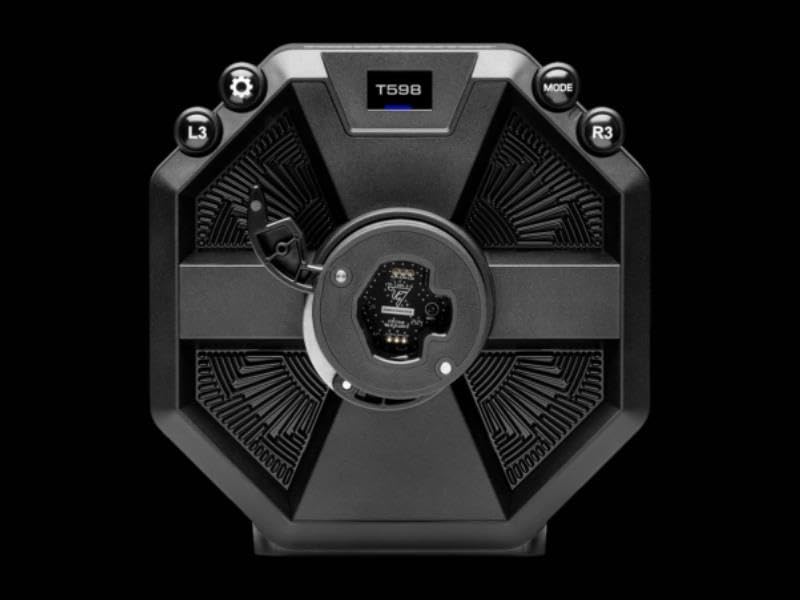
Gambar: Top view of the THRUSTMASTER T598 wheelbase, showing the display and various control buttons (L3, R3, Mode, Settings gear icon) for configuration.
3. Nyambungkeun Set Pedal
- Connect the pedal set cable to the designated port on the rear of the wheelbase.
- Pastikeun sambunganna aman.

Image: The THRUSTMASTER pedal set, featuring two pedals mounted on a sturdy base with the Thrustmaster logo, designed for realistic racing simulation.
4. Daya sareng Sambungan USB
- Connect the power adapter to the wheelbase and then to a wall outlet.
- Connect the USB cable from the wheelbase to an available USB port on your PlayStation console (PS4/PS5) or PC.
- The wheelbase will perform a self-calibration sequence upon power-on. Do not touch the wheel during this process.
Parentah Operasi
Kontrol dasar sareng tampilan
The T598 features an integrated display and various buttons for quick adjustments and status monitoring.

Image: Close-up of the THRUSTMASTER T598 wheelbase display, showing "FFB1 MASTER 100%" and control buttons (L3, R3), indicating force feedback master settings.

Image: Close-up of the THRUSTMASTER T598 wheelbase display, showing "FFB3 GEAR JOLT HIGH" and control buttons (L3, R3), indicating specific force feedback effects.
Use the L3 and R3 buttons, along with the MODE and Settings buttons, to navigate the display menu and adjust settings such as Force Feedback strength, vibration effects, and steering angle.
Force Feedback (FFB)
The T598 utilizes Direct Axial Drive Technology to deliver precise and powerful Force Feedback. This technology directly transmits motor forces to the steering wheel, providing realistic sensations of road texture, impacts, and vehicle dynamics.

Gambar: Hiji ngabeledug view diagram of the THRUSTMASTER T598 direct drive mechanism, illustrating the internal components responsible for generating force feedback, including the motor and drive shaft.
Adjust FFB settings via the wheelbase display or through the Thrustmaster control panel on PC for optimal experience in different racing titles.
Kasaluyuan
The THRUSTMASTER T598 is fully compatible with:
- PlayStation 5 (PS5)
- PlayStation 4 (PS4)
- PC (Windows 10/11)
Ensure your console or PC operating system is up to date. For PC, download the latest drivers and firmware from the official Thrustmaster support websitus.
Pangropéa
- beberesih: Use a soft, dry cloth to clean the wheel and wheelbase. Avoid abrasive cleaners or solvents.
- Panyimpenan: When not in use, store the device in a cool, dry place, away from direct sunlight.
- Pembaruan firmware: Pariksa dukungan resmi Thrustmaster sacara rutin website for firmware updates. Keeping your device's firmware up to date ensures optimal performance and compatibility with new games and systems.
Pamérésan masalah
| Masalah | Solusi anu mungkin |
|---|---|
| Wheel not recognized by console/PC. |
|
| No Force Feedback or weak FFB. |
|
| Wheel calibration issues. |
|
spésifikasi
| Fitur | Rincian |
|---|---|
| Ngaran produk | THRUSTMASTER T598 Direct Drive Racing Wheel |
| Nomer modél | T598 |
| merek | Tukang dorong |
| Force Feedback Technology | Langsung Axial Girang |
| Kasaluyuan | PlayStation 5, PlayStation 4, PC |
| Dimensi produk | 12.6 x 17.72 x 13.78 inches (Wheelbase and Wheel) |
| Item Beurat | Kurang leuwih 24.5 pon |
Garansi sareng Rojongan
For warranty information and technical support, please visit the official Thrustmaster support websitus atanapi ngahubungan layanan palanggan maranéhna. Simpen bukti pameseran anjeun pikeun klaim garansi.
Resmi Thrustmaster Websitus: support.thrustmaster.com


