1. Bubuka jeung Leuwihview
The Grandstream HT812 V2 is an advanced 2-port Analog Telephone Adapter (ATA) designed to provide high-quality voice communication over an IP network. It features two FXS ports for connecting traditional analog telephones or fax machines and an integrated Gigabit NAT router for network connectivity. This device is built on Grandstream's established SIP ATA/gateway technology, ensuring reliable performance and robust security for both home and office environments.
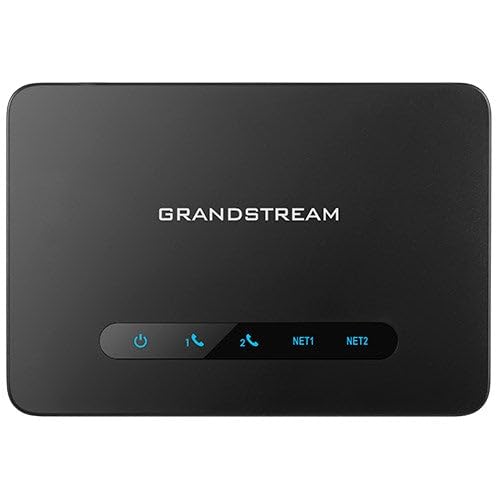
Gambar 1: Hareupeun view of the Grandstream HT812 V2 VoIP ATA, showing its compact design and indicator lights.
2. Naon dina Box
Saatos muka bungkusan, mangga pariksa yén sadaya komponén aya sareng dina kaayaan anu saé:
- Grandstream HT812 V2 Unit
- Catu daya Universal
- Kabel Ethernet
- Guide Instalasi Gancang
Upami aya barang anu leungit atanapi ruksak, mangga ngahubungi padagang anjeun kanggo bantosan.
3. Fitur Produk
The HT812 V2 offers a range of features designed for efficient and secure VoIP communication:
- Ngarojong 2 SIP profiles jeung 2 palabuhan FXS for connecting analog phones or fax machines.
- Features strong énkripsi AES with a unique security certificate per unit, enhancing communication security.
- Ngarojong T.38 Fax for reliable Fax-over-IP functionality.
- Ngawengku a high-performance NAT router for efficient network management.
- Aktipkeun Konferensi sora 3 arah per port, facilitating multi-party calls.
- Nganteurkeun exceptional voice quality with wideband HD codec support.
4. Parentah Setup
Follow these steps to set up your Grandstream HT812 V2:
- Nyambung ka Daya: Plug the universal power supply into the HT812 V2's power port and then into a power outlet.
- Nyambung kana Jaringan:
- Sambungkeun hiji tungtung kabel Ethernet ka Palabuan Wan on the HT812 V2.
- Connect the other end of the Ethernet cable to your internet router or modem.
- (Optional) If using the integrated router functionality, connect your computer or other network devices to the palabuhan LAN on the HT812 V2.
- Sambungkeun Alat Analog: Plug your analog telephone(s) or fax machine(s) into the FXS1 jeung/atawa FXS2 ports on the HT812 V2 using standard telephone cables.
- Daya Hurung: Ensure the device powers on. The LED indicators on the front panel will illuminate to show status. Refer to the Quick Installation Guide for specific LED behavior.
- Aksés Web panganteur: To configure advanced settings, access the device's web panganteur ku ngetikkeun alamat IP na kana a web browser. The default IP address can usually be found in the Quick Installation Guide or obtained via an IVR prompt (dial *** from a connected analog phone).
5. Parentah Operasi
Once the HT812 V2 is successfully set up and configured with your SIP provider, you can begin making and receiving calls:
- Nelepon: Pick up the connected analog phone, wait for a dial tone, and dial the desired phone number.
- Narima Telepon: The connected analog phone will ring for incoming calls. Pick up the handset to answer.
- Konferensi 3 Arah: During an active call, press the Flash button on your analog phone, dial the third party's number, and once connected, press Flash again to bridge the calls.
- Fax: Connect your T.38 compatible fax machine to an FXS port. Ensure T.38 support is enabled and configured on both the ATA and your SIP provider for reliable fax transmission.
- Surat sora: Access voicemail by dialing the designated voicemail access number provided by your SIP service provider.
6. Pangropéa
To ensure optimal performance and longevity of your HT812 V2, consider the following maintenance tips:
- Pembaruan firmware: Regularly check the Grandstream website for firmware updates. Keeping your device's firmware up-to-date ensures access to the latest features, security patches, and performance improvements.
- beberesih: Anggo lawon anu lemes sareng garing pikeun ngabersihkeun bagian luar alat. Ulah nganggo pembersih cair atanapi aerosol langsung kana alat éta.
- panempatan: Place the device in a well-ventilated area, away from direct sunlight, heat sources, and moisture.
- Konfigurasi Nyadangkeun: Periodically back up your device's configuration settings through the web panganteur. Ieu ngamungkinkeun pikeun restorasi gancang bisi reset pabrik atawa ngagantian alat.
7. Cara ngungkulan
If you encounter issues with your HT812 V2, try the following troubleshooting steps:
- Teu aya Nada Telepon:
- Ensure the analog phone is correctly connected to an FXS port.
- Verify the HT812 V2 is powered on and connected to the internet.
- Check your SIP registration status via the web panganteur.
- Teu Bisa Nelepon/Narima Telepon:
- Pastikeun sambungan internét anjeun aktip sareng stabil.
- Check SIP account credentials and registration status in the web panganteur.
- Ensure firewall settings are not blocking VoIP traffic (SIP port 5060, RTP ports).
- Kualitas Sora Goréng:
- Check your internet bandwidth and latency. VoIP requires a stable connection.
- Ensure Quality of Service (QoS) is properly configured on your router and the HT812 V2 to prioritize voice traffic.
- Try a different Ethernet cable or FXS port.
- Alat teu ngaréspon:
- Perform a power cycle by unplugging the power adapter, waiting 10 seconds, and plugging it back in.
- If the issue persists, a factory reset may be necessary (refer to the Quick Installation Guide for instructions). Note: A factory reset will erase all configurations.
For further assistance, consult the full user manual or contact Grandstream technical support.
8. Spésifikasi
| Atribut | Rincian |
|---|---|
| Nomer modél | HT812 V2 |
| Dimensi produk | 5.12 x 3.54 x 1.18 inci |
| Item Beurat | 12 ons |
| Palabuhan FXS | 2 |
| SIP Profiles | 2 |
| Router NAT | Integrated Gigabit |
| Dukungan Fax | T.38 Fax-over-IP |
| Énkripsi | AES with unique security certificate per unit |
| Sora Codec | Wideband HD codec |
| Produsén | Grandstream |
| Tanggal Kahiji Sadia | 30 Januari 2025 |
9. Garansi jeung Rojongan
For warranty information, please refer to the documentation included with your product or visit the official Grandstream website. Technical support can be accessed through Grandstream's support portal, where you can find FAQs, knowledge base articles, and contact information for direct assistance.
It is recommended to register your product on the Grandstream websitus pikeun nampi apdet sareng bewara dukungan.