1. Bubuka
This manual provides detailed instructions for the installation, operation, and maintenance of your Bolide BTG-1909-8MP (4K) H.265 IR Eyeball Camera. Please read this manual thoroughly before using the product to ensure proper setup and functionality. This camera is designed for high-performance surveillance, offering ultra-high-definition video, advanced AI detection, and robust weather resistance.
2. Émbaran Kasalametan
- Ensure all power connections are secure and meet the camera's specifications (POE or 12VDC).
- Do not expose the camera to extreme temperatures outside its operating range.
- Hindarkeun lénsa tina paparan langsung ka sumber cahaya anu kuat, sapertos panonpoé, sabab ieu tiasa ngaruksak sénsor gambar.
- Nanganan kaméra kalayan ati-ati pikeun nyegah karuksakan fisik.
- Installation should be performed by qualified personnel if working with electrical wiring.
3. Eusi Paket
Pastikeun yén sadaya item aya dina pakét anjeun:
- Bolide BTG-1909-8MP (4K) H.265 IR Eyeball Camera
- Pemasangan Screws sareng Colokan Tembok
- Pituduh Mimitian Gancang (upami aya)
4. Produk Langkungview
The Bolide BTG-1909 is an 8MP (4K) IR Eyeball Camera featuring a 2.8mm fixed lens for wide-angle coverage. It supports H.265 compression for efficient data management and includes advanced AI capabilities for human and vehicle detection. The camera is equipped with a built-in microphone for audio monitoring and an IR illuminator for night vision up to 82 feet. Its IP67 weatherproof rating ensures durability in various outdoor conditions.
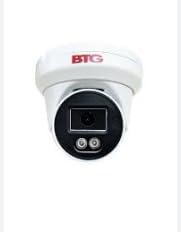
Gambar: Hareupeun view of the Bolide BTG-1909-8MP Eyeball Camera, showing the lens and IR illuminators.
5. Setélan
5.1 Masang kaméra
The BTG-1909 is designed for ceiling mount installation. Choose a suitable location that provides the desired viewing angle and is within reach of power and network connections.
- Secure the mounting template (if provided) or mark the drill holes on the ceiling.
- Drill pilot holes according to the marks.
- Lebetkeun colokan témbok kana liang anu dibor.
- Sejajarkeun dasar kaméra sareng liangna teras amankeun nganggo sekrup anu disayogikeun.
- Saluyukeun sudut kaméra pikeun sinyalna optimal.
5.2 Daya sareng Sambungan Jaringan
The camera supports Power over Ethernet (PoE) or 12VDC power.
- Sambungan PoE: Connect an Ethernet cable from a PoE-enabled switch or NVR directly to the camera's RJ45 port. This provides both power and data.
- 12VDC Connection: If not using PoE, connect a 12VDC power adapter (not included) to the camera's power input port. Then, connect an Ethernet cable from your network router/switch to the camera's RJ45 port for data.
- Sambungan Wi-Fi: For wireless connectivity, ensure the camera is initially connected via Ethernet for configuration. Access the camera's web interface or app to configure Wi-Fi settings.
5.3 Pamasangan Kartu Micro SD
The camera features a micro SD slot for local storage.
- Locate the micro SD card slot on the camera (refer to the product diagram if available).
- Gently insert a compatible micro SD card (up to 512GB) into the slot until it clicks into place.
- Format the SD card via the camera's web interface or mobile application for proper recording.
6. Nyuping
6.1 Konfigurasi Awal
After connecting the camera, use the manufacturer's provided software or mobile application to discover and perform initial setup. This typically involves setting a strong password, configuring network settings, and updating firmware.
6.2 Ngaksés Kaméra
- Aplikasi Mobile: Download the official Bolide surveillance app to your smartphone. Add the camera using its QR code or IP address.
- Web Browser: Enter the camera's IP address into a web browser on a computer connected to the same network. Log in with your credentials.
- NVR/VMS: Integrate the camera with a compatible Network Video Recorder (NVR) or Video Management System (VMS) for centralized monitoring and recording.
6.3 Fitur jeung Fungsi konci
- Résolusi 8MP (4K): View and record ultra-high-definition video. Adjust resolution settings in the camera's interface if needed.
- AI Manusa/Deteksi Kandaraan: Enable and configure AI detection zones and sensitivity settings to receive accurate alerts for human and vehicle presence.
- IR Peuting Visi: The camera automatically switches to infrared mode in low-light conditions, providing clear black-and-white video up to 82 feet.
- Mikropon internal: Enable audio recording in the camera settings to capture sound within the camera's vicinity.
- Komprési H.265: This advanced compression technology optimizes storage and bandwidth usage without compromising video quality.
7. Pangropéa
- beberesih: Anggo lawon anu lemes sareng garing pikeun ngabersihkeun lénsa sareng awak kaméra. Pikeun kokotor anu bandel, usap sakedikamp lawon bisa dipaké, tapi ulah make bahan kimia anu kasar.
- Pembaruan firmware: Rutin pariksa produsén urang websitus pikeun apdet firmware. Ngamutahirkeun firmware tiasa ningkatkeun kinerja, nambihan fitur énggal, sareng ningkatkeun kaamanan.
- Manajemén Panyimpenan: Périodik ulangview dirékam footage and manage storage on the micro SD card or NVR to ensure continuous recording.
- Inspeksi Fisik: Periodically inspect the camera's mounting and cables for any signs of wear or damage, especially for outdoor installations.
8. Cara ngungkulan
- Henteu aya kakuatan: Check power connections (PoE or 12VDC adapter). Ensure the power source is active.
- Henteu aya Pidéo / Offline: Verify network cable connection. Check IP address settings. Ensure the camera is powered on. Restart the camera and network devices.
- Kualitas Gambar goréng: Clean the lens. Check for obstructions. Ensure sufficient lighting. Adjust resolution settings in the camera interface.
- AI Detection Not Working: Verify AI detection settings are enabled and configured correctly (detection zones, sensitivity). Ensure firmware is up to date.
- Cannot Access SD Card: Ensure the SD card is inserted correctly and formatted. Try a different compatible SD card.
9. Spésifikasi
| Fitur | Spésifikasi |
|---|---|
| Modél | BTG-1909 |
| Resolusi | 8MP (4K) |
| Lensa | 2.8mm lensa Maneuh |
| Komprési Video | H.265/H.264 |
| Sumber Daya | PoE, 12VDC |
| Fitur AI | Deteksi Manusa/Kandaraan |
| Jarak IR | Nepi ka 82ft |
| Audio | Diwangun-di Mic |
| Panyimpenan | Slot Micro SD (nepi ka 512GB) |
| Résistansi Cuaca | IP67 |
| Konektipitas | Kabel (Ethernet), Wi-Fi |
| Tipe Pamasangan | Gunung siling |
| Ukuran (L x W x H) | 4.1 x 3.3 x 3.3 inci |
| Beurat | 1 pon |
10. Garansi jeung Rojongan
For warranty information and technical support, please refer to the documentation included with your purchase or visit the official Bolide websitus. Simpen resi pameseran anjeun salaku bukti pameseran pikeun klaim garansi.


