Bubuka
Thank you for choosing the BOGASING Era S9 Pro Bluetooth Speaker. This manual provides essential information for setting up, operating, and maintaining your speaker to ensure optimal performance and longevity. Please read this manual thoroughly before using the product.
Produk Leuwihview
The BOGASING Era S9 Pro is a portable Bluetooth speaker designed to deliver detailed and dynamic sound. It features a 2-channel audio system, long battery life, and multiple connectivity options.
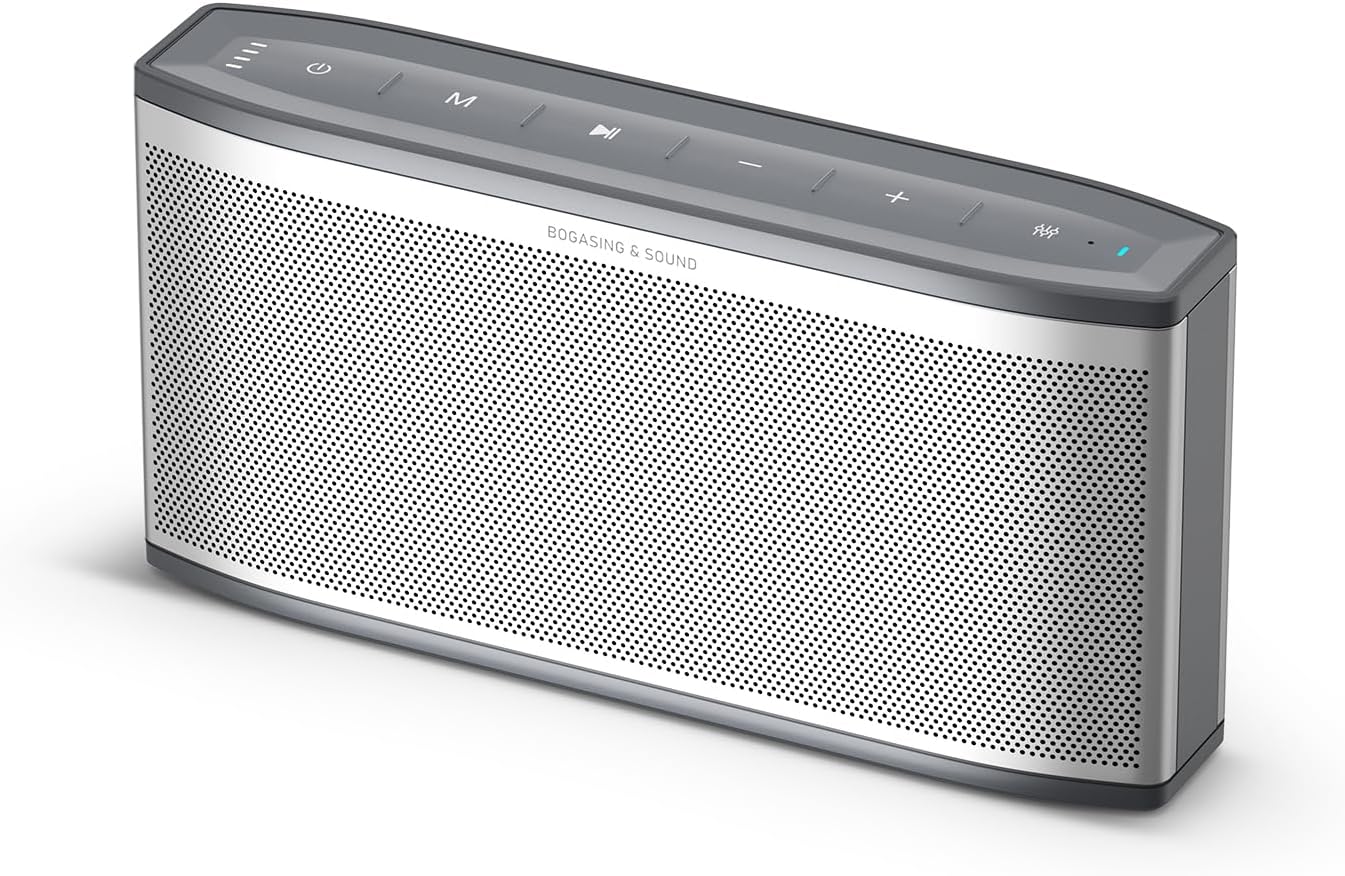
Figure 1: BOGASING Era S9 Pro Speaker. This image displays the speaker's sleek silver design with its top-mounted control buttons and perforated front grille.
Fitur konci:
- Enhanced Audio System: Features a 2-way system with a large-diameter driver, silk dome tweeter, and dual passive radiators for rich bass and clear details.
- Dipanjangkeun Playtime: Up to 48 hours of continuous music playback on a single charge.
- Desain awét: High-quality metal mesh grilles and acoustic mesh fabric for improved frequency response and robust construction.
- Sababaraha Balukar Sora: Choose between Super Bass, Vocal, and 3D Stereo modes to suit your listening preference.
- Stereo Nirkabel Sejati (TWS): Pair two Era S9 Pro speakers for an immersive, wide soundstage.
- Konektipitas canggih: Bluetooth 5.3 for stable wireless connection, supports TF card, USB-C, and AUX input.
- Mikropon internal: Ngamungkinkeun nelepon tanpa nganggo leungeun.
Eusi pakét
Mangga parios pakét kanggo barang-barang ieu:
- BOGASING Era S9 Pro Bluetooth Speaker
- Kabel Ngecas USB-C
- Kabel AUX
- Manual pangguna (dokumén ieu)
If any items are missing or damaged, please contact BOGASING customer service.
Disetél
1. Ngecas Speaker
Before first use, fully charge the speaker. Connect the provided USB-C cable to the speaker's charging port and the other end to a USB power adapter (not included) or a computer's USB port.
- The LED indicator light on the speaker will show charging status.
- A full charge provides up to 48 hours of playtime, depending on volume and usage.

Figure 2: Connectivity Ports and LED Indicator. This image highlights the TF card slot, USB-C charging port, AUX input, and the LED indicator light on the speaker.
2. Powering on / Pareum
Press and hold the power button on the top panel of the speaker to turn it on or off. You will hear an audible prompt indicating the power status.
Parentah Operasi
1. Papasangan Bluetooth
- Turn on the Era S9 Pro speaker. It will automatically enter Bluetooth pairing mode, indicated by a flashing LED light.
- Dina alat anjeun (smartphone, tablet, laptop), aktipkeun Bluetooth sareng milarian alat anu sayogi.
- Select "BOGASING Era S9 Pro" from the list of devices.
- Once connected, the LED light will become solid, and you will hear a confirmation sound.
Spiker bakal otomatis nyambung deui ka alat anu terakhir dipasangkeun nalika dihurungkeun, upami alatna aya dina jangkauan sareng Bluetooth diaktipkeun.
2. Maénkeun Musik
- Mode Bluetooth: After successful pairing, play music from your connected device. Use the speaker's volume buttons (+/-) to adjust volume, and the play/pause button to control playback.
- Mode Kartu TF: Selapkeun kartu TF (microSD) sareng audio files kana slot kartu TF. Speaker bakal otomatis pindah ka modeu kartu TF tur mimitian playback.
- Mode AUX: Connect your audio device to the speaker's AUX input using the provided 3.5mm AUX cable. The speaker will automatically switch to AUX mode.
3. Sound Effect Modes
The Era S9 Pro offers three distinct sound modes. Press the EQ button on the top panel to cycle through them:
- Bass anu saé: Enhances low frequencies for a powerful bass experience.
- Vokal: Optimizes mid-range frequencies for clear vocal reproduction.
- Stereo 3D: Creates a wider, more immersive soundstage.

Figure 3: Three Sound Effect Modes. The speaker is shown in a casual setting, emphasizing its versatility for different audio preferences.
4. Leres Wireless Stereo (TWS) papasangan
To achieve a true wireless stereo experience, you can pair two BOGASING Era S9 Pro speakers:
- Ensure both Era S9 Pro speakers are powered on and not connected to any Bluetooth device.
- On one speaker (this will be the primary speaker), press and hold the TWS button (often indicated by two interlocking circles or a similar icon) until you hear a prompt.
- Spéker primér bakal milarian spéker sékundér. Sakali disambungkeun, anjeun bakal ngadéngé sora konfirmasi, sarta indikator LED dina duanana speaker bakal robah pikeun nunjukkeun mode TWS.
- Now, connect your device to the primary speaker via Bluetooth as described in "Bluetooth Pairing" (Step 1).
- Audio ayeuna bakal diputer dina stereo ngaliwatan duanana speaker.

Figure 4: True Wireless Stereo Setup. This image demonstrates how two speakers can be positioned to create an immersive stereo sound experience.
5. Nelepon Hands-Free
When connected via Bluetooth to your smartphone, the built-in microphone allows you to answer or end calls directly from the speaker.
- Ngajawab / mungkas Telepon: Pencét tombol Play / Reureuh sakali.
- Nolak Telepon: Pencét jeung tahan tombol Play / Reureuh.
Pangropéa
- beberesih: Anggo kaén anu garing sareng lemes pikeun ngabersihan permukaan spéker. Ulah make cleaners abrasive, alkohol, atawa pangleyur kimiawi séjén, sabab ieu bisa ngaruksak finish.
- Panyimpenan: Simpen spéker dina tempat anu tiis sareng garing jauh tina sinar panonpoé langsung sareng suhu anu ekstrim.
- Perawatan batré: Pikeun ngahémat umur batré, eusian pinuh ku speaker sahenteuna tilu bulan sakali upami henteu dianggo rutin. Ulah sering ngosongkeun batréna.
- Tahan cai: The speaker is waterproof (IPX7 rated). While it can withstand immersion in water up to 1 meter for 30 minutes, it is not designed for continuous underwater use. Ensure charging ports are dry before charging.
Pamérésan masalah
| Masalah | Mungkin Cukang lantaranana | Solusi |
|---|---|---|
| Speaker teu hurung. | Batré lemah atawa béak. | Cas speaker sapinuhna nganggo kabel USB-C anu disayogikeun. |
| Teu tiasa dipasangkeun sareng alat Bluetooth. | Speaker is not in pairing mode; device's Bluetooth is off; speaker is already connected to another device; device is too far. | Ensure speaker is in pairing mode (flashing LED). Turn on Bluetooth on your device. Disconnect from other devices. Move device closer to speaker (within 10 meters). |
| Taya sora atawa volume low. | Volume on speaker or device is too low; incorrect input mode; connection issue. | Increase volume on both speaker and connected device. Ensure correct input mode (Bluetooth, TF, AUX). Re-pair Bluetooth or re-insert cables. |
| Distorsi sora. | Volume is too high; audio source quality is poor; speaker is too far from device. | Reduce volume. Try a different audio source. Move device closer to speaker. |
| Papasangan TWS gagal. | Speaker jauh teuing; hiji spiker geus dipasangkeun ka hiji alat. | Pastikeun kadua spiker padeukeut sareng henteu nyambung ka alat Bluetooth anu sanés sateuacan ngamimitian pasangan TWS. |
spésifikasi
| Fitur | Rincian |
|---|---|
| Ngaran modél | Era S9 Pro |
| merek | BOGASING |
| Téhnologi konektipitas | Bluetooth 5.3, TF Card, AUX |
| Tipe Speaker | Portable Bluetooth Speaker (2-Channel Audio) |
| Speaker Maksimum Kaluaran Power | 50 Watt |
| Réspon Frékuénsi | 20 KHz (wates luhur, khas pikeun rentang pinuh) |
| Waktu maén | Up to 48 hours (at 10-30% volume) |
| Sumber Daya | Batré Powered (1 batré Litium Ion kaasup) |
| Bahan | logam |
| Warna | pérak |
| Ukuran produk (D x W x H) | 2.55" x 11.66" x 4.33" |
| Item Beurat | 0.88 Kilogram (1.94 pon) |
| Peunteun waterproof | IPX7 |
| Fitur husus | Built-in Microphone, Hi-Res Audio, EQ Sound Modes (Super Bass, Vocal, 3D Stereo), True Wireless Stereo (TWS) |
Garansi sareng Rojongan
Émbaran jaminan
BOGASING provides an 18-garansi sasih for the Era S9 Pro speaker. This warranty covers manufacturing defects and ensures professional after-sales service. Please retain your proof of purchase for warranty claims.
Rojongan Palanggan
If you have any questions or require assistance with your BOGASING Era S9 Pro speaker, please contact our customer service team. We aim to resolve your inquiries within 24 hours.
How to contact BOGASING customer service:
- Go to your order history on the platform where you purchased the product.
- Find the BOGASING order for your Era S9 Pro speaker.
- Select your order and choose the relevant topic from the displayed options (e.g., "Product Support," "Return Item," etc.).
- Select "Contact us" to send a message to our support team.
For more information, you may also visit the official BOGASING store page: BOGASINToko G


