1. Bubuka
This manual provides detailed instructions for the operation and maintenance of your BOGASING Era S9 Pro Bluetooth Speaker. Please read this manual thoroughly before use to ensure proper functionality and to maximize your listening experience.
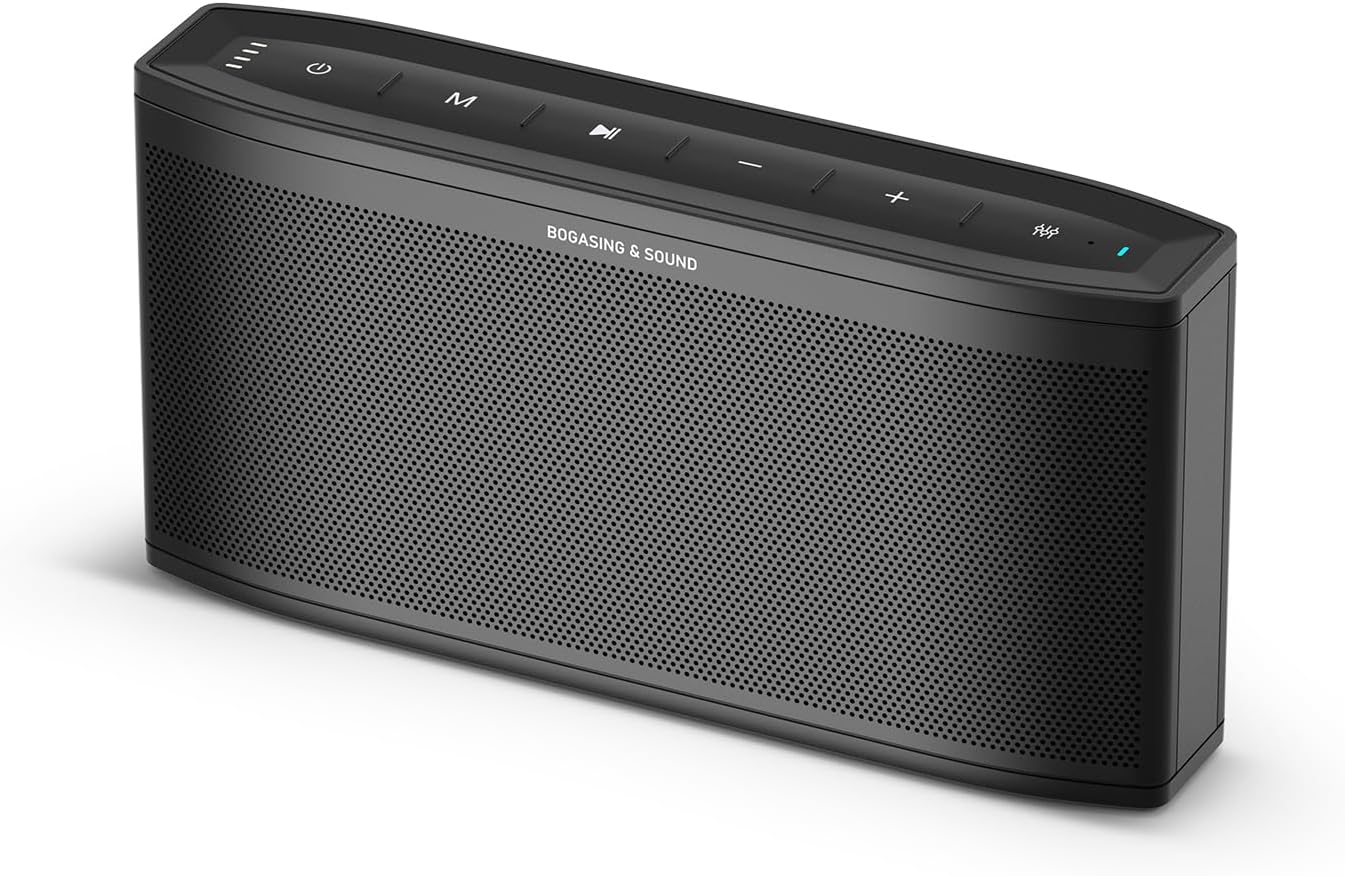
Figure 1: BOGASING Era S9 Pro Bluetooth Speaker, front view.
2. Fitur konci
- Kinerja Audio anu Ditingkatkeun: Features a 2-way system with a large-diameter driver, silk dome tweeter, and dual passive radiators for rich bass and clear audio details.
- Dipanjangkeun Playtime: Offers up to 48 hours of continuous music playback on a single charge.
- Desain Premium: Constructed with high-quality metal mesh grilles and acoustic mesh fabric for improved frequency response and a sleek aesthetic.
- Sababaraha Modeu Sora: Choose from Super Bass, Vocal, and 3D Stereo sound effects to suit your preferences.
- Stereo Nirkabel Sejati (TWS): Pair two Era S9 Pro speakers for an immersive, wide soundstage.
- Konektipitas serbaguna: Equipped with Bluetooth 5.3 for stable wireless connection, and supports TF card, USB-C, and AUX inputs.
- Mikropon internal: Ngamungkinkeun nelepon tanpa nganggo leungeun.
3. Eusi Paket
Mangga parios eusi pakét nalika unboxing:
- BOGASING Era S9 Pro Bluetooth Speaker
- Kabel Ngecas USB-C
- Kabel AUX
- Manual pangguna (dokumén ieu)
4. Kontrol jeung Indikator

Figure 2: Top panel controls and LED indicator light.
The speaker features intuitive controls located on the top panel and various input ports on the rear.
- Tombol Daya: Pencét jeung tahan pikeun mareuman/nonaktipkeun.
- Tombol Mode (M): Short press to switch between Bluetooth, TF Card, and AUX modes.
- Tombol Puter/Reureuh: Pencét pikeun maénkeun atanapi ngareureuhkeun audio.
- Volume Naik (+): Ningkatkeun volume.
- Volume Turun (-): Ngurangan volume.
- Tombol EQ: Cycle through Super Bass, Vocal, and 3D Stereo sound modes. The LED indicator will change color to reflect the selected mode.
- Lampu Indikator LED: Displays power status, battery level, and current EQ mode.

Figure 3: Rear connectivity ports including TF, Type-C, and AUX.
5. Setélan
5.1 Ngecas Speaker
Before first use, fully charge the speaker. Connect the provided USB-C cable to the speaker's Type-C port and the other end to a USB power adapter (not included) or a computer's USB port. The LED indicator will show charging status and turn off when fully charged.
5.2 Powering on / Pareum
- Pikeun ngahurungkeun, pencét jeung tahan tombol Daya nepi ka indikator LED hurung.
- Pikeun mareuman, pencét sareng tahan tombol Daya dugi indikator LED pareum.
6. Parentah Operasi
6.1 Nyapasangkeun Bluetooth
- Ensure the speaker is powered on and in Bluetooth mode (indicated by a blue LED). If not, short press the Mode (M) button to switch.
- On your device (smartphone, tablet, etc.), enable Bluetooth and search for "BOGASING Era S9 Pro" in the list of available devices.
- Select "BOGASING Era S9 Pro" to pair. Once connected, the speaker will emit an audible confirmation, and the LED will remain solid blue.
Spéker bakal otomatis nyobian nyambung deui ka alat anu dipasangkeun terakhir nalika diaktipkeun.
6.2 Leres Wireless Stereo (TWS) papasangan
To achieve a wider stereo sound, you can pair two BOGASING Era S9 Pro speakers together.

Figure 4: Two Era S9 Pro speakers configured for True Wireless Stereo.
- Ensure both Era S9 Pro speakers are powered on and not connected to any Bluetooth device.
- Dina hiji spiker (ieu bakal janten spiker utama), pencét dua kali tombol Puter/Pause. Spiker bakal lebet kana modeu pasangan TWS.
- Dua spiker bakal otomatis nyambung. Sakali disambungkeun, LED spiker utama bakal kedip-kedip biru, sareng LED spiker sekundér bakal biru polos.
- Now, connect your device to the primary speaker via Bluetooth as described in section 6.1. The primary speaker will then transmit audio to both speakers, creating a stereo sound experience.
6.3 Modeu Sora (EQ)
The Era S9 Pro offers three distinct sound modes:

Figure 5: Speaker displaying different EQ modes.
- Super Bass (Green LED): Enhances low frequencies for a powerful bass experience.
- Vocal (Red LED): Optimizes mid-range frequencies for clear and prominent vocals.
- 3D Stereo (Blue LED): Creates a wider, more immersive soundstage.
To switch between modes, short press the EQ button on the top panel. The LED indicator will change color accordingly.
6.4 Using the Built-in Microphone
When connected via Bluetooth, the built-in microphone allows you to answer calls directly through the speaker.
- Ngajawab Telepon: Pencét pondok tombol Play / Reureuh.
- Tungtung Telepon: Pencét pondok tombol Play / Reureuh.
- Nolak Telepon: Pencét jeung tahan tombol Play / Reureuh.
7. Pilihan Konéktipitas
7.1 Putereun Kartu TF
Lebetkeun kartu TF (microSD) anu dieusi ku audio files into the TF card slot on the rear of the speaker. The speaker will automatically switch to TF card mode and begin playback. Use the Play/Pause and Volume buttons to control playback.
7.2 Input AUX
Connect an external audio device (e.g., MP3 player, computer) to the speaker's AUX port using the provided 3.5mm AUX cable. The speaker will automatically switch to AUX mode. Control playback and volume from your connected device.
8. Pangropéa
- Ngabersihan spéker nganggo kaén anu lemes sareng garing. Ulah make cleaners abrasive atawa pangleyur.
- Hindarkeun ngalaan speaker ka suhu ekstrim, kalembaban, atanapi sinar panonpoé langsung.
- While the speaker is waterproof, avoid submerging it in water for extended periods. Ensure the charging port cover is securely closed when near water.
- Simpen spéker dina tempat anu tiis sareng garing upami henteu dianggo.
9. Cara ngungkulan
| Masalah | Mungkin Cukang lantaranana | Solusi |
|---|---|---|
| Speaker teu hurung. | batré lemah. | Ngecas spéker pinuh. |
| Teu bisa masangkeun via Bluetooth. | Speaker henteu dina mode papasangan; alat Bluetooth pareum; jauh teuing ti speaker. | Ensure speaker is in Bluetooth mode; enable Bluetooth on device; move device closer (within 10m). |
| Taya sora. | Volume low teuing; modeu input salah; alat teu diputer. | Increase speaker/device volume; switch to correct input mode (Bluetooth, AUX, TF); ensure device is playing audio. |
| Distorsi sora. | Volume teuing tinggi; batré lemah. | Reduce volume; charge the speaker. |
| Papasangan TWS gagal. | Speaker geus disambungkeun ka alat; jauh teuing. | Disconnect speakers from any devices; ensure speakers are close to each other during pairing. |
10. Spésifikasi
| Fitur | Rincian |
|---|---|
| Ngaran modél | Era S9 Pro |
| merek | BOGASING |
| Téhnologi konektipitas | Bluetooth 5.3, AUX, USB-C, TF Card |
| Tipe Speaker | Portable Bluetooth Speaker (2-Channel Audio) |
| Speaker Maksimum Kaluaran Power | 50 Watt |
| Kahirupan batré | Nepi ka 48 Jam |
| Dimensi produk | 2.55 "D x 11.66" W x 4.33" H |
| Item Beurat | 1.94 pon (0.88 Kilogram) |
| Bahan | logam |
| Tahan cai | Sumuhun |
| Fitur husus | Hi-Res Audio, Built-in Microphone, EQ Modes (Super Bass, Vocal, 3D Stereo), TWS Pairing |
11. Video Produk Resmi
Video 1: Official BOGASING Era S9 Pro Wireless Bluetooth Speaker for Home. This video demonstrates the speaker's features and sound capabilities.
12. Garansi jeung Rojongan
BOGASING provides an 18-month warranty for the Era S9 Pro speaker. For any questions, concerns, or technical support, please contact BOGASING customer service.
How to Contact BOGASING Customer Service:
- Pindah ka sajarah pesenan anjeun.
- Find the BOGASING order in the list.
- Select order questions and choose your topic from the list displayed.
- Select "Contact us".
BOGASING aims to resolve inquiries within 24 hours.


