Bubuka
Welcome to the user manual for your PRUNUS J-167 Portable Radio. This guide provides detailed instructions on how to set up, operate, and maintain your radio, ensuring optimal performance and longevity. Please read this manual thoroughly before using the device.
Produk Leuwihview
The PRUNUS J-167 is a compact and versatile portable radio designed for ease of use and excellent reception across multiple bands. It features a built-in rechargeable battery and a convenient earphone jack for private listening.
Fitur konci
- Batré anu tiasa dieusi deui: Equipped with a 500mAh rechargeable battery, offering up to 140 minutes of playtime at maximum volume after a 2-hour charge via USB-C.
- Handheld Size & Carrying Lanyard: Compact dimensions (2.8 x 1.2 x 4.5 inches) and lightweight (0.35 pounds) for easy portability, includes a hand lanyard.
- Wide Range of Stations with Strong Reception: Supports FM (87-108MHz), AM (522-1620KHz), and SW (5.9-18.0MHz) bands. Features a long telescopic antenna and DSP chip for clear, static-free reception.
- Support Headphone Jack: Includes a 3.5mm earphone jack for private listening.

Gambar 1: Hareupeun view of the PRUNUS J-167 Portable Radio, showing the speaker grille, tuning dial, and band indicators.
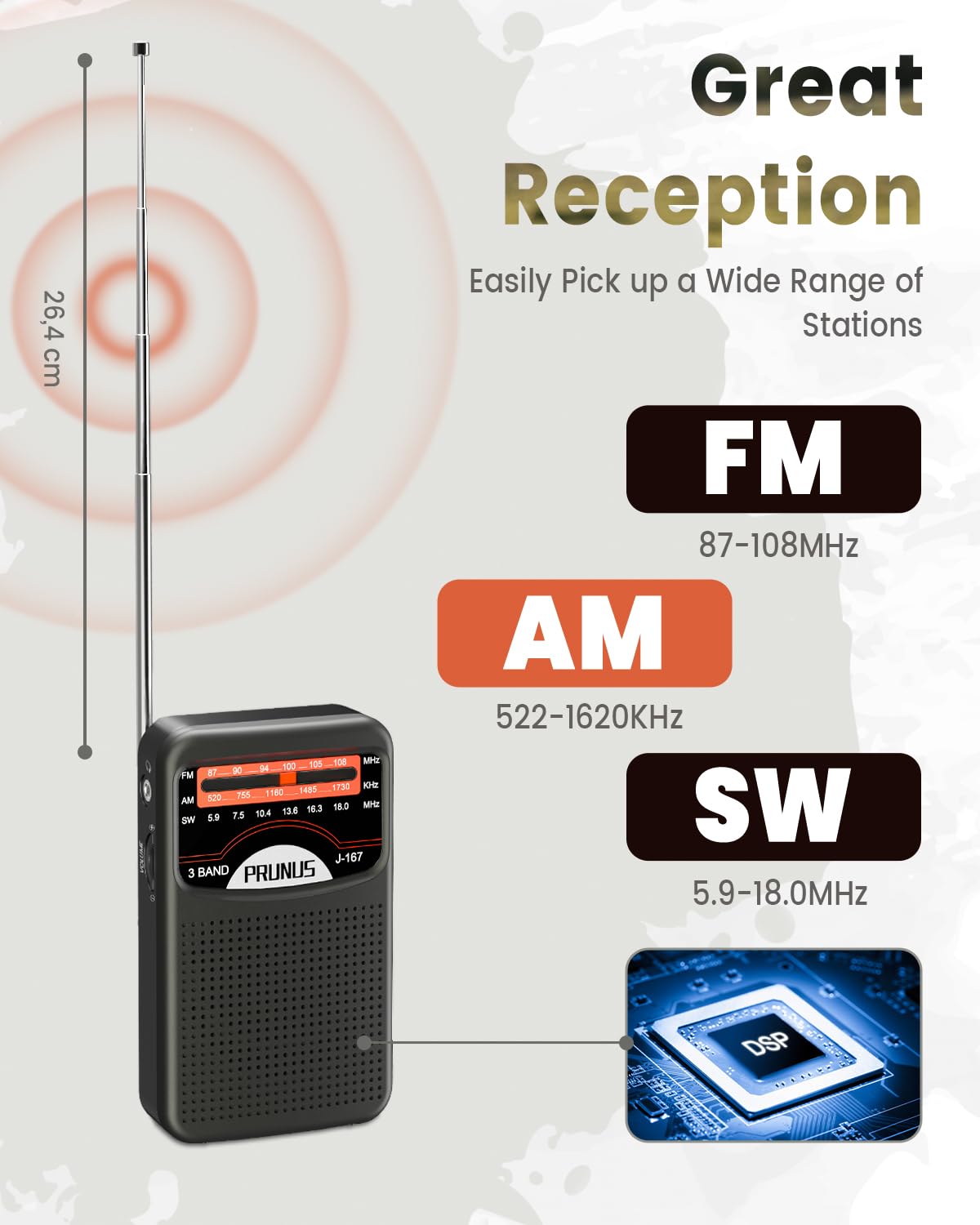
Figure 2: Illustration of the PRUNUS J-167 radio's reception capabilities across FM (87-108MHz), AM (522-1620KHz), and SW (5.9-18.0MHz) bands, highlighting its strong signal reception with a DSP chip.

Figure 3: The compact size of the PRUNUS J-167 radio, shown held in a hand, demonstrating its portability and ease of carrying.
Naon dina Box
- 1 x PRUNUS J-167 Radio
- 1 x Kabel Ngecas USB-C
- 1 x Buku Panduan Pamilik
- 1 x Lanyard

Figure 4: All items included in the PRUNUS J-167 product package: the radio unit, USB-C charging cable, owner's manual, and lanyard.
Disetél
1. Ngecas Batré
- Locate the USB-C charging port on the side of the radio.
- Sambungkeun kabel USB-C anu disayogikeun kana port ngecas radio.
- Connect the other end of the USB-C cable to a compatible USB power source (e.g., computer USB port, wall adapter, power bank).
- The charging indicator light will illuminate during charging. A full charge typically takes approximately 2 hours.

Figure 5: The PRUNUS J-167 radio being charged via its USB-C port, connected to a wall outlet, illustrating the charging process.

Gambar 6: A close-up view of the USB-C charging port and the DC 5V input on the side of the PRUNUS J-167 radio, with the charging indicator light visible.
2. Ngalampirkeun Lanyard
Thread the provided lanyard through the designated loop on the side of the radio. This allows for convenient carrying and helps prevent accidental drops.
Parentah Operasi
1. Powering on / Pareum
To power on the radio, rotate the volume knob clockwise until you hear a click. To power off, rotate the volume knob counter-clockwise until it clicks off.
2. Band Selection (AM/FM/SW)
Use the band switch located on the side of the radio to select your desired frequency band: FM, AM, or SW (Shortwave).

Figure 7: A close-up of the side controls on the PRUNUS J-167 radio, showing the tuning knob and the slide switch for selecting FM, AM, or SW bands.
3. Nyetél ka Stasion
- Extend the telescopic antenna fully for optimal reception, especially for FM and SW bands.
- Slowly rotate the tuning knob on the side of the radio to scan for stations.
- Adjust the knob precisely until you achieve clear audio for your desired station.
4. Using the Earphone Jack
For private listening, plug any standard 3.5mm headphones into the earphone jack located on the side of the radio. The internal speaker will automatically mute when headphones are connected.

Figure 8: A user enjoying the PRUNUS J-167 radio with headphones connected to the 3.5mm earphone jack, illustrating private listening.
Pangropéa
beberesih
Wipe the radio's exterior with a soft, dry cloth. Do not use abrasive cleaners, solvents, or strong chemicals, as these may damage the finish. Avoid getting moisture into any openings.
Perawatan batré
- Pikeun manjangkeun umur batre, ulah miceun batre pinuh.
- Charge the radio regularly, even if not in frequent use, to maintain battery health.
- Simpen radio di tempat anu tiis sareng garing upami henteu dianggo salami lami.
Panyimpenan
When storing the radio, ensure it is powered off. Keep it away from extreme temperatures, direct sunlight, and high humidity. It is recommended to store it in its original packaging or a protective case.
Pamérésan masalah
| Masalah | Mungkin Cukang lantaranana | Solusi |
|---|---|---|
| Henteu aya kakuatan / Radio henteu hurung. | Batré béak. | Charge the radio using the provided USB-C cable. |
| panarimaan goréng / statis. | anteneu teu ngalegaan; sinyal lemah; gangguan. | Fully extend the telescopic antenna. Try repositioning the radio. Move away from electronic devices that may cause interference. |
| No sound from speaker (headphones unplugged). | Volume is too low; Radio is off. | Increase the volume. Ensure the radio is powered on. |
| Difficulty tuning to a specific station. | Tuning knob sensitivity. | Rotate the tuning knob slowly and precisely to find the desired frequency. |
spésifikasi
| Fitur | Rincian |
|---|---|
| merek | PRUNUS |
| Modél | J-167 |
| Dimensi produk | 11.43 x 7.37 x 2.79 cm (4.5 x 2.9 x 1.1 inci) |
| Item Beurat | 157 g (0.35 pon) |
| Batré | Built-in 500mAh Rechargeable Lithium Ion |
| Port ngecas | USB-C (DC 5V) |
| Pita Radio Dirojong | AM (522-1620KHz), FM (87-108MHz), SW (5.9-18.0MHz) |
| Speaker Maksimum Kaluaran Power | 5 Watt |
| Earphone Jack | 3.5mm Audio |
| Bahan | Plastik |
Garansi sareng Rojongan
PRUNUS is committed to providing high-quality products and customer satisfaction. While specific warranty details are not provided in this manual, PRUNUS offers customer support for their products.
For any inquiries, technical assistance, or support needs, please contact PRUNUS customer service. Refer to the contact information provided on the product packaging or the official PRUNUS websitus pikeun saluran rojongan paling up-to-date.
Kontak Pabrikan: PRUNUS, Prunus-technik@hotmail.com


