1. Bubuka
This manual provides detailed instructions for the installation, operation, and maintenance of your SINOTIMER DC/AC 24V Digital Programmable Timer Switch, Model 24VDC. This device is designed for precise, programmable control of electrical circuits, offering up to 28 ON/OFF events per day across a 7-day cycle. Please read this manual thoroughly before use to ensure proper function and safety.

Image 1.1: The SINOTIMER 7 Day Digital Programmable Timer Switch.
2. Émbaran Kasalametan
- Bahaya listrik: Installation and wiring should only be performed by qualified personnel. Ensure power is disconnected before any installation or maintenance.
- Voltage kasaluyuan: This device operates on DC/AC 24V. Connecting to an incorrect voltage supply may damage the unit and pose a safety risk.
- Kapasitas beban: Do not exceed the maximum load rating of 10A at 250VAC (2000 watts). For higher loads, use an external contactor or relay.
- Lingkungan: Install the timer in a dry, protected environment. While the unit has some dustproof features, direct exposure to water or extreme temperatures should be avoided.
- Batré: The internal battery is for memory backup only. Do not attempt to charge or replace it unless specified in the maintenance section.
3. Eusi Paket
Pastikeun yén sadaya item aya dina bungkusan:
- 1x SINOTIMER Digital Programmable Timer Switch (Model: 24VDC)
- 1x Pamasangan Bracket
- 1 x Panutup Lebu
- 1x CR2032 Battery (pre-installed or separate)
- 1x Disassembly Tool (small screwdriver)
- 2x Pasang Sekrup
- 5x Spade Connecting Wires
- 1x Manual Pamaké (dokumén ieu)
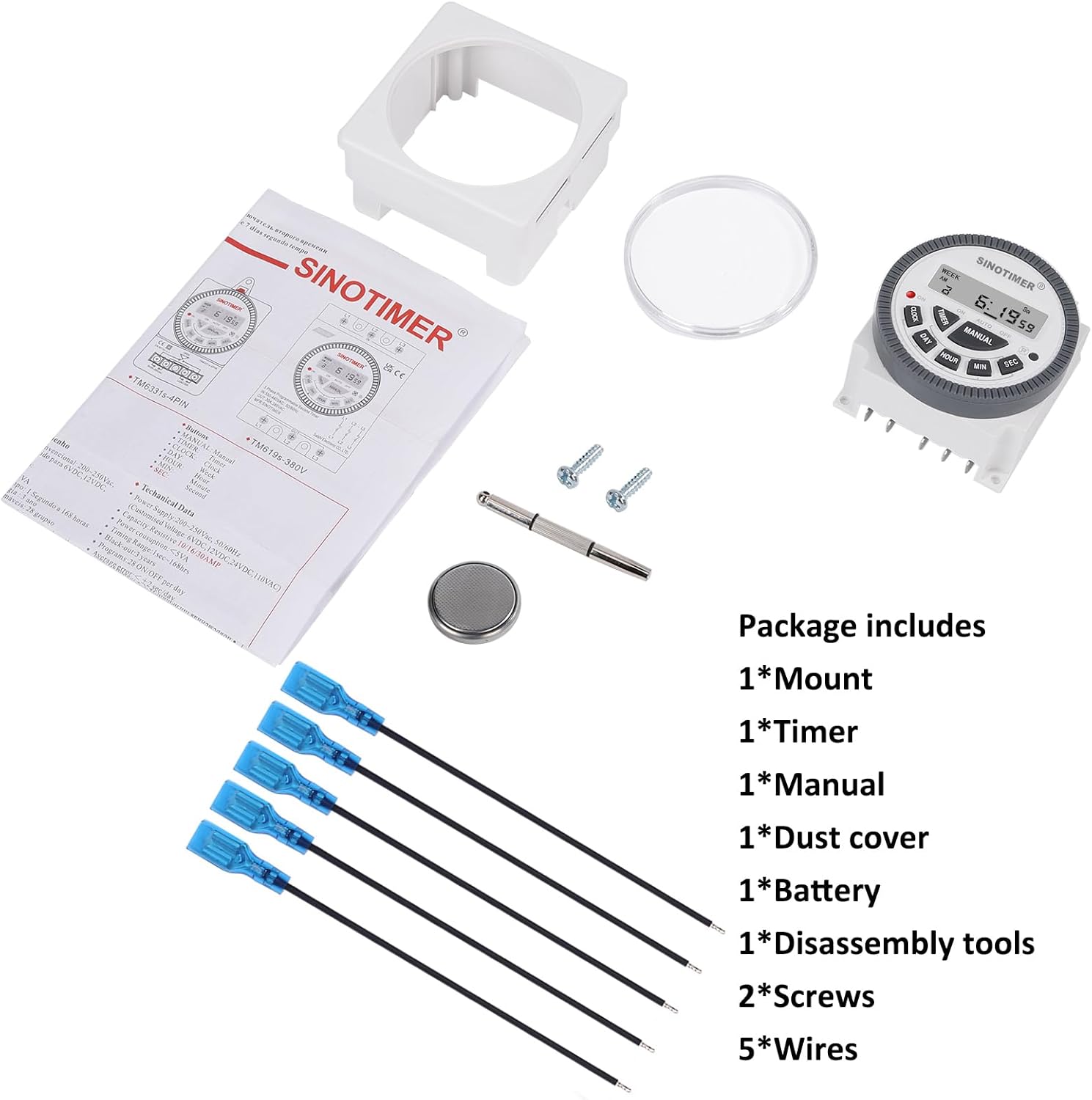
Image 3.1: Visual representation of the package contents, including the timer, mount, manual, dust cover, battery, disassembly tool, screws, and wires.
4. Produk Langkungview & Fitur
The SINOTIMER DC/AC 24V Digital Programmable Timer Switch is a versatile device designed for automating various electrical applications. Its compact design and digital display ensure ease of use and integration into control panels.
Fitur konci:
- Programmability 7 dinten: Allows for up to 28 ON/OFF events per day, with flexible programming blocks for daily, weekly, or custom schedules.
- Digital tampilan: Clear LCD for time, day, and program status.
- Cadangan Batré Internal: Retains program settings during power outages.
- SPDT Output: Single Pole Double Throw relay output (1 Normally Open + 1 Normally Closed contact).
- Kapasitas Beban Tinggi: Rated for up to 10A at 250VAC, 2000 watts.
- Format 12/24 Jam: User-selectable time display format.
- Desain tahan debu: Enhanced durability for various environments.

Gambar 4.1: Leuwihview of the timer's key features, including its robust design and advanced functionality.
5. Spésifikasi
| Fitur | Spésifikasi |
|---|---|
| Modél | 24VDC (TM-619) |
| Masukan Voltage | DC/AC 24V |
| Tipe Kaluaran | SPDT (1NO+1NC) |
| Max Beban Ayeuna | 10A @ 250VAC, 2000W |
| Kajadian Programmable | Nepi ka 28 ON/OFF per dinten |
| Format waktos | 12-hour / 24-hour selectable |
| Nyadangkeun batré | Internal CR2032 (for program memory) |
| Diménsi (D x W x H) | 1.77" x 2.83" x 2.83" (45mm x 72mm x 72mm) |
| Beurat | 5.3 ons (kira-kira 150g) |
| Bahan | Logam, Plastik |

Image 5.1: Dimensional drawing and terminal layout of the timer switch.
6. Pamasangan & Wiring
PERHATOSAN: Disconnect all power before installation to prevent electric shock or equipment damage.
6.1 Pamasangan
- Select a suitable location for mounting, ensuring it is protected from moisture and excessive heat.
- Attach the mounting bracket to a flat surface using the provided screws.
- Slide the timer switch into the mounting bracket until it clicks securely into place.
- Optionally, install the clear dust cover over the timer face for added protection.
6.2 Parentah Wiring
The timer switch features 5 spade connecting terminals. Refer to the wiring diagram below and the labels on the back of the unit for correct connections.
- Terminal 1 & 2: Power Input (DC/AC 24V). Connect your 24V power supply here.
- Terminal 3: Common (COM) for the relay output.
- Terminal 4: Normally Open (NO) contact for the relay output. The circuit connected here will be ON when the timer is active.
- Terminal 5: Normally Closed (NC) contact for the relay output. The circuit connected here will be OFF when the timer is active.

Image 6.1: Simplified wiring diagram for the timer switch.

Gambar 6.2: Example of spade connectors attached to the timer terminals.
7. Parentah Operasi
After successful installation and power connection, the timer display should illuminate. If not, ensure power is supplied correctly and the internal battery is properly seated.
7.1 Setelan Mimiti (Pamakéan Mimiti)
- Reset: Press the 'R' (Reset) button with a pointed object (e.g., the provided disassembly tool) to clear all previous settings. The display will show '0:00'.
- Setel Waktos Ayeuna:
- Pencét éta JAM kancing.
- Pencét POÉ to select the current day of the week (Mo, Tu, We, Th, Fr, Sa, Su).
- Pencét JAM pikeun ngeset jam ayeuna.
- Pencét MIN pikeun nyetél menit ayeuna.
- Pencét SEK to set the current second (optional, for precise synchronization).
- To switch between 12-hour (AM/PM) and 24-hour format, press JAM jeung POÉ sakaligus.
7.2 Programming ON/OFF Events
The timer supports up to 28 ON/OFF programs. Each program consists of an ON time and an OFF time.
- Pencét éta TIMER button. The display will show '1 ON'. This is the first ON program.
- Pencét POÉ to select the day(s) for this program. You can choose a single day, weekdays, weekends, or various combinations. Keep pressing POÉ mun siklus ngaliwatan pilihan.
- Pencét JAM pikeun nyetel jam ON anu dipikahoyong.
- Pencét MIN pikeun nyetel menit ON anu dipikahoyong.
- Pencét TIMER again. The display will show '1 OFF'. This is the first OFF program.
- Repeat steps 2-4 to set the desired OFF day(s), hour, and minute for this program.
- Terus pencét TIMER to cycle through '2 ON', '2 OFF', up to '28 ON', '28 OFF', setting each program as needed.
- Saatos netepkeun sadaya program anu dipikahoyong, pencét tombol JAM button to return to the current time display. The programs are now saved.
7.3 Manual Override
The MANUAL button allows you to override the programmed schedule temporarily or permanently.
- Pencét MANUAL pikeun ngaliwat modeu-modu ieu:
- ON: Output is continuously ON, ignoring programs.
- OTOMATIS ON: Output is currently ON, following programs.
- Otomatis Pareum: Output is currently OFF, following programs.
- Pareuman: Output is continuously OFF, ignoring programs.
- Pilih OTOMATIS ON or Otomatis Pareuman to resume programmed operation.
8. Pangropéa
8.1 beberesih
Ngusap unit ku kaén anu lembut sareng garing. Ulah make cleaners abrasive atawa pangleyur.
8.2 Ngagantian batré
The internal CR2032 battery provides backup for program memory. If the display becomes dim or programs are lost during power outages, batréna panginten kedah digentos.
- PERHATOSAN: Disconnect main power to the timer before replacing the battery.
- Tangtukeun lokasi kompartemen batré dina tonggong unit.
- Taliti muka panutup kompartemen.
- Leupaskeun batré CR2032 heubeul terus selapkeun nu anyar, mastikeun polaritasna bener (+ sisi luhur).
- Tutup panutup kompartemen batré.
- After replacement, perform an initial setup (Section 7.1) to reset and set the current time.

Image 8.1: Location of the replaceable CR2032 battery.
9. Cara ngungkulan
| Masalah | Mungkin Cukang lantaranana | Solusi |
|---|---|---|
| Pintonan kosong atanapi taram | No power supply; Incorrect wiring; Dead internal battery. | Check 24V power input (Terminals 1 & 2). Verify wiring. Replace CR2032 battery. |
| Programs are not running | Timer is in Manual ON/OFF mode; Incorrect program settings; Incorrect current time. | Pencét MANUAL until 'AUTO ON' or 'AUTO OFF' is displayed. Review program settings (Section 7.2). Set current time correctly (Section 7.1). |
| Output does not switch ON/OFF | Incorrect output wiring; Load exceeds capacity; Faulty relay. | Verify output wiring (Terminals 3, 4, 5) to your load. Ensure load does not exceed 10A/2000W. If issues persist, contact support. |
| Waktos teu akurat | Internal clock drift; Battery low. | Reset and set time again. Consider replacing the internal battery if drift is significant. |
10. Jaminan & Dukungan
For warranty information and technical support, please refer to the documentation provided with your purchase or contact SINOTIMER customer service through the retailer where the product was purchased. Please have your product model (24VDC) and purchase date available when contacting support.
Sumberdaya Online: For additional information, FAQs, or to view other SINOTIMER products, visit the official SINOTIMER store or websitus.


