1. Bubuka
This manual provides detailed instructions for setting up, operating, and maintaining your BenQ EW2790U 27-inch 4K monitor. Please read this manual thoroughly before using the monitor to ensure proper functionality and to prevent damage.
2. Émbaran Kasalametan
Salawasna tuturkeun pancegahan kaamanan dasar ieu pikeun ngirangan résiko seuneu, kejutan listrik, sareng tatu:
- Ulah ngalaan monitor ka hujan atawa beueus.
- Ulah muka monitor casing; tingal ngalayanan ka tanaga mumpuni.
- Pastikeun ventilasi ditangtoskeun sabudeureun monitor.
- Use only the power cord and adapter provided by BenQ.
- Cabut monitor nalika badai kilat atanapi nalika henteu dianggo kanggo waktos anu lami.
3. Eusi Paket
Pastikeun yén sadaya item aya dina pakét anjeun:
- BenQ EW2790U 27-inch 4K Monitor
- Kabel listrik
- Kabel HDMI
- Kabel USB-C
- Gancang Mimitian Guide
- Kartu Garansi
4. Setélan
4.1 Ngarakit Stand
- Teundeun monitor nyanghareupan handap dina permukaan lemes, beresih pikeun nyegah goresan.
- Pasangkeun dasar penyangga kana beuheung penyangga teras amankeun nganggo sekrup anu disayogikeun.
- Sejajarkeun rakitan penyangga sareng slot pemasangan di tukang monitor teras pencét dugi ka ngaklik kana tempatna.

Figure 4.1: Assembled BenQ EW2790U monitor.
4.2 Nyambungkeun Kabel
Sambungkeun kabel anu diperlukeun ka monitor sareng komputer anjeun:
- kakuatan: Sambungkeun kabel listrik ka input daya monitor teras ka stopkontak.
- Video:
- HDMI: Connect an HDMI cable from your computer's HDMI output to one of the monitor's HDMI ports (HDMI 1, 2, or 3).
- USB-C: Connect a USB-C cable from your computer's USB-C port to the monitor's USB-C (65W) port for video, data, and power delivery.
- USB Hilir: Connect USB-A devices to the USB-A 3.2 downstream ports on the monitor.
- Audio: Sambungkeun headphone ka jack headphone upami hoyong.

Gambar 4.2: Tukangeun view of BenQ EW2790U showing connectivity ports.

Gambar 4.3: Detil view of BenQ EW2790U input/output ports.
4.3 Nyaluyukeun Ergonomi
The EW2790U monitor offers various adjustments for comfortable viewing:
- Penyesuaian Jangkungna: Naékkeun atawa turunkeun monitor ka tingkat panon anu dipikahoyong.
- Dengdekkeun: Adjust the screen's vertical angle.
- Putar: Puterkeun layar sacara horisontal.
- Pangsi: Puterkeun layar 90 derajat kanggo modeu potret.

Figure 4.4: BenQ EW2790U monitor pivot adjustment.
5. Ngoperasikeun Monitor
5.1 Daya Hurung/Pareuman
Press the Power key located on the bottom right of the monitor to turn it on or off.

Figure 5.1: Monitor controls: Scenario hotkey, 5-way controller, and Power key.
5.2 Menu dina layar (OSD).
Use the 5-way controller on the bottom bezel to navigate the OSD menu and adjust settings such as brightness, contrast, color mode, and input source.
5.3 Scenario Hotkey
The Scenario hotkey allows quick access to custom or preset optimal monitor settings for various uses like work, studying, gaming, or watching movies.
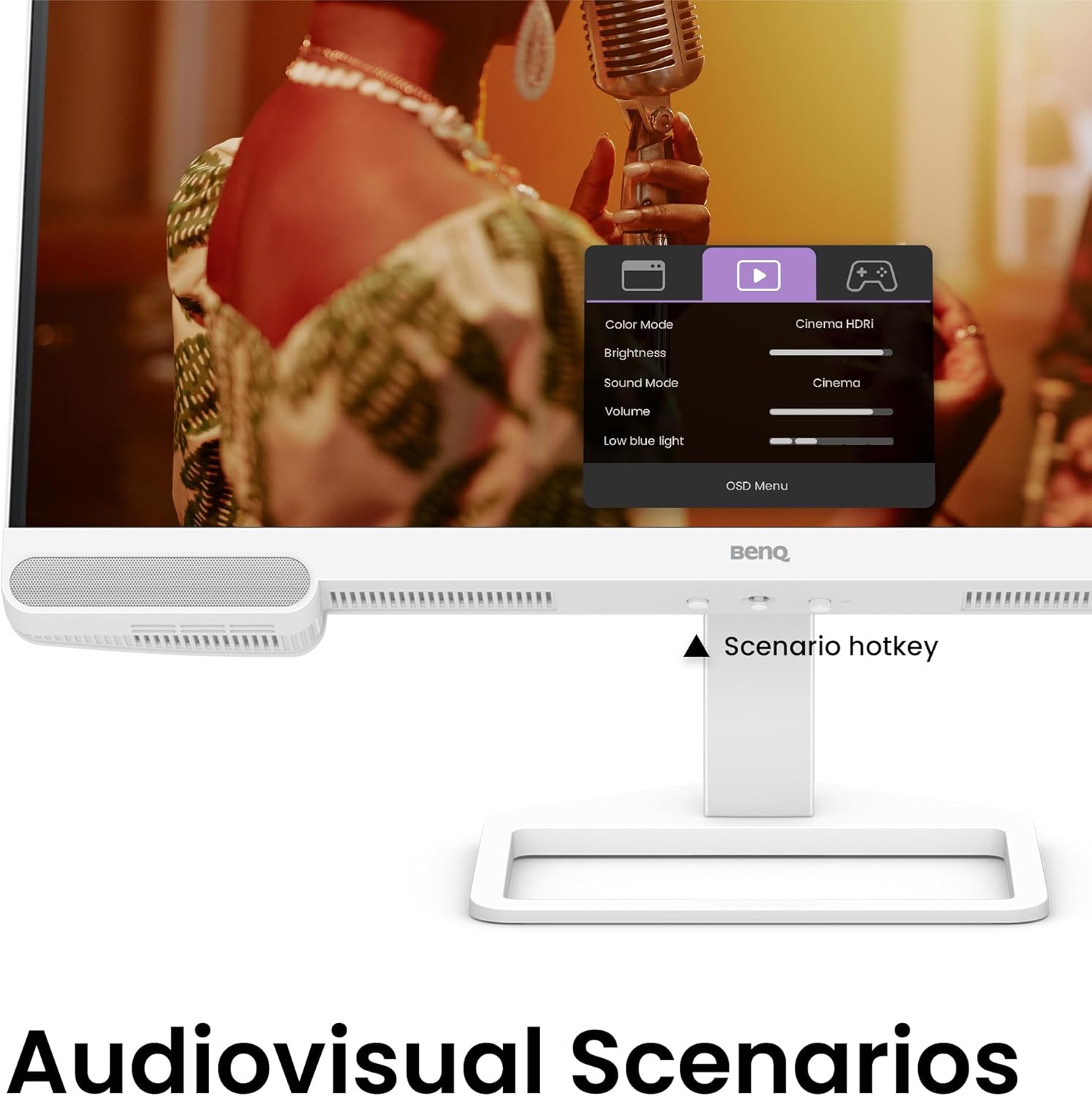
Figure 5.2: OSD menu accessed via Scenario hotkey.
5.4 AI Contrast Technology
The exclusive AI Contrast technology intelligently adjusts the contrast based on the displayed content, optimizing image quality without affecting other areas of the screen.

Figure 5.3: Demonstration of AI Contrast technology.
5.5 Spiker Terpasang
The monitor includes a pair of 5W built-in speakers for audio output. Adjust the volume through the OSD menu or your connected device.

Figure 5.4: BenQ EW2790U built-in 5W speakers.
6. Pangropéa
6.1 Ngabersihan Monitor
- Salawasna cabut monitor saméméh beberesih.
- Anggo kaén anu lemes sareng teu aya serat anu hampang dampdikumbah ku cai atawa cleaner hampang, non-abrasive.
- Ulah menyemprot cleaner langsung kana layar.
- Ulah nganggo alkohol, amonia, atanapi pembersih anu kasar, sabab tiasa ngaruksak layar atanapiasing.
6.2 Panyimpenan
Store the monitor in a cool, dry place away from direct sunlight and extreme temperatures. If storing for an extended period, consider using the original packaging for protection.
7. Cara ngungkulan
| Masalah | Mungkin Cukang lantaranana | Solusi |
|---|---|---|
| Henteu aya gambar dina layar | kabel listrik dipegatkeun; kabel video dipegatkeun; Sumber input salah dipilih. | Ensure power and video cables are securely connected. Press the Scenario hotkey to select the correct input source. |
| Gambar buram atanapi menyimpang | Résolusi anu salah; kabel vidéo leupas. | Set the display resolution to 3840x2160. Check video cable connections. |
| Teu aya sora ti panyatur | Volume low teuing; Dijempékeun; Kaluaran audio anu salah dipilih dina komputer. | Adjust volume via OSD menu or computer settings. Ensure monitor is selected as audio output device. |
| AI Contrast not working as expected | Feature disabled; Specific content not optimized. | Check OSD settings to ensure AI Contrast is enabled. Performance may vary with different content. |
8. Spésifikasi
| Fitur | Rincian |
|---|---|
| Ukuran layar | 27 inci |
| Resolusi | 3840x2160 (4K UHD) |
| Rasio Aspék | 16:9 |
| Color Coverage | 95% P3 |
| AI Contrast Technology | Sumuhun |
| Diwangun-di Speaker | 2 x 5W |
| Konektipitas | 1x USB Type-C (65W), 3x HDMI (2.0), USB-C 3.2 downstream, USB-A 3.2 downstream, Headphone Jack |
| Desain ergonomis | Pangaluyuan Jangkungna, Kemiringan, Putar, Pivot |
| Item Beurat | 21.4 pon |
| Ukuran produk (L x W x H) | 17 x 8 x 21 inci |
9. Garansi jeung Rojongan
Your BenQ EW2790U monitor is covered by a manufacturer's warranty. Please refer to the warranty card included in your package for specific terms and conditions. For technical support, product registration, or service inquiries, please visit the official BenQ websitus atanapi ngahubungan departemén layanan palanggan maranéhna.
Official BenQ Websitus: www.benq.com


