1. Bubuka
This manual provides essential information for setting up, operating, and maintaining your JVC LT-55NQ7165C AI Vision Series QLED Google TV. Please read it thoroughly before use to ensure proper functionality and safety.

The JVC LT-55NQ7165C is a 55-inch 4K Ultra HD QLED Google TV, featuring a 60Hz refresh rate, AI Vision technology, and integrated smart functionalities. It offers a vibrant display with HDR and HLG support, powerful 60 Watts Dolby Atmos sound, and extensive connectivity options.
Leuwihview of JVC AI Vision Series QLED Android TV features.
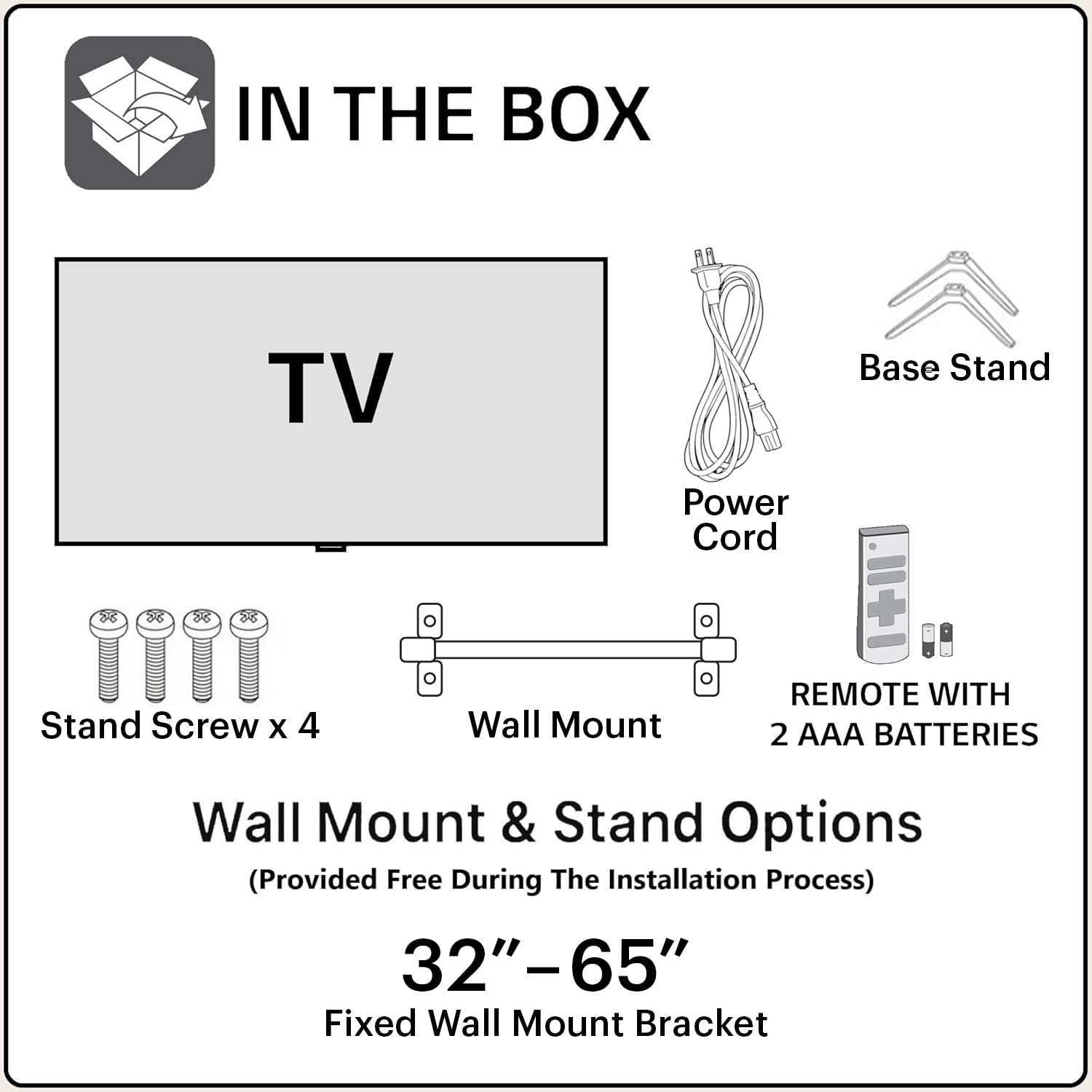
2. Naon dina Box
Saatos muka bungkusna, pastikeun sadaya komponén ieu kalebet:
- 1N JVC LT-55NQ7165C LED TV
- 1N Remote Control (with 2 AAA batteries included)
- 1N Wall Mount Bracket
- 1N Table Top Stand (Base Stand)
- Sekrup nangtung 4x
- Kabel Listrik 1N
- Manual pangguna (dokumén ieu)
3. Setup jeung Instalasi
Your JVC TV offers both table-top and wall-mount installation options. Ensure the TV is placed on a stable surface or securely mounted to a wall.
3.1. Table-Top Installation
- Teundeun layar TV sacara saksama dina permukaan anu lemes sareng bersih pikeun nyegah goresan.
- Attach the two base stands to the bottom of the TV using the provided screws. Ensure they are firmly secured.
- Place the TV on a flat, stable surface, ensuring adequate ventilation around the unit.
3.2. Wall-Mount Installation
For wall-mount installation, it is recommended to seek professional assistance. The provided wall mount bracket is suitable for this model.
- Identify a suitable wall location, ensuring it can support the weight of the TV.
- Follow the instructions provided with the wall mount bracket to securely attach it to the wall.
- Carefully attach the TV to the wall mount bracket. Ensure all connections are secure before releasing TV.
Awas: Improper wall mounting can result in serious injury or damage to your TV. Always follow safety guidelines.
3.3. Mimiti Power-On
- Sambungkeun kabel listrik ka TV teras ka stopkontak.
- Selapkeun batré AAA anu kalebet kana remot kontrol.
- Pencét tombol daya dina kadali jauh atawa dina TV pikeun ngahurungkeun.
- Follow the on-screen instructions for initial setup, including language selection, network connection, and Google account login.
4. Konektipitas
The JVC LT-55NQ7165C offers a variety of ports for connecting external devices and network access.

- Port HDMI (3): Connect gaming consoles, set-top boxes, Blu-ray players, and other HDMI-enabled devices. Supports ALLM (Auto Low Latency Mode) and eARC (Enhanced Audio Return Channel).
- Port USB (2): Connect hard drives, USB flash drives, and other USB devices for media playback.
- Wi-Fi Dual Band: Connect to your home network wirelessly (2.4GHz / 5GHz).
- Port Ethernet (LAN): Pikeun sambungan internét kabel.
- Bluetooth 5.0: Connect wireless headphones, speakers, or other Bluetooth accessories.
- Kaluaran audio optik: Connect to external sound systems or soundbars for high-quality audio.

5. Ngoperasikeun TV Anjeun
5.1. Kadali jauh
The included remote control allows you to navigate the TV's features. It includes dedicated buttons for popular streaming services and Google Assistant voice control.

- Tombol Daya: Ngahurungkeun atawa mareuman TV.
- Tombol Asisten Google: Ngaktipkeun paréntah sora.
- Pad Navigasi: Pikeun navigasi menu.
- Volume Kaluhur/Turun: Saluyukeun volume audio.
- Saluran luhur/handap: Robah saluran TV.
- Tombol Netflix, Prime Video, YouTube: Aksés langsung ka aplikasi streaming ieu.
5.2. Google TV Features
Your JVC TV runs on the Google TV operating system, providing access to a vast library of content and smart features.
- Aksés Aplikasi: Download and install over 10,000 apps and games from the Google Play Store, including Netflix, Prime Video, YouTube, Zee5, Disney+ Hotstar, SonyLIV, MX Player, JioCinema, Apple TV, and Voot.
- Asisten Google: Use voice commands to search for content, control smart home devices, get answers, and more. Press the Google Assistant button on your remote and speak into the microphone.
- Screen Mirroring (Chromecast built-in): Cast content from your compatible smartphone, tablet, or computer directly to your TV screen.
- Rekomendasi Pribadi: Google TV learns your preferences and suggests content tailored to you.


5.3. Fitur tampilan
Experience stunning visuals with the TV's advanced display technologies.
- Resolusi 4K Ultra HD: Enjoy incredibly sharp and detailed images with 3840 x 2160 pixels.
- Téknologi QLED: Quantum Dot LED display delivers vibrant colors and improved brightness.
- HDR (High Dynamic Range) & HLG: Provides enhanced contrast, brightness, and a wider color gamut for a more lifelike picture.
- Seri Visi AI: AI-powered processing optimizes picture quality for various content types.
- 1.1 Billion Colours: Experience a rich and extensive color palette.
- Laju Refresh 60Hz: Smooth motion for most content.


5.4. Fitur Audio
Immerse yourself in rich and clear audio with the TV's integrated sound system.
- Kaluaran 60 Watt: Powerful audio delivery for an engaging listening experience.
- Dolby Digital Plus & Dolby Atmos: Provides immersive, multi-dimensional sound that moves around you.
- DTS-TruSurround: Enhances surround sound effects for a cinematic audio experience.

5.5. Kaulinan
The TV is designed to enhance your gaming experience with features like ALLM (Auto Low Latency Mode) and a responsive display.

6. Cara ngungkulan
Tingali kana bagian ieu pikeun masalah umum sareng solusina.
6.1. Taya Daya
- Ensure the power cord is securely connected to both the TV and a working power outlet.
- Pariksa naha stop kontak listrik berpungsi ku cara nyolokkeun alat anu sanés.
- Verify that the remote control batteries are correctly inserted and not depleted.
6.2. No Picture / Poor Picture Quality
- Pariksa sadaya sambungan kabel (HDMI, anteneu, jsb) pikeun mastikeun aranjeunna aman.
- Pilih sumber input anu leres nganggo remot kontrol.
- Saluyukeun setelan gambar (kacaangan, kontras, warna) dina menu TV.
- If using an external device, check its output settings.
6.3. No Sound / Poor Sound Quality
- Pastikeun polumeu teu dipareuman atawa disetel handap teuing.
- Pariksa sambungan kabel audio kana sistem sora éksternal.
- Atur setélan audio dina menu TV.
- If using external speakers, ensure they are powered on and functioning correctly.
6.4. Masalah Sambungan Jaringan
- Pastikeun router Wi-Fi anjeun dihurungkeun sareng fungsina.
- Balikan deui router sareng modem anjeun.
- Buka setelan jaringan TV sareng cobian sambungkeun deui ka jaringan Wi-Fi anjeun.
- Lamun make sambungan kabel, pastikeun kabel Ethernet disambungkeun aman.
7. Spésifikasi
| Fitur | Rincian |
|---|---|
| Ngaran modél | LT-55NQ7165C |
| Ukuran layar | 55 Inci (140 cm) |
| Téknologi tampilan | QLED, IPS Display |
| Resolusi | 4K Ultra HD (3840 x 2160) |
| Refresh Laju | 60 Hz |
| Fitur husus | Dolby Digital Plus, HDR, DTS-TruSurround, Google Assistant, Dolby Atmos, AI Vision Series |
| Sistem operasi | Google TV |
| Ram | 2 GB |
| Panyimpenan (ROM) | 16 GB |
| Kaluaran Audio | 60 Watt |
| Konektipitas | Dual Band Wi-Fi, 3 HDMI, 2 USB, Bluetooth 5.0, Optical, Ethernet |
| Ukuran produk (L x W x H) | 124 x 12 x 71 cm |
| Item Beurat | 10.4 kg |
| Sumber Daya | AC |
| Viewdina Angle | 178 darajat |
| Babandingan Kontras Gambar | 4000:1 |

8. Garansi jeung Rojongan
Your JVC LT-55NQ7165C TV comes with a standard manufacturer's warranty.
- Garansi produk: 1 taun ti tanggal pameseran.
- Garansi Asesoris Jarak Jauh: 6 bulan ti tanggal pameseran.
To avail warranty services, please retain your purchase invoice. The user manual can also be accessed from the brand's websitus dina bagian rinci produk.
Pangecualian Garansi: The warranty does not cover light bleeding and dot issues (Mura issues) occurring on a certain Grey scale, as per the Mura Inspection standard, this is considered acceptable. As per ND (Neutral Density) Filter 2% guideline, this is not considered a panel defect.
For further assistance or technical support, please refer to the contact information provided on the official JVC websitus atanapi dokuméntasi pameseran Anjeun.


