Bubuka
This manual provides instructions for the ALLIMITY replacement remote control, designed for various Strong TV models. It covers setup, operation, maintenance, and troubleshooting to ensure optimal performance. This remote control is designed to be fully functional without the need for programming or complex installation.
Disetél
1. Pamasangan batré
Kadali jauh merlukeun dua batré AAA (teu kaasup). Turutan léngkah ieu pikeun masangana:
- Panggihan kompartemen batré dina tonggong kadali jauh.
- Geser panutup kompartemen batré ka handap pikeun mukakeunana.
- Selapkeun dua batré AAA, mastikeun terminal positif (+) jeung négatip (-) align bener jeung markings jero kompartemen nu.
- Geser panutup kompartemen batré deui kana tempatna nepi ka klik aman.

Gambar 1: Tukangeun view of the remote control with the battery compartment open, indicating where to insert AAA batteries according to polarity markings.
2. Pamakéan awal
This ALLIMITY remote control is designed for immediate use with compatible Strong TV models. No programming or complex setup is required. Once batteries are installed, point the remote control towards your Strong TV and begin operation.
Parentah Operasi
The remote control features a standard layout for easy navigation and control of your Strong TV. Below is a guide to the main functions:

Gambar 2: Hareup jeung sisi views of the ALLIMITY remote control, illustrating its ergonomic design and button layout. Dimensions are approximately 23 cm (9.06 in) in length and 5.3 cm (2.09 in) in width.
Tombol Fungsi Leuwihview
- Kakuatan (●): Ngahurungkeun atawa mareuman TV.
- Ngajempékeun (🔇): Ngajempékeun atanapi nganonaktipkeun sora TV.
- Tombol Jumlah (0-9): Pilih saluran TV langsung.
- SUBTITEL: Aktipkeun atanapi nganonaktipkeun subtitle.
- YouTube: Aksés langsung ka aplikasi YouTube.
- VOL (+/-): Saluyukeun tingkat polumeu.
- CH (▲/▼): Robah saluran TV kaluhur atanapi kahandap.
- TV: Switches to TV mode.
- SUMBER: Milih sumber input (HDMI, AV, jsb.).
- USB: Ngaksés média tina alat USB anu nyambung.
- Menu (☰): Muka ménu utama.
- Inpormasi (i): Mintonkeun inpormasi ngeunaan program ayeuna.
- ECO: Ngaktipkeun atanapi mareuman modeu hemat énergi.
- imah (🏠): Returns to the home screen or smart TV interface.
- Setélan (⚙): Opens the TV settings menu.
- Tombol Navigasi (▲ ▼ ◀ ▶): Napigasi ngaliwatan ménu jeung pilihan.
- OKÉ: Konfirmasi pilihan.
- Balik (↶): Mulih ka layar atawa ménu saméméhna.
- KALUAR: Kaluar tina menu atawa aplikasi ayeuna.
- NETFLIX: Aksés langsung ka aplikasi Netflix.
- Tombol Warna (Beureum, Héjo, Konéng, Biru): Functionality varies by TV model and context (e.g., teletext, interactive services).
- SARE: Nyetél timer saré pikeun TV.
- ZOOM (+/-): Adjusts the screen zoom level.
- DAFTAR CH: Mintonkeun daptar saluran.
- TEKS: Activates or deactivates teletext.
- pituduh: Muka pituduh program éléktronik (EPG).
- PRE-CH: Switches to the previously viewsaluran ed.
- FAV: Ngaksés saluran paporit.
- Media Control Buttons (Rewind, Play/Pause, Fast Forward, Previous, Stop, Next): Ngadalikeun putereun média.
- CDLANG: Changes the audio language or track during media playback.

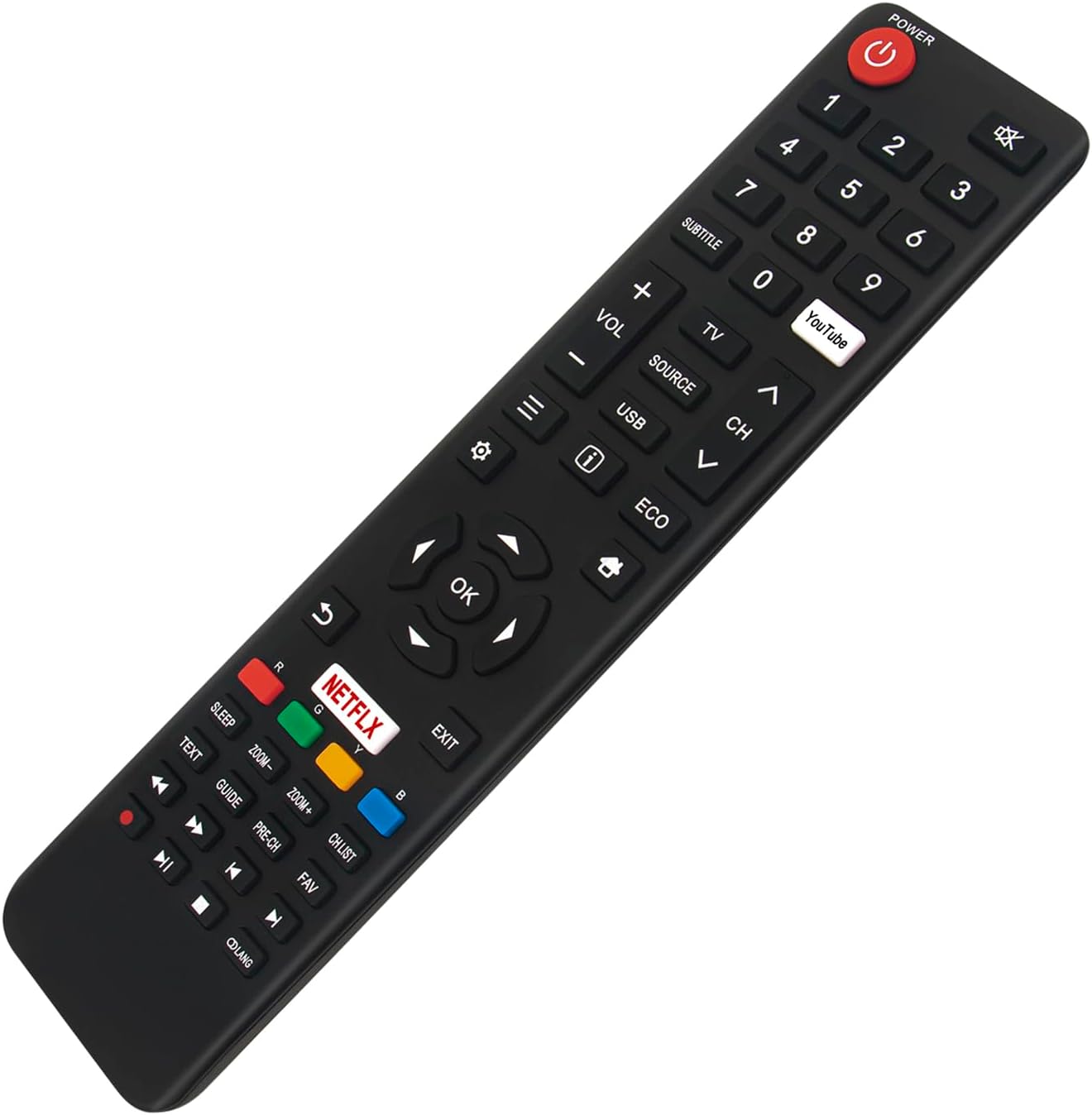
Gambar 3: Two angled views of the ALLIMITY remote control, providing a clear perspective of all buttons and their labels for easy identification during operation.
Pangropéa
Ngabersihan Remote Control
Pikeun ngajaga penampilan sareng fungsionalitas kadali jauh:
- Ngusap beungeut ku kaen lemes, garing.
- Keur kokotor bandel, rada dampen lawon ku cai atawa hampang, cleaner non-abrasive.
- Hindarkeun ngagunakeun bahan kimia anu kasar, pangleyur, atanapi bantalan beberesih anu abrasive, sabab ieu tiasa ngarusak résolusi atanapi komponén internal.
Ngagantian batré
Ganti batréna nalika réspon remot kontrol janten laun atanapi eureun jalan. Salawasna ganti kadua batréna dina waktos anu sami ku batré AAA énggal. Ulah nyampur batré lami sareng énggal, atanapi jinis batré anu béda.
Panyimpenan
Upami kadali jauh henteu dianggo kanggo waktos anu panjang, cabut batréna pikeun nyegah bocor sareng kamungkinan karusakan alat.
Pamérésan masalah
| Masalah | Mungkin Cukang lantaranana | Solusi |
|---|---|---|
| Kadali jauh teu jalan. |
|
|
| Tombol-tombol khusus teu ngaréspon. |
|
|
| Remote control feels sluggish. | Daya batre lemah. | Ganti batré. |
Model TV anu cocog: This remote control is compatible with the following Strong TV models: SRT 50UC6203, SRT 40FB5203, SRT 49UA6203, SRT 65UA6203, SRT 32HB5203, SRT 43UA6203, SRT 55UA6203, SRT 32HC4432, SRT 43UB6203, SRT 55UB6203.
spésifikasi
- merek: KAKATAAN
- warna: Hideung
- Téknologi konektipitas: Infrabeureum (IR)
- Fitur husus: Desain ergonomis
- Alat anu cocog: Strong TV models: SRT 50UC6203, SRT 40FB5203, SRT 49UA6203, SRT 65UA6203, SRT 32HB5203, SRT 43UA6203, SRT 55UA6203, SRT 32HC4432, SRT 43UB6203, SRT 55UB6203
- Ngaran modél: SRT-50UC6203 (reference model)
- Rentang maksimum: 10 Méter (kira-kira 33 kaki)
- Jumlah Kancing: 25
- Jenis Controller: Infrabeureum
Garansi sareng Rojongan
Information regarding specific warranty terms or direct manufacturer support for this ALLIMITY remote control is not available in the provided product data. For any issues or inquiries, please refer to the retailer's return policy or contact the seller directly through your purchase platform.


