1. Bubuka
This manual provides essential information for the safe and efficient operation of your Philips Evnia 24M2N3200L 24-inch Gaming Monitor. Please read this manual thoroughly before using the product and retain it for future reference.
2. Émbaran Kasalametan
Perhatikeun pancegahan kaamanan ieu pikeun nyegah karusakan monitor sareng mastikeun kasalametan pangguna:
- Ulah ngalaan monitor ka hujan atawa beueus.
- Ulah muka monitor casing; ngarujuk sadaya jasa ka tanaga anu mumpuni.
- Pastikeun ventilasi ditangtoskeun sabudeureun monitor.
- Paké ngan adaptor kakuatan disadiakeun kalawan monitor.
- Hindarkeun nempatkeun barang beurat dina kabel listrik.
- Bersihkeun layar nganggo lawon anu lemes sareng henteu ngaganggu. Ulah nganggo cairan pembersih langsung kana layar.
3. Eusi Paket
Pastikeun yén sadaya item aya dina bungkusan:
- Philips Evnia 24M2N3200L Monitor
- Stand Monitor (Dasar sareng Beuheung)
- Kabel Daya
- Kabel HDMI
- Kabel DisplayPort
- Manual pangguna (dokumén ieu)

Image: The retail packaging box for the Philips Evnia 24M2N3200L monitor, showing the product name and design awards.
4. Setélan
4.1. Nangtung Majelis
- Teundeun monitor nyanghareupan handap dina permukaan lemes, beresih pikeun nyegah goresan.
- Attach the stand neck to the monitor's VESA mounting area. Secure with screws if provided.
- Attach the stand base to the bottom of the stand neck. Tighten the thumb screw or screws until secure.

Gambar: Tukangeun view of the monitor showing the attached stand and the VESA mounting area.
4.2. Nyambungkeun ka Komputer
Monitor ngadukung sambungan HDMI sareng DisplayPort.
- Sambungan Daya: Sambungkeun kabel daya ka input daya monitor terus ka stopkontak.
- Sambungan Video:
- For HDMI: Connect one end of the HDMI cable to the monitor's HDMI port and the other end to your computer's HDMI output.
- For DisplayPort: Connect one end of the DisplayPort cable to the monitor's DisplayPort and the other end to your computer's DisplayPort output.
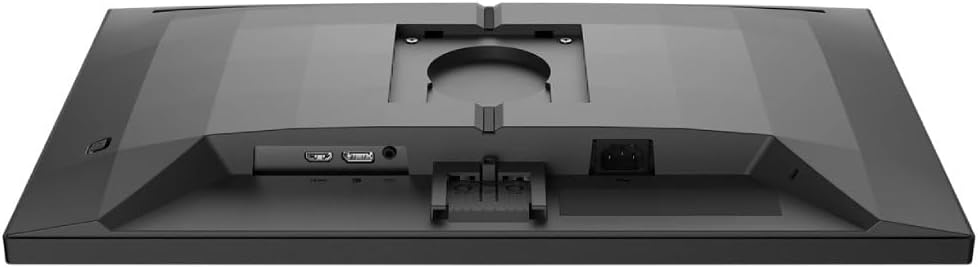
Gambar: Detil view of the monitor's rear panel, showing the HDMI, DisplayPort, and power input ports.
5. Ngoperasikeun Monitor
5.1. Daya Hurung / Pareum
Press the power button, usually located on the bottom right or rear of the monitor, to turn it on or off. The power LED will indicate the monitor's status.
5.2. Menu dina Layar (OSD).
The OSD menu allows you to adjust various monitor settings. Use the joystick or buttons (refer to your monitor's specific layout) to navigate and select options.
- Gambar: Saluyukeun kacaangan, kontras, seukeutna gambar, sareng gamma.
- warna: Pilih suhu warna, modeu sRGB, atanapi setelan warna anu ditetepkeun ku pangguna.
- Audio: Control volume if the monitor has built-in speakers or an audio output.
- Input: Manually select the input source (HDMI, DisplayPort).
- Kaulinan: Access specific gaming features like SmartImage Game, Low Input Lag, and Adaptive Sync settings.
- Setélan OSD: Saluyukeun basa OSD, transparansi, sareng seep waktos.

Image: The Philips Evnia 24M2N3200L monitor showcasing a high-quality image from a video game, highlighting its display capabilities.
6. Pangropéa
6.1. Ngabersihan Monitor
- Salawasna cabut monitor saméméh beberesih.
- Use a soft, clean, lint-free cloth to gently wipe the screen.
- Pikeun tanda pengkuh, enteng dampBilas lawon ku cai atanapi pembersih layar anu hampang sareng henteu abrasif. Ulah nyemprotkeun cairan langsung kana layar.
- Bersihkeun monitor casing ku lawon anu lemes sareng garing.
6.2. Panyimpenan
Upami nyimpen monitor kanggo waktos anu panjang, pegatkeun sadaya kabel sareng bungkus dina bungkusan aslina pikeun ngajaga tina lebu sareng karusakan fisik. Simpen dina tempat anu tiis, garing.
7. Cara ngungkulan
Upami anjeun mendakan masalah sareng monitor anjeun, tingal masalah sareng solusi umum ieu:
| Masalah | Mungkin Cukang lantaranana | Solusi |
|---|---|---|
| Henteu aya gambar dina layar | Power cable disconnected, video cable loose, incorrect input source. | Pariksa sambungan kabel kakuatan jeung video. Pilih sumber input anu leres via OSD. |
| Gambar kedip-kedip | Loose video cable, graphics card issue, refresh rate mismatch. | Ensure video cable is secure. Update graphics drivers. Adjust refresh rate in OS settings. |
| Warna teu bener | Incorrect color settings, faulty cable. | Reset color settings in OSD. Try a different video cable. |
| Monitor teu hurung | No power, faulty power adapter. | Check power outlet and cable. Ensure power adapter is functioning. |
8. Spésifikasi
| Fitur | Rincian |
|---|---|
| Nomer modél | 24M2N3200L |
| Ukuran layar | 24 inci |
| Tipe Panel | IPS |
| Resolusi | 1920 x 1080 (HD lengkep) |
| Rasio Aspék | 16:9 |
| Refresh Laju | 180Hz |
| Waktu Tanggapan | 0.5 ms (MPRT) |
| Konektipitas | 1x HDMI, 1x DisplayPort |
| Sumber Daya | Daya listrik |
| Ukuran produk (kalayan stand) | 19.5 x 54 x 43.3 cm (Jalna x Rubak x Jangkungna) |
| Beurat Produk (kalayan nangtung) | 4.96 kg |
| Produsén | Philips |
9. Garansi jeung Rojongan
Kanggo inpormasi jaminan sareng dukungan téknis, mangga tingal kartu jaminan anu kalebet dina pakét anjeun atanapi kunjungan dukungan resmi Philips websitus. Simpen resi pameseran anjeun salaku bukti pameseran pikeun klaim garansi.
Dukungan Online: www.philips.com/support


