1. Produk Langkungview
The ZIHNIC S12A Clip-on Earbuds are advanced open-ear wireless headphones designed for comfort and high-quality audio. Featuring Bluetooth 5.4 connectivity, a smart LED touch screen for intuitive control, and a non-in-ear design, these earbuds are suitable for extended wear during various activities including workouts, commuting, and daily use. They offer superior audio performance with noise cancellation and extended battery life.

Image: ZIHNIC S12A Clip-on Earbuds shown in their charging case, highlighting the sleek design and integrated display.
2. Setup Guide
2.1. Ngecas Awal
Before first use, fully charge your ZIHNIC S12A earbuds and their charging case. Connect the provided charging cable to the case and a compatible USB power source. The LED screen on the case will indicate the charging status. A full charge takes approximately 1.5 hours.

Image: Visual representation of the earbuds' battery life, showing 1.5 hours for quick charge, 9 hours of play time, and 36 hours of standby in the case.
2.2. Papasangan Bluetooth
- Buka wadah ngecas. Earbuds bakal otomatis asup kana mode papasangan.
- Dina alat Anjeun (smartphone, tablet, jsb), aktipkeun Bluetooth.
- Milarian pikeun available Bluetooth devices and select "ZIHNIC S12A" from the list.
- Once connected, a voice prompt will confirm successful pairing. The earbuds will automatically reconnect to the last paired device when taken out of the case.
3. Parentah Operasi
3.1. Ngagem Earbuds
The ZIHNIC S12A earbuds feature an open-ear clip-on design for comfortable and secure fit without entering the ear canal. Gently clip the earbuds onto your ear, ensuring the audio output is positioned correctly for optimal sound. This design allows for environmental awareness while enjoying audio.

Image: A person demonstrating the comfortable and secure fit of the ZIHNIC S12A Open-Ear Clip-on Earbuds.
3.2. Smart LED Touch Screen Controls
The charging case features an intuitive LED touch screen for easy control and customization. Double-tap the screen to unlock and access various functions. These functions include:
- Kontrol Puteran: Maénkeun/pareumkeun, luncatan lagu.
- Penyesuaian volume: Ningkatkeun atanapi ngirangan volume.
- Setélan ékualiser: Sesuaikeun sora profiles (contona, normal, bass boost).
- Konci layar: Hindarkeun sentuhan anu teu dihaja.
- Pindah Basa: Robah basa tampilan.
- Tingkat cahaya: Saluyukeun kacaangan layar.
- Lost Earphone Finder: Locate misplaced earbuds (see Troubleshooting section).
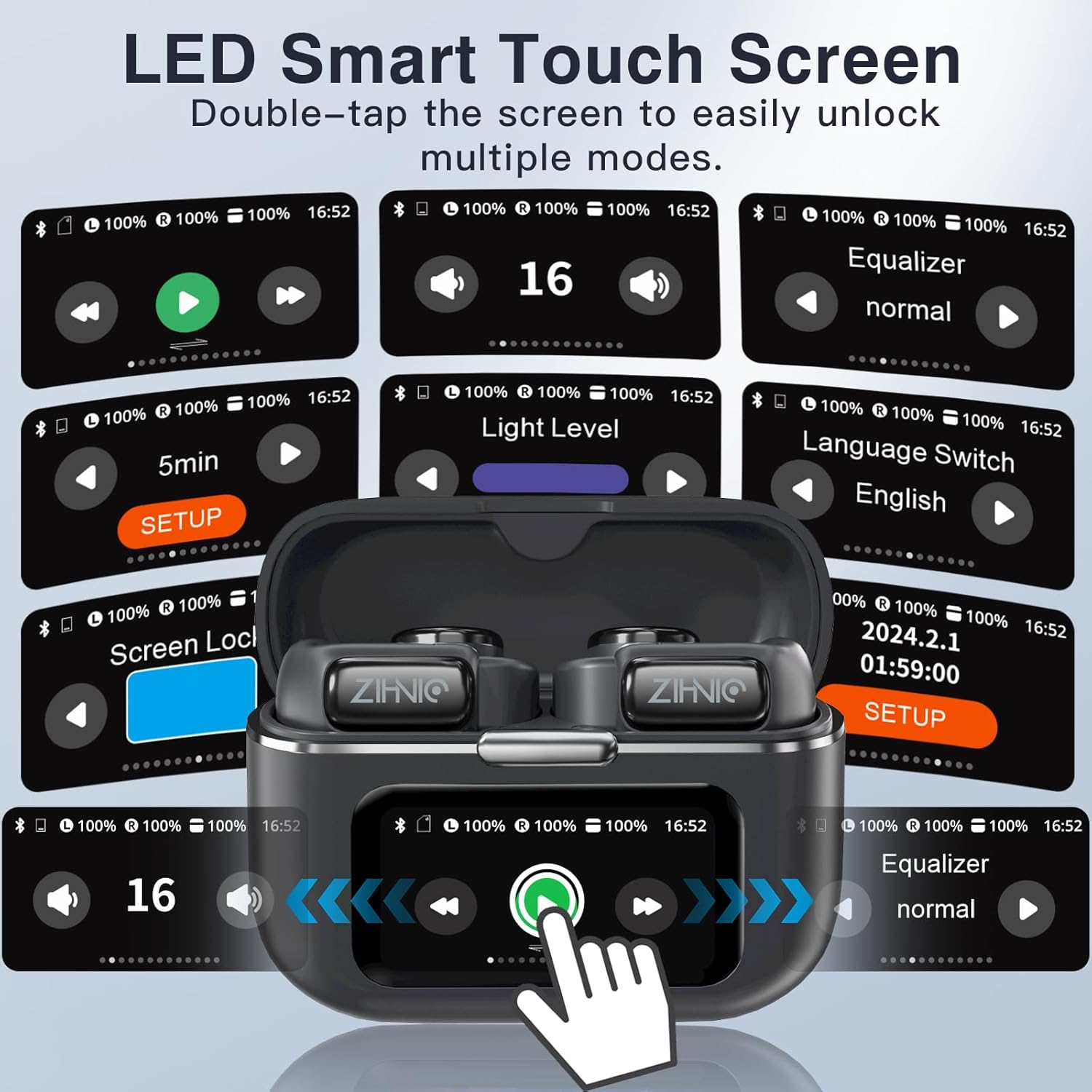
Image: A collage of the ZIHNIC S12A's LED Smart Touch Screen interface, showing various control options like playback, volume, equalizer, screen lock, and language settings.
3.3. Audio Playback and Storage
The earbuds deliver superior HiFi stereo sound with optimized amplitude and sensitivity, ensuring crystal-clear audio and dynamic sound reproduction. They are designed to minimize sound leakage for a private listening experience. The earbuds also feature 4GB of internal storage, allowing you to store up to 1000 songs directly on the device for offline listening.

Image: An exploded diagram illustrating the components responsible for HiFi Stereo Sound within the ZIHNIC S12A earbuds, emphasizing immersive audio quality.

Image: A graphic illustrating the 4GB internal storage capacity of the ZIHNIC S12A earbuds, capable of holding up to 1000 songs for music on the go.
3.4. Manajemén nelepon
The built-in microphone with advanced noise-cancellation technology ensures clear, hands-free communication. To answer or end calls, use the touch controls on the earbuds as indicated in the Smart LED Touch Screen Controls section. For optimal call quality, ensure the microphone is not obstructed.
4. Pangropéa sarta perawatan
- beberesih: Rutin usap earbuds sareng wadah ngecas ku lawon anu lemes, garing, teu aya serat. Hindarkeun ngagunakeun bahan abrasive atanapi bahan kimia anu kasar.
- Tahan cai: The earbuds are waterproof, making them suitable for workouts and light rain. However, avoid submerging them in water or exposing them to high-pressure water jets. Dry them thoroughly if they get wet.
- Panyimpenan: Upami teu dianggo, simpen earbud dina wadah ngecasna pikeun ngajagi tina lebu sareng karusakan. Simpen di tempat anu tiis, garing, sareng jauh tina suhu anu ekstrim.
- Perawatan batré: To prolong battery life, avoid fully discharging the earbuds and case frequently. Charge them regularly, even if not in daily use.
5. Cara ngungkulan
If you encounter issues with your ZIHNIC S12A earbuds, refer to the common problems and solutions below:
| Masalah | Solusi anu mungkin |
|---|---|
| Earbuds teu dipasangkeun / nyambungkeun. |
|
| Taya sora atawa volume low. |
|
| Microphone issues (e.g., screeching sounds for others). |
|
| Internal music storage not working. |
|
| Lost one earbud. |
|

Image: The ZIHNIC S12A charging case display showing the "Find My Earphone" feature, which assists in locating misplaced earbuds.
6. Spésifikasi
| Fitur | Rincian |
|---|---|
| Ngaran modél | S12A |
| merek | ZIHNIC |
| Téhnologi konektipitas | Nirkabel (Bluetooth 5.4) |
| Panempatan Ceuli | Ceuli Buka (Clip-on) |
| Kontrol bising | Pembatalan Noise aktip |
| Métode kontrol | Touch (Smart LED Screen) |
| Kahirupan Batré (Playback) | Up to 9 hours (earbuds), 36 hours (with charging case) |
| Waktu Ngecas | Kira-kira. 1.5 jam |
| Panyimpenan internal | 4GB (up to 1000 songs) |
| Item Beurat | 50 Gram (1.76 ons) |
| Rentang Frékuénsi | 20Hz - 20,000Hz |
| Impedansi | 16 ohm |
| Komponén Kaasup | Kabel, Buku Panduan |
7. Garansi jeung Rojongan
ZIHNIC S12A Clip-on Earbuds come with a 12-garansi sasih from the date of purchase, covering manufacturing defects. For any product inquiries, technical support, or warranty claims, please contact ZIHNIC customer support through the official channels provided at the time of purchase or visit the ZIHNIC brand store on Amazon.


