
DEVAISE ASJZ032
DEVAISE 48x24 Inch Electric Standing Desk with Drawers (Model ASJZ032) User Manual
Pitunjuk lengkep pikeun perakitan, operasi, sareng pangropéa.
Émbaran Kasalametan penting
Mangga baca sagala parentah taliti saméméh assembly sarta pamakéan. Simpen manual ieu pikeun rujukan ka hareup.
- Always ensure that the total weight on the desk does not exceed 180 lbs (81.6 kg).
- Be cautious of obstructions when adjusting the desk height to avoid potential damage or injury.
- Utilize the anti-collision feature to prevent collisions with objects or people during height adjustments.
- Jauhkeun barudak sareng piaraan tina méja nalika dianggo.
- Ensure all screws and bolts are securely tightened before use. Periodically check for loose connections.
- Ulah diuk atawa nangtung dina meja.
- Pegatkeun sambungan kakuatan saméméh beberesih atawa perawatan.
Eusi pakét
Pariksa heula sadaya komponén parantos aya sateuacan ngamimitian perakitan. Tingali pidéo perakitan pikeun idéntifikasi visual bagian-bagianna.
Video: "Fast Assembly for DEVAISE Standing Desk with Drawers" - This video provides a visual guide to all included parts and the assembly process.
pakét kedah ngawengku:
- Desktop (1 piece)
- Suku (2 lembar)
- Komponen palang/pigura
- Motor sareng kotak kontrol
- Panél kontrol
- Adaptor kakuatan sareng kabel
- Laci (2 buah)
- rak gudang
- Headphone hooks (2 pieces)
- Perangkat keras perakitan (sekrup, baut, kunci Allen)
- Buku pituduh
Parentah Majelis
Follow these steps carefully for proper assembly. All parts are clearly labeled, and pre-drilled holes are provided for convenience. An Allen wrench is included for assembly.
- Step 1: Attach the Drive Rod to the Motor.
Insert the drive rod (part 4 in video) into the motor (part 5 in video). Ensure it is securely seated.

Gambar: Ngabeledug view of desk components, illustrating the quick installation process with labeled parts.
- Step 2: Assemble the Desk Legs.
Attach the foot supports to the bottom of each leg (parts 3 and 10 in video) using the provided screws (A) and Allen wrench (E).
- Step 3: Connect Legs with Crossbar.
Position the legs upright and connect them using the main crossbar (part 1 in video). Secure with screws (B) and Allen wrench (E).
- Step 4: Install Side Brackets.
Attach the side brackets (part 2 in video) to the top of the leg assembly, securing them with screws (B) and Allen wrench (E).
- Step 5: Prepare the Desktop.
Place the desktop (parts 7 and 18 in video) face down on a soft, clean surface. Attach the connecting plates (N) and wooden dowels (H) to join the desktop sections if applicable.
- Step 6: Attach Leg Assembly to Desktop.
Carefully align the assembled leg frame with the pre-drilled holes on the underside of the desktop. Secure the frame to the desktop using screws (C) and Allen wrench (E).
- Step 7: Connect Control Box and Cables.
Mount the control box (G) and connect all motor and control panel cables (F) as shown in the diagram. Ensure all connections are firm.
- Step 8: Assemble the Storage Shelf.
Assemble the storage shelf components (parts 11, 12, 13, 14, 15 in video) using screws (I), wooden dowels (H), and the provided tools (E, K, L).
- Step 9: Attach Storage Shelf to Desktop.
Carefully place the assembled storage shelf onto the desktop, aligning it with the designated holes. Secure it with screws (I) and wooden dowels (H).
- Step 10: Install Drawers and Hooks.
Insert the fabric drawers (part 16 in video) into their compartments. Attach the headphone hooks (part 8 in video) to the sides of the desk.

Image: Fully assembled DEVAISE Electric Standing Desk with two monitors, a laptop, and various office accessories, highlighting its functional design.
Parentah Operasi
This section details how to use the electric height adjustment and integrated features of your DEVAISE standing desk.
adjustment Jangkungna listrik
The desk features a smooth electric height adjustment system, allowing you to switch between sitting and standing positions effortlessly. The height range is from 28.35 inches to 46.45 inches.
- Ngagunakeun éta Ka luhur (▲) jeung Turun (▼) panah dina panel kontrol pikeun nyaluyukeun jangkungna méja sacara manual.
- The LED display will show the current height in inches.
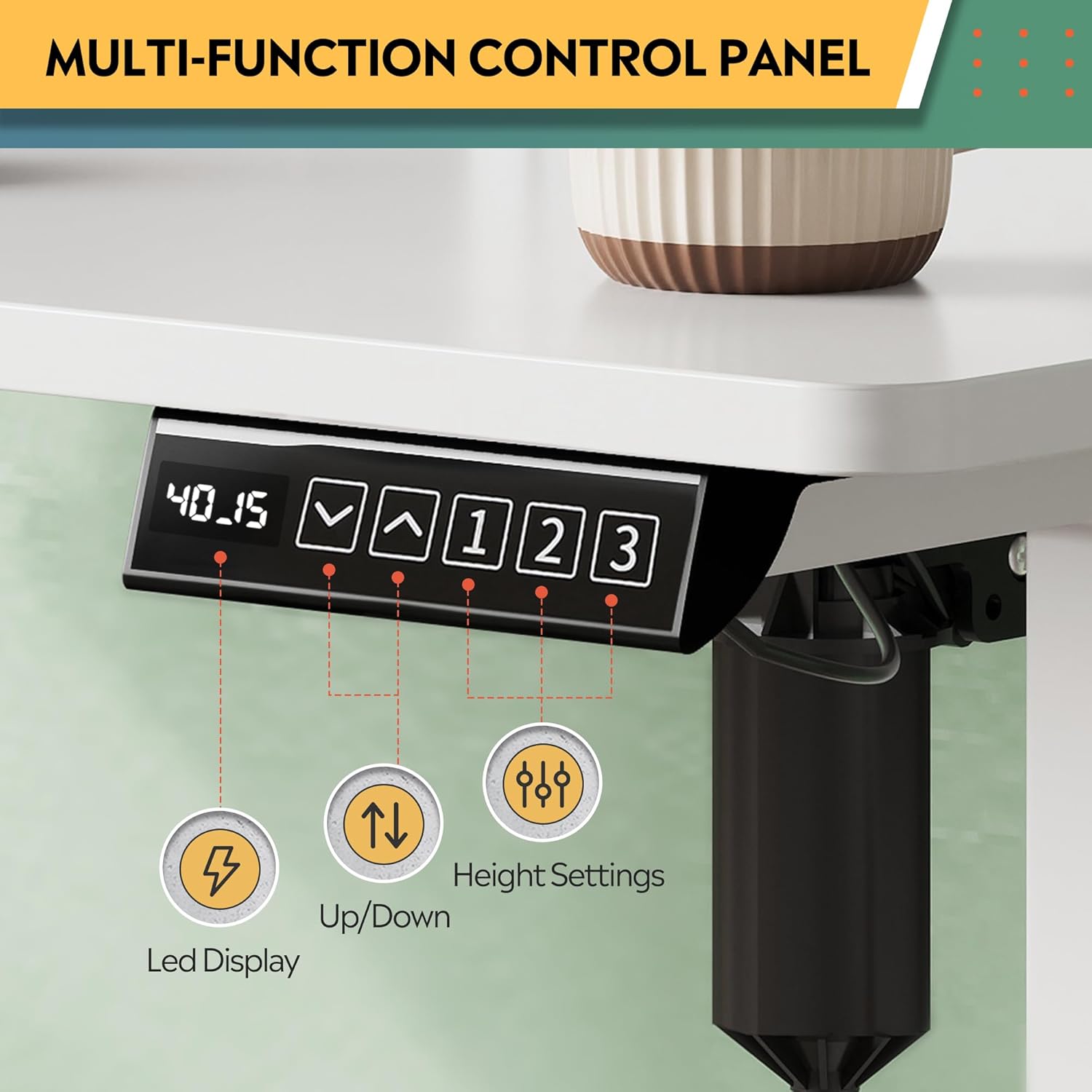
Image: Multi-function control panel showing LED display, up/down arrows, and memory preset buttons.
Mémori prasetél
The desk includes three programmable height settings for quick, one-touch adjustments to your preferred sitting or standing heights.
- Saluyukeun meja ka jangkungna nu Anjeun hoyongkeun maké panah luhur/handap.
- Pencét éta "M" button (or similar memory set button, if present) followed by one of the numbered preset buttons (1, 2, atawa 3) pikeun nyimpen jangkungna ayeuna.
- To recall a saved height, simply press the corresponding numbered preset button (1, 2, atawa 3).
Stopkontak Terpadu sareng Port USB
The desk is equipped with 2 AC outlets and 2 USB ports (12A, 110~125V) for convenient power access for your devices.
- Plug your monitors, laptops, and other devices directly into the AC outlets.
- Anggo port USB pikeun ngecas smartphone, tablet, sareng asesoris anu didayakeun ku USB.
Video: "DEVAISE Standing Desk with S" - Demonstrates the integrated power outlets, USB ports, and headphone hooks.
Fitur Anti-Tabrakan
The smart anti-collision feature automatically stops and reverses the desk's movement if an obstruction is detected, protecting both the desk and your belongings.
Video: "DEVAISE Electric Standing Desk for Home Office" - Illustrates the sit-to-stand functionality and the anti-collision system.
Pangropéa
Pangropéa rutin mastikeun umur panjang sareng kinerja optimal méja nangtung anjeun.
- beberesih: Ngusap beungeut meja ku hipu, damp lawon. Hindarkeun bahan kimia anu kasar atanapi pembersih abrasive anu tiasa ngaruksak finish.
- Pamariksaan: Pariksa sadaya sekrup sareng sambungan sacara berkala pikeun mastikeun éta pageuh. Kencengkeun deui upami diperyogikeun.
- Manajemén Kabel: Ensure cables are neatly organized and not interfering with the desk's movement. Use the provided cable management features.
- Perawatan Motor: The motor system is designed for maintenance-free operation. Do not attempt to open or service the motor or control box.
Pamérésan masalah
If you encounter any issues with your DEVAISE standing desk, refer to the following common problems and solutions.
| Masalah | Mungkin Cukang lantaranana | Solusi |
|---|---|---|
| Méja teu obah. | Power cable disconnected, motor cable loose, control box error. | Check all power and motor connections. Unplug the desk for 10 seconds, then plug it back in to reset. |
| Méja obah teu rata atawa ngaluarkeun sora anu teu biasa. | Beban teu rata, sekrup kendor, halangan. | Ensure weight is evenly distributed. Check and tighten all assembly screws. Clear any obstructions. |
| Fitur anti tabrakan sering teuing micu. | Sensitivity setting too high, minor obstruction. | Check the area for any subtle obstructions. Refer to the control panel manual for adjusting anti-collision sensitivity (if available). |
| Preset mémori teu tiasa dianggo. | Preset teu disimpen kalawan bener. | Re-program the memory presets following the "Memory Presets" instructions in this manual. |
Lamun masalah persists, mangga ngahubungan rojongan customer.
spésifikasi
| Fitur | Rincian |
|---|---|
| merek | DEVAISE |
| Nomer modél | ASJZ032 |
| Desain méja | Méja nangtung |
| Ukuran produk (D x W x H) | 27.6 "D x 47.24" W x 28.35" H (70.1cm D x 120cm W x 72cm H) |
| Warna | Bodas |
| Jangkungna Minimum | 28.35 Inci (72 cm) |
| Jangkungna maksimum | 46.45 Inci (118 cm) |
| Kamampuh beurat maksimum | 180 Pon (81.6 kg) |
| Bahan Dasar | Iron, Alloy Steel Frame |
| Tipe Bahan Top | Kayu direkayasa |
| Jumlah laci | 2 |
| Outlet listrik | 2 Stop Kontak AC, 2 Port USB (12A, 110~125V) |
| Fitur husus | Adjustable Height, Electric, Headphone Hooks, Storage Shelf |
| Majelis Diperlukeun | Sumuhun |
Garansi sareng Rojongan
Your DEVAISE Electric Standing Desk comes with a limited warranty. For specific details regarding the warranty period and coverage, please refer to the warranty card included in your package or contact DEVAISE customer support.
Rojongan Palanggan: Should you require assistance with assembly, product operation, or any other inquiries, our U.S.-based customer support team is available to help. Please refer to the contact information provided in your product packaging or on the official DEVAISE websitus.
Optional protection plans are available for purchase, offering extended coverage for 2-year or 3-year durations, or a monthly complete protect plan. Details can be found where the product was purchased.