
Produk Leuwihview
The DOGNESS 2L Automatic Pet Feeder (Model F06) is designed to provide convenient and consistent meal delivery for your pets. With programmable feeding times and portion control, it helps manage your pet's diet and ensures they are fed even when you are away. This feeder features a 2-liter capacity, voice recording function, and dual power options for reliability.
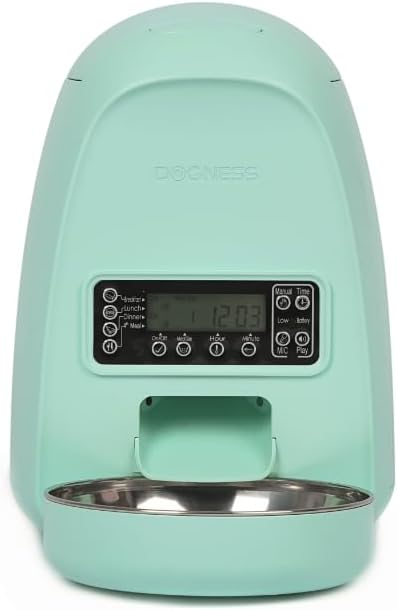
Gambar 1: Hareupeun view of the DOGNESS Automatic Pet Feeder, highlighting its compact design and control panel.
Fitur konci
- Kapasitas 2 Liter: Ideal for small to medium-sized pets, holding a sufficient amount of dry food.
- Timed Dispense: Program up to 4 meals per day with customizable portion sizes.
- Rékam sora: Record a 10-second message to call your pet for meals.
- Desain Anti-Clogging: Ensures smooth food dispensing and prevents blockages.
- Pasokan Daya Ganda: Operates via power adapter or 3 x D batteries (not included) for uninterrupted feeding during power outages.
- Gampang pikeun ngabersihan: Features a removable stainless steel feeding bowl for hygiene.
Guide Setup
1. Unpacking jeung Majelis
- Sacara saksama miceun sadaya komponén tina bungkusan.
- Place the stainless steel feeding bowl into its designated slot at the base of the feeder.
2. Powering the Feeder
The feeder supports dual power options for reliability:
- adaptor kakuatan: Connect the provided power adapter to the feeder's power port and plug it into a standard electrical outlet.
- Cadangan batré: Pikeun kakuatan anjeuntage protection, insert 3 x D-size batteries (not included) into the battery compartment located at the bottom of the feeder. Ensure correct polarity.

Figure 2: Illustration of the dual power supply, showing both the power adapter connection and the battery compartment for D-size batteries.
3. Filling the Food Barrel
- Buka tutup luhur feeder.
- Pour dry pet food into the 2-liter food barrel. Ensure the kibble size is between 2-10mm to prevent jamming.
- Tutup pageuh-pageuh supaya kadaharan tetep seger.

Figure 3: The 2-liter food barrel, indicating its capacity and the recommended kibble size for optimal performance.
Parentah Operasi
1. Nyetél Waktos Ayeuna
- Press and hold the "Time" button until the hour display flashes.
- Use the "Hour" and "Minute" buttons to adjust the current time.
- Press "Time" again to confirm and save.
2. Ngatur Jadwal sareng Porsi Dahar
The feeder allows for up to 4 meals per day (Breakfast, Lunch, Dinner, 4th Meal).
- Press the "Meal" button to cycle through the meal settings (Breakfast, Lunch, Dinner, 4th Meal).
- When a meal time is displayed, use the "On/Off" button to enable or disable it.
- Use the "Hour" and "Minute" buttons to set the desired feeding time for that meal.
- Press the "Meal Size" button to adjust the portion size for the current meal. Each unit typically dispenses 5-7g of food. You can set up to 15 portions per meal.
- Balikan deui pikeun sadaya tuangeun anu dipikahoyong.

Figure 4: The control panel, illustrating the buttons for setting meal times, portion sizes, and recording voice messages.
3. Voice Recording Function
You can record a 10-second voice message to play at each feeding time, calling your pet to their meal.
- Press and hold the "MIC" button. The feeder will beep, indicating it's ready to record.
- Nyarios pesen anjeun sacara jelas kana mikropon.
- Release the "MIC" button to stop recording.
- Press the "Play" button to listen to your recorded message.

Figure 5: The voice recording feature, allowing you to personalize meal calls for your pet.
4. Manual Dahar
To dispense food manually, press the "Manual Feed" button. This will dispense one portion of food immediately.
5. Video Pangajaran
For a visual guide on setting up and operating your DOGNESS feeder, please watch the official product video below:
Video 1: Official DOGNESS video demonstrating the features and setup of the 2L Mini Automatic Feeder for Dogs and Cats.
Pangropéa
Ngabersihan Feeder
- Unplug the feeder from the power outlet and remove any batteries.
- Remove the stainless steel feeding bowl and wash it with soap and water. Rinse thoroughly and dry completely.
- Lap awak utama wadah pakan ku iklanamp lawon. Ulah beuleum unit utama dina cai.
- Pastikeun sadaya bagian garing pisan sateuacan dipasang deui sareng dieusi deui ku tuangeun.
Regular cleaning helps maintain hygiene and ensures the longevity of your feeder.
Pamérésan masalah
| Masalah | Mungkin Cukang lantaranana | Solusi |
|---|---|---|
| Panyeuseup teu ngaluarkeun dahareun. | Food hopper empty; food jammed; power issue. | Refill food. Check for blockages in the dispenser. Ensure power adapter is connected or batteries are installed correctly. |
| Incorrect feeding times/portions. | Settings not saved correctly; time not set. | Re-program meal times and portions, ensuring each setting is confirmed. Verify current time is accurate. |
| Voice message not playing. | Message not recorded or recorded too quietly. | Re-record the voice message, speaking clearly and close to the microphone. |
| Feeder loses settings after power off. | No battery backup installed or batteries are dead. | Install fresh D-size batteries for backup power. |
spésifikasi
- model: F06
- Kapasitas: 2 liter
- Ukuran (L x W x H): 16 x 5 x 7 inci
- beurat: 2 pon
- kakuatan: DC 5V Power Adapter, 3 x D-size batteries (not included)
- Bahan: ABS plastic, Stainless Steel bowl
- Pabrikan: ANJING
- Negara asal: Cina
Garansi sareng Rojongan
The product information indicates "Warranty Description: NO". For any product inquiries, technical support, or assistance, please contact DOGNESS customer service directly. Refer to the product packaging or the official DOGNESS websitus pikeun inpo kontak panganyarna.
You can visit the official DOGNESS store on Amazon for more information: DOGNESS Store