Bubuka
Thank you for choosing the Porodo Lifestyle 4K Digital Camera. This camera is designed to capture your world in stunning detail, offering 4K video recording and high-resolution 50MP images. With features like 16x digital zoom, a flip flash, and a 180° rotating screen, it is ideal for vlogging, photography, and various content creation needs. This manual provides essential information on setting up, operating, and maintaining your camera to ensure optimal performance and longevity.
Émbaran Kasalametan
- Do not expose the camera to extreme temperatures, direct sunlight, or high humidity.
- Hindarkeun leupaskeun atanapi tundukkeun kaméra kana tabrakan anu kuat.
- Keep the camera away from water and liquids unless specifically designed for underwater use (this model is not).
- Entong nyobian ngabongkar atanapi ngarobih kaméra. Ieu bakal ngabatalkeun jaminan.
- Anggo ngan ukur jinis batré sareng metode ngecas anu ditangtukeun.
- Jauhkeun tina jangkauan barudak.
Eusi pakét
Mangga cék kotak pikeun item di handap ieu:
- Porodo Lifestyle 4K Digital Camera
- Batré Rechargeable (650mAh)
- Kabel Ngecas Tipe-C
- Manual pangguna (dokumén ieu)
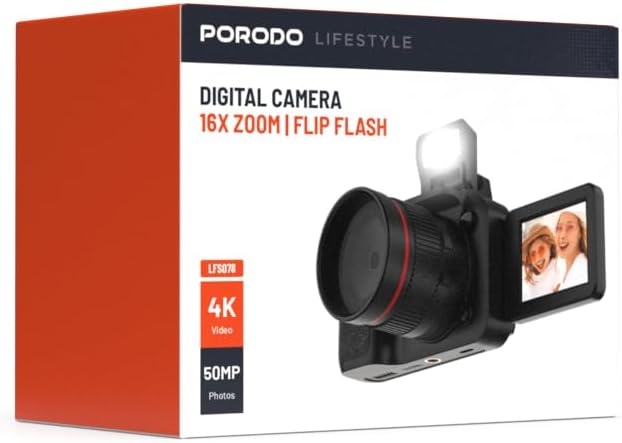
Gambar: Hareupeun view of the Porodo Lifestyle 4K Digital Camera retail box, showing the camera and key features.

Gambar: Balik view of the Porodo Lifestyle 4K Digital Camera retail box, displaying product specifications and features.
Produk Leuwihview
Familiarize yourself with the various parts of your Porodo Lifestyle 4K Digital Camera.

Image: The Porodo Lifestyle 4K Digital Camera shown with its 180° rotating screen flipped open and the integrated flash extended upwards.
- Lensa: Main optical component for capturing images and videos.
- Flip Flash: Provides additional illumination in low-light conditions.
- 180° Rotating Screen (2.2'' Display): Ngamungkinkeun pikeun fléksibel viewing angles, ideal for vlogging and selfies.
- Tombol Daya: Ngahurungkeun / mareuman kaméra.
- Tombol jepret: Motret poto atanapi ngamimitian / ngeureunkeun ngarékam pidéo.
- Kadali zum: Adjusts the 16x digital zoom.
- Tombol Napigasi: Pikeun navigasi menu sareng pangaturan setélan.
- Tipe-C Port: Pikeun ngecas sareng mindahkeun data.
- Slot Kartu Mémori: For inserting an SD card (not included).
Disetél
1. Pamasangan Batré sareng Ngecas
- Teangan tempat panutup kompartemen batré dina handapeun kaméra.
- Geser kancing pikeun muka panutup.
- Insert the provided 650mAh battery, ensuring the contacts align correctly.
- Tutupkeun panutup kompartemen batré dugi ka ngaklik pageuh.
- Connect the camera to a power source using the Type-C charging cable. The charging indicator will illuminate.
- A full charge takes approximately 2.5 hours. The indicator will change or turn off when charging is complete.
2. Pamasangan Kartu Mémori
A memory card (SD card, not included) is required to store photos and videos.
- Locate the memory card slot, usually on the side or bottom of the camera.
- Insert the SD card with the metal contacts facing the correct direction (refer to the diagram near the slot if available) until it clicks into place.
- Pikeun nyabut, dorong kartu ka jero dugi ka kaluar.
3. Daya Awal Hurung
- Pencét terus tahan tombol Daya salami sababaraha detik dugi ka layar hurung.
- Upon first use, you may be prompted to set the date and time. Use the navigation buttons to adjust and confirm.
Parentah Operasi
Basic Photo Mode (50MP)
- Turn on the camera. It will typically default to photo mode.
- Frame your shot using the 2.2'' display.
- Press the Shutter button halfway down to focus (if applicable).
- Press the Shutter button fully to capture a 50MP image.

Image: A person holding the Porodo Lifestyle 4K Digital Camera, demonstrating a typical usage scenario for capturing photos.

Gambar: Lain view of a person holding the Porodo Lifestyle 4K Digital Camera, illustrating the camera's ergonomic design during use.
Basic Video Mode (4K)
- Switch the camera to video mode (usually via a dedicated button or menu option).
- Press the Shutter button once to start 4K video recording. A recording indicator (e.g., red dot, timer) will appear on the screen.
- Pencét tombol Shutter deui pikeun ngeureunkeun rékaman.

Image: The Porodo Lifestyle 4K Digital Camera highlighting its 4K video resolution capability.
Using the 16X Digital Zoom
- While in photo or video mode, use the zoom controls (often marked with 'W' for Wide and 'T' for Telephoto) to adjust the 16x digital zoom.
- Press 'T' to zoom in and 'W' to zoom out.
Using the Flip Flash
- To activate the flash, manually flip it up from its resting position.
- The camera will automatically use the flash when needed in low-light conditions, depending on your flash settings (e.g., Auto, Fill-in, Red-eye reduction).
- To turn off the flash, gently push it back down until it locks into place.
Using the 180° Rotating Screen
- The 2.2'' display can be rotated 180 degrees.
- Flip the screen out from the side of the camera and rotate it to face forward for selfies or vlogging, or to various angles for creative shots.
- Ensure the screen is securely positioned before shooting.

Image: The Porodo Lifestyle 4K Digital Camera illustrating its 2.2-inch display and 180-degree flip screen functionality.
Playback jeung mupus Files
- Enter Playback mode (usually via a dedicated button or menu option).
- Pake tombol napigasi pikeun ngagulung poto sareng video Anjeun.
- Pikeun mupus a file, select it and press the Delete button (often marked with a trash can icon). Confirm deletion when prompted.
Nyambungkeun ka Komputer
- Pareuman kaméra.
- Connect the camera to your computer using the provided Type-C cable.
- Turn on the camera. It should appear as a removable disk drive on your computer.
- You can now transfer photos and videos to your computer.
Pangropéa
Ngabersihan Kaméra
- Anggo lawon anu lemes sareng henteu lint pikeun ngabersihan awak kaméra.
- For the lens and screen, use a specialized lens cleaning cloth and solution. Do not use abrasive materials.
- Avoid spraying cleaning solutions directly onto the camera. Apply to the cloth first.
Perawatan batré
- Recharge the battery fully before first use.
- Hindarkeun sering-sering ngosongkeun batré pikeun manjangkeun umurna.
- If storing the camera for an extended period, charge the battery to about 50% and remove it from the camera.
Panyimpenan
- Simpen kaméra di tempat anu tiis, garing, jauh tina sinar panonpoé langsung sareng suhu anu ekstrim.
- Use a camera bag or case to protect it from dust and scratches.
Pamérésan masalah
| Masalah | Mungkin Cukang lantaranana | Solusi |
|---|---|---|
| Kaméra teu hurung. | Batréna paéh atanapi teu dipasang kalayan leres. | Ngecas batré. Pastikeun batréna diselapkeun kalayan polaritasna anu leres. |
| Teu tiasa nyandak poto/video. | Kartu mémori pinuh, teu diselapkeun, atawa ruksak. | Lebetkeun kartu memori. Hapus anu teu perlu files. Format the card (this will erase all data). |
| Images/Videos are blurry. | Lens is dirty. Insufficient light. Camera shake. | Clean the lens. Use the flash or shoot in brighter conditions. Hold the camera steady. |
| Flash teu jalan. | Flash is not flipped up. Flash setting is off. | Ensure the flash is manually flipped up. Check flash settings in the menu. |
| Kaméra ngadégdég. | Software glitch. | Cabut sareng pasang deui batréna pikeun ngareset kaméra. |
spésifikasi
Detailed technical specifications for the Porodo Lifestyle 4K Digital Camera:

Image: Visual representation of the camera's core capabilities: 4K video, 50MP photos, and 16x digital zoom.

Image: A detailed table outlining the technical specifications of the Porodo Lifestyle 4K Digital Camera.
- Ngaran modél: Porodo Lifestyle 4K Digital Camera – 50MP, 16x Zoom, Flip Flash, 180° Rotating Screen
- Jumlah modél: 6849108448116
- merek: Porodo
- maksimal WebResolusi Gambar cam: 50 MP
- Resolusi Video: 4K (3840x2160)
- Ngazum Digital: 16X
- Zoom optik: 1.0
- tampilan: 2.2'' (180° Rotating Screen)
- Kapasitas batré: 650mAh (1 batré P76 kaasup)
- Waktos damel: Nepi ka 3 jam
- Waktu Ngecas: Kurang leuwih 2.5 jam
- Port ngecas: Tipe-C
- Téknologi Sénsor Poto: CMOS
- Dirojong File Bentuk: JPG (images), AVI (videos)
- Stabilisasi Gambar: Digital
- Rasio Aspék: 16:9, 4:3
- Katerangan pangukuran: titik
- Ukuran produk: 6 x 13 x 9 cm; 310 g
- Negara asal: Cina
Garansi sareng Rojongan
Porodo products are designed with quality and reliability in mind. For warranty information and technical support, please refer to the official Porodo websitus atanapi ngahubungan distributor lokal Anjeun.
Dukungan Online: Nganjang ka Porodo Store on Amazon pikeun émbaran produk jeung apdet.
Pilihan Garansi Dipanjangkeun: Additional warranty plans may be available through authorized retailers. Please check with your point of purchase for details.


