1. Bubuka
Thank you for choosing the DEVAISE ASJZ025 Electric Standing Desk. This manual provides detailed instructions for the safe assembly, operation, and maintenance of your new electric standing desk. Please read this manual thoroughly before use and retain it for future reference.

Figure 1.1: The DEVAISE 71-inch electric standing desk in maple finish, showcasing its spacious desktop accommodating multiple monitors and office accessories.
2. Émbaran Kasalametan penting
PERHATOSAN: Gagal nuturkeun parentah kaamanan ieu bisa ngakibatkeun tatu atawa ruksakna produk.
- Always keep children and pets away from the desk when it is in motion.
- Utilize the child lock feature to prevent unintended height adjustments.
- Be aware of the anti-collision feature. Do not force the desk to move if it encounters an obstacle.
- Pastikeun sadaya kabel diurus kalayan leres pikeun nyegah pabeulit nalika nyaluyukeun jangkungna.
- Ulah ngabebanan méja sacara kaleuleuwihi. Kapasitas beurat maksimum nyaéta 180 lbs.
- Only use the desk for its intended purpose as a workstation.
3. Eusi Paket
Pariksa yén sadaya komponén aya sateuacan ngamimitian assembly. Lamun aya bagian nu leungit atawa ruksak, kontak rojongan customer.
- Desktop (Maple, 71 x 28 inches)
- Desk Legs (2) with Dual Motors
- Control Panel kalawan LED Display
- Adaptor Daya sareng Kabel
- Crossbars and Support Frames
- Headphone Hook
- Majelis Hardware (screws, bolts, parabot)
- Instruksi Manual

Angka 3.1: Ngabeledug view showing all components for the DEVAISE Electric Standing Desk, including the desktop, leg frames, control panel, and various hardware pieces, indicating a quick installation process.
4. Setup jeung Majelis
Assembly is designed to be straightforward with pre-drilled holes and labeled parts. It is recommended to have a Phillips head screwdriver for some placements. For detailed visual guidance, refer to the included assembly instructions booklet.
- Ngabongkar komponén: Taliti miceun sadaya bagian tina bungkusan. Mariksa karusakan naon waé.
- Kumpulkeun pigura: Attach the crossbars and support frames to the desk legs using the provided hardware. Ensure all connections are secure.
- Pasang Desktop: Place the desktop upside down on a soft, clean surface. Align the pre-drilled holes on the desktop with the frame. Secure the desktop to the frame using the provided screws.
- Pasang Panel Kontrol: Mount the control panel to the underside of the desktop in the designated area. Connect the motor cables and power cable to the control panel.
- Manajemén Kabel: Anggo beungkeut kabel atanapi klip anu kalebet pikeun ngatur sareng ngamankeun sadaya kabel, nyegah éta ngaganggu gerakan méja.
- Power-Up mimiti: Connect the power adapter to the desk and then to a power outlet.

Figure 4.1: The DEVAISE Electric Standing Desk set up in an office environment, showcasing its spacious maple desktop and white frame, accommodating multiple monitors and accessories.
5. Parentah Operasi
5.1. Control Panel Leuwihview
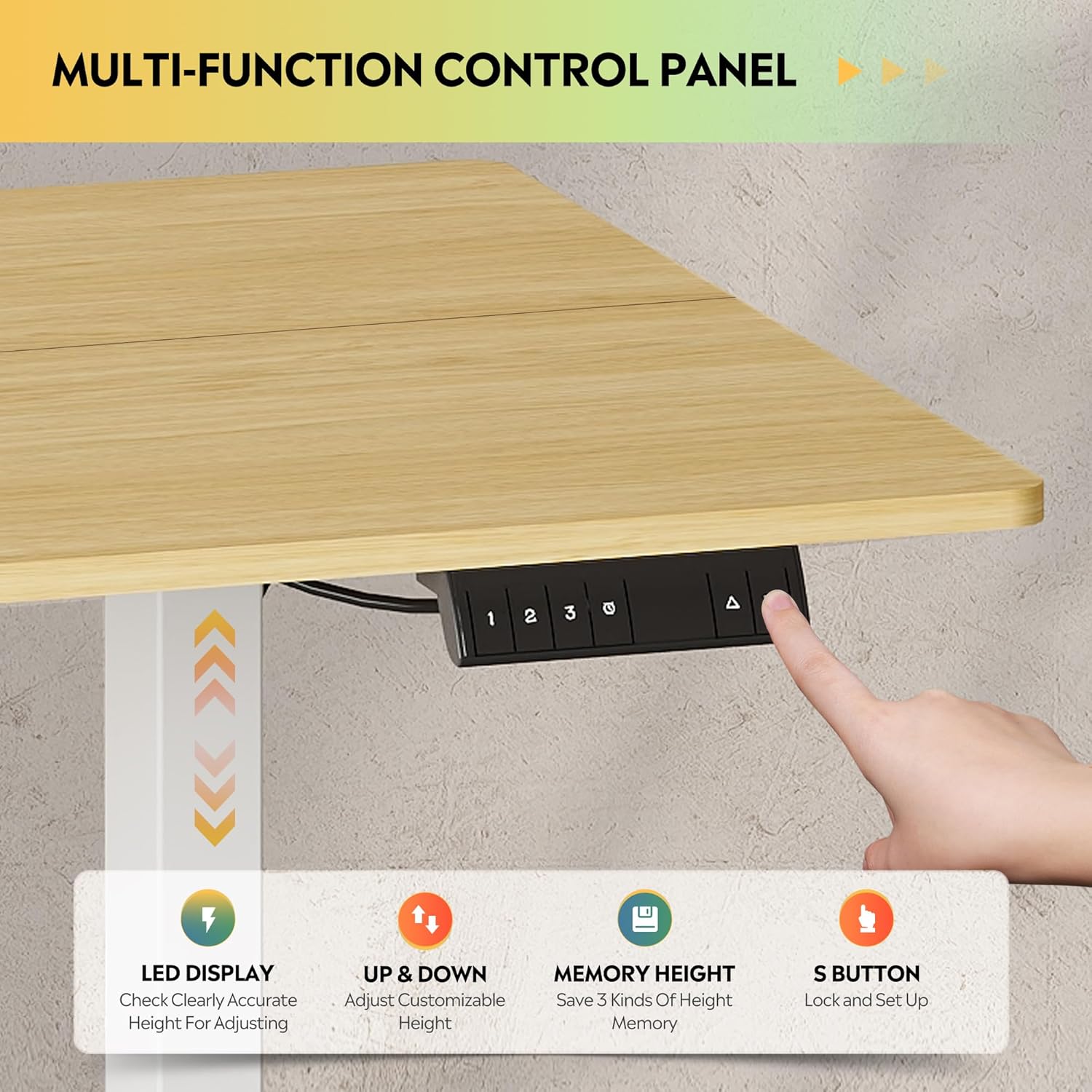
Gambar 5.1: A lengkep view of the multi-function control panel, featuring an LED display, up/down adjustment buttons, three memory preset buttons (1, 2, 3), and an 'S' button for saving settings and child lock.
- Témbong LED: Némbongkeun jangkungna méja ayeuna dina inci.
- Up/Down Buttons (▲/▼): Pencét terus tahan pikeun nyaluyukeun jangkungna méja sacara manual. Leupaskeun pikeun eureun.
- Memory Preset Buttons (1, 2, 3): Quickly move the desk to a saved height.
- 'S' Button: Used to save height presets and activate the child lock.
5.2. adjustment jangkungna
The desk features a tri-motor system for quiet and smooth height transitions.
- adjustment manual: Press and hold the ▲ button to raise the desk or the ▼ button to lower it. The desk will move smoothly between 28.35 inches and 46.45 inches.
- Ngagunakeun Preset Mémori: Press one of the preset buttons (1, 2, or 3) to automatically move the desk to the corresponding saved height.

Figure 5.2: Illustration of the DEVAISE Electric Standing Desk's adjustable height range, demonstrating its ability to transition from a sitting height of 28.35 inches to a standing height of 46.45 inches.
5.3. Nyetél Preset Mémori
- Atur méja kana jangkungna anu dipikahoyong nganggo tombol ▲ atanapi ▼.
- Press the 'S' button. The LED display will show "S-".
- Dina 3 detik, pencét tombol preset mémori anu dipikahoyong (1, 2, atanapi 3). Layar bakal némbongkeun "S-1", "S-2", atanapi "S-3" pikeun mastikeun jangkungna parantos disimpen.
5.4. Child Fungsi konci
To prevent accidental adjustments, activate the child lock:
- Aktipkeun: Press and hold the 'S' button for 5 seconds until "LOC" appears on the LED display. All buttons will be disabled.
- Nonaktipkeun: Press and hold the 'S' button again for 5 seconds until "LOC" disappears and the current height is displayed.
6. Pangropéa
- beberesih: Lap méja sareng pigura nganggo kaén anu lemes,amp lawon. Hindarkeun pembersih abrasive atanapi bahan kimia anu kasar.
- Manajemén Kabel: Pariksa sacara berkala yén sadaya kabel diatur kalayan aman sareng henteu ngaganggu gerakan méja.
- Pariksa Fastener: Pariksa sadaya sekrup sareng baut sacara berkala pikeun mastikeun éta tetep pageuh.
- Kapasitas beurat: Do not exceed the maximum weight capacity of 180 lbs to ensure longevity and proper function.
7. Cara ngungkulan
| Masalah | Mungkin Cukang lantaranana | Solusi |
|---|---|---|
| Méja teu obah. | Power cable disconnected; Child lock active; Overload; Motor error. | Check power connection. Deactivate child lock (see Section 5.4). Reduce weight on desk. Unplug for 10 seconds, then plug back in to reset. |
| Méja obah teu rata atawa ngaluarkeun sora anu teu biasa. | Pangiket leupas; Halangan; Sebaran beurat teu rata. | Check and tighten all assembly fasteners. Remove any obstructions. Distribute weight evenly on the desktop. |
| Anti-collision feature activates frequently. | Obstruction in path; Sensitivity setting (if adjustable, not specified). | Ensure clear path for desk movement. If problem persists, contact support. |
| Layar LED nunjukkeun kode kasalahan. | Gangguan sistem spésifik. | Refer to the full troubleshooting guide in the included manual or contact DEVAISE customer support with the error code. |
8. Spésifikasi
| Fitur | Rincian |
|---|---|
| merek | DEVAISE |
| Nomer modél | ASJZ025 |
| Ukuran produk (D x W x H) | 27.59 "D x 70.86" W x 29.13" H |
| Warna | Maple (Desktop), White (Frame) |
| Jangkungna Minimum | 28.35 inci |
| Jangkungna maksimum | 46.45 inci |
| Tipe Bahan Top | Kayu direkayasa |
| Bahan Dasar | Beusi |
| Rekomendasi beurat maksimum | 180 pon |
| Fitur husus | 3-Button Memory Presets, Adjustable Height, Dual Motors, Electric, LED Touchscreen |
| Tingkat Noise | Under 50dB during adjustment |
| Komponén Kaasup | Headphone Hook |
| Majelis diperlukeun | Sumuhun |
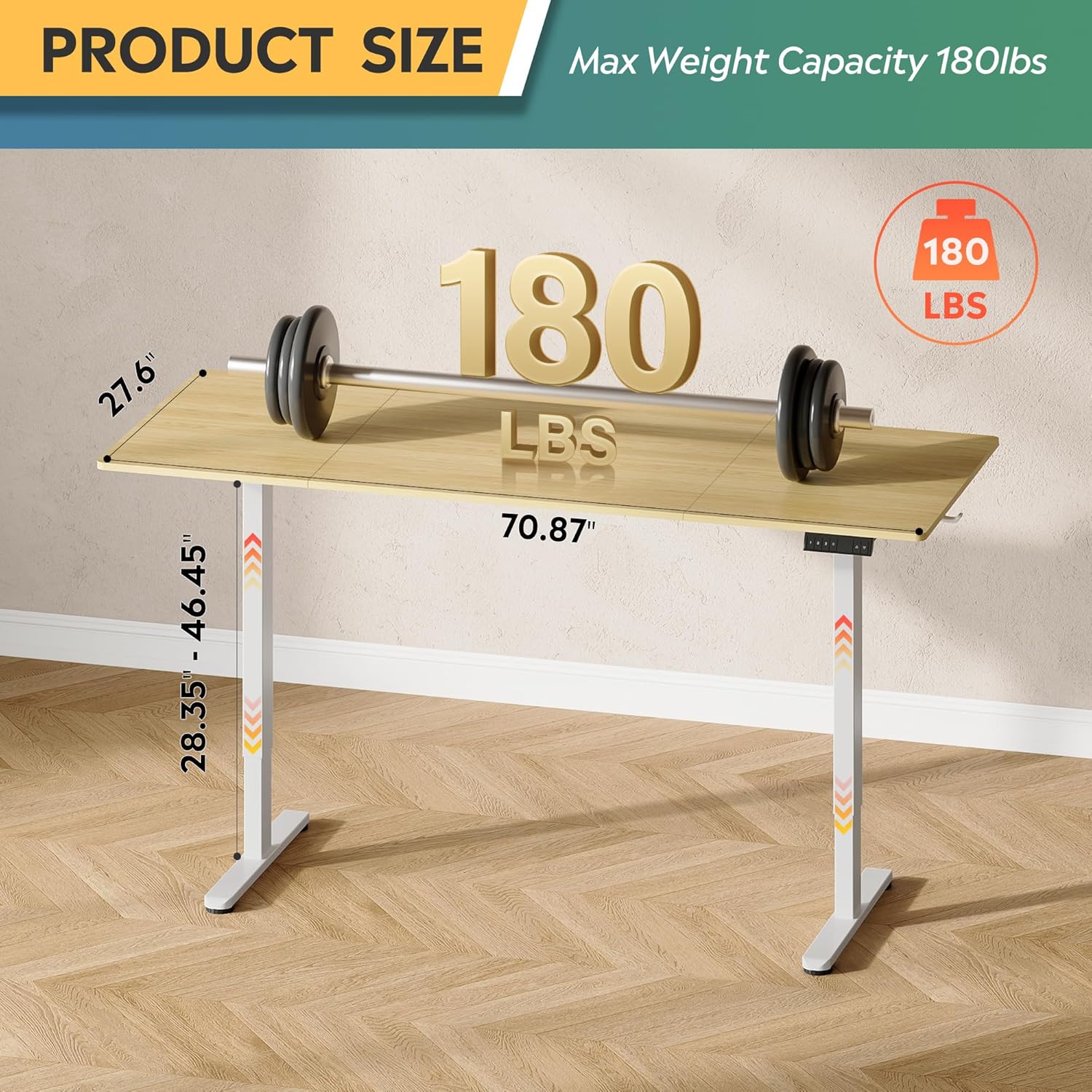
Figure 8.1: Diagram illustrating the product dimensions (70.87" width, 27.6" depth) and height adjustment range (28.35" - 46.45"), along with its maximum weight capacity of 180 lbs.
9. Garansi jeung Rojongan
9.1. Émbaran jaminan
This DEVAISE Electric Standing Desk comes with a Garansi kawates. Please refer to the warranty card included in your package for specific terms and conditions. Retain your proof of purchase for warranty claims.
9.2. Rojongan Palanggan
For any questions regarding assembly, operation, troubleshooting, or product selection, please contact our U.S.-based product support team. Contact information can be found on the DEVAISE official websitus atanapi dina bungkusan produk Anjeun.
You can also visit the official DEVAISE store for more information: DEVAISE Store


