
1. Bubuka
The Audizio Avola is a comprehensive audio system designed to provide a wide range of listening options. It integrates Internet Radio, DAB+, FM radio, a CD player, and Bluetooth connectivity into a single, elegant unit. This manual will guide you through the setup, operation, and maintenance of your Avola system, ensuring you can fully utilize its features for an optimal audio experience.
2. Parentah Kasalametan
- Sasayogian tanaga: Paké ngan adaptor kakuatan disadiakeun. Pastikeun voltage cocog sarat wewengkon Anjeun.
- Cai sareng Uap: Do not expose the unit to rain, moisture, or liquids. Avoid placing objects filled with liquids, such as vases, on the unit.
- Ventilasi: Pastikeun ventilasi nyukupan di sabudeureun unit. Ulah meungpeuk bukaan ventilasi.
- Sumber Panas: Jauhkeun unit tina sumber panas sapertos radiator, registers panas, kompor, atanapi aparat sanésna anu ngahasilkeun panas.
- beberesih: Disconnect the unit from the power supply before cleaning. Use a soft, dry cloth. Do not use liquid cleaners or aerosol cleaners.
- Palayanan: Ulah nyobian ngalayanan unit sorangan. Rujuk sadayana jasa ka tanaga jasa anu mumpuni.
- Pamuter CD: Do not insert foreign objects into the CD tray. Handle CDs by their edges to avoid scratches.
3. Eusi Paket
Pastikeun yén sadaya barang aya dina bungkusan:
- 1x Audizio Avola Internet Radio
- 1x Kadali Jauh
- 1 x adaptor kakuatan
- 1x User Manual (Quick Start Guide)

Image: Audizio Avola unit shown with its remote control and power adapter.
4. Produk Langkungview
4.1 Panel payun

Gambar: Hareupeun view of the Audizio Avola with the CD tray closed.
The front panel features the main display, control buttons, a CD tray, and input ports.
- tampilan: Color display for navigation and information.
- Tombol kontrol: MENU, INFO, REC/DEL, PRESET/REPEAT, STANDBY, I/R, Play/Pause, Stop, Skip/Fast Forward/Rewind.
- Baki CD: Pikeun nyelapkeun CD audio.
- Kenop TUNE/PILIH: Rotate to navigate menus, press to select.
- Tombol VOLUME: Saluyukeun tingkat kaluaran audio.
- Port USB: Pikeun nyambungkeun alat panyimpenan USB.
- Slot Kartu SD: Pikeun inserting kartu memori SD.
- Input AUX: 3.5mm jack for external audio sources.
- Jack headphone: 3.5mm jack pikeun déngékeun swasta.

Image: Close-up of the Audizio Avola front panel showing USB, SD, AUX, and headphone ports.
4.2 Panel tukang
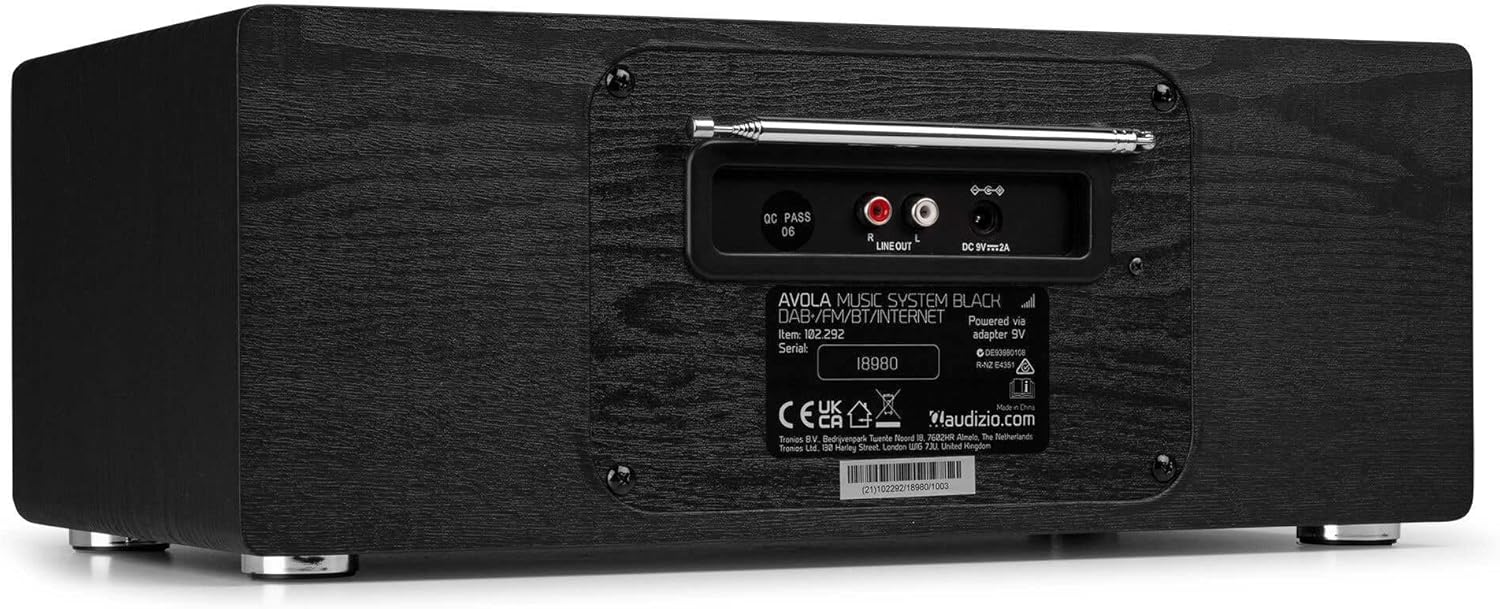
Gambar: Tukangeun view of the Audizio Avola, highlighting the antenna and connection ports.
The rear panel houses essential connections:
- Antena Teleskopik: Pikeun panarimaan radio DAB + jeung FM. Manjangkeun pinuh pikeun sinyal pangalusna.
- GARIS KALUAR (RCA): Pikeun nyambungkeun ka éksternal amppanyatur atawa panyatur.
- DC 9V 2A Power Input: Pikeun nyambungkeun adaptor kakuatan.
5. Setélan
5.1 Sambungan Daya
- Connect the power adapter to the DC 9V 2A input on the rear of the Avola unit.
- Colokkeun adaptor kakuatan kana stop kontak témbok nu cocog.
- The unit will enter standby mode. Press the STANDBY button on the unit or remote control to power on.
5.2 Setup anteneu
For optimal DAB+ and FM radio reception, fully extend the telescopic antenna located on the rear panel. Adjust its position for the best signal quality.
5.3 Initial Setup (WLAN Connection)
To access Internet Radio features, the Avola must be connected to a Wi-Fi network.
- Upon first power-on, the unit may prompt you to set up the network connection. If not, press MENU, navigate to 'System Settings' and then 'Network'.
- Select 'Wi-Fi Network' and choose 'Scan' to find available networks.
- Pilih jaringan Wi-Fi anjeun tina daptar.
- Enter your Wi-Fi password using the TUNE/SELECT knob to navigate characters and press to confirm each character.
- Once connected, the display will show a Wi-Fi icon.
6. Modeu Operasi
6.1 Internét Radio
Access thousands of radio stations worldwide via your Wi-Fi connection.
- Press the MENU button and select 'Internet Radio'.
- Anjeun tiasa ngotéktak stasiun dumasar lokasi, genre, atanapi milarian stasiun khusus.
- Use the TUNE/SELECT knob to navigate and select.
- To save a station as a preset, press and hold the PRESET/REPEAT button until the preset menu appears, then select a preset number.

Image: The Audizio Avola display showing the Internet Radio interface.
6.2 DAB + Radio
Digital Audio Broadcasting Plus offers high-quality digital radio.
- Press the MENU button and select 'DAB Radio'.
- Unit ieu bakal otomatis nyeken stasiun DAB+ anu sayogi.
- Use the TUNE/SELECT knob to browse and select stations.
- Simpen prasetél sapertos anu dijelaskeun pikeun Radio Internét.
6.3 Radio FM
Listen to traditional analog FM radio broadcasts.
- Press the MENU button and select 'FM Radio'.
- Use the TUNE/SELECT knob to manually tune or press and hold to auto-scan for stations.
- Simpen prasetél sapertos anu dijelaskeun pikeun Radio Internét.
6.4 Pamuter CD
Play your favorite audio CDs.
- Press the MENU button and select 'CD Player'.
- Press the 'Open' button next to the CD tray to open it.
- Carefully place an audio CD onto the tray with the label side facing up.
- Press the 'Open' button again to close the tray. The unit will begin playing the CD automatically.
- Use the Play/Pause, Stop, and Skip buttons for playback control.
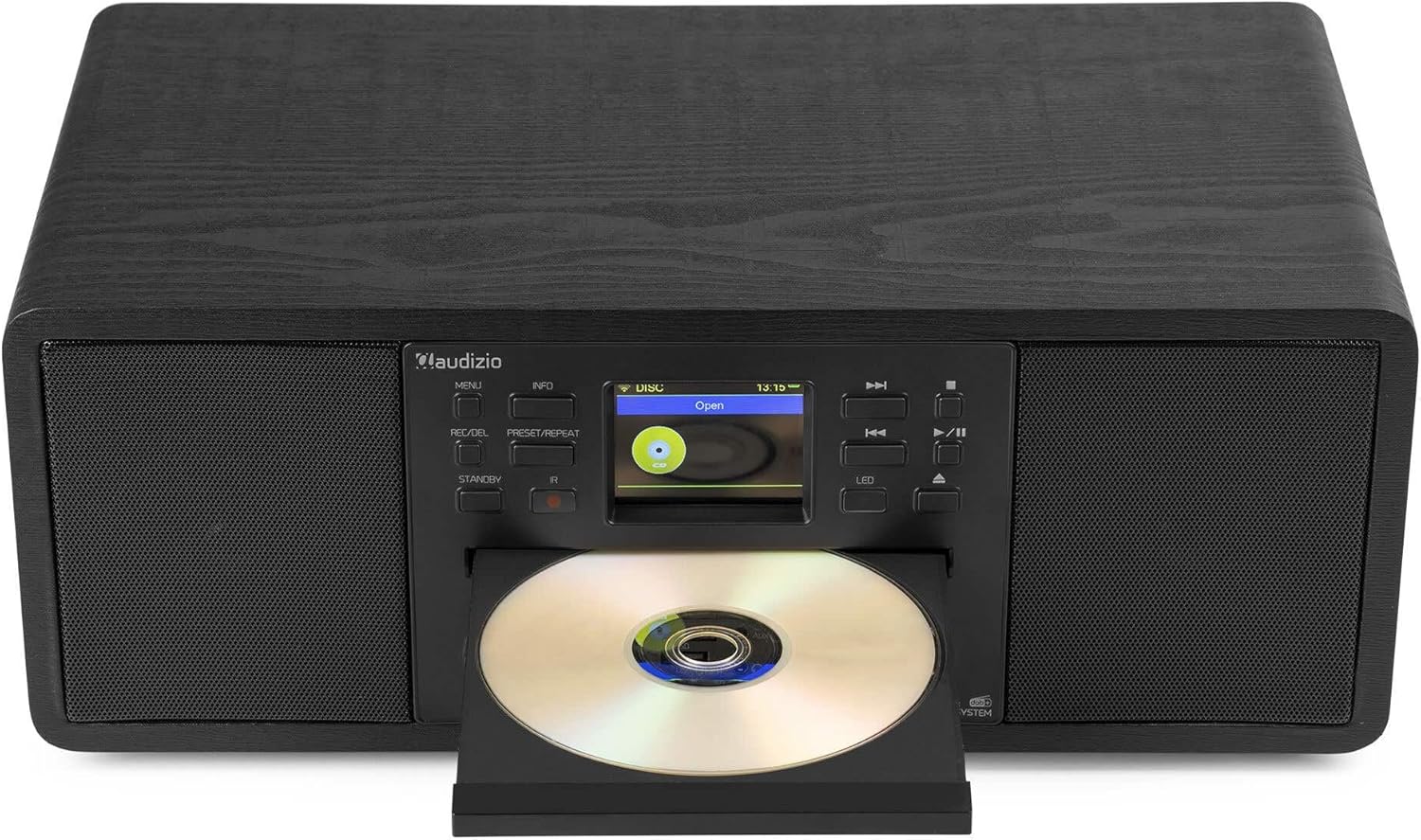
Image: The Audizio Avola with its CD tray open, ready for disc insertion.
6.5 Konektipitas Bluetooth
Ngalirkeun audio sacara nirkabel tina smartphone, tablet, atanapi alat Bluetooth anjeun anu sanés.
- Press the MENU button and select 'Bluetooth'.
- The Avola will enter pairing mode and become discoverable.
- On your Bluetooth device, search for 'Audizio Avola' in the Bluetooth settings and select it to pair.
- Once connected, the display will show 'BT Connected'. You can now play audio from your device through the Avola.

Image: The Audizio Avola display indicating a successful Bluetooth connection.
6.6 USB / SD Playback
Puterkeun audio filetina drive USB atanapi kartu SD.
- Insert a USB drive into the USB port or an SD card into the SD card slot on the front panel.
- Press the MENU button and select 'USB' or 'SD' (the unit may automatically switch to the correct mode).
- Napigasi ngaliwatan Anjeun files and folders using the TUNE/SELECT knob.
- Press the TUNE/SELECT knob to play a selected track.
7. Pangropéa
- Ngabersihan Unit: Use a soft, dry, lint-free cloth to clean the exterior of the unit. Do not use abrasive cleaners, waxes, or solvents.
- Ngabersihan Lensa CD: If CD playback becomes erratic, use a commercially available CD lens cleaner disc to clean the laser lens.
- Panyimpenan: Upami nyimpen unit kanggo waktos anu panjang, pegatkeun sambungan tina catu daya sareng simpen di tempat anu tiis sareng garing.
8. Cara ngungkulan
| Masalah | Mungkin Cukang lantaranana | Solusi |
|---|---|---|
| Taya kakuatan | Adaptor daya teu nyambung atawa stop kontak faulty. | Pariksa sambungan kakuatan. Coba outlet béda. |
| Taya sora | Volume lemah teuing, bisu diaktipkeun, atawa sumber salah dipilih. | Ningkatkeun volume. Pariksa lamun bisu aktip. Pastikeun sumber input bener dipilih. |
| Radio Internét teu nyambung | Sandi Wi-Fi salah, sinyal lemah, atanapi masalah jaringan. | Re-enter Wi-Fi password. Move unit closer to router. Check router status. |
| DAB+/FM reception poor | Antenna henteu ngalegaan atanapi daérah sinyal goréng. | Panjangkeun sareng saluyukeun anteneu teleskopik sacara lengkep. Coba pindahkeun posisi unitna. |
| CD teu diputer | CD inserted incorrectly, dirty/scratched CD, or unsupported format. | Ensure CD is inserted label-side up. Clean or replace CD. Verify CD format (supports CD-DA, MP3). |
| Bluetooth teu dipasangkeun | Device not in pairing mode, or Avola not discoverable. | Ensure both devices are in pairing mode. Check Bluetooth settings on your device. |
9. Spésifikasi
| Fitur | Spésifikasi |
|---|---|
| Ngaran modél | Avola |
| Nomer Barang | 102.292 |
| Ukuran (L x W x H) | 45.8 x 25.8 x 19.7 cm |
| Beurat | 4 kg |
| Input kakuatan | 220 Volt (via power adapter) |
| Speaker Output Power (Max) | 60 Watt |
| Mode Kaluaran Audio | Stereo |
| Format Audio Dirojong | CD-DA, MP3 |
| Téhnologi konektipitas | WLAN, Bluetooth, AUX, RCA |
| Alat nu cocog | MP3 Player, PC, Smartphone, Tablet |
| Warna | Hideung |
10. Garansi jeung Rojongan
Audizio products are designed and manufactured to the highest standards. In the unlikely event of a problem with your product, please contact your retailer for assistance. Keep your proof of purchase for warranty claims. For further support or inquiries, please refer to the official Audizio websitus atanapi ngahubungan layanan palanggan maranéhna.