1. Bubuka
This manual provides essential information for the safe and efficient operation, maintenance, and troubleshooting of your EAZYRC FMS Rochobby 1/18 Atlas RC Crawler. Please read this manual thoroughly before operating the vehicle to ensure proper usage and to maximize its lifespan.
The EAZYRC FMS Rochobby 1/18 Atlas is a high-performance remote-controlled crawler designed for various terrains. It features a robust 4x4 drivetrain, advanced lighting, a 2.4GHz radio system for reliable control, durable ball bearings, full metal gears, and a 4-link suspension system for superior climbing and driving capabilities. The rapid separation car body allows for quick access and battery changes.
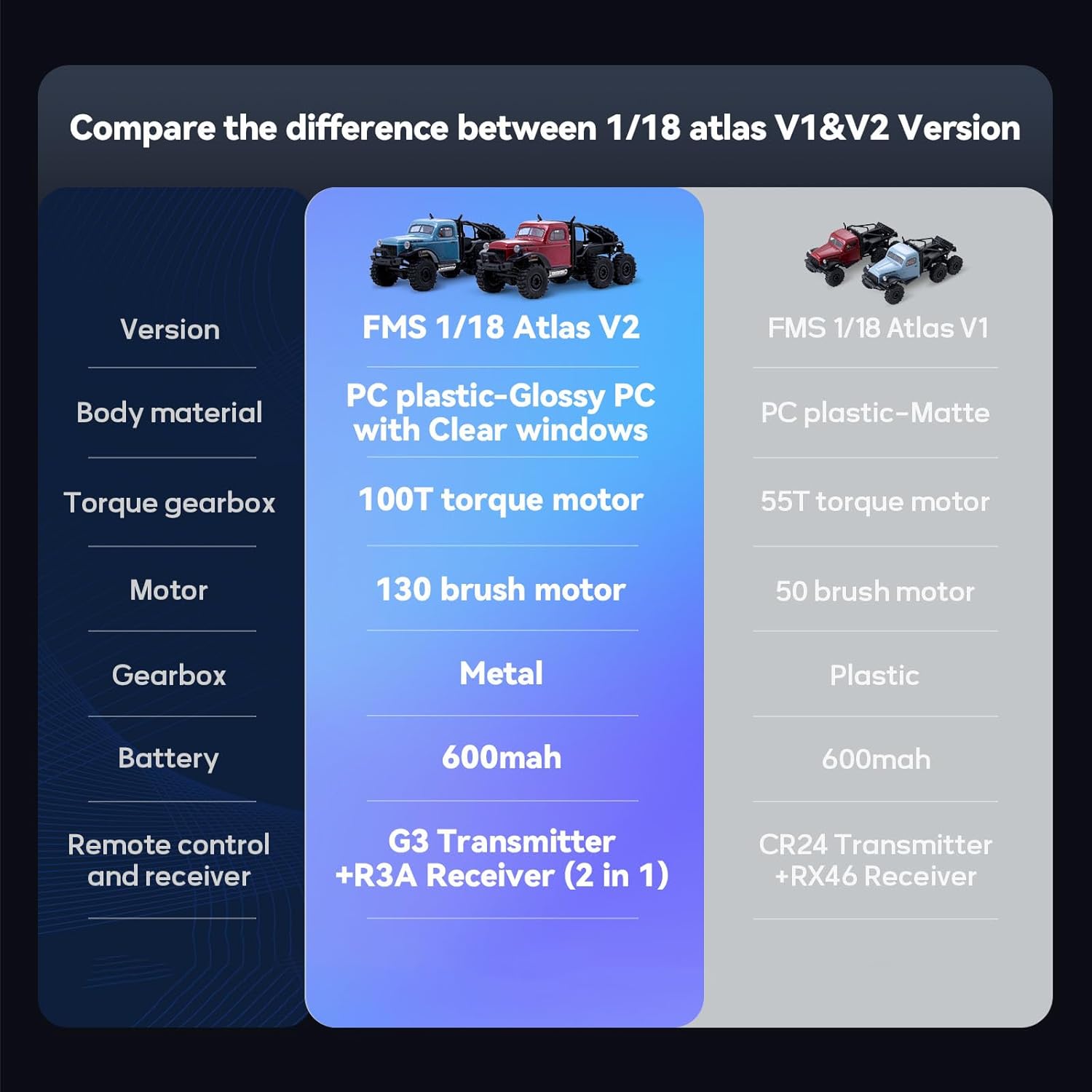
Image: Two EAZYRC FMS Rochobby 1/18 Atlas RC Crawlers navigating rocky terrain, showcasing their robust design and off-road capability.
2. Naon dina Box
Saatos ngabongkar bungkusan, mangga pariksa yén sadaya komponén anu didaptarkeun di handap aya sareng dina kaayaan anu saé:
- EAZYRC FMS Rochobby 1/18 Atlas RC Crawler (assembled)
- 2.4GHz Remote Control Transmitter
- Batré Litium Polimer (tos dipasang atanapi misah)
- Kabel Ngecas USB
- Manual Pitunjuk (dokumén ieu)
3. Setup Guide
3.1 Pamasangan Batré sareng Ngecas
The RC Crawler requires one Lithium Polymer battery, which is included. Ensure the battery is fully charged before first use.
- Accessing the Battery Compartment: The 1/18 Atlas features a rapid separation car body. Gently lift and detach the body shell to access the internal components, including the battery compartment.
- Nyambungkeun batré: Connect the included Lithium Polymer battery to the vehicle's ESC (Electronic Speed Controller) connector. Ensure the polarity is correct.
- Ngeusi batre: Use the provided USB charging cable. Connect the battery to the charging cable, and then plug the USB end into a suitable USB power source (e.g., computer USB port, USB wall adapter). The charging indicator will show the charging status (refer to charger instructions for specific light patterns).
- Reattaching the Body: Once the battery is installed and charged, carefully reattach the car body, ensuring it is securely fastened.

Image: The rapid separation car body is shown lifted, providing easy access to the battery and other internal electronics for quick changes or maintenance.
3.2 Setup Kontrol Jauh
The remote control operates on a 2.4GHz frequency, providing stable and responsive control.
- Pasang Batré: Insert the required batteries (typically AA, not included) into the remote control transmitter, observing correct polarity.
- Daya Hurung: Turn on the remote control transmitter first, then turn on the RC Crawler. The vehicle and transmitter should automatically bind. If not, refer to the binding procedure in the remote control's specific manual.
4. Parentah Operasi
Familiarize yourself with the controls before operating the vehicle in challenging environments.
4.1 Kadali Dasar
- Throttle pemicu: Pull the trigger to move forward, push to brake or reverse.
- Setir: Turn the wheel left or right to steer the vehicle. The new servo steering system provides a wider turning radius for improved maneuverability.

Image: A diagram illustrating the improved turning radius provided by the new servo steering system, enhancing the crawler's agility.
4.2 Tip Nyetir
- The 35T 550 motor provides strong power, allowing the crawler to reach speeds of up to 5km/h on flat surfaces.
- The full metal gears and 4-link suspension system contribute to strong climbing and driving ability, making it suitable for various terrains.
- The vehicle is equipped with all-terrain tires for optimal grip and performance on diverse surfaces.
- Avoid operating in deep water or extreme mud to prevent damage to electronic components.

Image: A collage demonstrating the EAZYRC FMS Rochobby 1/18 Atlas RC Crawler's capability to conquer various terrains, including marshland, grassland, mud, and indoor obstacles.
4.3 Video produk
Watch these official product videos for visual guidance on features and operation:
Video: Hiji leuwihview of the EAZYRC FMS Rochobby 1/18 Atlas RC Crawler, demonstrating its key features and performance (1:43 duration).
Video: A demonstration of the EAZYRC FMS Rochobby 1/18 Atlas RC Crawler in action, highlighting its off-road capabilities (1:52 duration).
5. Pangropéa
Regular maintenance ensures optimal performance and extends the life of your RC Crawler.
5.1 beberesih
- After each use, especially in dirty or dusty conditions, clean the vehicle using a soft brush or compressed air to remove debris.
- Usap awak ku iklanamp lawon. Hindarkeun ngagunakeun bahan kimia anu kasar.
5.2 Perawatan Batré
- Always disconnect the battery from the vehicle when not in use.
- Simpen batré di tempat anu tiis, garing, jauh tina sinar panonpoé langsung sareng suhu anu ekstrim.
- Do not overcharge or over-discharge Lithium Polymer batteries. Follow manufacturer guidelines for charging.
5.3 Inspection komponén
- Regularly inspect the ball bearings and metal gears for wear or damage. Replace as necessary to maintain smooth operation.
- Check the 4-link suspension components for any loose connections or damage.
- Pastikeun sadaya screws na fasteners ketat.

Gambar: A lengkep view of the RC crawler's chassis, highlighting the full metal gears designed for superior strength and endurance.
6. Cara ngungkulan
If you encounter issues with your RC Crawler, refer to the following common problems and solutions:
| Masalah | Mungkin Cukang lantaranana | Solusi |
|---|---|---|
| Kandaraan henteu ngaréspon kana kadali jauh | Low battery in vehicle or remote; Not bound; Interference | Charge vehicle battery; Replace remote batteries; Re-bind transmitter and receiver; Move to an area with less interference. |
| Vehicle moves slowly or lacks power | Low vehicle battery; Motor or gear issue | Charge vehicle battery fully; Inspect motor and gears for obstructions or damage. |
| Steering is unresponsive or erratic | Servo damage; Loose steering linkage; Interference | Check steering servo and linkages; Re-bind; Move to an area with less interference. |
| Lampu teu jalan | Loose connection; Damaged LED | Check wiring connections to the lights; Contact support for replacement parts if LEDs are damaged. |
7. Spésifikasi
Key technical specifications for the EAZYRC FMS Rochobby 1/18 Atlas RC Crawler:
- model: 1/18 Atlas
- Skala: 1/18
- Sistim drive: 4X4
- Motor: 35T 550 Brushed Motor
- Gearbox: Full Metal Gearbox
- Suspensi: 4 Patalina Gantung
- Setir: New Servo Steering System
- Sistem Radio: 2.4GHz
- Batré: 1 batré Litium Polimér (kaasup)
- Ukuran produk: 21 x 9 x 10 inci
- Beurat barang: 2.55 pon
- Umur Disarankeun: 16 taun ka luhur
- Pabrikan: EAZYRC

Image: A diagram illustrating the key dimensions of the EAZYRC FMS Rochobby 1/18 Atlas RC Crawler, including length, width, and height.
8. Garansi jeung Rojongan
Your EAZYRC FMS Rochobby 1/18 Atlas RC Crawler is covered by a Garansi jasa perbaikan 3 bulan. This warranty covers manufacturing defects and ensures repair services for eligible issues within the specified period.
For technical support, warranty claims, or inquiries regarding replacement parts, please contact EAZYRC customer service through their official website or the retailer where the product was purchased. Please have your product model and purchase information ready when contacting support.


