1. Bubuka
The PRUNUS J-924 is a multi-functional emergency radio designed for reliability and convenience in various situations, from daily use to outdoor adventures and emergency preparedness. It combines advanced radio reception with essential survival features, ensuring you stay connected and safe.
2. Produk Langkungview
The J-924 radio is compact and robust, featuring an intuitive layout for easy operation. Its dimensions are approximately 17 cm (L) x 9.1 cm (W) x 7.1 cm (H), and it weighs about 0.6 kg.
Komponén konci:
- DAB/DAB+/FM Receiver: For clear digital and analog radio broadcasts.
- Layar LCD: Shows time, frequency, station information, and battery status.
- Tombol kontrol: Power, Volume, Time Mode, Band/Alarm, M-/M+, Scan, Tune Up/Down.
- Retractable Antenna: Extends for improved radio reception.
- Engkol leungeun: Pikeun generasi kakuatan manual.
- Panel surya: Pikeun ngecas tanaga surya.
- Senter LED: Integrated into one end for illumination.
- Bacaan Lamp: Located on the top panel for ambient light.
- Port ngecas USB-C: Pikeun ngecas batré internal.
- Port Kaluaran USB-A: Pikeun ngecas alat éksternal (fungsi bank kakuatan).
- 3.5mm Earphone Jack: Pikeun déngékeun pribadi.
- Slot Kartu TF: For playing audio from a memory card.
- SOS Alarm Button: Activates a loud alarm and flashing light.
- Kompas: Integrated into the strap for navigation.

Figure 2.1: PRUNUS J-924 Radio with key features and dimensions highlighted.
3. Setélan
3.1 Pilihan Daya
The J-924 radio offers five versatile power options to ensure continuous operation:
- Built-in 10,000 mAh Lithium Battery: The primary power source, rechargeable via USB-C, hand crank, or solar panel.
- USB-C ngecas: Connect the provided USB-C cable to a 5V/2A adapter (not included) for fast and convenient charging. The battery indicator on the display will show charging progress.
- Engkol leungeun: Rotate the hand crank clockwise or counter-clockwise at a steady pace (approx. 130-150 RPM) to generate power. Cranking for 1 minute can provide approximately 5-10 minutes of radio playback or 15-20 minutes of flashlight use.
- Panel surya: Place the radio with the solar panel facing direct sunlight. The solar panel charges the internal battery, ideal for maintaining charge during outdoor activities. Charging efficiency depends on sunlight intensity.
- 3 x AAA Batteries (Not Included): Open the battery compartment and insert three AAA batteries, observing polarity. This option provides backup power, especially useful during prolonged power outages or when other charging methods are unavailable.
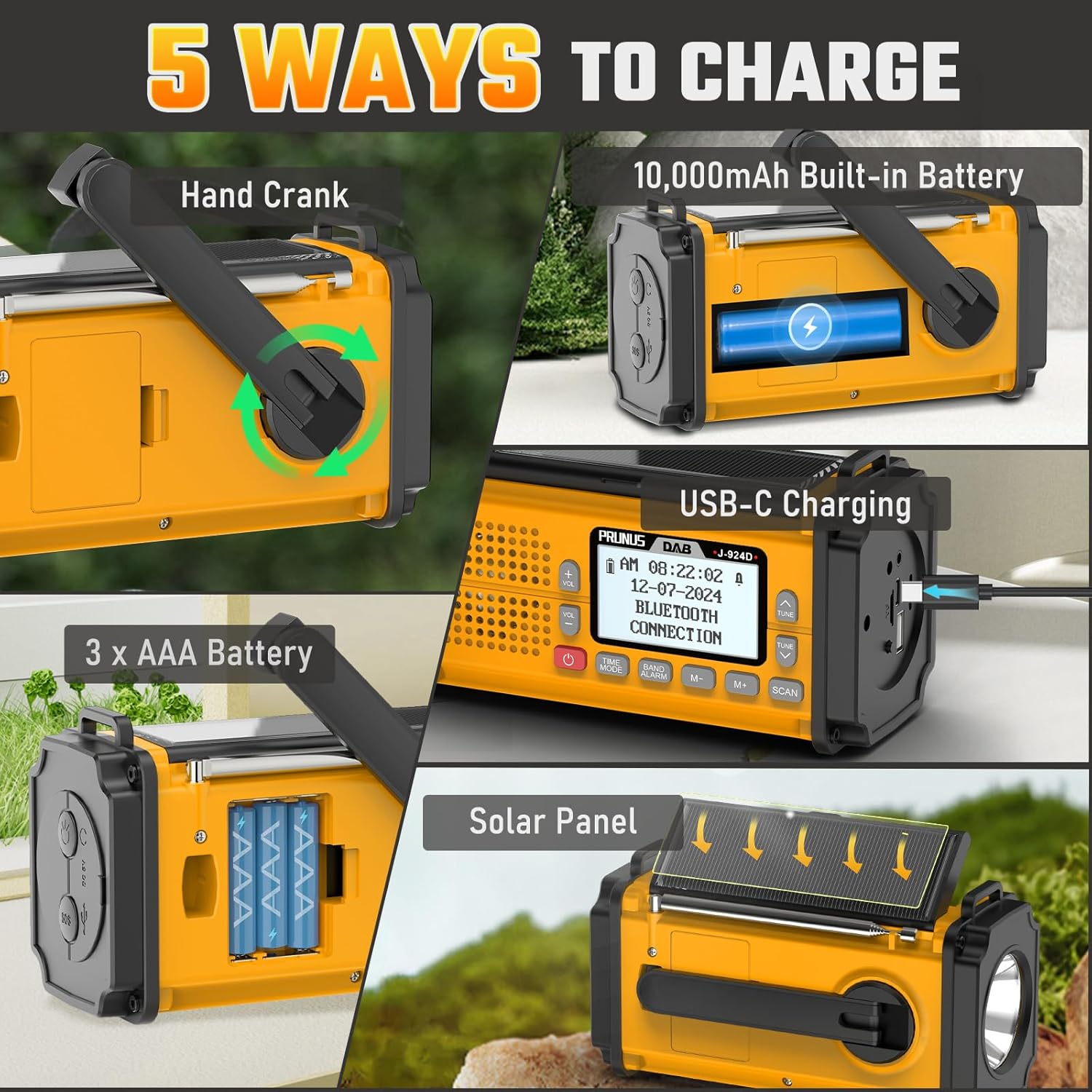
Figure 3.1: Five methods for powering and charging the PRUNUS J-924 radio.
4. Parentah Operasi
4.1 Daya Hurung/Pareuman
Pencét jeung tahan tombol Kakuatan tombol () for 2 seconds to turn the radio on or off.
4.2 Radio Operation (DAB/DAB+/FM)
Panjangkeun anteneu anu tiasa ditarik sapinuhna pikeun nampi panarimaan anu optimal.
- Pilihan Band: Pencét éta BAND/ALARM button to switch between DAB, DAB+, and FM modes.
- Scan otomatis: Dina modeu DAB atawa FM, pencét tombol SCAN button to automatically search for and save available stations. The radio can store up to 100 DAB and 100 FM stations.
- Tuning Manual: Ngagunakeun éta TUNE UP jeung TURUN tombol pikeun ngaluyukeun frékuénsi sacara manual.
- Stasion prasetél: Ngagunakeun éta M- jeung M+ buttons to navigate through saved preset stations. To save a station manually, tune to the desired frequency, then press and hold M- or M+ until the preset number flashes, then press again to confirm.

Figure 4.1: DAB+/FM Receiver functionality.
4.3 Fungsi Speaker Bluetooth
The radio can function as a 5W Bluetooth speaker for clear and balanced music playback.
- papasangan: Switch the radio to Bluetooth mode. The display will show "Bluetooth Connected" or similar. Enable Bluetooth on your device (e.g., smartphone) and select "J-924" from the list of available devices to pair.
- Puteran Audio: Once paired, audio from your device will play through the radio's speaker.
4.4 Alarm Clock & Time Mode
The radio features a clock and alarm function.
- Modeu waktos: Pencét éta MODE WAKTU tombol pikeun view waktos ayeuna.
- Setélan Alarm: Pencét jeung tahan tombol BAND/ALARM button to enter alarm setup. Use the TUNEUP/TURUNKEUN buttons to adjust values and M-/M+ to move between settings (hour, minute, alarm source, volume).
4.5 Flashlight & Reading Lamp
The radio is equipped with two lighting options:
- Senter LED: Press the dedicated flashlight button (usually on the side or front) to turn the powerful LED flashlight on/off.
- Bacaan Lamp: Lift the top panel to reveal the reading lamp. Pencét bacaan lamp button (if separate) or the flashlight button again to activate it.

Figure 4.2: Using the LED Flashlight and Reading Lamp.
4.6 SOS Alarm
In an emergency, the SOS alarm can attract attention.
- Aktipkeun: Pencét éta SOS button. The radio will emit a loud siren sound and activate a flashing light.
- Nonaktipkeun: Pencét éta SOS button again to turn off the alarm.

Figure 4.3: SOS Alarm and integrated compass.
4.7 Fungsi Power Bank
The built-in 10,000 mAh battery can charge external devices.
- Alat Ngecas: Connect your smartphone or other USB-powered device to the USB-A output port on the radio using your device's charging cable. The radio will begin charging your device.

Figure 4.4: The PRUNUS J-924 functioning as a power bank.
4.8 Media Playback (TF Card / USB Drive)
The radio supports playing audio files from a TF card or USB drive.
- Selapkeun Média: Insert a TF card into the TF card slot or a USB drive into the USB-A input port. The radio should automatically switch to the corresponding playback mode.
- Kadali: Ngagunakeun éta M- jeung M+ tombol pikeun nganapigasi lagu.
4.9 Video Produk Resmi
For a visual guide on the PRUNUS J-924's features and operation, please watch the official product video below:
Video 4.1: Hiji leuwihview of the PRUNUS J-924 Emergency Radio's features and functions.
5. Pangropéa
- beberesih: Ngusap radio ku hipu, damp lawon. Ulah make cleaners abrasive atawa pangleyur.
- Panyimpenan: Simpen radio dina tempat anu tiis sareng garing jauh tina sinar panonpoé langsung sareng suhu anu ekstrim. Upami nyimpen kanggo waktos anu lami, pastikeun batré internal dieusi sawaréh (sakitar 50%) sareng ngecas deui unggal 3-6 bulan pikeun ngajaga kaséhatan batré.
- Tahan cai: While designed for outdoor use, avoid submerging the radio in water. It is splash-resistant, not waterproof.
6. Cara ngungkulan
| Masalah | Mungkin Cukang lantaranana | Solusi |
|---|---|---|
| Radio teu hurung. | Low battery; AAA batteries incorrectly installed or depleted. | Charge the internal battery via USB-C, hand crank, or solar. Check and replace AAA batteries if used. |
| panarimaan radio goréng. | Antena teu dipanjangkeun; daérah sinyal lemah; gangguan. | Fully extend the antenna. Relocate the radio to an area with better signal. Avoid strong electromagnetic interference. |
| Alat éksternal teu ngecas. | Radio battery low; incorrect cable; device not compatible. | Ensure the radio's internal battery has sufficient charge. Use a compatible USB cable. Verify device compatibility. |
| Bluetooth teu nyambung. | Radio not in Bluetooth mode; device not discoverable; previously paired. | Switch radio to Bluetooth mode. Ensure device Bluetooth is on and discoverable. Forget previous pairing on your device and re-pair. |
7. Spésifikasi
| Fitur | Rincian |
|---|---|
| merek | PRUNUS |
| Nomer modél | J-924 |
| Warna | B-Yellow |
| Dimensi produk | 17L x 6W x 8H séntiméter |
| Bahan | Acrylonitrile Butadiene Styrene (ABS) |
| Téhnologi Tuning | DAB/DAB+/FM |
| Band Radio Dirojong | DAB/DAB+, FM |
| Rentang Frékuénsi FM | 87-108 MHz |
| DAB / DAB + rentang Frékuénsi | 168-240 MHz |
| Téhnologi konektipitas | Bluetooth |
| Fitur husus | Rechargeable, Flashlight, Reading Lamp, SOS Alarm, Power Bank, Clock, Compass |
| Sumber Daya | Solar Powered, Hand Crank, USB-C, Built-in 10000 mAh Lithium-ion Battery, 3x AAA Batteries (not included) |
| Komponén Kaasup | Manual pamaké |
8. Jaminan & Dukungan
PRUNUS products are manufactured with high-quality materials and craftsmanship. For warranty information and customer support, please refer to the documentation included with your purchase or contact PRUNUS customer service directly. Keep your purchase receipt for warranty claims.


