1. Bubuka
The Rapsodo MLM2PRO is an advanced mobile launch monitor and golf simulator designed to provide professional-level accuracy and real-time analytics for golfers of all skill levels. This device tracks 13 core golf metrics, offering invaluable insights to refine your technique and improve performance. It is suitable for both indoor and outdoor use, transforming any space into a comprehensive golf training environment.
2. Komponén produk
Your Rapsodo MLM2PRO package includes the following items:
- MLM2PRO Launch Monitor Unit
- Tripod Nangtung
- Mawa Kasus
- Kabel Ngecas (USB-C)
- 3 Callaway® RPT™ Chrome Soft X® Golf Balls

Figure 2.1: Rapsodo MLM2PRO Launch Monitor with included accessories.

Figure 2.2: The MLM2PRO unit and tripod neatly stored in its compact carrying case.
3. Setup Guide
Follow these steps to set up your Rapsodo MLM2PRO for optimal performance:
- Ngecas Alat Anjeun: Use the included USB-C cable to fully charge your MLM2PRO. Charging can take up to 4 hours. The LED light will turn off when fully charged.
- Unduh Aplikasi: Download and install the MLM2PRO™ app from either the App Store (iOS) or Google Play Store (Android). After downloading, follow the on-screen prompts to activate your Premium Membership.
- Connect & Check: Connect your MLM2PRO™ to your phone or tablet through a Direct Connection or Local Wi-Fi Connection. The device has its own internal Wi-Fi for direct connection, eliminating the need for an external network at the range.
- Update Your Firmware: Once connected, check if your firmware is up to date. If an update is available, please install the update before starting a session. Firmware updates typically take 5 to 7 minutes. The LED light will flash white during installation and turn red when the update is complete.
- Physical Setup & Alignment:
- Attach the MLM2PRO unit to the included tripod.
- Place the MLM2PRO on a stable, level surface approximately 6 to 8 feet behind the ball, directly in line with your target.
- Pastikeun alat boga jelas view of the ball and your swing path.

Figure 3.1: The compact design of the MLM2PRO allows for easy handling and setup.

Figure 3.2: Indoor setup of the MLM2PRO with a golf net.
4. Parentah Operasi
Once your MLM2PRO is set up and connected, you can begin your training session:
- Start a Session: Open the MLM2PRO app on your connected device. Select your desired mode (e.g., Practice, Virtual Golf, Combine).
- Ball Placement: For accurate spin rate and spin axis measurements, use the included Callaway® RPT™ Chrome Soft X® Golf Balls. These balls feature marked patterns that the MLM2PRO's cameras detect.
- Swing & Analyze: Take your shot. The MLM2PRO will automatically capture data and video of your swing. Review the metrics displayed on your device instantly.
- Virtual Golf Courses: The MLM2PRO integrates with leading golf apps to offer a full-swing golf simulator experience, including access to over 30,000 simulated courses.

Figure 4.1: Callaway RPT balls are essential for precise spin data.

Figure 4.2: Real-time data and video replay on the companion app.
Video 4.1: Experience virtual golf on over 30,000 simulated courses with the MLM2PRO.
5. Key Features & Metrics
The MLM2PRO provides comprehensive data and visual feedback:
- 13 Core Golf Metrics: Includes Carry Distance, Total Distance, Spin Rate, Spin Axis, Ball Speed, Club Speed, Launch Angle, Launch Direction, Descent Angle, Apex, Shot Type, Side Carry, and Smash Factor.
- Sistem kaméra ganda:
- Swing Vision: Dual swing replay (down-the-line and face-on) when paired with your device.
- Shot Vision: Wide-angle camera records a video with shot trace for every shot.
- Impact Vision: High-speed shutter camera captures each shot at impact.
- Rapsodo Precision Technology (RPT): Custom-designed Callaway® RPT™ Chrome Soft X® Golf Balls enable spin measurements within 1% accuracy of high-priced launch monitors.

Figure 5.1: The 2X Vision system provides detailed swing and impact analysis.
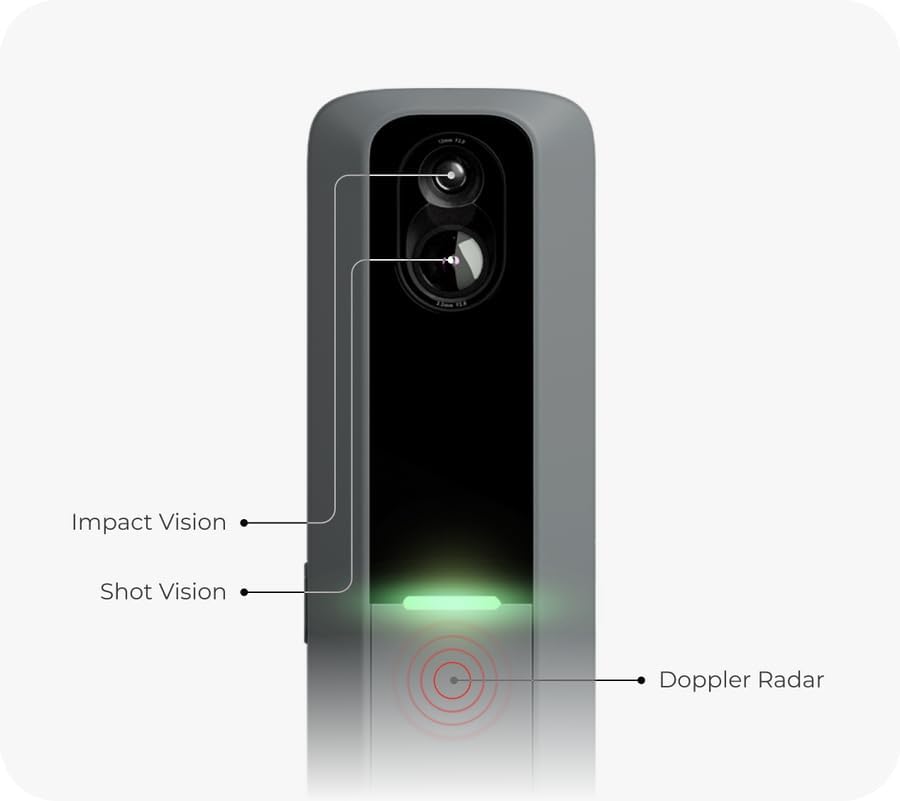
Figure 5.2: RPT technology ensures accurate spin data.
6. Pangropéa
To ensure the longevity and optimal performance of your MLM2PRO:
- beberesih: Regularly wipe the device, especially the camera lenses and radar area, with a soft, dry cloth. Avoid abrasive cleaners or solvents.
- Panyimpenan: Store the MLM2PRO in its provided carrying case when not in use to protect it from dust, moisture, and physical damage. Store in a cool, dry place.
- Perawatan batré: For long-term storage, ensure the battery is charged to approximately 50%. Recharge every few months to prevent deep discharge.
7. Cara ngungkulan
If you encounter issues with your MLM2PRO, consider the following:
- Masalah konektipitas: Ensure your device's Wi-Fi is enabled and connected to the MLM2PRO's direct network or your local Wi-Fi. Try restarting both the MLM2PRO and your connected device.
- Bacaan teu akurat: Verify the MLM2PRO is placed correctly (6-8 feet behind the ball, aligned with target). Ensure you are using Callaway® RPT™ balls for spin data. Check for any obstructions between the device and the ball.
- Aplikasi katirisan / nabrak: Ensure your app is updated to the latest version. Close and reopen the app. If issues persist, reinstall the app.
- Kagagalan Update Firmware: Ensure a stable internet connection during firmware updates. Do not power off the device during an update.
For more detailed troubleshooting, refer to the official User Manual PDF linked in the Support & Resources section.
8. Spésifikasi
| Spésifikasi | Nilai |
|---|---|
| Ngaran modél | MLM2PRO |
| Item Beurat | 16 ons |
| Ukuran Paket (L x W x H) | 10.43 x 6.34 x 4.76 inci |
| Bahan | palastik |
| Warna | kulawu |
| Téhnologi konektipitas | Bluetooth, WiFi |
| Ukuran layar | 3 inches (on device, for basic display) |
| Komponén Kaasup | MLM2PRO, Tripod, Carrying Case, Charging Cable, 3 Callaway® RPT™ Chrome Soft X® Golf Balls |
9. Émbaran jaminan
The Rapsodo MLM2PRO comes with a 1 Taun Produsén Garansi. Please retain your proof of purchase for warranty claims. For detailed warranty terms and conditions, refer to the official Rapsodo websitus atawa manual pamaké pinuh.
10. Rojongan & Sumberdaya
For additional support and resources, please refer to the following:
- Buku Panduan Resmi (PDF): Unduh Buku Panduan
- Pitunjuk Panggunaan (IFU) (PDF): Unduh IFU
- Rojongan In-App: Access support options directly within the MLM2PRO app.


