
Bubuka
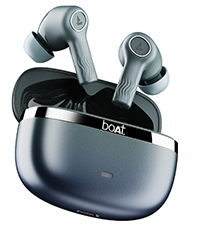
Welcome to the user manual for your boAt Nirvana Ion ANC Pro True Wireless Stereo (TWS) Earbuds. These earbuds are designed to provide a high-quality audio experience with advanced features such as Hi-Res Audio with LDAC, Active Noise Cancellation, and extended battery life. Please read this manual carefully to ensure proper use and optimal performance of your device.

Image: boAt Nirvana Ion ANC Pro TWS Earbuds and charging case.
Naon dina Box
- 1 x TWS Earbuds
- 1 x Kasus Ngecas
- 1 x Kartu Garansi
- 1 x Manual Pamaké
- 1 x Kabel Ngecas (Tipe-C)
Disetél
1. Ngecas Awal
Sateuacan dianggo anu munggaran, eusian pinuh earbud sareng wadah ngecas. Sambungkeun kabel ngecas Tipe-C anu disayogikeun kana port ngecas dina wadah sareng sumber daya. Lampu indikator dina wadah bakal nunjukkeun status ngecas.
2. Nyapasangkeun sareng Alat Anjeun
- Buka tutup wadah ngecas. Earbuds bakal otomatis asup kana mode papasangan.
- Dina telepon pinter anjeun atanapi alat Bluetooth anu sanés, buka setélan Bluetooth.
- Milarian pikeun "Nirvana Ion ANC Pro" in the list of available devices.
- Select it to connect. Once connected, you will hear an audio prompt.
The earbuds support Bluetooth v5.3 for stable and efficient wireless connectivity.
3. Pamasangan Aplikasi boAt Hearables
Enhance your experience by installing the boAt Hearables App. This app allows for customization of EQ settings, firmware updates, and other advanced controls.
Scan this QR code to download the boAt Hearables App. Alternatively, visit l.ead.me/bdAX6k.

Image: boAt Hearables App interface for sound customization and ANC control.
Parentah Operasi
1. Toél Kontrol
The earbuds feature intuitive touch controls for various functions. Specific gestures may vary; refer to the app for customization options.
- Puter / Reureuh: Ketok tunggal dina boh earbud.
- Lagu salajengna: Ketok dua kali dina earbud katuhu.
- Lagu Sateuacanna: Ketok dua kali dina earbud kénca.
- Ngajawab / mungkas Telepon: Ketok tunggal dina boh earbud.
- Nolak Telepon: Pencét lila dina boh earbud.
- Aktipkeun Asisten Sora: Ketok tilu kali dina boh earbud.
- Ganti Modeu ANC: Long press on either earbud (customizable via app).
2. Modeu pembatalan Noise aktip (ANC).
The Nirvana Ion ANC Pro offers up to 32dB Active Noise Cancellation to reduce ambient noise. You can switch between different modes:
- Mode ANC: Ngurangan noise éksternal pikeun pangalaman déngékeun immersive.
- Modeu Transparansi: Ngidinan anjeun ngadangu sakuliling anjeun bari ngadangukeun audio, ningkatkeun kasadaran situasional.
- Modeu Normal: Putereun audio standar tanpa panyabutan bising atanapi transparansi.

Image: Demonstrating 32dB Active Noise Cancellation.
3. Dual EQ Modes with Crystal Bionic Sound
Experience high-fidelity audio with 10mm drivers and choose between two distinct sound profiles:
- Sora Bionik Kristal: Powered by HiFi, this mode delivers enhanced clarity and detail.
- boAt Signature Sound: Provides a balanced and dynamic audio experience, characteristic of boAt products.

Image: Visual representation of Dual EQ Modes.
4. BEAST™ Mode (Low Latency for Gaming)
Activate BEAST™ Mode for an ultra-low latency experience, ideal for gaming. This mode reduces audio delay to approximately 60ms, ensuring synchronized sound with on-screen action.

Image: BEAST™ Mode for low latency gaming.
5. Multipoint Konéktipitas
Connect your earbuds to two devices simultaneously and seamlessly switch between them. For example, you can listen to music on your laptop and instantly answer a call on your phone without re-pairing.

Image: Multipoint Connectivity feature.
6. Crystal Clear Calling with ENx™ Technology
The earbuds are equipped with 4 microphones and ENx™ Technology to ensure your voice is transmitted clearly during calls, even in noisy environments.

Image: Crystal Clear Calling with ENx™ Technology.
7. Ngecas sareng Umur Batré
The earbuds offer an impressive total playback time of up to 120 hours with the charging case. The ASAP™ Charge feature provides 4 hours of playback from just 10 minutes of charging.

Image: 120 Hours Playback and ASAP™ Charge.
Pangropéa
- beberesih: Anggo lawon anu lemes sareng garing pikeun ngabersihkeun earbud sareng wadah ngecas. Entong nganggo bahan kimia anu keras atanapi bahan anu abrasif.
- Panyimpenan: Simpen earbuds dina wadah ngecas nalika henteu dianggo pikeun ngajagi sareng tetep dicas.
- Tahan cai: The earbuds are not water resistant. Avoid exposure to water, sweat, or moisture.
- Port ngecas: Jaga port ngecas Tipe-C bébas tina lebu sareng kokotor.
Pamérésan masalah
| Masalah | Solusi |
|---|---|
| Earbuds teu dipasangkeun | Pastikeun earbud tos dicas. Pareuman teras hurungkeun Bluetooth dina alat anjeun. Pasang deui earbud kana wadahna, tutup, teras buka deui pikeun lebet deui kana modeu pairing. |
| Ngan hiji earbud jalan | Place both earbuds back in the case, close the lid, then open again. Check battery levels for both earbuds. Try resetting the earbuds (refer to app or support for specific reset instructions). |
| Volume lemah atawa kualitas sora goréng | Adjust volume on your device and through touch controls. Ensure earbuds are clean and properly seated in your ears. Check EQ settings in the boAt Hearables App. |
| Masalah ngecas | Ensure the charging cable is securely connected. Try a different charging cable or power adapter. Clean the charging port on the case. |
| ANC teu efektif | Ensure earbuds are properly sealed in your ear canal. Switch between ANC modes using touch controls or the app. |
spésifikasi
| Fitur | Rincian |
|---|---|
| Ngaran modél | Nirvana Ion ANC Pro |
| merek | parahu |
| Panempatan Ceuli | Dina Ceuli |
| Vérsi Bluetooth | 5.3 |
| Rentang Bluetooth | 15 Méter |
| Kontrol bising | Pembatalan Noise Aktif (nepi ka 32dB) |
| Ukuran Supir Audio | 10 Milimeter |
| Audio Codec | LDAC (Hi-Res Audio) |
| Kahirupan Batré (Total) | Nepi ka 120 Jam |
| Ngecas Gancang | ASAP™ Charge (10 mins = 4 Hrs playback) |
| Métode kontrol | Toél, Kontrol Sora |
| Mikropon | 4 (with ENx™ Technology) |
| Tingkat Résistansi Cai | Henteu Tahan Cai |
| Alat nu cocog | Smartphone, Tablet, Laptop, Desktop |
| Beurat | 45 gram (kira-kira.) |
Garansi & Rojongan
Your boAt Nirvana Ion ANC Pro TWS Earbuds come with a Garansi 1 Taun ti tanggal beuli.
For product-related queries, technical support, or warranty claims, please contact boAt customer support:
- Kontak Rojongan: +91 (022) 69181920
- Surélék: info@imaginemarketingindia.com
- Pabrikan: Imagine Marketing Ltd.
- Alamat Pabrikan: Unit no. 204 & 205, 2nd floor, D-wing & E-wing, Corporate Avenue, Andheri Ghatkopar Link Road, Mumbai, Maharashtra-400093, India.
Mangga nahan resi pameseran Anjeun pikeun validasi jaminan.