1. Bubuka
Thank you for choosing the WHATOOK Compressed Air Duster. This electric air duster is designed for efficient and powerful cleaning of various items, including keyboards, computers, car interiors, and household surfaces. Featuring a high-speed brushless motor and stepless speed regulation, it offers a versatile and eco-friendly alternative to traditional canned air. Please read this manual thoroughly before use to ensure safe and optimal performance.
2. Émbaran Kasalametan
- Jauhkeun alat ieu tina cai sareng cairan sanésna. Ulah dianggo nalika leungeun baseuh.
- Do not point the air duster directly at people or animals.
- Ensure the charging cable and adapter are in good condition. Do not use if damaged.
- Ulah meungpeuk asupan hawa atawa outlet salila operasi.
- Store the device in a cool, dry place, away from direct sunlight and high temperatures.
- Jauhkeun tina jangkauan barudak.
- The device is equipped with overheating protection. If it reaches 70°C, it will automatically stop working to prevent damage.
3. Produk Langkungview jeung Komponén
The WHATOOK Compressed Air Duster comes with several components designed for various cleaning tasks.
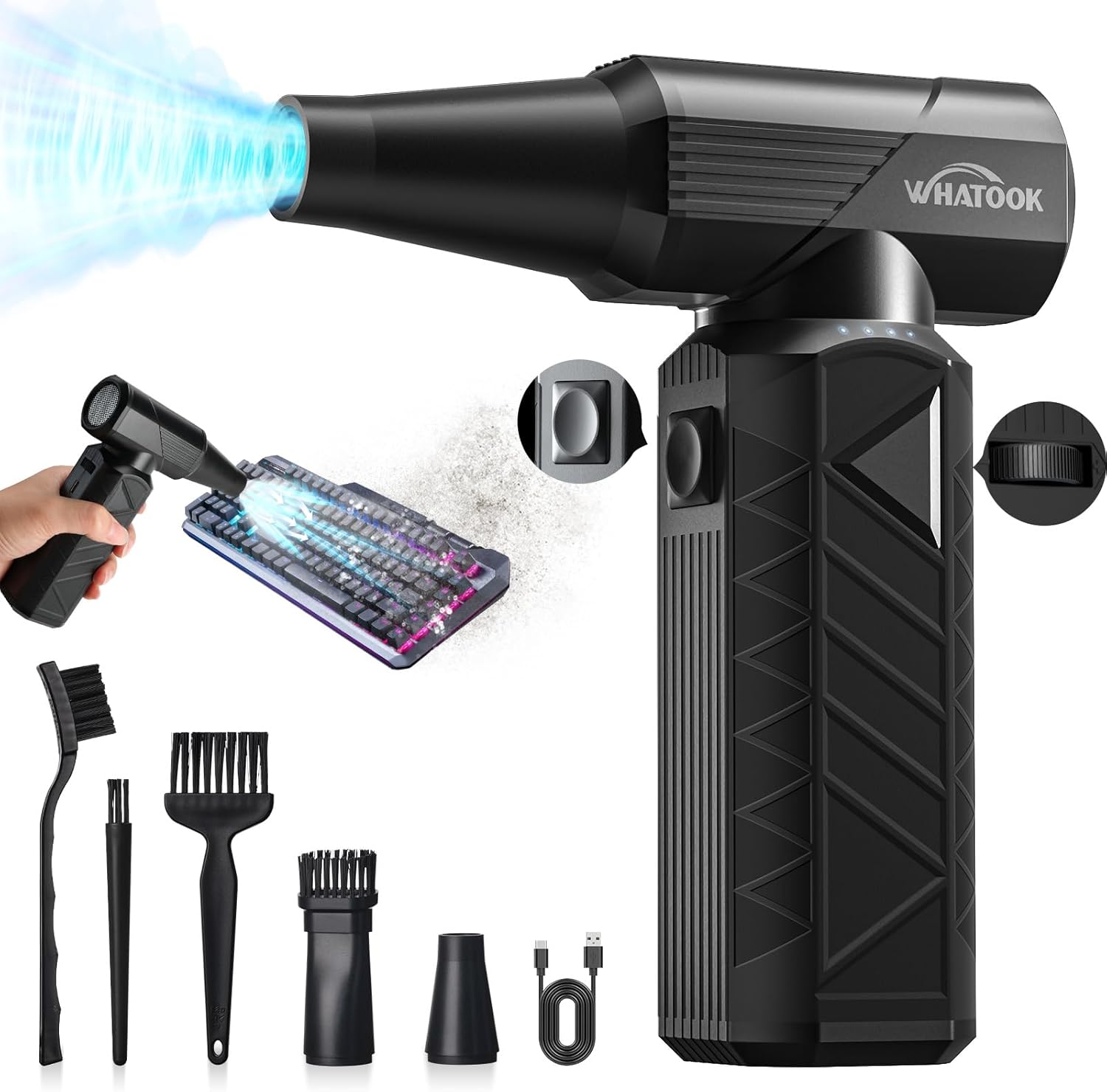
Figure 3.1: Main unit and accessories including various brushes and nozzles, and a USB-C charging cable.
Naon anu aya dina Kotak:
- Electric Air Duster (Main Unit)
- Kabel Ngecas Tipe-C
- Cleaning Kit (various brushes)
- Kantong Panyimpen
- Manual pangguna (dokumén ieu)

Gambar 3.2: Gambaran visual barang-barang anu kalebet dina kemasan produk.
Nozzles:
The device includes two primary nozzles for different applications:

Figure 3.3: Round Nozzle. Suitable for general purpose cleaning, barbecue fire starting, pet drying, sofa seats, and lockers.

Figure 3.4: Brush Nozzle. Ideal for cleaning cars, computers, keyboards, window sill gaps, and sofas, providing both blowing and brushing action.
4. Setélan
4.1 Ngecas Awal
Before first use, fully charge the air duster. Connect the provided Type-C charging cable to the device and a compatible 10W power adapter (not included). The device features a 10000mAh battery and supports fast charging, reaching full charge in approximately 3 hours.

Figure 4.1: The air duster connected to a charger, illustrating its 10W fast charging capability and built-in overheating protection.
4.2 Ngagantelkeun Nozzles
Select the appropriate nozzle for your cleaning task. Align the nozzle with the air outlet on the main unit and push it firmly until it clicks into place. Ensure it is securely attached before operation.
5. Parentah Operasi
The WHATOOK Compressed Air Duster offers two primary operating modes for precise control over airflow.

Figure 5.1: Close-up of the control buttons and metal grid design, showing the keystroke and slide wind speed modes.
5.1 Keystroke Mode (3-Gear Adjustment)
This mode provides fixed speed settings for quick and easy operation.
- Press the power button once: Activates 1st gear (approx. 50,000 RPM) - suitable for low airflow tasks like pet hair or delicate items.
- Press the power button twice: Activates 2nd gear (approx. 100,000 RPM) - medium wind for computers, keyboards, and general digital products.
- Press the power button three times: Activates 3rd gear (approx. 180,000 RPM) - high-end wind for sofas and other hard-to-damage items.
- Press the power button four times: Turns the device off.
5.2 Slide Wind Speed Mode (Stepless Regulation)
This mode allows for precise, continuous adjustment of airflow from 1 to 100 gears.
- Press and hold the power button for 3 seconds to activate this mode. The indicator light will blink 3 times.
- Use the slide control (dial) to adjust the wind power to your desired level.
- Press the on/off button briefly to turn the device off.
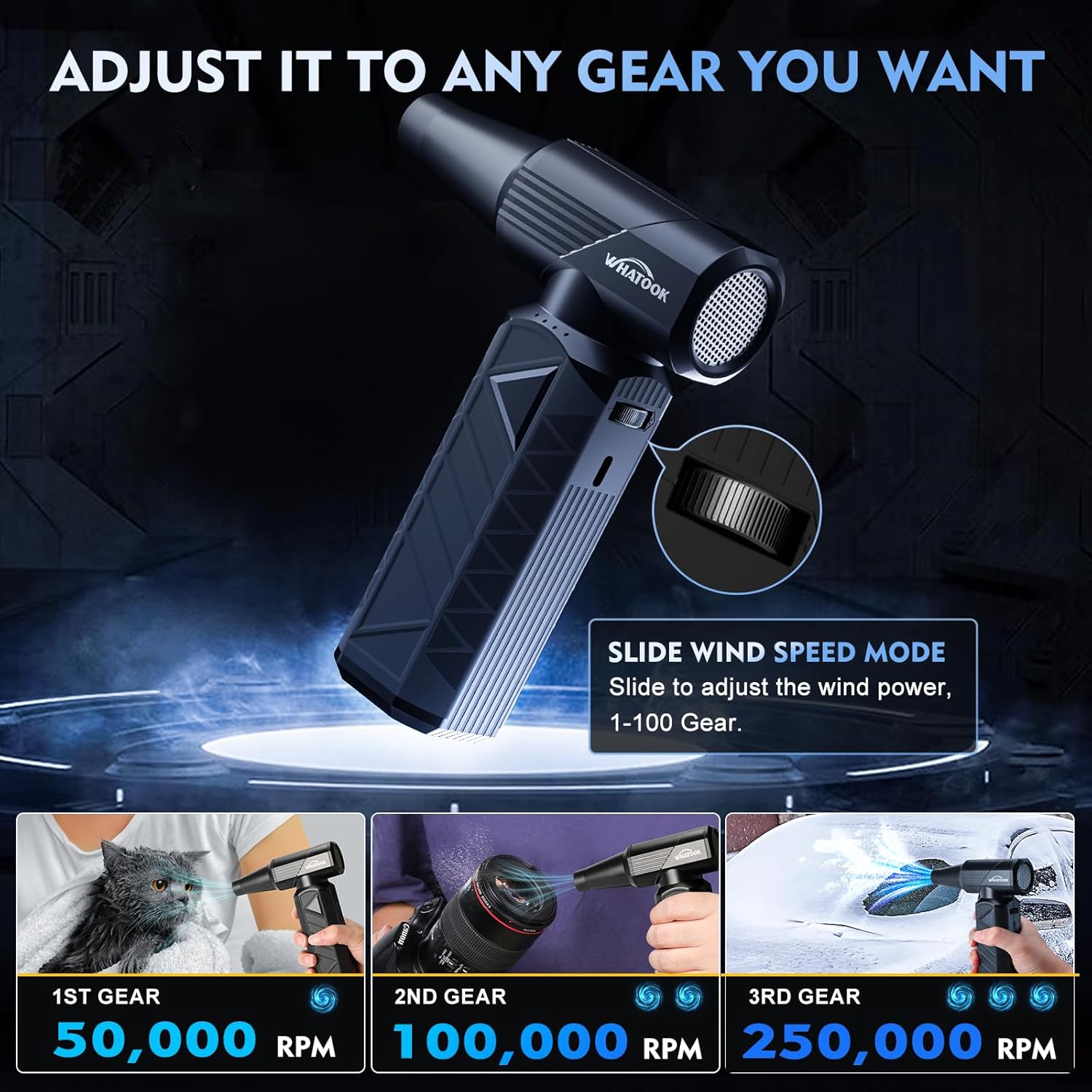
Figure 5.2: The air duster demonstrating its adjustable speed settings and suitability for diverse tasks such as pet drying, camera cleaning, and car detailing.
5.3 Multi-Purpose Applications
The air duster is versatile and can be used for a wide range of cleaning and inflation tasks:
- Éléktronik: Keyboards, PCs, cameras, and other sensitive electronic devices.
- otomotif: Car interiors, vents, hard-to-reach crevices.
- Rumah tangga: Dusting furniture, window sills, pet hair removal.
- Inflasi: Use the first speed for inflating items like swimming rings (ensure safety and proper nozzle).
- Luar: Efficient for making fires (e.g., barbecue), blowing leaves.

Gambar 5.3: Kelamples of the air duster's multi-role capabilities, including cleaning windows, assisting with barbecues, inflating swimming rings, cleaning keyboards, blowing leaves, and detailing car interiors.
6. Pangropéa
6.1 Ngabersihan Alat
Wipe the exterior of the air duster with a soft, dry cloth. Do not use harsh chemicals or abrasive cleaners. The upgraded design ensures easy cleaning of all corners.
6.2 Panyimpenan
When not in use, store the air duster in its provided storage bag in a cool, dry place. Ensure it is fully charged before long-term storage to maintain battery health.
6.3 Perawatan Batré
The 10000mAh battery is designed for long life. To maximize battery lifespan, avoid completely draining the battery frequently. Recharge when the battery indicator shows low power. The device has advanced safety features including temperature, current, and short-circuit protection.
7. Cara ngungkulan
| Masalah | Mungkin Cukang lantaranana | Solusi |
|---|---|---|
| Alat henteu hurung. | batré lemah. | Ngecas alat sapinuhna nganggo kabel Tipe-C anu disayogikeun. |
| Aliran hawa lemah. | Incorrect speed setting or low battery. | Adjust to a higher gear or use slide mode. Ensure battery is charged. |
| Alat eureun teu disangka-sangka. | Perlindungan overheating diaktipkeun. | Allow the device to cool down. Avoid prolonged continuous use at maximum power. |
| Nozzle detaches easily. | Nozzle not fully secured. | Ensure the nozzle is pushed firmly onto the air outlet until it clicks into place. |
8. Spésifikasi
| Fitur | Rincian |
|---|---|
| Modél | W02-Black-1 |
| Laju Motor | Up to 180,000 RPM (Brushless Motor) |
| tekenan angin | 300 G |
| Laju Angin | Nepi ka 120 m/s |
| Kapasitas batré | 10000 mah |
| Waktu Ngecas | Approx. 3 hours (with 10W fast charging) |
| Diménsi | 1.7 x 5.1 x 6.2 inci (kira-kira) |
| Beurat | 0.64 lbs (kira-kira) |
| Warna | Hideung |
| Produsén | Lixin industrial(Shenzhen) Co.,Ltd. |

Figure 8.1: Detailed comparison of the WHATOOK Electric Air Duster's performance metrics against other types of air dusters.
9. Garansi jeung Rojongan
The WHATOOK Compressed Air Duster is covered by a standard manufacturer's warranty. For specific warranty details, technical support, or any inquiries not covered in this manual, please refer to the official WHATOOK websitus atanapi ngahubungan layanan palanggan maranéhanana langsung. Simpen resi pameseran anjeun pikeun klaim jaminan.
Kanggo inpo nu leuwih lengkep, buka di WHATOOK Store on Amazon.


