1. Bubuka
This manual provides essential information for the safe and efficient use of your Acer SA270G0bi 27-inch IPS Full HD Monitor. Please read it thoroughly before operating the device and keep it for future reference.
2. Émbaran Kasalametan
- Sumber Daya: Anggo ngan ukur adaptor daya anu disayogikeun sareng monitor. Pastikeun stop kontakna dipasang dina ground anu leres.
- panempatan: Place the monitor on a stable, flat surface. Avoid direct sunlight, heat sources, and areas with high humidity or dust.
- Ventilasi: Ulah meungpeuk bukaan ventilasi. Ngidinan spasi nyukupan sabudeureun monitor pikeun aliran hawa ditangtoskeun.
- beberesih: Pegatkeun sambungan kabel listrik saméméh beberesih. Paké lawon lemes, garing. Hindarkeun pembersih cair atanapi semprotan aerosol.
- Liquid and Foreign Objects: Do not allow liquids or foreign objects to enter the monitor. If this occurs, immediately unplug the monitor and contact service personnel.
- Kanyamanan panon: Take regular breaks to reduce eye strain. Adjust screen brightness and contrast to a comfortable level.
3. Eusi Paket
Pastikeun yén sadaya item aya dina pakét anjeun:
- Acer SA270G0bi Monitor
- Monitor Stand (Round Base)
- Kabel listrik
- Kabel HDMI
- Mini D-Sub (VGA) Cable
- Manual pangguna (dokumén ieu)
4. Setélan
4.1 Ngarakit Stand Monitor
- Taliti cabut monitor jeung nangtung komponén tina bungkusan.
- Pasang beuheung nangtung ka panel monitor. Pastikeun éta ngaklik aman kana tempatna.
- Attach the round base to the stand neck. Tighten the screw at the bottom of the base to secure it.
4.2 Nyambungkeun Kabel
Sambungkeun kabel anu diperyogikeun kana monitor sareng komputer anjeun:
- Kakuatan Kabel: Sambungkeun kabel daya kana input daya monitor teras kana stop kontak anu dihubungkeun ka ground.
- Kabel Video: Connect either an HDMI cable or a Mini D-Sub (VGA) cable from your computer's video output to the corresponding input on the monitor.

Gambar: Tukangeun view of the Acer SA270G0bi monitor showing dimensions and available ports. It features one HDMI 1.4 port and one Mini D-Sub 15-pin port. The monitor has a tilt angle of 15 degrees up and 5 degrees down. Please note that this model does not include built-in speakers or a headphone jack.
4.3 Powering On
Press the power button located on the monitor to turn it on. The monitor will automatically detect the active input source.
5. Ngoperasikeun Monitor
5.1 Menu dina layar (OSD).
The OSD menu allows you to adjust various monitor settings. Use the buttons on the monitor (usually located on the bottom right or rear) to navigate the menu.
Setélan OSD umum:
- Caang/Kontras: Saluyukeun luminance sareng kontras sakabéh tampilan.
- Setélan warna: Robah suhu warna, gamma, sareng tingkat RGB individu.
- Sumber Input: Manually select between HDMI and Mini D-Sub inputs.
- Modeu Gambar: Select predefined display modes (e.g., Standard, ECO, Game, Movie).
5.2 Fitur konci
- Panel IPS: Ngarasakeun warna-warna anu cerah sareng lega viewing angles (178° horizontal/vertical) with the Full HD (1920x1080) IPS panel. The non-glare surface reduces reflections.
- 120Hz Refresh Rate & 1ms VRB: Experience smoother visuals with a 120Hz refresh rate and a rapid 1ms Visual Response Boost (VRB) to reduce motion blur and ghosting.
- AdaptiveSync: Nyingkronkeun laju refresh monitor sareng laju pigura kartu grafis anjeun pikeun ngaleungitkeun layar anu robek sareng gagap.
- Desain pigura nol: The ultra-thin bezel design maximizes screen space and is ideal for multi-monitor setups.
- Acer VisionCare™: Technologies like Flicker-less, Blue Light Shield, and Low Dimming are integrated to help reduce eye fatigue during prolonged use.

Image: The Acer SA270G0bi monitor highlighting its IPS display technology, Full HD (1920x1080) resolution, wide 178-degree viewing angles, and non-glare panel for comfortable viewing.
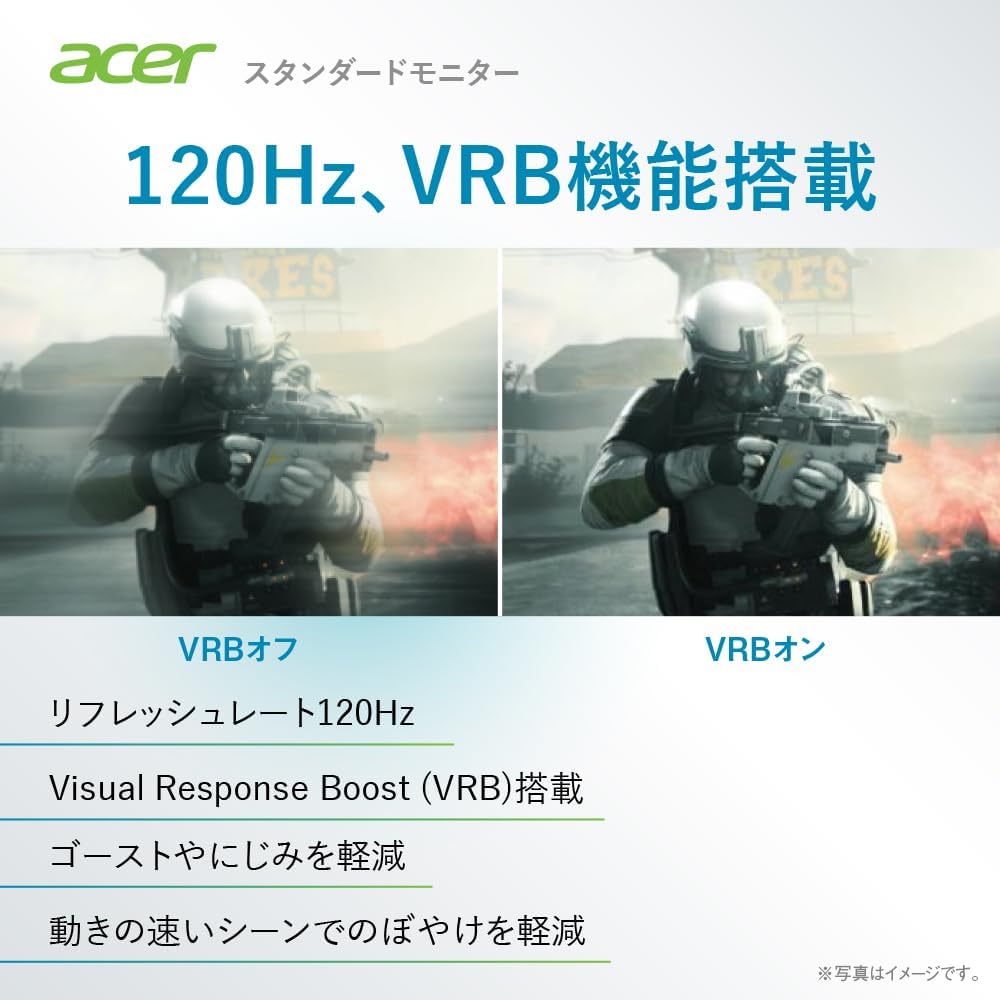
Image: A comparison demonstrating the effect of Visual Response Boost (VRB) on the Acer SA270G0bi monitor. The left side shows VRB off with more motion blur, while the right side shows VRB on, resulting in clearer images during fast-moving scenes.

Gambar: Sisi jeung hareup view of the Acer SA270G0bi monitor, illustrating its ultra-thin profile and Zero Frame design, which minimizes the bezel for an expansive viewpangalaman.

Image: The Acer SA270G0bi monitor displaying a city skyline, with an overlay indicating Acer VisionCare™ technology. This feature includes Flicker-less, Blue Light Shield, and Acer Low Dimming technologies designed to reduce eye strain.
5.3 Acer Display Widget
The Acer Display Widget software allows for intuitive control of monitor settings directly from your PC. Download and install the application to access various display modes and split-screen functions.

Image: Screenshot of the Acer Display Widget interface, showing options for Visual Modes (sRGB, Reading, Darkroom, User, Standard, ECO, Graphic, Movie), Visual Sync, and Split Screen settings, allowing PC-based control of the monitor.
6. Pangropéa
6.1 Ngabersihan Monitor
- Salawasna cabut monitor tina stop kontak sateuacan beberesih.
- Make kaen nu lemes, teu aya lint rada dampened with water to clean the screen. Avoid using alcohol-based cleaners, solvents, or abrasive materials.
- Pikeun monitor casing, make kaen anu lemes sareng garing.
7. Cara ngungkulan
| Masalah | Solusi anu mungkin |
|---|---|
| Henteu aya gambar dina layar | Ensure the power cable is securely connected. Check if the video cable (HDMI/D-Sub) is properly connected to both the monitor and the computer. Press the monitor's power button. Select the correct input source via the OSD menu. |
| Gambar buram atanapi menyimpang | Check the video cable connection. Ensure the display resolution and refresh rate are set correctly in your computer's display settings. For D-Sub connections, use the OSD's auto-adjust function. |
| Warna teu bener | Adjust color settings (brightness, contrast, color temperature) in the OSD menu. Reset the monitor to factory default settings. |
| Ngawas kedip-kedip | Ensure the refresh rate is set correctly. Enable Acer VisionCare's Flicker-less feature if available. Check for external interference. |
8. Spésifikasi
| Fitur | Rincian |
|---|---|
| Ngaran modél | SA270G0bi |
| Ukuran Panel | 27 inci |
| Tipe Panel | IPS, Non-glare |
| Resolusi | HD lengkep (1920 x 1080 piksel) |
| Rasio Aspék | 16:9 |
| Refresh Laju | 120Hz (HDMI), 56-75Hz (Mini D-Sub) |
| Waktu Tanggapan | 1 ms (VRB) |
| Viewdina Angle | 178° (H) / 178° (V) |
| Warna tampilan | Kira-kira. 16.77 juta kelir |
| Terminal Input | 1 x HDMI 1.4, 1 x Mini D-Sub 15-pin |
| Panyatur | Teu dilengkepan |
| Jack headphone | Teu dilengkepan |
| Ukuran (W x D x H) | 61.2 x 21.2 x 44.7 cm |
| Beurat | 3.5 kg |
| Sudut Dengdekkeun | Up 15°, Down 5° |
9. Garansi jeung Rojongan
For product support, warranty information, and frequently asked questions, please visit the official Acer support page:
Support business hours: 10:00 - 19:00, 365 days a year (excluding company-designated holidays).


