
A30C
Buku Panduan Pangguna Proyektor LED Mini Portabel A30C Generik
Model: A30C | Brand: Generic
Bubuka
This manual provides essential information for the safe and effective operation of your Generic A30C Mini Portable LED Projector. Please read this manual thoroughly before using the product and retain it for future reference. This compact, high-definition LED projector is designed to transform any space into a vibrant viewing experience, perfect for movies, gaming, and family entertainment.

Image: The Generic A30C Mini Portable LED Projector, a compact black device with a lens and control buttons on top.
Guide Setup
1. Ngabongkar bungkusan
Sacara saksama miceun sadaya komponén tina bungkusan. Pastikeun aya item di handap ieu:
- Generic A30C Mini Portable LED Projector
- Adaptor kakuatan
- Remote Control (upami kalebet)
- Manual pangguna (dokumén ieu)
2. Panempatan
Teundeun proyektor dina permukaan datar anu stabil. Pikeun optimal viewing, position the projector perpendicular to the projection surface (wall or screen). The projection distance directly affects the screen size. Refer to the diagram below for recommended distances and corresponding screen sizes.

Image: A diagram illustrating recommended projection distances and corresponding screen sizes, ranging from 33 inches at 3.28 feet (1m) to 300 inches at 29.52 feet (9m). A recommended range of 1.5m-3m is highlighted.
Ensure adequate ventilation around the projector to prevent overheating. Do not block the ventilation openings.
3. Sambungan Daya
Connect the power adapter to the DC input port on the projector. Plug the other end of the power adapter into a suitable electrical outlet. The power indicator light will illuminate.
Parentah Operasi
1. Daya Hurung / Pareum
Press the power button on the projector or the remote control to turn the device on. Press it again to turn off the projector.
2. Pamilihan Sumber Input
The projector supports multiple input sources including HDMI, USB, SD card, and audio jack. Use the "Source" button on the projector or remote control to cycle through available input options and select your desired source.

Image: An illustration showing the projector connecting wirelessly via WiFi to Android and iOS devices, and wired via USB cable to other devices, highlighting its versatile connectivity.
- HDMI: Nyambung ka laptop, konsol kaulinan, pamaén Blu-ray, jsb.
- USB: Muterkeun média files langsung ti USB flash drive.
- Kartu SD: Muterkeun média filelangsung tina kartu memori SD.
- Audio Kaluar: Sambungkeun speaker éksternal atawa headphone.
- Konektipitas Bluetooth: Connect to Bluetooth-enabled audio devices.
3. Focusing and Keystone Correction
Adjust the focus ring near the lens until the projected image is clear and sharp. If the image appears trapezoidal, use the keystone correction feature (if available on your model, typically a manual dial or digital setting) to adjust the image to a rectangular shape.
4. Kualitas tampilan
The A30C projector features an LCD imaging system and LED light source, supporting up to 1920 x 1080 pixels for crisp and clear images. Its advanced display technology provides enhanced brightness and contrast compared to standard projectors.
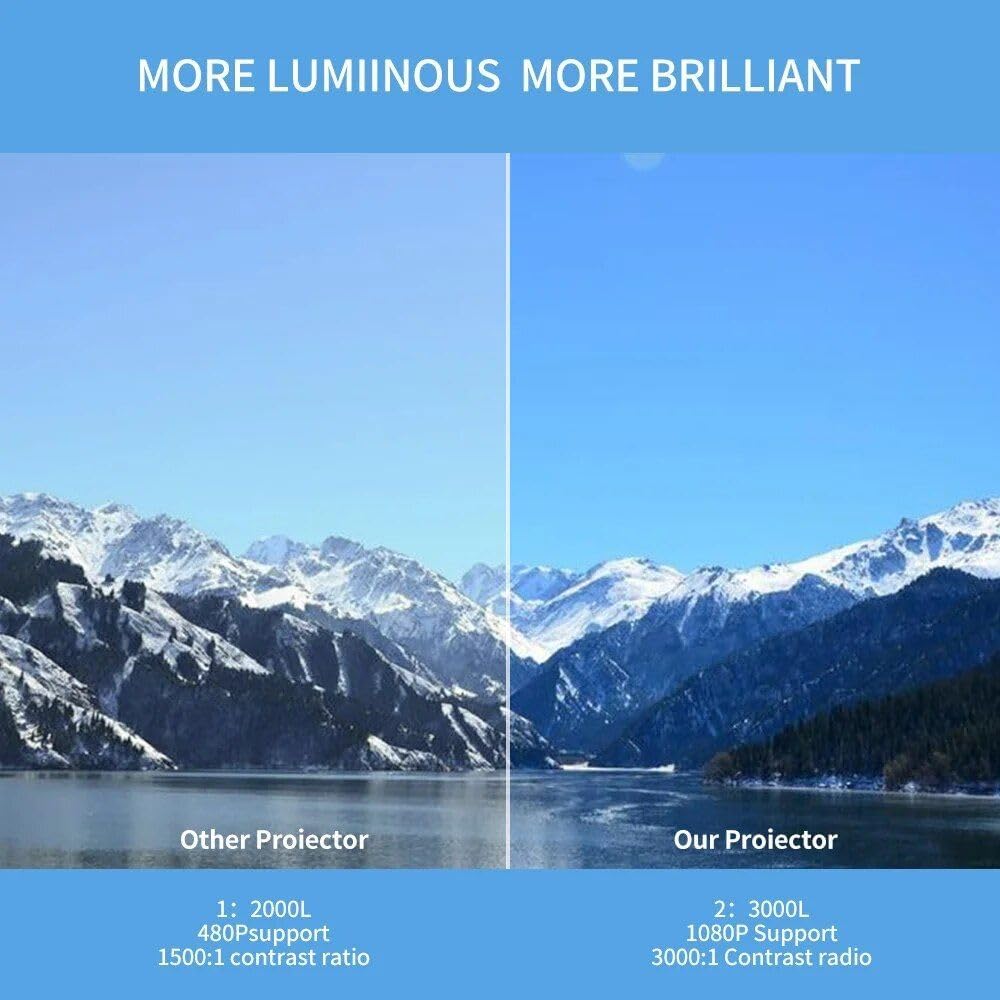
Image: A side-by-side comparison showing the superior brightness and clarity of "Our Projector" (3000L, 1080P Support, 3000:1 Contrast Ratio) versus "Other Projector" (2000L, 480P Support, 1500:1 Contrast Ratio), demonstrating the enhanced visual experience.
Pangropéa
1. beberesih
- Lensa: Anggo lawon anu lemes sareng henteu lint anu dirancang khusus pikeun lénsa optik. Ulah make cleaners abrasive atawa pangleyur.
- Luar: Lap bagian luar proyéktor ku lawon anu lemes sareng garing. Pikeun kokotor anu bandel, usap sakedikampen lawon jeung cai.
- Port ventilasi: Periodically check and gently clean the ventilation ports to ensure proper airflow and prevent dust buildup. Use a soft brush or compressed air.
2. Panyimpenan
Lamun teu dipake keur lila, nyimpen projector dina tiis, tempat garing, jauh tina sinar panonpoé langsung jeung hawa ekstrim. Disarankeun nganggo bungkusan asli atanapi kotak pelindung pikeun nyegah akumulasi lebu sareng karusakan fisik.

Image: A hand placing the compact projector into a pant pocket, illustrating its small size and portability for easy storage and transport.
Pamérésan masalah
| Masalah | Mungkin Cukang lantaranana | Solusi |
|---|---|---|
| Taya gambar projected | Daya teu nyambung; sumber input salah; Tutup lénsa. | Pariksa sambungan kakuatan; Pilih sumber input anu leres; Cabut tutup lensa. |
| Gambar kabur | Teu fokus; Jarak proyéksi salah. | Adjust focus ring; Adjust projector distance. |
| Gambar téh trapezoidal | Projector teu jejeg layar. | Adjust keystone correction; Reposition projector. |
| Taya sora | Volume low teuing; Dijempékeun; Alat audio éksternal teu nyambung leres. | Increase volume; Unmute; Check audio cable connections or Bluetooth pairing. |
| Overheating | Diblokir ventilasi; pamakéan berkepanjangan. | Ensure ventilation ports are clear; Allow projector to cool down. |
spésifikasi
| Fitur | Rincian |
|---|---|
| merek | Generik |
| Modél | A30C |
| Téknologi tampilan | LCD Imaging System, LED Light Source |
| Resolusi pribumi | 1280 x 720 piksel |
| Resolusi dirojong | Nepi ka 1920 x 1080 piksel (1080P) |
| Konektipitas | HDMI, USB, SD Card Slot, Audio Jack, DC Power Input, Bluetooth |
| Warna | Hideung |
| Item Beurat | 14.1 ons (kira-kira 400g) |
| Dimensi produk | 6.3 x 4.72 x 2.16 inci (kira-kira 16 x 12 x 5.5 cm) |
| Dianjurkeun Paké | jero rohangan |
| Negara asal | Cina |
Garansi sareng Rojongan
This product is covered by a standard manufacturer's warranty. For specific warranty terms and conditions, please refer to the documentation provided at the time of purchase or contact your retailer. For technical support, troubleshooting assistance, or service inquiries, please contact the Generic customer support team through the contact information provided with your purchase or on the official Generic websitus.
Please have your product model (A30C) and ASIN (B0DM84NGD2) ready when contacting support.
Ask a question about this manual
Ask about setup, troubleshooting, compatibility, parts, safety, or missing instructions. Manuals+ will review the question and use this page’s manual context to help answer it.