1. Parentah Kasalametan penting
Mangga baca sareng ngartos sadaya parentah kaamanan sateuacan nganggo produk ieu. Tetep parentah ieu pikeun rujukan hareup.
- Sumber Daya: Anggo ngan ukur adaptor daya atanapi batré anu ditangtukeun. Pastikeun voltasetage cocog sarat Unit urang.
- Cai sareng Uap: Do not expose the unit to rain, moisture, or dripping water. Do not place objects filled with liquids on the unit.
- Ventilasi: Pastikeun ventilasi anu leres. Ulah meungpeuk sagala bukaan ventilasi.
- Panas: Jauhkeun unit tina sumber panas sapertos radiator, registers panas, kompor, atanapi aparat sanésna anu ngahasilkeun panas.
- beberesih: Ngabersihan ngan ku kaén garing. Ulah make cleaners cair atawa cleaners aerosol.
- Palayanan: Entong nyobian ngalayanan produk ieu nyalira. Rujuk sadayana ngalayanan ka tanaga jasa anu mumpuni.
- Kasalametan laser: This unit contains a laser component. Do not open the CD compartment while a disc is playing. Avoid direct exposure to the laser beam.
2. Eusi Paket
Pastikeun yén sadaya item aya dina bungkusan:
- G Keni Portable CD and Cassette Player Boombox Combo
- Kabel Daya AC
- Kadali jauh
- Manual pangguna (dokumén ieu)
3. Produk Langkungview
The G Keni BT-9224MU is a versatile audio system combining a CD player, cassette player/recorder, AM/FM radio, Bluetooth speaker, and USB playback. It features dual 3W speakers for stereo sound and can be powered by AC or batteries for portability.
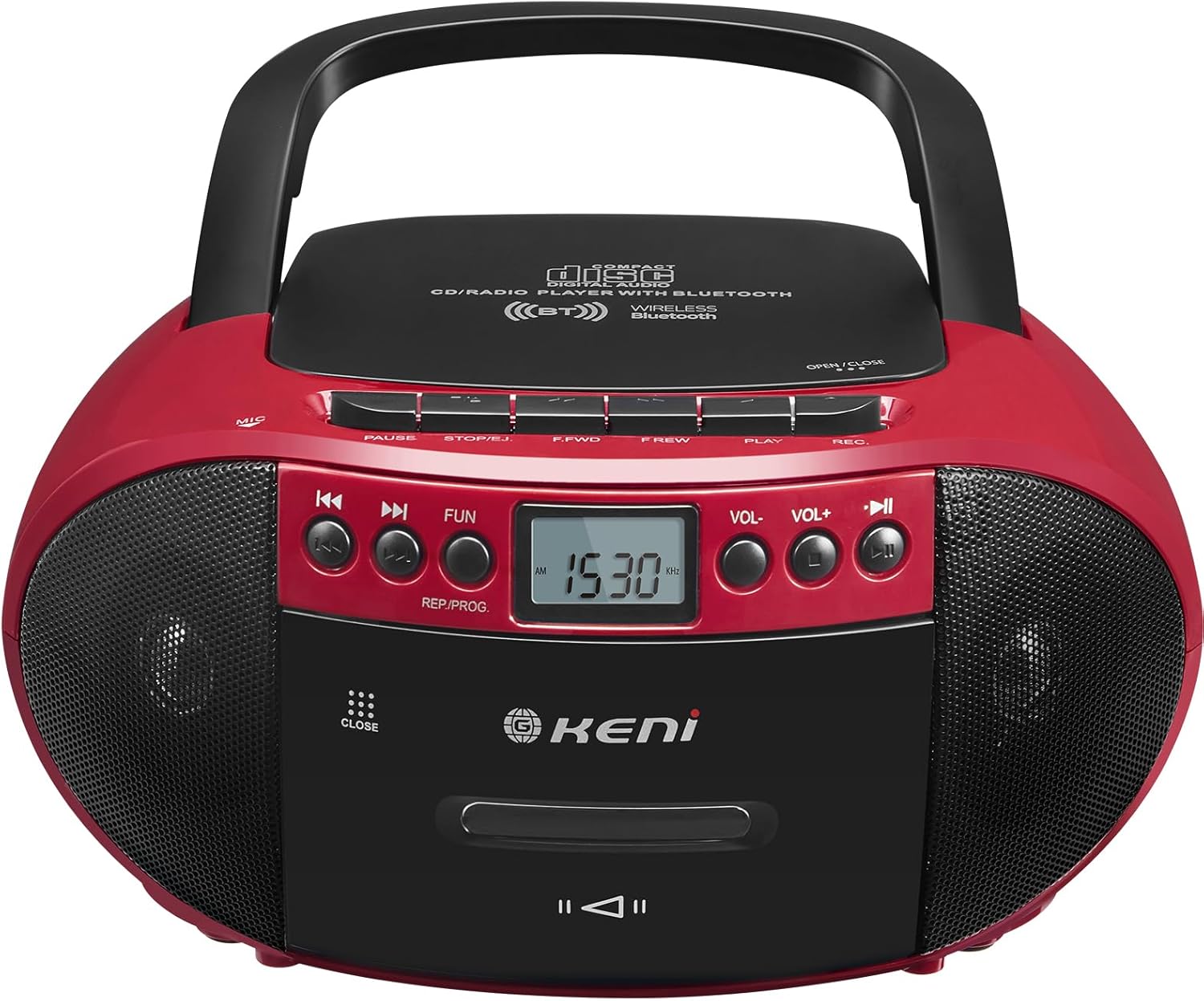
Gambar 3.1: Hareupeun view of the G Keni BT-9224MU Boombox.

Figure 3.2: The boombox highlighting its five playback modes: CD Player, Cassette Player, FM/AM Radio, USB Input, and Bluetooth.
4. Setélan
4.1 Powering Unit
The boombox can be powered by either AC power or batteries.
4.1.1 Sambungan Daya AC
- Locate the AC power input jack on the back of the unit.
- Connect the supplied AC power cord to the jack.
- Plug the other end of the AC power cord into a standard wall outlet (100-240V, 50/60Hz).
4.1.2 Pamasangan batré
Pikeun panggunaan anu gampang dibawa, alat ieu peryogi 6 batré ukuran 'C' (teu kalebet).
- Buka tutup kompartemen batréna anu aya di handapeun unit.
- Lebetkeun 6 batré ukuran 'C', pastikeun polaritasna (+/-) leres sapertos anu dituduhkeun di jero kompartemenna.
- Tutup panutup kompartemen batré aman.

Figure 4.1: Illustrations of AC power connection and battery installation.
4.2 Adjustment anteneu
For optimal FM radio reception, extend the telescopic antenna. For AM reception, the unit has a built-in ferrite bar antenna, so repositioning the unit may improve reception.
5. Parentah Operasi
5.1 Kadali umum
- Tombol DAYA: Hurungkeun unit ON atawa OFF.
- Tombol FUNGSI/MODE: Switches between CD/USB/Bluetooth, Cassette, and AM/FM Radio modes.
- Tombol VOLUME +/-: Saluyukeun tingkat kaluaran audio.
- Tombol MAINKAN / PAUSE: Ngamimitian atanapi ngeureunkeun puteran dina modeu CD, USB, atanapi Bluetooth.
- STOP/EJECT Button: Stops playback and opens the CD lid or cassette door.
- Tombol LUNcat/PILARIAN (◀◀ / ▶▶): Ngaliwatan lagu/files atawa maju/mundur gancang.
5.2 Operasi CD Player
The unit supports CD, CD-R, CD-RW, and MP3 discs.
- penting: Before first use, remove the laser lens protector paper plate from the CD compartment.
- Pencét éta FUNGSI / MODÉ tombol pikeun milih modeu CD.
- Pencét éta STOP/EJECT tombol pikeun muka tutup kompartemen CD.
- Teundeun CD kalayan sisi labélna ngadep ka luhur kana spindel.
- Tutupkeun tutup kompartemen CD. Unit bakal maca disk.
- Pencét éta MUTER / Reureuh tombol pikeun ngamimitian playback.
- Paké Léngsér / Pilarian tombol pikeun nganapigasi lagu.

Figure 5.1: Inserting a CD into the boombox, with the remote control visible.
5.3 Cassette Player & Recorder Operation
The unit allows playback and recording of standard audio cassettes.
5.3.1 Playback kaset
- Pencét éta FUNGSI / MODÉ tombol pikeun milih modeu Kaset.
- Pencét éta STOP/EJECT tombol pikeun muka panto kasét.
- Selapkeun pita kasét kalayan ujung kabuka nyanghareup ka luhur.
- Tutup panto kasét.
- Pencét éta ulin button (usually indicated by a triangle) to start playback.
- Paké FAST FORWARD (F.FWD) jeung REWIND (F.REW) tombol pikeun nganapigasi tape.
- Pencét éta STOP/EJECT button to stop playback and open the door.

Figure 5.2: A cassette tape being inserted into the boombox.
5.3.2 Rekaman Kaset
The unit can record from the radio, CD, or via its built-in microphone.
- Insert a blank cassette tape into the cassette compartment.
- Select the desired source for recording (CD, Radio, or ensure no other source is playing for voice recording).
- Pencét éta Rékaman (REK) button (usually red) to begin recording. The PLAY button will also engage automatically.
- Pikeun ngeureunkeun rékaman, pencét éta STOP/EJECT kancing.
5.4 AM / Operasi Radio FM
Enjoy local radio broadcasts with the built-in tuner.
- Pencét éta FUNGSI / MODÉ tombol pikeun milih modeu radio AM atanapi FM.
- Extend the telescopic antenna for FM reception. Adjust its position for best signal.
- Ngagunakeun éta TUNING knob or buttons (if available) to scan for stations. The LCD screen will display the frequency.
- Saluyukeun VOLUME ka tingkat nu dipikahoyong.

Figure 5.3: The boombox being used to listen to AM/FM radio outdoors.
5.5 Operasi Bluetooth
Connect your Bluetooth-enabled devices to stream audio wirelessly.
- Pencét éta FUNGSI / MODÉ button to select Bluetooth mode. The unit will enter pairing mode, indicated by a flashing Bluetooth icon or audible prompt.
- Dina alat sélulér anjeun, aktipkeun Bluetooth sareng milarian alat anu sayogi.
- Select "G Keni BT-9224MU" (or similar name) from the list to pair.
- Saatos dipasangkeun, anjeun tiasa maénkeun audio tina alat anjeun ngalangkungan boombox.

Figure 5.4: A smartphone streaming music to the boombox via Bluetooth 5.1.
5.6 Playback USB
Play MP3/WMA audio files langsung ti USB flash drive.
- Selapkeun USB flash drive kana port USB dina unit.
- Pencét éta FUNGSI / MODÉ button to select USB mode. The unit will automatically detect and begin playing compatible audio files.
- Paké MUTER / Reureuh jeung Léngsér / Pilarian tombol pikeun ngadalikeun playback.
5.7 Ngagunakeun Remote Control
The included remote control provides convenient operation for certain functions.
- The remote control can operate functions for CD, Bluetooth, and USB playback.
- It cannot control cassette and radio playback.
- Ensure the remote control has working batteries and is pointed towards the front of the boombox.
5.8 Headphone Usage
Connect headphones to the 3.5mm headphone jack for private listening. When headphones are connected, the main speakers will be muted.
6. Pangropéa
6.1 Ngabersihan Unit
- Ngusap bagian luar unit nganggo kaén anu lembut sareng garing.
- Ulah make cleaners abrasive, lilin, atawa pangleyur sabab bisa ngaruksak finish.
6.2 Perawatan Lénsa CD
- A dirty CD lens can cause skipping or playback errors. Use a specialized CD lens cleaning kit if necessary.
- Avoid touching the lens directly.
6.3 Kaset Kepala beberesih
- Over time, cassette heads can accumulate dust and oxide, affecting sound quality. Use a cassette head cleaning tape or a cotton swab with isopropyl alcohol to gently clean the heads and pinch rollers.
7. Cara ngungkulan
If you encounter issues with your G Keni BT-9224MU, refer to the following common problems and solutions:
| Masalah | Mungkin Cukang lantaranana | Solusi |
|---|---|---|
| Taya kakuatan | ari AC teu nyambung; Batré béak atanapi teu leres diselapkeun. | Pariksa sambungan kabel AC; Ganti batré atanapi pastikeun polaritasna leres. |
| CD teu diputer / skipping | Disc is dirty or scratched; Laser lens is dirty; Disc inserted incorrectly. | Clean the disc; Clean the laser lens; Re-insert disc with label side up. Ensure laser lens protector was removed. |
| Cassette not playing / Poor sound | Tape is tangled or damaged; Cassette heads are dirty. | Check tape condition; Clean cassette heads and pinch rollers. |
| panarimaan radio goréng | anteneu teu nambahan / disaluyukeun; Sinyal lemah. | Extend and adjust FM antenna; Reposition the unit for AM reception. |
| Bluetooth teu nyambung | Unit not in Bluetooth mode; Device not in pairing mode; Too far from unit. | Ensure unit is in Bluetooth mode; Put device in pairing mode; Move device closer to the unit. |
| Kadali jauh teu jalan | Batré béak; Halangan antara jarak jauh sareng unit. | Replace remote batteries; Remove any obstructions. Note: Remote does not control cassette or radio. |
8. Spésifikasi
| Fitur | Spésifikasi |
|---|---|
| Nomer modél | BT-9224MU |
| Sumber Daya | AC 100-240V ~ 50/60Hz / 6 x 'C' size batteries (DC 9V) |
| Speaker Kaluaran Power | 3 Watts (per speaker, total 6W) |
| Konektipitas | Bluetooth 5.1, USB, Auxiliary, AM/FM Radio |
| Tipe Disc cocog | CD, CD-R, CD-RW, MP3 |
| Mode Kaluaran Audio | Stereo |
| Dimensi produk | 10 x 8.8 x 5 inci (25.4 x 22.35 x 12.7 cm) |
| Item Beurat | 2.64 pon (1.2 kg) |
| Bahan | palastik |
| Komponén Kaasup | AC Cord, Remote Control |
9. Garansi jeung Rojongan
9.1 Émbaran jaminan
This G Keni product is covered by a jasa jaminan 12-bulan ti tanggal beuli. Garansi ieu nyertakeun cacad manufaktur sareng pagawean dina panggunaan normal.
9.2 Rojongan Palanggan
For any questions, technical assistance, or warranty claims, please contact G Keni customer service. We are committed to providing support and ensuring customer satisfaction.
Please refer to the detailed user manual included in your package or visit the official G Keni websitus pikeun inpormasi pangrojong paling up-to-date.


