1. Bubuka
This manual provides comprehensive instructions for the Richmat HJH55 Wireless Remote Control, designed for use with compatible adjustable bed bases. It covers essential information regarding product setup, operation, maintenance, and troubleshooting to ensure optimal performance and user experience. This specific model is referred to as 'Remote 1'.
The Richmat HJH55 remote is compatible with various adjustable bed brands, including MLILY, MATTRESS FIRM, CLASSIC BRANDS, and INNOVA. Always verify compatibility with your specific control box device before attempting to pair.
2. Émbaran Kasalametan
- Keep the remote control away from water or excessive moisture.
- Hindarkeun leupaskeun kadali jauh atanapi tunduk kana tabrakan anu kuat.
- Do not attempt to disassemble or repair the remote control yourself. Refer to qualified service personnel.
- Pastikeun batréna diselapkeun kalayan polaritasna anu leres.
- Cabut batré upami kadali jauh henteu dianggo kanggo waktos anu panjang pikeun nyegah bocor.
3. Setélan
3.1 Pamasangan batré
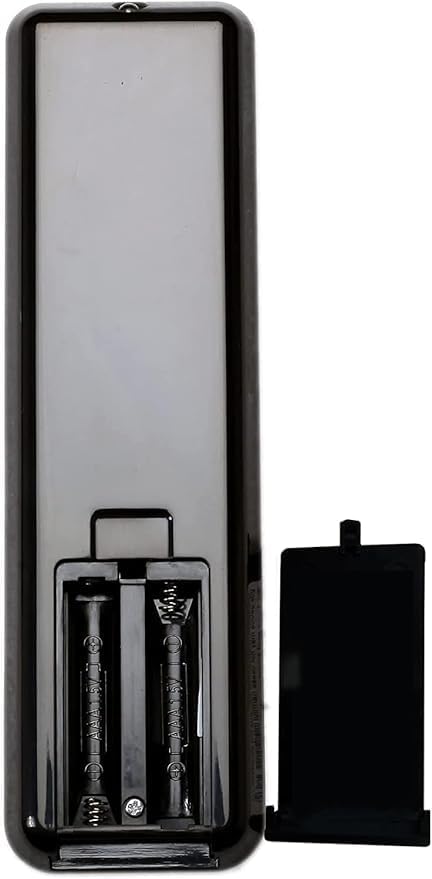
The Richmat HJH55 remote control requires two (2) AAA batteries (not included). To install or replace batteries:
- Teangan tempat panutup kompartemen batré dina tonggong kadali jauh.
- Geser panutup ka handap pikeun muka kompartemen.
- Selapkeun dua batré AAA, mastikeun terminal positif (+) jeung négatip (-) align bener jeung markings jero kompartemen nu.
- Geser panutup deui kana tempatna dugi ka klik aman.
3.2 Remote and Control Box Compatibility
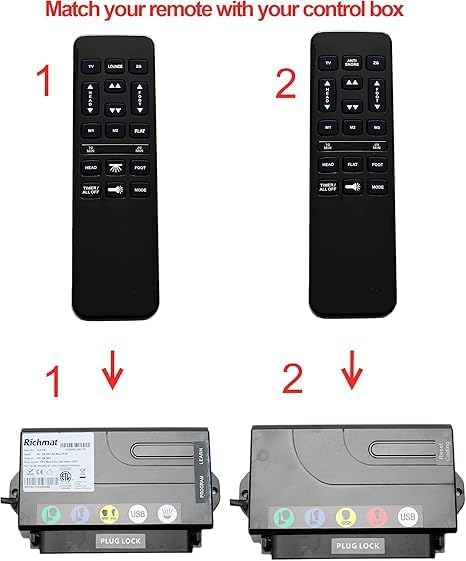
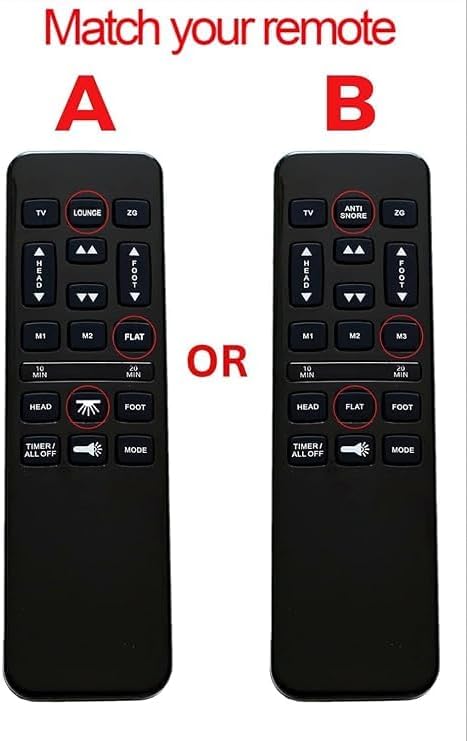
It is crucial to ensure that your remote control is compatible with your bed base's control box. Different Richmat remotes (e.g., Remote 1, Remote 2) are designed to work with specific control box models. Please check your existing remote and control box for matching model numbers or visual identification.
3.3 Parentah papasangan
The remote control does not come pre-paired with your bed base and requires manual pairing. Follow these steps to pair your Richmat HJH55 remote with its control box:
- Pastikeun kakuatan: Make sure your bed base's power adapter is securely plugged into a wall outlet and the control box.
- Locate Cable Lock: Identify the cable lock mechanism on your power adapter's cable.
- Sambungkeun kabel: Connect the power adapter cable to the control box cable, ensuring a secure connection.
- Press Learn Button: On the side of your bed base's control box, locate and press the small 'Learn' or 'Program' button.
- Simultaneous Remote Press: While holding the 'Learn' button on the control box, simultaneously press and hold the SIRAH (panah ka luhur) sareng NANGTANG (up arrow) buttons on your Richmat HJH55 remote control.
- Konfirmasi: Continue holding the buttons until you hear a beep from the control box. This indicates successful pairing.
4. Parentah Operasi
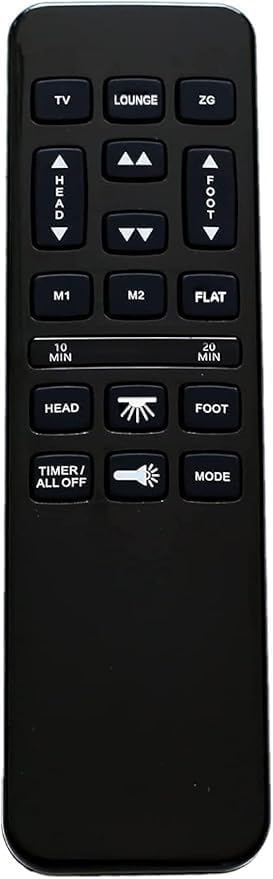
Familiarize yourself with the buttons on your Richmat HJH55 remote control to operate your adjustable bed base effectively.
4.1 Fungsi Tombol
- TV: Adjusts the bed to a preset TV viewdina posisi.
- LOUNGE: Adjusts the bed to a preset lounge position.
- ZG (Zero Gravity): Adjusts the bed to a preset Zero Gravity position, which elevates the head and feet to promote circulation and relieve pressure.
- HEAD (Up/Down Arrows): Adjusts the head section of the bed upwards or downwards.
- FOOT (Up/Down Arrows): Adjusts the foot section of the bed upwards or downwards.
- M1 / M2: Programmable memory buttons to save and recall your favorite bed positions.
- datar: Mulih ranjang ka posisi sagemblengna datar.
- 10 MIN / 20 MIN: Activates a massage timer for 10 or 20 minutes.
- HEAD (Massage Icon): Activates or adjusts the head massage function.
- FOOT (Massage Icon): Activates or adjusts the foot massage function.
- TIMER / ALL OFF: Turns off all active functions (e.g., massage, light) or sets a timer for specific functions.
- Ikon Bohlam Lampu: Ngahurungkeun atanapi mareuman lampu handapeun ranjang.
- MODÉ: Cycles through different massage modes or light settings.
5. Pangropéa
- beberesih: Ngusap kadali jauh ku lawon lemes, garing. Ulah make cleaners cair atawa bahan abrasive.
- Ngagantian batré: Replace batteries when the remote's response becomes sluggish or stops working. Always use new AAA batteries.
- Panyimpenan: Simpen remote dina tempat anu garing, jauh tina sinar panonpoé langsung sareng suhu anu ekstrim.
6. Cara ngungkulan
- Jauh Teu Ngabales:
- Pariksa naha batréna leres dipasang sareng gaduh muatan anu cekap. Ganti lamun perlu.
- Pastikeun teu aya halangan antara remot sareng panarima dasar ranjang.
- Verify that the bed base is properly plugged into a power outlet.
- Jarak Jauh Teu Bisa Dipasangkeun:
- Review the 'Pairing Instructions' in Section 3.3 carefully and repeat the steps.
- Confirm that your remote control model (Remote 1) is compatible with your bed base's control box. In some cases, newer remotes may not be compatible with older control boxes, even if they appear identical. This may require purchasing a remote and control box combo.
- Ensure the 'Learn' or 'Program' button on the control box is functioning correctly.
- Operasi intermittent:
- batré lemah bisa ngabalukarkeun operasi intermittent. Gantina.
- Pastikeun remot aya dina jangkauan efektif tina dasar ranjang.
7. Spésifikasi
| Nomer modél | HJH55 |
| merek | Richmat (Generic Manufacturer) |
| Sumber Daya | 2 x Batré AAA (teu kalebet) |
| Warna | Hideung |
| Fitur husus | Tombol backlit |
| Jumlah Max Alat Dirojong | 1 (per remot) |
8. Garansi jeung Rojongan
For specific warranty information, please refer to the documentation provided with your adjustable bed base or contact the original seller or manufacturer of the Richmat HJH55 remote control. Keep your purchase receipt for warranty claims.
If you encounter issues not covered in this manual or require further assistance, please contact the customer support of your bed base manufacturer or the seller of this remote control.